

The first line opencode printed on my bug-fix run was > build · seaglass-alpha-free. My opencode setup was the stock one: Google and OpenAI keys exported, no model named. opencode picked one anyway, a free model hosted by the opencode team, and its own docs say that while it is free, “collected data is retained and used to improve the model”.
The bug got fixed, in 32 seconds. The opencode setup is the part that needs your attention. On the older 1.19.6 build, the same default run picked gemini-3-pro-image, which is Google’s picture model, to edit a Python file. Different version, different surprise, same cause: nobody told opencode which model to use.
So the verdict, before the details. Install opencode if you want to choose the model that reads your code. Put that choice in the opencode setup on day one, in a config file. I ran both versions eleven times on 27 November 2026 against one bug and six model names. Nine runs fixed it; the other two stopped at an error before any model answered.
What is opencode for?
opencode is a coding agent that lives in your terminal. You give it a sentence, it reads your files, runs shell commands, edits code and runs your tests to see if it was right. The repository calls itself “The open source coding agent”. It is MIT licensed and works with whatever model you point it at.
I read github.com/anomalyco/opencode through the GitHub API at 05:05 UTC on 27 November 2026: 229,456 stars. That was the highest of the coding agents I read that morning, ahead of 157,249 for Claude Code’s repository and 136,602 for Codex CLI. A star is a click, not a code review, so I ran it.
It suits the job where you already know the failing test and want a diff back, and where you care whose model sees your code. I used the non-interactive command, opencode run, because it is the one you can put in a script.
The bug was a small one. parse_duration turns “1h30m” into seconds, with four tests, two of them red. " 2H 15m " came back as 900, because the regex only knew lowercase units and the 2H vanished. And "soon" returned 0 when the test wants a ValueError. Every run got the same sentence: “make the failing tests in test_durations.py pass without editing the tests”.
The opencode setup, step by step
The install docs list several installs: a curl script first, then brew, then npm install -g @opencode/cli. I took the npm one, and on this machine that is where it stalled, because a global install needs write access to /usr/local/lib: npm error code EACCES. An older 1.19.0 was already answering on the PATH too. A prefix inside the project solved both: npm i -g --prefix ./npm-prefix2 @opencode/cli added 5 packages in 18 seconds and opencode --version printed opencode v2.4.2.
GitHub is a different story. Its latest release is v1.19.6, published 17 November, and the old opencode-ai package on npm gives you that 1.x line. I installed it as well, 3 packages in 12 seconds, so that each run below has a version attached.
Then the keys for the opencode setup. I exported GOOGLE_GENERATIVE_AI_API_KEY and OPENAI_API_KEY, and pointed XDG_DATA_HOME and XDG_CONFIG_HOME at a folder inside the project. That keeps opencode’s login file, session history and log next to the transcript, not scattered through my home directory. The log turned out to matter.
The last step is the one a first run skips. In opencode.json, in the project folder:
{ "$schema": "https://opencode.ai/config.json", "model": "openai/gpt-5.4-mini" }With that file, the next run’s header read build · gpt-5.4-mini on 2.4.2 and on 1.19.6 alike. Delete the file and the opencode setup goes back to whatever opencode likes. The models page also documents --model provider/model for a single run. For a whole machine or a CI box, the same page names one switch: set OPENCODE_DISABLE_FREE_MODELS=1 on the server process and the free opencode models, Seaglass among them, drop out of the catalog and the defaults.
What goes wrong with opencode?
Two things go wrong, and both sit with the model. The edits came out fine.
The model is chosen for you, and not well
On 2.4.2, with two paid keys in the environment and no model named, the header said seaglass-alpha-free. The opencode Zen docs page calls it “a stealth model that’s free on OpenCode for a limited time”, and its privacy section lists Seaglass Alpha Free among the models whose data “is retained and used to improve the model”. Your repository goes into that. The run itself was clean: fixed in 32 seconds, $0.00 in opencode stats.
On 1.19.6 the fallback landed on a picture model. The current models docs describe the fallback as “the newest available supported model”, and on my Google key 1.19.6 chose gemini-3-pro-image. It fixed the bug too. But my first run took 83 seconds, and the log shows four AI_APICallError: You exceeded your current quota entries between 05:07:14 and 05:07:29, each retried after a longer wait, with nothing of it on the terminal. The second default run took 30 seconds. opencode stats --models priced the two image-model runs at $0.2465 together, about $0.12 each. One gpt-5.4-mini run cost $0.0140.
Bon. Both fallbacks write the model into the first line of the transcript, so the check is cheap. The config line in the opencode setup above is the fix.
A model the catalog lists, and your key cannot call
On 1.19.6, opencode models openai listed openai/gpt-5-mini. I ran it:
$ opencode run -m openai/gpt-5-mini "say hi"
Error: {
  "name": "UnknownError",
  "data": { "message": "Unexpected server error. Check server logs for details.", "ref": "err_b9d17c97" }
}
exit=1 seconds=2
The reason is only in the log, and --print-logs --log-level DEBUG brings it to the terminal: ProviderModelNotFoundError: Model not found: openai/gpt-5-mini. Did you mean: gpt-5.4-mini, gpt-5.4-mini-flex, gpt-5.4-mini-fast? The providers page says the catalog comes from models.dev, so the list runs ahead of what your account serves. The same gap showed up with keys: a run with only GEMINI_API_KEY set answered that GOOGLE_GENERATIVE_AI_API_KEY was missing.
Version 2.4.2 closed most of that. The same call died in 1 second with “Error: Model unavailable: openai/gpt-5-mini”, the model had left the list, and GEMINI_API_KEY alone was enough to get a reply from Gemini. It still exits 1 with no edit made, which a CI job catches. On 1.19.6 you spend a while looking in the wrong place.
What did I actually run?
A folder with durations.py, test_durations.py, a virtualenv holding pytest and a git repository, reset with git checkout . before every run. The capture is the gpt-5.4-mini run on 2.4.2, then one row per model on each version.
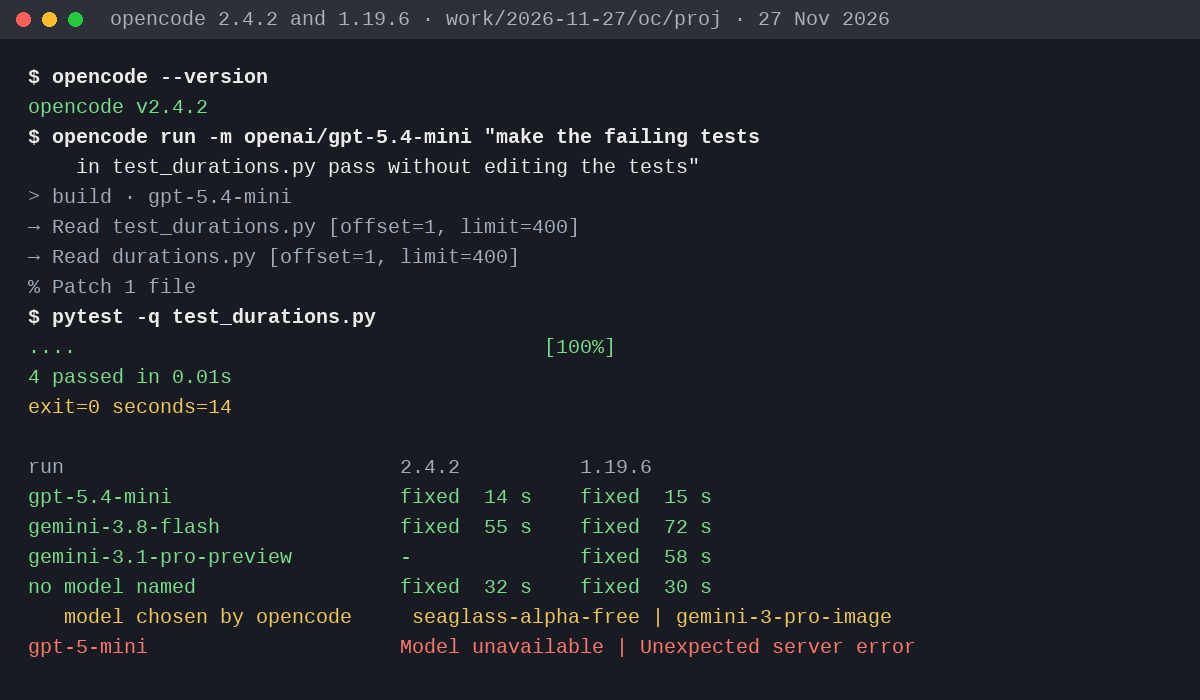
Passing four tests proves less than it sounds, so I wrote six more inputs the tests do not cover. Three must parse: "0s" is 0, "1h 30m" is 5400, "45M" is 2700. Three must raise ValueError: "5x", "1h banana 30m" and "1h30". The original code scores 2 of 6. I scored seven of the fixes this way, from two versions and five model names, and all seven got 6 of 6. git diff --stat showed one file changed every time, durations.py, tests untouched.
| Model | Version | Seconds | Cost | |—|—|—|—| | gpt-5.4-mini | 2.4.2, 1.19.6 | 14, 15 | $0.0140 on 1.19.6 | | seaglass-alpha-free (2.4.2 default) | 2.4.2 | 32 | $0.00 | | gemini-3.8-flash | 2.4.2, 1.19.6 | 55, 72 and 79 | about $0.08 a run | | gemini-3.1-pro-preview | 1.19.6 | 58 | $0.1181 |
My pick for a bug this size is gpt-5.4-mini: 14 seconds and $0.0140, the same quality of fix as a model that took four times as long. That ranking covers one bug and eleven runs.
Me, I’ve started reading the first line of every agent transcript before the last one. For opencode that line is the model name, and it is the cheapest check there is. On 19 November I looked at how Crush handles yolo-mode permissions, and opencode has the matching switch, --auto, which the 1.19.6 run --help text calls “auto-approve permissions that are not explicitly denied (dangerous!)”.
