

Fifteen seconds and nine retry lines: that is how long Codex CLI took to tell me I was not logged in. I had exported my key under the wrong name, and Codex never said which name it wanted. It tried a WebSocket, fell back to HTTPS, printed nine Reconnecting lines across the two, and ended on a 401.
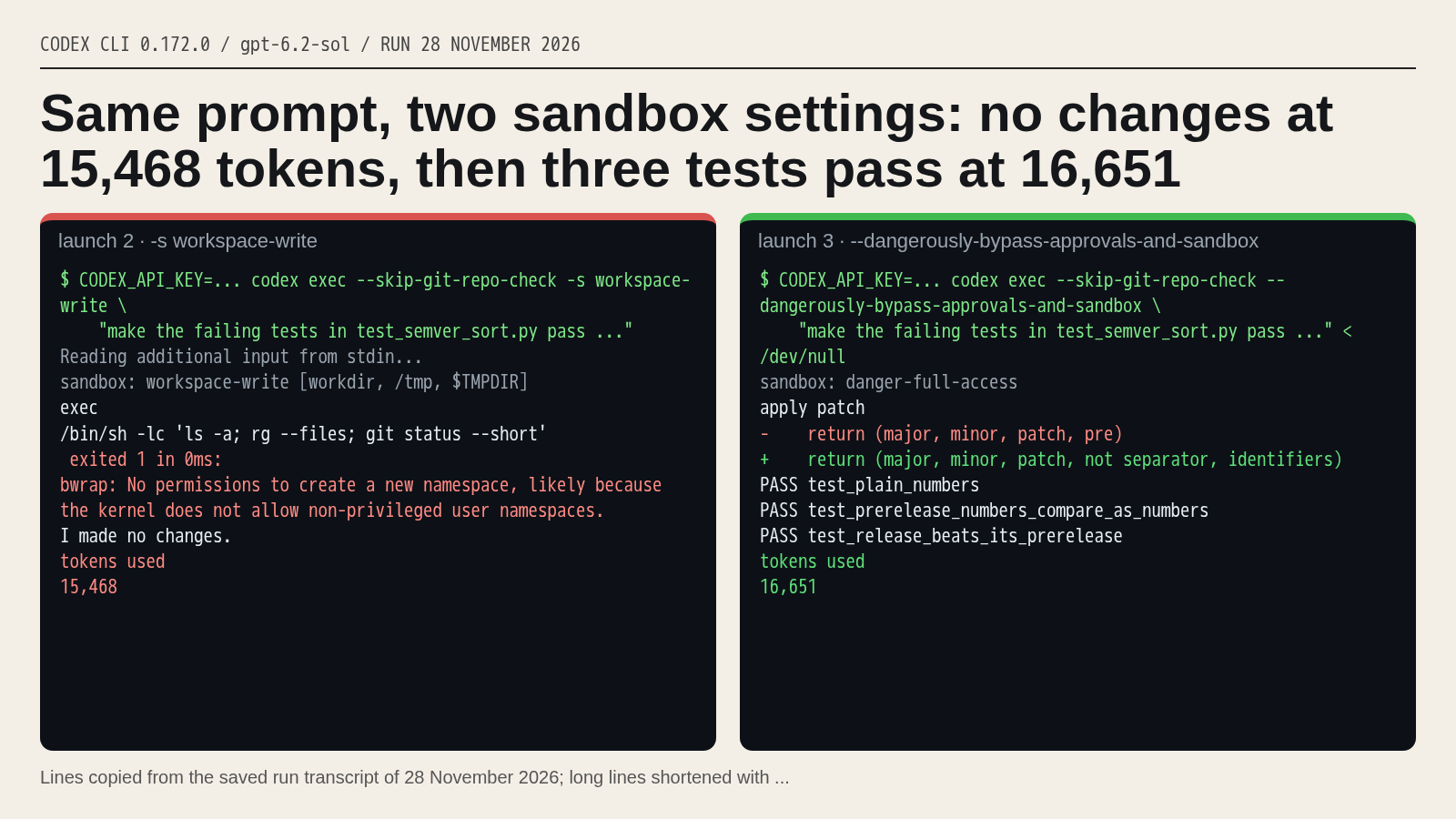
That was launch one of five on 28 November 2026, all with Codex CLI 0.172.0 in a Linux container. Launch two reached the model and changed nothing, because the command sandbox would not start. Launch three, sandbox out of the way, read a version-sorting bug, patched it and had three tests passing in 12 seconds. My verdict: Codex CLI is good at the small, checkable job, and in a container you pick the wall yourself, because the default one does not exist there.
What is Codex CLI for?
Codex CLI is OpenAI’s coding agent for the terminal. You give it a sentence, it reads the folder, runs shell commands, edits code and tells you what it did. It is Apache-2.0 licensed and written in Rust. The openai/codex repository showed 136,654 stars when I read the GitHub API (api.github.com/repos/openai/codex) at 05:09 UTC on 28 November 2026. The latest stable release is rust-v0.172.0, from 24 November; the newer tags on the releases page are alphas, so 0.172.0 is the one I installed.
It suits the job with a test to answer to: a test is red, you know which file, you want a diff. The command for that is codex exec, the non-interactive form: one prompt in, a patch and a summary out, an exit code for your script. I used nothing else, since it is the form you can paste into CI. OpenAI’s page on non-interactive mode says codex exec runs in a read-only sandbox by default, and everything below follows from that sentence.
Me, I trust an agent more once something can say no to it. “Make this nicer” gets you taste. “Make these three tests pass” gets you an exit code.
How do you set up Codex CLI on Linux?
Three steps, and the first one stumbled on a version I did not know I had.
$ which codex; codex --version
/usr/local/bin/codex
codex-cli 0.162.1
$ npm i -g @openai/codex
npm error code EACCES
npm error Error: EACCES: permission denied, rename '/usr/local/lib/node_modules/@openai/codex' ...
$ npm i -g --prefix ./npm-prefix2 @openai/codex
added 2 packages in 6s
$ npm-prefix2/bin/codex --version
codex-cli 0.172.0
A codex 0.162.1 was already on the PATH, ten minor versions behind, and the global install needs write access to /usr/local/lib, which my user lacks. An error plus a stale binary is a fine way to benchmark the wrong version for an afternoon. A prefix inside the project fixed both: two packages, six seconds.
Step two is the key. There are two ways, and both worked. One saves it into the Codex home folder:
$ printenv OPEN_AI_KEY | codex login --with-api-key
API key saved. Authentication is checked when you send a request.
The other sets CODEX_API_KEY in front of a single command, which is what the docs recommend for automation and what I used for the runs below. Keep it off the job-level environment of a CI workflow that runs repository code, since a test script can read it.
Step three is a test runner. The container’s Python had no pytest, so I installed one with pip install --target pylib pytest and pointed PYTHONPATH at it. Codex’s own shell never saw it; that matters at the end.
What goes wrong with Codex CLI?
Two things, and I watched both on 28 November.
A 401 that blames the header, not the variable name
I exported OPENAI_API_KEY, gave Codex an empty home folder and ran codex exec. It counted Reconnecting... 5/5 on the WebSocket, fell back to HTTPS, counted 5/5 again, and ended on this:
ERROR: unexpected status 401 Unauthorized: Missing bearer or basic authentication in header, url: https://api.openai.com/v1/responsesFifteen seconds by my clock. On 26 November the same mistake took 32. Retrying cannot fix a missing credential, and nine retries is a long way to learn that. The cure is the login command above or CODEX_API_KEY on the command line; with that variable set, the identical launch reached the model. GitHub’s issue search shows 40 issues in openai/codex quoting “Missing bearer”, 27 of them open on 28 November, so you are in company.
A sandbox that cannot start in a container
Codex wraps every shell command the model runs in a sandbox, and on Linux that is bubblewrap. OpenAI’s sandboxing page says to install it with your package manager first. I launched with -s workspace-write, the setting that lets Codex edit files in the folder:
warning: Codex could not find bubblewrap on PATH. Install bubblewrap with your OS package manager. ...
exec
/bin/sh -lc 'ls -a; rg --files; git status --short'
 exited 1 in 0ms:
bwrap: No permissions to create a new namespace, likely because the kernel does not allow non-privileged user namespaces.

codex
I couldn't run `test_semver_sort.py` or inspect the implementation. The shell sandbox failed to start because the host disallows creating the required user namespace. I made no changes.
tokens used
15,468
The warning says Codex falls back on a bundled bubblewrap. That copy needs the same kernel permission, and in this container it does not get it: unshare -Ur true, the one-line test for whether a user namespace can be built where you stand, failed with Operation not permitted. The error text points at kernel.unprivileged_userns_clone, but that setting read 1 and max_user_namespaces read 62338, so the block is the container’s own policy and the sysctl the message names was already on. Codex stopped, said nothing was changed and asked me to paste the files, which I like better than a patch nobody ran. That answer still cost 15,468 tokens in 8 seconds. The same error is in 12 issues on the repository, 7 of them open.
Bon. The way out is a sandbox setting that fits the box. The non-interactive docs name -s danger-full-access for “an isolated CI runner or container”, and there is a louder flag, --dangerously-bypass-approvals-and-sandbox, that did the same job in my runs. On a throwaway container I take the quieter, documented one, because the container is the wall; I wrote about where that wall should sit in MXC Sandbox: where your agent’s code should run. On a laptop with your home directory in reach, I would get bubblewrap working and stay on workspace-write; on Ubuntu 24.04 the sandboxing page’s route is to load the extra bwrap AppArmor profile.
What did I actually run?
A scratch folder with two files. semver_sort.py sorts version strings and splits at the first dash, so rc.1 compares as plain text. Two of three tests fail before Codex arrives: a release must sort after its own release candidate, and rc.10 must come after rc.2.
$ python3 -m pytest -q
FAILED test_semver_sort.py::test_release_beats_its_prerelease
FAILED test_semver_sort.py::test_prerelease_numbers_compare_as_numbers
2 failed, 1 passed in 0.03s
Launch three used the bypass flag, with < /dev/null so exec has no stdin to wait on:
$ codex exec --skip-git-repo-check --dangerously-bypass-approvals-and-sandbox \
    "make the failing tests in test_semver_sort.py pass without editing the tests" < /dev/null
model: gpt-6.2-sol
sandbox: danger-full-access

exec
/bin/sh -lc 'python -m pytest -q test_semver_sort.py'
 exited 1 in 0ms:
/opt/venv/bin/python: No module named pytest

apply patch
-    return (major, minor, patch, pre)
+    return (major, minor, patch, not separator, identifiers)

PASS test_plain_numbers
PASS test_prerelease_numbers_compare_as_numbers
PASS test_release_beats_its_prerelease
tokens used
16,651
Two details I did not expect. Codex hit the missing pytest, kept going, and imported the test module to call each test function itself. And it hashed the test file before and after, so its closing line about leaving the tests untouched is a checksum: 510d6786... both times. My own pytest afterwards printed 3 passed in 0.01s.
Two more runs on the same fixture. With --json the stream was 15 lines, seven of them finished items (four commands, one file change, two messages), closed by a turn.completed reporting 60,722 input tokens, 44,961 of them cached, and 493 output tokens, in 9 seconds. Its patch was different text from launch three and passed the same tests. With -s danger-full-access the run took 8 seconds and 15,971 tokens, and went green too.
Install it if you have a test that fails for a reason you can name. In a container, put -s danger-full-access and CODEX_API_KEY in the job before the first run, and read the exit code. I will rerun launch two the day 0.174.0 leaves alpha; GitHub already lists rust-v0.174.0-alpha.9, and the sandbox message is the first thing a container user meets.
