
Claude Code headless mode is claude -p: the same agent as the interactive session, run once from a command line, with no screen and nobody to press Yes. It reads a prompt, does the work, prints the answer and exits, which is what a shell script, a cron job or a CI step needs. Claude Code is Anthropic’s coding agent for the terminal, and it is not open source. Anthropic’s headless page says that Claude Code “exits with code 0 on success and a non-zero code when the run fails, so your scripts can branch on the exit status”, and that sentence is the first one the lab checked. It held: every run failure the lab tried exited 1 (a run killed from outside gave 143, and the shell’s timeout gave 124). What it does not tell you is that a run can exit 1 with "subtype":"success" in the result, and that an exit 0 can sit on a job that did nothing. This document is about Claude Code headless mode from the first -p to a workflow that runs on every push.
This is document 7 of 8. In it I go over what claude -p prints in text, JSON and stream form, how to pipe data in, what the permission system does when nobody can answer it, which exit codes and failure shapes a script has to handle, what --bare removes, how to keep a session across calls, the Agent SDK in TypeScript and Python, and two GitHub Actions workflows, with the cost and safety limits that went with each. My position on Claude Code headless mode: use it for read-only jobs first, put a turn cap, a dollar cap and a timeout on every call, and never take a zero, or a success, as proof that the work was done. Every output below was run for real by the lab behind this guide on Claude Code 2.1.316, and anything the lab did not run says “not tested” with the reason.
Five results come first, because each one breaks a script that looks fine. A run that fails inside Claude Code can come back with "subtype":"success" and "is_error":true, so a script that tests the subtype passes a broken run, while the exit code on that run was 1 and was right. In a fresh clone nobody has trusted, claude -p throws away the project’s permissions.allow rules and says so on stderr, so the rule you committed does not let your CI step run its tests. The Agent SDK ships its own copy of Claude Code, and an unpinned install ran 2.1.317 on a machine whose claude is 2.1.316. Without a model flag, -p ran Sonnet 5.5 on the lab’s login, where Anthropic’s model page says the default is Opus 5.5, and the same question cost twenty times what Haiku charged there. And Anthropic’s own GitHub Action, on a pull request that adds or changes the workflow file, finished green and never ran Claude. The sections below show each of them with its transcript.
What do you need before you start?
The companion repository at the tag for this document, jq, Node.js, Python 3 for the SDK section, and a terminal. The tag doc-7-start is the finished state of document 6, the commit ce84493. Each document starts in its own folder, so this one is cloned into ~/order-notifier-doc7 and the clones from earlier documents stay where they are:
git clone --branch doc-7-start https://github.com/dominicplouffe/order-notifier.git ~/order-notifier-doc7
cd ~/order-notifier-doc7
git log --oneline | head -4
npm test 2>&1 | grep -E "^# (tests|pass|fail)"
You should see the MCP commit on top, ce84493 Add the orders MCP server (stdio and HTTP), .mcp.json and two MCP allow rules, then b7641d8 (two subagents, two skills and a plugin), the hooks commit 59389ed and the settings commit 4408459, and # tests 25, # pass 25, # fail 0. That is the state every number below belongs to unless the text says otherwise: document 6 finished, document 5’s two subagents (route-reviewer and test-triage) and two skills (changelog-draft and service-conventions, the second with user-invocable: false, so it never shows in the / list) in .claude/, next to document 3’s route-doc skill (ls .claude/skills shows three folders), and document 5’s plugin notifier-kit not installed. If you installed the plugin and kept it, your counts of slash commands and agents will each be higher by one (the plugin’s changelog-draft command and test-triage agent, and no extra tool; document 5’s last section prints the delta). The lab ran the feature sections of this document on an earlier cut of the same repository, 5951d84, which had route-doc but no subagents, no other skills and no plugin. Where a printed number depends on what .claude/ loads (the init event’s counts, the --bare comparison), the lab re-ran the command on ce84493 and the block shows that run. Everything else did not depend on it, and the lab did not repeat it. The lab’s machine had Node 22.23.4, npm 10.9.9, jq 1.6 and git 2.39.5.
That new folder matters for this document: Claude Code keeps the trust answer per path, and ~/order-notifier-doc7 is a path it has never been started in. Do not start claude interactively in it before the trust section below. In a clone you already opened, you have accepted its trust dialog, and you will not see the “Ignoring” warning below or the denial that goes with it. The counts in this document also assume the plugins from document 5 are gone, as its last section leaves them. With notifier-kit still enabled the init event shows 31 tools, 57 slash commands and 8 agents instead of 30, 54 and 7, and a SessionStart hook event appears in streams.
Two credentials come into this document and they are used differently. The claude calls ran on a Claude subscription login, because document 1 set that up. The Agent SDK and --bare cannot use a subscription login, and the lab ran those, and its GitHub Actions runs, on an Anthropic API key, which you create in the Claude Console. In the shell where you run those parts, set it by hand, because neither the SDK nor claude reads a .env file for you:
export ANTHROPIC_API_KEY=your-key-here
The lab used --model haiku on almost every call to keep each one to a fraction of a cent. Without --model, the lab’s login ran Sonnet 5.5, and your default may be a different model (the section on the first cost comparison explains), so Claude’s wording in your run will differ from the quotes below and the cost will be higher. The mechanics did not differ, and that section shows the one number that does. Output blocks have the lab’s folder path replaced by dots, and the ids after toolu_ and the session ids are cut or replaced.
Almost every call in a fresh clone also printed one more line, on stderr, before anything else:
Ignoring 3 permissions.allow entries from .claude/settings.json: this workspace has not been trusted. Run Claude Code interactively here once and accept the trust dialog, or set projects["/tmp/lab/n/h/order-notifier"].hasTrustDialogAccepted: true in /tmp/lab/n/h/.claude.json.
The blocks below leave that line out unless the point is the line itself. It has a section of its own, and it is the most useful thing in this document if you have a CI job.
Most of the runs below end by printing a one-line digest of the JSON result. This is the lab’s jq filter, written as a function so it reads a pipe. Paste it into your shell before the first call:
digest() { jq -r '"DIGEST: subtype=\(.subtype) is_error=\(.is_error) turns=\(.num_turns) total_cost_usd=\(.total_cost_usd) denials=\(.permission_denials|map(.tool_name+":"+(.tool_input|tostring|.[0:70]))|join(" | ")) terminal_reason=\(.terminal_reason)"'; }
What does Claude Code headless mode print?
Text, by default. The lab’s first call, on a machine where no first-run dialog had been done on purpose, with only the subscription token in the environment:
claude -p "In one sentence: what does this repository do? Read README.md first." --model haiku --output-format text < /dev/null
It's a dependency-free Node.js toy order-notification service: `POST /orders` validates an order, builds a confirmation email, and posts it to a configured endpoint, and it serves as a teaching companion for a Claude Code guide.
Exit code 0, answer on stdout, and no setup screen. The < /dev/null is how the lab ran every call that has no piped input, so stdin is empty. Anthropic’s page lists three output formats, text, json and stream-json, and the next two sections run the other two.
One result belongs here before the formats. With no --model, the call below ran on Sonnet 5.5 on the lab’s login. The same prompt on Haiku is in the second block:
claude -p "Read src/orders.js with the Read tool and summarise it in two sentences." --output-format json < /dev/null | digest
claude -p "Read src/orders.js with the Read tool and summarise it in two sentences." --model haiku --max-budget-usd 0.05 --output-format json < /dev/null | digest
DIGEST: subtype=success is_error=false turns=2 total_cost_usd=0.0256285 denials= terminal_reason=completed
DIGEST: subtype=success is_error=false turns=2 total_cost_usd=0.00133247 denials= terminal_reason=completed
$0.0256 against $0.0013, about twenty times, for a two-sentence summary of one file. The lab read the model name out of .modelUsage of the first result and it was claude-sonnet-5-5, on a subscription token, at 2.1.316. That is a measurement of the lab’s login and not a promise about yours. Anthropic’s model configuration page, fetched the same day, says the default setting is account-dependent: “Pro, Max, Ultra, Team, Enterprise, and Anthropic API: defaults to Opus 5.5”, and that before v2.1.280 it resolved to Sonnet 5 on Pro and Team Standard. The page and the lab disagree, and the lab did not find out why. The page gives three routes that can override the account-type default. An admin-set organization default (Enterprise plans, v2.1.196 or later). A model recorded on your account, which on an Enterprise plan happens when you are logged in with claude.ai and save a default with /model (v2.1.280 or later). And ANTHROPIC_DEFAULT_MODEL, under the conditions in its section. The log rules out the variable: the call had no --model, ran under env -i with only the token and five plain variables (HOME, PATH, TERM, LANG and DISABLE_AUTOUPDATER=1) in the environment, on a fresh home folder, and modelUsage still came back claude-sonnet-5-5. So nothing in the call itself chose the model. The log cannot see the other two, because both live on the account side, and the lab did not check either. Your own answer takes one command, run on a call that did not pass --model: jq '.modelUsage | keys' on the JSON result. If it says Opus, the multiple below is larger for you, not smaller. This is the whole case for putting --model in every Claude Code headless mode script: the default is chosen for an interactive session where you want the best answer, and a nightly job that summarises a diff may not. Every cost figure in this document is Haiku unless the text says otherwise. The second command carries a --max-budget-usd 0.05 cap that the first does not, and neither run came near it.
What is in the JSON result?
One object, printed when the run ends. The lab asked how many test files there are, with --output-format json, and listed its keys:
claude -p "How many test files are in test/? Answer with just the number." --model haiku --output-format json < /dev/null > out.json
jq 'keys' out.json
[
  "api_error_status",
  "duration_api_ms",
  "duration_ms",
  "fast_mode_disabled_reason",
  "fast_mode_state",
  "first_content_frame_ms",
  "is_error",
  "modelUsage",
  "num_turns",
  "permission_denials",
  "queued_turn_count",
  "result",
  "result_index",
  "safety_stops",
  "session_id",
  "stop_reason",
  "subagent_stats",
  "subtype",
  "terminal_reason",
  "time_to_request_ms",
  "total_cost_usd",
  "ttft_ms",
  "ttft_stream_ms",
  "type",
  "usage",
  "uuid"
]
Twenty-six keys at 2.1.316 in Claude Code headless mode, and a script needs six of them: is_error, result, total_cost_usd, session_id, permission_denials and subtype. Here are those and a few neighbours for the same call:
jq -r '.result' out.json
jq '{type,subtype,is_error,num_turns,duration_ms,total_cost_usd,stop_reason,terminal_reason,session_id,permission_denials,usage:{input_tokens:.usage.input_tokens,output_tokens:.usage.output_tokens,cache_read:.usage.cache_read_input_tokens,cache_create:.usage.cache_creation_input_tokens}}' out.json
4
{
  "type": "result",
  "subtype": "success",
  "is_error": false,
  "num_turns": 2,
  "duration_ms": 3218,
  "total_cost_usd": 0.0012926300000000001,
  "stop_reason": "end_turn",
  "terminal_reason": "completed",
  "session_id": "be818022-...",
  "permission_denials": [],
  "usage": {
    "input_tokens": 4,
    "output_tokens": 132,
    "cache_read": 31963,
    "cache_create": 4533
  }
}
Anthropic’s page says total_cost_usd and the per-model breakdown are “client-side estimates” that “can differ from your actual bill”, and I read it the same way: it is good for comparing two runs and for a cap, and I would not reconcile an invoice against it. Two turns for a question about a folder, because one turn was the tool call that listed it and the second was the answer. The cache numbers sit beside the cost of about a tenth of a cent: 31,963 input tokens were read from cache and 4,533 were new.
How do you stream the result?
With --output-format stream-json, one JSON object per line, as the run goes. It needs --verbose, and the first try without it is the error:
claude -p "Say hi" --model haiku --output-format stream-json < /dev/null
Error: When using --print, --output-format=stream-json requires --verbose
Exit code 1, nothing on stdout. With --verbose, the lab asked the two-turn question again and counted the event types in order:
claude -p "How many test files are in test/? Answer with just the number." --model haiku --output-format stream-json --verbose < /dev/null > out.jsonl
jq -r '[.type, (.subtype // "-")] | join("/")' out.jsonl | uniq -c
      1 system/init
      1 assistant/-
      1 rate_limit_event/-
      1 user/-
      1 assistant/-
      1 result/success
The first event is system/init, which says what the session is made of, and the last line is the result, the same object as in the JSON mode. The assistant line is Claude’s tool call, the user line is the tool result going back, and the second assistant line is the answer. This is the init event, selected fields only:
jq -c 'select(.type=="system" and .subtype=="init")|{model,permissionMode,cwd:(.cwd|tostring|.[0:40]),tools_n:(.tools|length),mcp_servers,slash_n:(.slash_commands|length),agents_n:(.agents|length),session_id,claude_code_version,apiKeySource,output_style,capabilities}' out.jsonl
{"model":"claude-haiku-5-5","permissionMode":"default","cwd":"...","tools_n":31,"mcp_servers":[{"name":"orders","status":"connected","source":"project"}],"slash_n":56,"agents_n":7,"session_id":"460c6ca4-...","claude_code_version":"2.1.316","apiKeySource":"none","output_style":"default","capabilities":["interrupt_receipt_v1","interrupt_cancel_queued_v1","interrupt_send_now_v1","interrupt_requeue_taken_v1","msg_lifecycle_v1","request_marker_lists_v1","ask_user_question_unanswered_v1","lifecycle_wakeup_source_v1","sdk_mcp_tools_list_changed","sdk_mcp_manifests","mcp_read_resource_v1","mcp_tool_ui_meta_v1","ui_surface_v1","mcp_call_result_not_for_model_v1"]}
The counts are for the clone from the start of this document, with document 5’s subagents and skills and without its plugin: 56 slash commands and 7 agents (claude, Explore, general-purpose, Plan, route-reviewer, statusline-setup and test-triage). On the lab’s earlier cut, which had no document 5 files, the same command printed 55 and 5. Four fields in it matter to a pipeline. permissionMode is default in -p, the mode that asks, and it asks nobody. Anthropic’s page calls it Manual mode and says that from v2.1.302 claude -p runs start there when nothing sets a mode. mcp_servers shows the orders server from document 6’s .mcp.json connected, with no approval dialog, and tools_n is 31 because its three tools are in the list. claude_code_version is the version that ran, and apiKeySource is none because this call authenticated with the subscription token. Anthropic’s page says to check capabilities to “feature-detect instead of comparing version strings”, and the fourteen names in it are what 2.1.316 reported. The last line of the stream, cut to four fields:
tail -1 out.jsonl | jq -c '{type,subtype,is_error,result,num_turns,total_cost_usd}'
{"type":"result","subtype":"success","is_error":false,"result":"4","num_turns":2,"total_cost_usd":0.0004475}
To see the text arrive as it is written, add --include-partial-messages and filter for the deltas, which is the jq line from Anthropic’s page:
claude -p 'Count from 1 to 5, one number per line.' --model haiku --output-format stream-json --verbose --include-partial-messages < /dev/null > out.jsonl
jq -rj 'select(.type == "stream_event" and .event.delta.type? == "text_delta") | .event.delta.text' out.jsonl; echo
jq -r '[.type, (.event.type // .subtype // "-")] | join("/")' out.jsonl | uniq -c | head -20
1
2
3
4
5
      1 system/init
      1 system/status
      1 stream_event/message_start
      1 stream_event/content_block_start
      2 stream_event/content_block_delta
      1 assistant/-
      1 stream_event/content_block_stop
      1 stream_event/message_delta
      1 stream_event/message_stop
      1 rate_limit_event/-
      1 result/success
Two content_block_delta events carried the five numbers, so the stream arrives in pieces, not in letters. The cost of that call was $0.00099718.
The input side has a stream form too. --input-format stream-json reads user messages as JSON lines on stdin, which lets one process hold one session across several prompts. The lab sent two:
printf '%s\n%s\n' '{"type":"user","message":{"role":"user","content":"Remember the number 41. Reply: ok."}}' '{"type":"user","message":{"role":"user","content":"Add one to the number I told you. Reply with just the result."}}' | claude -p --model haiku --input-format stream-json --output-format stream-json --verbose > out.jsonl
jq -r 'select(.type=="result")|"result: \(.result) | cost \(.total_cost_usd) | turns \(.num_turns)"' out.jsonl
result: ok | cost 0.00146184 | turns 1
result: 42 | cost 0.00238928 | turns 1
Two results, one per message, and the second answered “42”, so the session carried the 41 across. The event list for that run had two system/init events and one session_id, and the second cost is the running total of the conversation, as the section on sessions shows. If your script needs a session that lasts, this is the shape. If it needs one answer, it does not.
How do you pipe data into Claude Code headless mode?
Two ways, and both exit 0. Stdin can be the data with the instruction in the argument, or the prompt can be stdin alone. The lab used the repo’s own git history for the first:
git log --oneline | head -5 | claude -p 'One line: what is the newest commit about?' --model haiku --output-format json | jq -r '.result, .total_cost_usd'
Add the orders MCP server (stdio and HTTP), along with its `.mcp.json` and two MCP allow rules.
0.00104068
And a stat output with a two-part instruction:
git show 59389ed --stat | claude -p 'Summarise this commit in one sentence, then list the files it touches.' --model haiku --output-format json | jq -r '.result, .total_cost_usd'
The commit adds team Claude Code hooks: a script that protects files from edits, a script that runs the tests after edits, and the settings that wire them up.

Files touched (3 files, 56 insertions, 0 deletions):
- `.claude/hooks/protect-files.sh` (+17)
- `.claude/hooks/run-tests.sh` (+15)
- `.claude/settings.json` (+24)
0.00120468
The second form, the prompt as stdin and nothing else, and a file piped in with a question as the argument:
echo 'Reply with exactly the word: pong' | claude -p --model haiku
cat src/config.js | claude -p 'List the environment variable names this file reads, one per line, nothing else.' --model haiku
wc -c src/config.js
pong
NOTIFIER_ENV
PORT
NOTIFIER_EMAIL_FROM
NOTIFIER_EMAIL_ENDPOINT
NOTIFIER_API_TOKEN
1391 src/config.js
Piping the data in has one advantage that Anthropic’s page names: “Piping the diff means Claude doesn’t need Bash permission to read it”. The model never runs git diff, so no allow rule is needed for it, and that is the safest way to hand a script’s output to Claude. The same page says “Piped stdin is capped at 10MB” and that going over the cap gives “a clear error and a non-zero status”. The lab did not run that, because the lab did not send 10 MB to find out and the cap is a documented limit, not a result: not tested.
How do you get an answer a script can parse?
Ask for a schema. --json-schema with --output-format json adds a structured_output field that holds the answer as an object, and the lab asked for the files directly under src/:
claude -p "List the names of the files directly under src/ ." --model haiku --output-format json --allowedTools "Glob,Read" --json-schema '{"type":"object","properties":{"files":{"type":"array","items":{"type":"string"}}},"required":["files"]}' < /dev/null > out.json
jq -c '.structured_output' out.json
jq -r '.result' out.json | head -c 300
jq -c '{is_error,subtype,num_turns,total_cost_usd}' out.json
{"files":["app.js","server.js","notifier.js","config.js","orders.js"]}
{"files":["app.js","server.js","notifier.js","config.js","orders.js"]}

{"is_error":false,"subtype":"success","num_turns":5,"total_cost_usd":0.004846710000000001}
Both fields held the same JSON, structured_output as an object and result as text. Five turns and $0.0048, because the model took a detour: the lab’s notes say it tried the Bash tool for an ls first, was denied, and answered with Glob instead, and the subtype stayed success. Anthropic’s page warns that “if a run ends without valid structured output, for example because Claude declined the request, the response has no structured_output field”, so a script tests that the field is there before it reads it. A schema that is not valid JSON Schema never reaches the model:
claude -p "hi" --model haiku --output-format json --json-schema '{"type":"banana"}' < /dev/null; echo exit=$?
Error: --json-schema is not a valid JSON Schema: data/type must be equal to one of the allowed values, data/type must be array, data/type must match a schema in anyOf
exit=1
What does Claude Code headless mode do with permissions when nobody is there?
Anything that would need a Yes is denied, the run goes on, and the run still exits 0. The rest of this section is the evidence, and the drawing is the summary of it. Each row is one run of one request, in a fresh clone, with the flags on the left:
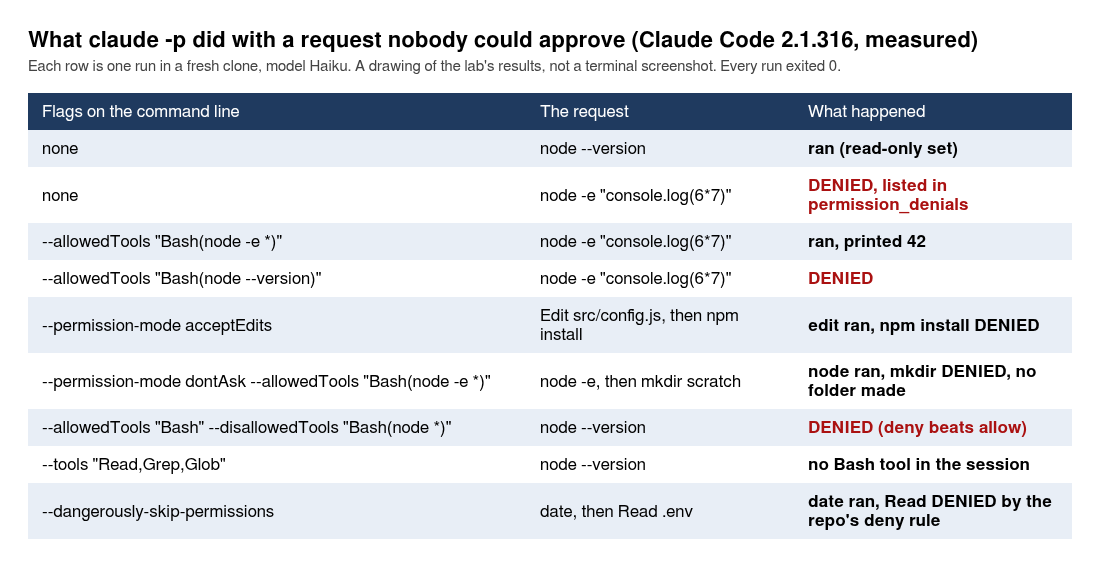
Start with no flags at all. The lab asked for node --version and then for a one-liner, node -e "console.log(6*7)", in default mode:
claude -p "Run node --version with the Bash tool and tell me exactly what it printed." --model haiku --output-format json < /dev/null | digest
claude -p 'Run node -e "console.log(6*7)" with the Bash tool and tell me exactly what it printed.' --model haiku --output-format json < /dev/null | digest
DIGEST: subtype=success is_error=false turns=2 total_cost_usd=0.0012502 denials= terminal_reason=completed
DIGEST: subtype=success is_error=false turns=2 total_cost_usd=0.0013896 denials=Bash:{"command":"node -e \"console.log(6*7)\"","description":"Run node one- terminal_reason=completed
The first ran, and Claude answered v22.23.4. The second did not run. Claude’s answer was “The Bash call didn’t run. It came back with “This command requires approval,” so node -e "console.log(6*7)" printed nothing and I have no output to report.” Look at the digest: subtype=success, is_error=false, and the only sign is in denials=. The difference between the two calls fits Anthropic’s built-in set of read-only commands: node --version behaved as if it is in the set and node -e as if it is not. The permissions page lists that set under “read-only commands”, and a command inside it needs no rule at all. date ran too, under an --allowedTools pattern that did not name it, and npm test and npm install were denied the way node -e was. A script that wants to know whether Claude did the thing has to read permission_denials, not the exit code and not the subtype.
What a denial looks like in a stream is a system event of its own:
claude -p 'Run node -e "console.log(6*7)" with the Bash tool.' --model haiku --output-format stream-json --verbose < /dev/null > out.jsonl
jq -c 'select(.type=="system" and (.subtype|tostring|test("denied|permission")))' out.jsonl | head -3 | cut -c1-400
jq -c 'select(.type=="result")|{subtype,permission_denials,total_cost_usd}' out.jsonl
{"type":"system","subtype":"permission_denied","tool_name":"Bash","tool_use_id":"toolu_...","decision_reason_type":"other","decision_reason":"This command requires approval","message":"This command requires approval","uuid":"723c159b-...","session_id":"e6cc86c6-..."}
{"subtype":"success","permission_denials":[{"tool_name":"Bash","tool_use_id":"toolu_...","tool_input":{"command":"node -e \"console.log(6*7)\"","description":"Run node one-liner printing 6*7"}}],"total_cost_usd":0.00144029}
Anthropic’s page says the same in a sentence: “With --output-format stream-json, denials appear as permission_denied system messages, and the final result message lists them in permission_denials.”
How do you allow one command?
With --allowedTools and a permission rule. The pattern must match the command, and a pattern for a different command does nothing:
claude -p 'Run node -e "console.log(6*7)" with the Bash tool and tell me exactly what it printed.' --model haiku --allowedTools "Bash(node -e *)" --output-format json < /dev/null | digest
claude -p 'Run node -e "console.log(6*7)" with the Bash tool and tell me exactly what it printed.' --model haiku --allowedTools "Bash(node --version)" --output-format json < /dev/null | digest
DIGEST: subtype=success is_error=false turns=2 total_cost_usd=0.00045093999999999993 denials= terminal_reason=completed
DIGEST: subtype=success is_error=false turns=2 total_cost_usd=0.0005533700000000001 denials=Bash:{"command":"node -e \"console.log(6*7)\"","description":"Run node one- terminal_reason=completed
Claude answered “It printed exactly 42” on the first. The second was denied, because Bash(node --version) matches one command and node -e is another. Anthropic’s page explains the star: “The trailing * enables prefix matching, so Bash(git diff *) allows any command starting with git diff. The space before * is important: without it, Bash(git diff*) would also match git diff-index.” The lab ran the star with a space and did not run the one without.
The opposite direction works too. A deny rule from --disallowedTools beat a broad allow, in the same run:
claude -p "Run node --version with the Bash tool and tell me what it printed." --model haiku --allowedTools "Bash" --disallowedTools "Bash(node *)" --output-format json < /dev/null | digest
DIGEST: subtype=success is_error=false turns=2 total_cost_usd=0.00135807 denials=Bash:{"command":"node --version","description":"Print Node.js version"} terminal_reason=completed
node --version is a read-only command that ran by itself in the first test of this section, and here it was denied, because a deny rule is checked before an allow rule. Remember that for the CI section: a deny you put in the workflow is not weakened by a broad allow next to it. And --tools is the harder form, because it removes the tool instead of denying a call:
claude -p "Run node --version with the Bash tool. If you have no Bash tool, say so." --model haiku --tools "Read,Grep,Glob" --output-format json < /dev/null | digest
claude -p 'hi' --model haiku --tools 'Read,Grep,Glob' --output-format stream-json --verbose < /dev/null 2>/dev/null | jq -c 'select(.type=="system" and .subtype=="init")|.tools'
DIGEST: subtype=success is_error=false turns=1 total_cost_usd=0.00035854 denials= terminal_reason=completed
["Glob","Grep","Read","mcp__orders__check_order","mcp__orders__preview_notification","mcp__orders__queue_notification"]
Claude said “I don’t have a Bash tool in this session”. Zero denials, because there was no call to deny. Notice the three mcp__orders__ tools in that list: --tools limits the built-in tools, and the MCP server from .mcp.json was still connected. That matters in a pipeline, because queue_notification is the tool from document 6 with a side effect, and a headless run in this repo has it unless you do something about it. The section on --bare is the something.
Which permission modes make sense without a human?
Three of them in the lab, and a fourth that did nothing useful. --permission-mode acceptEdits let the Edit through and denied the npm install after it:
claude -p "Add a one-line comment // checked at the top of src/config.js using the Edit tool. Then run npm install --no-audit --no-fund with the Bash tool. Say what happened to each step." --model haiku --permission-mode acceptEdits --output-format json < /dev/null | digest
git diff --stat && git diff | head -12
git checkout -q .
DIGEST: subtype=success is_error=false turns=4 total_cost_usd=0.00201609 denials=Bash:{"command":"npm install --no-audit --no-fund","description":"Install n terminal_reason=completed
 src/config.js | 1 +
 1 file changed, 1 insertion(+)
diff --git a/src/config.js b/src/config.js
index 95cae57..b04cf05 100644
--- a/src/config.js
+++ b/src/config.js
@@ -1,3 +1,4 @@
+// checked
 // Loads settings from config/<NOTIFIER_ENV>.json and lets a few environment
 // variables win over it. Nothing in here has a default that is a real secret.
One file changed and npm install did not run. Claude’s own summary: “The edit worked, but the npm install didn’t run.” Anthropic’s page says acceptEdits approves “common filesystem commands such as mkdir, touch, mv, and cp” and that “other shell commands and network requests still need an --allowedTools entry or a permissions.allow rule”, and npm install landed on the second side of that sentence. The git checkout -q . at the end puts the file back, and you will want it, because a headless edit is an edit.
--permission-mode dontAsk is the locked-down one, and Anthropic’s page names it for “locked-down CI runs”: Claude Code “denies every call that would otherwise prompt”. Things in the read-only set and things you allow still run. The lab combined it with one allow pattern and asked for two commands:
claude -p 'Run node -e "console.log(6*7)", then run mkdir scratch, with the Bash tool. Tell me what each did.' --model haiku --permission-mode dontAsk --allowedTools "Bash(node -e *)" --output-format json < /dev/null | digest
ls -d scratch 2>&1 | head -1
DIGEST: subtype=success is_error=false turns=3 total_cost_usd=0.00146807 denials=Bash:{"command":"mkdir scratch","description":"Create a scratch directory"} terminal_reason=completed
ls: cannot access 'scratch': No such file or directory
node -e ran and printed 42, mkdir scratch was denied, and no folder exists. The same mode with no allow pattern denied the node -e too, and in another dontAsk run date ran with no rule that named it, which fits the read-only set. This is the mode I would start every CI job in: it fails closed, and the allow list is then the whole of what the job may do.
There is a flag that adds one thing to that: --permission-prompts none, which Anthropic’s page describes as “for example in a scheduled job” and says “Claude is told that nobody can approve the request and not to retry it”. It “requires Claude Code v2.1.259 or later”, and 2.1.316 is later. In the lab’s run it changed the wording and not the outcome:
claude -p 'Run node -e "console.log(6*7)" with the Bash tool and tell me what it printed or why it did not.' --model haiku --permission-prompts none --output-format json < /dev/null | digest
DIGEST: subtype=success is_error=false turns=2 total_cost_usd=0.00053198 denials=Bash:{"command":"node -e \"console.log(6*7)\"","description":"Run node one- terminal_reason=completed
The command was denied, as in default mode with no flags, and Claude’s answer was that “the session has no approval surface, so the permission prompt … could not be answered”. Without the flag, in a -p run with no one attached, the lab’s default-mode run was denied the same way, and Anthropic’s page says it is the same: “In a -p run with no host, these requests are denied either way, and the flag also tells Claude not to retry them.” The flag earns its place when you run the SDK with a canUseTool callback, which the lab did not run: not tested.
Two more modes were tried once each. --permission-mode plan edited nothing, and it was the dearest call in this document, $0.0448 for a question about a /health route that already exists, about 30 times what the other Haiku calls in this section cost, so do not read it as typical. --permission-mode auto ran node --version for $0.0004. And --dangerously-skip-permissions ran date, and in the same call a read of a fake .env file the lab had created:
printf 'API_TOKEN=fake-value-for-the-lab\n' > .env
claude -p "Run date with the Bash tool, then read the file .env with the Read tool and quote it. Say what happened to each." --model haiku --dangerously-skip-permissions --output-format json < /dev/null | digest
rm -f .env
DIGEST: subtype=success is_error=false turns=3 total_cost_usd=0.00146102 denials=Read:{"file_path":"/.../order-notifier/.env"} terminal_reason=completed
date ran. The Read of .env was refused with “File is in a directory that is denied by your permission settings”, by the Read(./.env) deny rule that document 3 committed to .claude/settings.json. The lab repeated it under --permission-mode acceptEdits and got the same refusal. Deny rules held in every mode the lab tried, including the one whose name says it skips permissions. What a deny rule does not cover, a subprocess that reads the file through Bash, was shown in document 3, and document 8 comes back to it.
Why did npm test not run in a fresh clone when the repo allows it?
Because the folder is not trusted, and in -p it cannot become trusted. This is the second of the five results at the top, and it is the one that costs a CI job an afternoon. The repository’s .claude/settings.json from document 3 has this allow list:
"allow": ["Bash(npm test)", "mcp__orders__check_order", "mcp__orders__preview_notification"],
The lab asked Claude to run the tests in a fresh clone, three ways. First with nothing, then with the rule on the command line, then with the folder marked trusted:
claude -p "Run npm test with the Bash tool. Report the number of passing tests." --model haiku --output-format json < /dev/null | digest
claude -p "Run npm test with the Bash tool. Report the number of passing tests." --model haiku --allowedTools "Bash(npm test)" --output-format json < /dev/null | digest
DIGEST: subtype=success is_error=false turns=2 total_cost_usd=0.00139769 denials=Bash:{"command":"npm test 2>&1","description":"Run npm test in the project  terminal_reason=completed
DIGEST: subtype=success is_error=false turns=2 total_cost_usd=0.00058872 denials= terminal_reason=completed
The first run was denied, in spite of the committed rule. Claude’s answer: “I couldn’t run npm test. The Bash call returned “This command requires approval,” so the test suite never executed”. The second, with the same rule on the command line, ran, and Claude reported “npm test passes: 25 of 25 tests pass, 0 fail, 0 skipped.” The reason is the stderr line from the start of this document, which was printed on both runs: “Ignoring 3 permissions.allow entries from .claude/settings.json: this workspace has not been trusted.” Anthropic’s permissions page has the same fact in a table called “What runs before you trust a folder”, and the row for claude -p reads: “permissions.allow rules and additionalDirectories in .claude/settings.json” are “Not used. Claude Code prints a this workspace has not been trusted warning to stderr”. The same page says a -p run “never shows” the trust dialog, so there is nothing to click.
The warning tells you the way out, and the lab took it: set hasTrustDialogAccepted to true for the folder in ~/.claude.json. The file exists after any earlier claude run, so the lab edited it with jq:
jq --arg p "$(pwd -P)" '.projects[$p].hasTrustDialogAccepted = true' ~/.claude.json > ~/.claude.json.new && mv ~/.claude.json.new ~/.claude.json
jq -c --arg p "$(pwd -P)" '.projects[$p]|{hasTrustDialogAccepted}' ~/.claude.json
claude -p "Run npm test with the Bash tool. Report the number of passing tests." --model haiku --output-format json < /dev/null | digest
{"hasTrustDialogAccepted":true}
DIGEST: subtype=success is_error=false turns=2 total_cost_usd=0.00083872 denials= terminal_reason=completed
With the folder marked, the committed rule worked with no flag on the command line, and Claude reported “npm test passes 25 of 25 tests, with 0 failures and 0 skipped.” ($(pwd -P) is the real path of the folder you are standing in, with any symlink followed, which is the path Claude Code trusts. A plain $PWD would key the entry on the link in a symlinked folder and do nothing, so run the block from inside the clone. Typing a path by hand is the mistake to avoid: a path to some other clone marks that other folder trusted, and the denial in yours stays. The second jq line prints this folder’s entry only, because ~/.claude.json also holds an entry, with more fields, for every other project you have opened.) My position is to pass the allow rules on the command line in CI, with --allowedTools, and not to edit ~/.claude.json on a runner. The command line is in the workflow file where a reviewer sees it, and the same stderr line showed up on the GitHub runner in the lab’s CI runs, so the trap is real there too. The warning’s other way out, running claude once interactively in the folder and accepting the dialog, is not something a CI runner can do, and the lab did not try it: not tested.
Not everything in the repo is dropped in Claude Code headless mode, and the difference is a security fact. The Read(./.env) deny rule held in this untrusted clone, so deny rules are used. The PreToolUse and PostToolUse hooks from document 4 ran in -p: the lab’s stream, with --include-hook-events, listed hook_response events for PreToolUse:Edit and PostToolUse:Edit, both exit code 0. And the orders MCP server connected without a dialog. Anthropic’s headless page says it: “Without --bare, a -p session runs the hooks in a project’s .claude/settings.json and connects the servers in its .mcp.json, even in a folder you’ve never trusted.” So a headless run in someone else’s clone obeys the repository’s deny rules, hooks and servers, and ignores its allow rules. If you point claude -p at a repository you did not write, remember what that sentence implies about the hooks.
How does a script know the run failed?
By testing is_error, and by reading the exit code and permission_denials too. Four kinds of failure came out of the lab’s runs, and they do not look alike.
A bad flag stops before the run, on stderr, with exit 1. A bad value for a flag does the same and lists the choices:
claude -p 'hi' --model haiku --no-such-flag < /dev/null; echo exit=$?
claude -p 'hi' --model haiku --permission-mode nonsense < /dev/null; echo exit=$?
error: unknown option '--no-such-flag'
exit=1
error: option '--permission-mode <mode>' argument 'nonsense' is invalid. Allowed choices are acceptEdits, auto, bypassPermissions, manual, dontAsk, plan.
exit=1
A failure inside the run, the second kind, is the trap. Anthropic’s page describes it a few sentences after the exit-code one: “When a failure happens inside the run, such as missing authentication, Claude Code prints the failure as the result on stdout.” The page says the failure is a result. It does not say the result says error, and the exit code, which the first sentence promised, was 1 each time. I ran three failing calls: one with no credentials at all, one with a wrong API key, and one with a model name that does not exist. The first two calls run in a clean environment with a new empty home folder, so that your own login and key cannot reach them (env -i starts the call with an empty environment, and mktemp -d makes the empty home). The third one has to reach the API to be told the model is wrong, so it runs as you, with your login or key:
env -i HOME=$(mktemp -d) PATH="$PATH" claude -p 'hi' --model haiku --output-format json < /dev/null > out.json; echo exit=$?; jq -c '{subtype,is_error,result,api_error_status,terminal_reason,total_cost_usd}' out.json
env -i HOME=$(mktemp -d) PATH="$PATH" ANTHROPIC_API_KEY=junk claude -p 'hi' --model haiku --output-format json < /dev/null > out.json; echo exit=$?; jq -c '{subtype,is_error,result,api_error_status,terminal_reason,total_cost_usd}' out.json
claude -p 'hi' --model no-such-model-xyz --output-format json < /dev/null > out.json; echo exit=$?; jq -c '{subtype,is_error,result,api_error_status,terminal_reason,total_cost_usd}' out.json
rm -f out.json
The first two also print the “Ignoring 3 permissions.allow” line on stderr, because a new home has no trust answer for this folder, and the third prints one line of its own, [claude-code:unrecognized_model] {"model":"no-such-model-xyz","query_source":"sdk"}. The results:
exit=1
{"subtype":"success","is_error":true,"result":"Not logged in · Please run /login","api_error_status":null,"terminal_reason":"api_error","total_cost_usd":0}
exit=1
{"subtype":"success","is_error":true,"result":"Invalid API key · Fix external API key","api_error_status":401,"terminal_reason":"api_error","total_cost_usd":0}
exit=1
{"subtype":"success","is_error":true,"result":"There's an issue with the selected model (no-such-model-xyz). It may not exist or you may not have access to it. Run --model to pick a different model.","api_error_status":404,"terminal_reason":"api_error","total_cost_usd":0}
Three failures, three "subtype":"success", and is_error is true on each, with exit code 1 on each. The cost is zero, because no model was reached. The lab wrote each result to a file and read the exit code before the jq line, and so should a script, because in a pipe the exit code you see is jq‘s. Test is_error, not subtype, and not whether result is empty: here result holds an error message and is not empty at all. (The wrong key was the lab’s “junk” value, and the string junk in the command above is mine. If you run the first line without env -i and a new home, and you are logged in, it simply answers: the first line only fails where no login exists.)
The third kind is a cap that you set, and they are the useful ones. --max-turns 1 on a task that needed three file reads:
claude -p "Read src/config.js, src/orders.js and src/notifier.js one file at a time with the Read tool, then tell me which one is longest." --model haiku --max-turns 1 --output-format json < /dev/null > out.json; echo exit=$?
jq -c '{type,subtype,is_error,num_turns,terminal_reason,stop_reason,result:(.result|tostring|.[0:200]),errors}' out.json
claude -p "Read src/config.js, src/orders.js and src/notifier.js one file at a time with the Read tool, then tell me which one is longest." --model haiku --max-turns 1 < /dev/null > out.txt 2> err.txt; echo exit=$?; head -c 400 out.txt
exit=1
{"type":"result","subtype":"error_max_turns","is_error":true,"num_turns":2,"terminal_reason":"max_turns","stop_reason":"tool_use","result":"null","errors":["Reached maximum number of turns (1)"]}
exit=1
Error: Reached max turns (1)
Exit 1, a distinct subtype of error_max_turns, and in text mode a single line, Error: Reached max turns (1), on stdout with no newline after it. The result is the string "null", not an answer. num_turns says 2 for a cap of 1, because the turn that hit the cap is counted. The lab ran the two commands five times in a row on a fresh clone and got these same lines every time, five out of five. It first tried a cap of 2, and on 2.1.316 that one did not always stop: in about half of the lab’s repeat runs the same prompt finished with success, exit 0, an answer and num_turns 4, under a cap of 2. So treat --max-turns as a brake that stops a loop, not as an exact count of tool calls, and check the exit code and subtype when you set a cap, not the number. --max-budget-usd stops a run the same way, and the lab set it far below the cost of one call to see what that means:
claude -p "Read src/orders.js with the Read tool and summarise it in two sentences." --model haiku --max-budget-usd 0.0001 --output-format json < /dev/null > out.json; echo exit=$?
jq -c '{subtype,is_error,num_turns,terminal_reason,total_cost_usd,errors}' out.json
exit=1
{"subtype":"error_max_budget_usd","is_error":true,"num_turns":1,"terminal_reason":"budget_exhausted","total_cost_usd":0.00106398,"errors":["Reached maximum budget ($0.0001)"]}
A cap of $0.0001, a call that cost $0.00106398. So the cap is not a ceiling on one call: it stops the next step after the spend crossed it, and the call that crossed it is already paid for. With a cap of $0.05 the same task finished, success, for $0.00133247. Set the budget with room for one more call than you expect, and treat it as the guard against a loop and not as a price limit on a single step. This is the same lesson as the LiteLLM budget post: a cap that checks after the spend is a brake, and I would rather learn where it bites on a one-cent run than on an invoice.
The fourth kind is the process being killed from outside. Anthropic’s page says that after SIGTERM Claude Code “exits with code 143”, leaves the turn “unfinished and records no result for it”, and “terminates the process tree of any Bash command that is still running”. The lab’s first try failed to test it, because Haiku finished counting to 200 before the signal came and the exit code was 0, which tells nothing. The second made the command long: a node one-liner that waits 60 seconds, a SIGTERM to the claude process after 12 seconds:
( claude -p 'Run exactly this with the Bash tool and then say done: node -e "setTimeout(function(){console.log(1)}, 60000)"' --model haiku --allowedTools 'Bash(node -e *)' --output-format stream-json --verbose < /dev/null > out.jsonl 2>err.txt & pid=$!; sleep 12; echo "stream lines after 12 s: $(wc -l < out.jsonl)"; echo "node children before kill: $(grep -l setTimeout /proc/[0-9]*/cmdline 2>/dev/null | wc -l)"; kill -TERM $pid; wait $pid; echo exit=$?; sleep 1; echo "node children after kill: $(grep -l setTimeout /proc/[0-9]*/cmdline 2>/dev/null | wc -l)" )
jq -r '[.type,(.subtype//"-")]|join("/")' out.jsonl | uniq -c
stream lines after 12 s: 4
node children before kill: 8
exit=143
node children after kill: 5
      1 system/init
      1 assistant/-
      1 rate_limit_event/-
      1 system/task_started
      1 system/task_notification
      1 user/-
Exit 143, and the stream stops with no result line, as the page says. The process count is the part that did not come out clean: the grep matches any process whose command line contains the word setTimeout, and that includes the lab’s own subshells, so 8 and 5 are not “one child, then none”. The lab did not confirm that the child command is killed with its parent. The page’s claim stands as the page’s claim: not tested. A plain timeout wrapper, which is what a CI step uses, gave its own code:
timeout 3 claude -p 'Count slowly from 1 to 200, one number per line.' --model haiku < /dev/null > out.txt 2>&1; echo exit=$?
exit=124
124 is timeout‘s code and not Claude Code’s. So the exit-code sentence held for every run failure the lab tried in this section: eight cases, exit 1 each. A script sees 0, 1, 124 and 143 from claude -p, and in the cases that the lab tried those meant: finished and not an error, a flag error or a failure or a cap, a wrapper’s time limit, and a SIGTERM. Only exit 0 with is_error false and permission_denials empty means the work was done.
One more result, from the lab’s attempt to use sleep 60 as the long-running command: the Bash tool refused it, with a message that began “Blocked: standalone sleep 60”, and the run ended on its own. A bare sleep is no good as a stand-in for slow work, and the node one-liner above is what replaced it.
What does --bare change?
It removes everything the project and your home folder would add to Claude Code headless mode, so the run is the same on every machine. Anthropic’s page describes it as skipping “auto-discovery of hooks, skills, custom commands, subagents, installed plugins, MCP servers, auto memory, and CLAUDE.md”, and says “--bare is the recommended mode for scripted and SDK calls, and will become the default for -p in a future release”. There is a requirement attached: bare mode “doesn’t use your subscription login”, so it needs the API key. The lab ran the same edit prompt twice, with the key set in the environment, without --bare and with it:
claude -p 'Add a one-line comment // checked at the top of src/config.js with the Edit tool.' --model haiku --permission-mode acceptEdits --output-format stream-json --verbose --include-hook-events < /dev/null > out.jsonl
jq -c 'select(.type=="system" and .subtype=="init")|{tools_n:(.tools|length),mcp_servers,slash_n:(.slash_commands|length),agents_n:(.agents|length),apiKeySource,permissionMode}' out.jsonl
jq -c 'select(.type=="system" and (.subtype|tostring|startswith("hook_response")))|{hook_event,hook_name,outcome,exit_code}' out.jsonl
tail -1 out.jsonl | jq -c '{subtype,is_error,total_cost_usd,num_turns}'
git diff --stat | tail -1; git checkout -q .
{"tools_n":30,"mcp_servers":[{"name":"orders","status":"connected","source":"project"}],"slash_n":54,"agents_n":7,"apiKeySource":"ANTHROPIC_API_KEY","permissionMode":"acceptEdits"}
{"hook_event":"PreToolUse","hook_name":"PreToolUse:Edit","outcome":"success","exit_code":0}
{"hook_event":"PostToolUse","hook_name":"PostToolUse:Edit","outcome":"success","exit_code":0}
{"subtype":"success","is_error":false,"total_cost_usd":0.0016476350000000002,"num_turns":3}
 1 file changed, 1 insertion(+)
That is the run without --bare: the orders server connected, both hooks fired, $0.00165. The same command with claude --bare -p ... in front:
{"tools_n":3,"mcp_servers":[],"slash_n":51,"agents_n":5,"apiKeySource":"ANTHROPIC_API_KEY","permissionMode":"acceptEdits"}
{"subtype":"success","is_error":false,"total_cost_usd":0.0006228300000000001,"num_turns":3}
 1 file changed, 1 insertion(+)
Three tools instead of 30, no MCP servers, no hook events, and the edit still happened. Anthropic’s page says Claude “has access to the Bash, file read, and file edit tools” in bare mode, and the init event listed three. The cost was $0.00062 against $0.00165, 38 percent or a bit over a third, for the same file change. Slash commands went from 54 to 51, and agents_n went from 7 to 5: the two that dropped out are, by inference, route-reviewer and test-triage, the project subagents from document 5 (the --bare run printed only the count, and the names come from the seven listed without --bare). That is the page’s line about bare skipping subagents showing up in the count. The five that stay are built in. (On the lab’s earlier cut, which had no project subagents, agents_n was 5 both ways and the count showed nothing.) The queue_notification tool of document 6 is gone in bare mode, which is the answer to the --tools problem from the permissions section: the server is not loaded unless you name it with --mcp-config.
Bare mode never reads the subscription login. The lab tried it with only the token:
claude --bare -p 'hi' --model haiku --output-format json < /dev/null | jq -c '{subtype,is_error,result,terminal_reason,total_cost_usd}'
{"subtype":"success","is_error":true,"result":"Not logged in · Please run /login","terminal_reason":"api_error","total_cost_usd":0}
Another success that is an error. One trap remains on a runner: the lab’s CI logs showed the “Ignoring 3 permissions.allow” line even with --bare, so bare mode did not stop that warning, and the allow rules still have to be passed with --allowedTools. And what the bare run does not load is also what it does not obey: the project’s hooks did not run, which means a safety hook from document 4 does not protect a bare run. Anthropic’s page lists the things you pass back in by hand, --append-system-prompt, --settings, --mcp-config, --agents and --plugin-dir. The lab did not run any of those inside -p: not tested.
Can Claude Code headless mode remember the call before?
Yes, by session id, and the cost the second call reports is the whole conversation’s. The lab asked Claude to remember a word, then asked for it back with --resume, then with --continue:
claude -p 'Remember the word: pelican. Reply: stored.' --model haiku --output-format json < /dev/null > a.json
sid=$(jq -r .session_id a.json); echo session=$sid
jq -r '.result, .total_cost_usd' a.json
claude -p 'What word did I ask you to remember? One word.' --model haiku --resume "$sid" --output-format json < /dev/null | jq -r '.result, .total_cost_usd, .session_id'
claude -p 'And the word again, in capitals.' --model haiku --continue --output-format json < /dev/null | jq -r '.result, .total_cost_usd, .session_id'
session=bd4f285b-...
stored.
0.0009945800000000001
pelican
0.00187922
bd4f285b-...
PELICAN
0.00207747
bd4f285b-...
Both calls remembered it and both kept the same session id. The cost went 0.00099, 0.00188, 0.00208: the second and third numbers are running totals of the conversation, not the price of that call, which Anthropic’s page says in a sentence of its own: “the run reports the conversation’s whole total, earlier runs’ spend included”. If you total the costs of many resumed calls by adding them up, you will count the first call’s spend again every time.
The other side of this is --no-session-persistence, for a job that should leave nothing behind. The run writes no transcript, so a later --resume of its id fails:
claude -p 'Reply: ok' --model haiku --no-session-persistence --output-format json < /dev/null > a.json
sid=$(jq -r .session_id a.json); echo session=$sid
find ~/.claude/projects -name "$sid*" | wc -l
claude -p 'Reply: ok' --model haiku --resume "$sid" < /dev/null; echo exit=$?
session=6d7722e6-...
0
No conversation found with session ID: 6d7722e6-...
exit=1
Zero files in ~/.claude/projects for that id, and exit 1 on the resume. After the session runs in this section, the lab’s clean home folder held three .jsonl transcripts in ~/.claude/projects: the three pelican calls shared one session id, the no-persistence call wrote none, and the system-prompt call and the skill call wrote one each. Anthropic’s page says --resume also takes “the absolute path to a session’s .jsonl transcript file”, which the lab did not run.
Two more flags from the docs’ own scripts. --append-system-prompt adds an instruction and keeps the default prompt, and the lab used it with a diff piped in, as Anthropic’s review.sh example does:
git show HEAD --stat | claude -p --model haiku --append-system-prompt 'Answer in exactly five words.' --output-format json | jq -r '.result, .total_cost_usd'
Orders MCP server added, configured.
0.00187151
Five words, obeyed. And a skill runs by name, because Anthropic’s page says “User-invoked skills and custom commands work. Include /skill-name in the prompt string and Claude Code expands it before running.” The repo’s route-doc skill from document 3 has a line in it that runs git log when the skill loads, and the lab called it:
claude -p '/route-doc POST /orders' --model haiku --output-format json < /dev/null > out.json
jq -r '.is_error, .num_turns, .total_cost_usd' out.json
jq -r '.result' out.json | head -c 300
false
4
0.00259446
**Request:** a `POST /orders` with a JSON body holding one order object, with `id` (non-empty string), `customerEmail` (a valid email address), and `amountCents` (a positive integer no larger than the configured `maxOrderCents`). **Responses:** `201` with `{id, notified: true}` when the notification
Four turns, $0.0026, and the answer describes the route. Built-in commands that need a screen, such as /login, are not available in -p, and a few take an argument. Anthropic’s page lists them, and the lab did not run those.
How do you put Claude Code headless mode inside a script?
With a few lines of shell that treat three outcomes differently: the run failed, the run found nothing, the run found something. The lab wrote a small review script for the companion repo, and the CI workflow in a later section calls it. It reads a git diff on stdin, asks Claude for at most three concrete problems with a JSON schema, and exits 0 when there are none, 1 when the run itself failed, and 2 when it found problems. First a branch, so your files stay off the tag, then the script:
git checkout -b doc-7-work
mkdir -p scripts
cat > scripts/review-diff.sh <<'EOF'
#!/bin/bash
# Review a git diff with Claude in headless mode and print one finding per line.
# usage: scripts/review-diff.sh BASE_REF [extra claude flags, e.g. --bare]
# Exit codes: 0 reviewed and nothing found, 1 the run itself failed, 2 reviewed and found problems.
set -uo pipefail
base=${1:?usage: review-diff.sh BASE_REF [claude flags]}; shift
schema='{"type":"object","properties":{"problems":{"type":"array","items":{"type":"object","properties":{"file":{"type":"string"},"problem":{"type":"string"}},"required":["file","problem"]}}},"required":["problems"]}'
git diff "$base" -- . ':(exclude)*package-lock.json' | claude -p \
  "You review a diff for a small Node service. List at most 3 concrete problems a maintainer would want fixed. Report none if there are none." \
  --model haiku --max-turns 3 --max-budget-usd 0.25 \
  --output-format json --json-schema "$schema" "$@" > review.json || exit 1
jq -e '.is_error == false and has("structured_output")' review.json > /dev/null || { jq -r '.subtype + ": " + (.result // "")' review.json >&2; exit 1; }
jq -r '.structured_output.problems[] | "\(.file): \(.problem)"' review.json
jq -r '"cost $\(.total_cost_usd), \(.num_turns) turns, \(.subtype)"' review.json >&2
test "$(jq '.structured_output.problems | length' review.json)" -eq 0 || exit 2
EOF
chmod +x scripts/review-diff.sh
printf '\n.venv/\n\nreview.json\n' >> .gitignore
Read it for the three lines that matter. --max-turns 3 and --max-budget-usd 0.25 are the caps from the exit-code section, there so that a loop ends. The first jq -e line is the is_error test, and it also checks that structured_output exists, which is the check Anthropic’s page asks for. And git diff goes in on stdin, so Claude needs no Bash permission to read it. The pattern ':(exclude)*package-lock.json' keeps lock files out of the prompt, and the finished commit of this document has one that is 2,057 lines long.
The lab committed its own files as one commit on top of 5951d84 (the earlier cut of document 6’s finished state, before the recut to ce84493) and ran the script on that commit, with the subscription token and no --bare:
scripts/review-diff.sh HEAD~1 > f4.txt 2> f4.err; echo exit=$?; head -c 900 f4.txt; echo '--- stderr:'; grep -v '^Ignoring' f4.err | head -c 300
exit=2
sdk/ask.py: Line 31 formats total_cost_usd with :.4f unconditionally. If the SDK leaves it unset on an error result, the script crashes while printing the result line and hides the error. Guard the format. The same risk applies to sdk/ask.ts line 23, which uses .toFixed(4).
sdk/requirements.txt: Pins claude-agent-sdk==0.2.176, while sdk/package.json pins @anthropic-ai/claude-agent-sdk at 0.3.316. The two demos target different SDK generations, and ask.py's init-message fields may not match across versions. Pin both to the same release or document why they differ.
.github/workflows/claude-action.yml: Runs a paid model call (up to $0.25, API key) on every push to doc-7-work with no paths filter, so docs-only pushes also spend money. It also requests id-token: write without a github_token, so it may fail at the action's token-exchange step unless the Claude GitHub App is installed. Add a pa--- stderr:
cost $0.007327770000000001, 3 turns, success
Exit 2, three findings, $0.0073 on the lab’s run. The output is cut at 900 characters, by the lab’s head -c 900, which is why the third finding stops in the middle of a word. Your run will say other things, because the model’s findings change from run to run, and these are about the lab’s own files, which you have not written yet. A walk of this document in a reader’s clone, where HEAD~1 was the MCP commit, printed five findings about the files under mcp/ (exit 2, $0.0070): the prompt asks for at most three and the schema has no maxItems, so the count is not enforced. The second finding is a fair question with an answer: the versions in sdk/requirements.txt and sdk/package.json differ because the two packages number their releases differently, which the SDK section explains. And the script leaves review.json in the repo root every time it runs, which is why the .gitignore line above exists.
How do you run it from TypeScript or Python?
With the Agent SDK, which is the same agent loop as a library. Anthropic’s quickstart needs “Node.js 18.14+ or Python 3.10+”, and the lab had Node 22.23.4 and Python 3.11.2. Bon. The first thing to know is on that page too, in a note: “Both the TypeScript and Python SDKs bundle a native Claude Code binary”. The SDK does not run the claude on your PATH. It runs its own, and which one it runs depends on the SDK version you installed.
Put the SDK in its own folder inside the repo, with its own package.json, so the repo’s npm test stays free of dependencies. These are the quickstart’s TypeScript commands, run in a sdk/ folder:
mkdir sdk && cd sdk
npm init -y >/dev/null && npm pkg set type=module name=order-notifier-sdk-demo
npm install --no-audit --no-fund @anthropic-ai/claude-agent-sdk 2>&1 | tail -3
npm install --no-audit --no-fund --save-dev tsx 2>&1 | tail -3
cat package.json
ls node_modules/@anthropic-ai
du -sh node_modules
added 105 packages in 17s

added 4 packages in 7s
{
  "name": "order-notifier-sdk-demo",
  "version": "1.0.0",
  "description": "",
  "main": "index.js",
  "scripts": {
    "test": "echo \"Error: no test specified\" && exit 1"
  },
  "keywords": [],
  "author": "",
  "license": "ISC",
  "type": "module",
  "dependencies": {
    "@anthropic-ai/claude-agent-sdk": "^0.3.317"
  },
  "devDependencies": {
    "tsx": "^4.23.15"
  }
}
claude-agent-sdk
claude-agent-sdk-linux-x64
claude-agent-sdk-linux-x64-musl
sdk
694M	node_modules
Note the size. 694 MB is this Linux machine, where npm installed two native binaries, claude-agent-sdk-linux-x64 and claude-agent-sdk-linux-x64-musl, one for each C library. It is the lab’s number for this machine, and your Mac or your Linux box may install one binary and come out much smaller. And the version: ^0.3.317 is what the lab got on 3 November, and 2.1.317 is the Claude Code release that came out that day. A walk a day later got ^0.3.318, 707 MB and Claude Code 2.1.318. These numbers move with every release, so read yours.
The script is 25 lines. It streams the loop, prints the tool names and the answer, and sets its own caps: the model, three read-only tools, six turns and a quarter of a dollar.
cat > ask.ts <<'EOF'
import { query } from "@anthropic-ai/claude-agent-sdk";

const question = process.argv[2] ?? "What does src/orders.js export? Answer in two sentences.";

for await (const message of query({
  prompt: question,
  options: {
    model: "haiku",
    allowedTools: ["Read", "Glob", "Grep"],
    maxTurns: 6,
    maxBudgetUsd: 0.25,
  },
})) {
  if (message.type === "system" && message.subtype === "init") {
    console.log(`claude code ${message.claude_code_version}, model ${message.model}, mcp servers ${message.mcp_servers.length}`);
  } else if (message.type === "assistant") {
    for (const block of message.message.content) {
      if ("text" in block) console.log(block.text);
      else if ("name" in block) console.log(`[tool] ${block.name}`);
    }
  } else if (message.type === "result") {
    console.log(`${message.subtype}: ${message.num_turns} turns, $${message.total_cost_usd.toFixed(4)}`);
    process.exitCode = message.is_error ? 1 : 0;
  }
}
EOF
cd ..
npx --prefix sdk tsx sdk/ask.ts
(The cat above ran in the sdk/ folder, and the cd .. and the npx --prefix sdk line run from the repo root, which is the SDK’s working directory and so the folder Claude reads.)
claude code 2.1.317, model claude-haiku-5-5, mcp servers 1
[tool] Read
`src/orders.js` exports three functions and one error class: `validateOrder(order, config)`, which throws an `OrderError` for invalid orders, `formatAmount(cents, currency)`, and `buildNotification(order, config)`, which returns the `{ to, from, subject, body }` confirmation email. It also exports the `OrderError` class, which extends `Error`.
success: 2 turns, $0.0026
That is the loop working, with ANTHROPIC_API_KEY set. Read the first line again: claude code 2.1.317, on a machine where claude --version says 2.1.316. That is the bundled binary. The SDK installed the newest version of itself, which carried the newest Claude Code. And mcp servers 1 is the orders server from .mcp.json, loaded by the SDK with no setting from the script. A script that expects a clean agent gets the project’s servers.
Here are the two failures the lab hit. The first is a question that needs a tool the script did not list, Bash for npm test. The script allows Read, Glob and Grep and nothing else, so what happens depends on whether the folder is trusted. In the folder you trusted earlier in this document, the committed Bash(npm test) rule from document 3 applies, and the call runs. This output is from Claude Code 2.1.316 with the SDK installed as @anthropic-ai/claude-agent-sdk@0.3.316, so that the first line names the same release as claude --version:
npx --prefix sdk tsx sdk/ask.ts 'Run npm test with the Bash tool and tell me how many tests pass.' > out.txt 2> err.txt; echo exit=$?; head -c 1200 out.txt; echo '--- stderr:'; head -c 300 err.txt
exit=0
claude code 2.1.316, model claude-haiku-5-5, mcp servers 1
[tool] Bash
All 25 tests pass, with 0 failures, 0 cancelled, and 0 skipped. The run took about 678 ms.
success: 2 turns, $0.0006
--- stderr:
To see a refusal, take the trust entry back out of ~/.claude.json for this folder, and ask the same question again:
jq --arg p "$(pwd -P)" 'del(.projects[$p].hasTrustDialogAccepted)' ~/.claude.json > ~/.claude.json.new && mv ~/.claude.json.new ~/.claude.json
jq -c --arg p "$(pwd -P)" '.projects[$p]|{hasTrustDialogAccepted}' ~/.claude.json
npx --prefix sdk tsx sdk/ask.ts 'Run npm test with the Bash tool and tell me how many tests pass.' > out.txt 2> err.txt; echo exit=$?; head -c 1200 out.txt; echo '--- stderr:'; head -c 300 err.txt
{"hasTrustDialogAccepted":null}
exit=0
claude code 2.1.316, model claude-haiku-5-5, mcp servers 1
[tool] Bash
The first attempt was blocked for approval, probably because of the `2>&1 | tail` pipe. I'll run the plain command.
[tool] Bash
I couldn't get the tests to run, so I don't have a pass count yet. Both `npm test` attempts were blocked with "requires approval," and I haven't tried to get around that permission check.

To proceed, you can approve `npm test` for this project when prompted, or add a permission rule for it in `.claude/settings.json`. Once it runs, I can report the pass count.
success: 3 turns, $0.0010
--- stderr:
The tool was refused, the answer says so, the result is success, and the script’s exit code is 0. It is the same shape as the CLI: a refused tool is not an error. Put the trust entry back before you go on, with the line from the trust section:
jq --arg p "$(pwd -P)" '.projects[$p].hasTrustDialogAccepted = true' ~/.claude.json > ~/.claude.json.new && mv ~/.claude.json.new ~/.claude.json
And the SDK with no key in the environment, which is what a reader sees who forgets the export:
npx --prefix sdk tsx sdk/ask.ts > e2c.out 2> e2c.err; echo exit=$?; echo '--- stdout:'; cat e2c.out; echo '--- stderr, size:'; wc -l -c < e2c.err; echo '--- stderr, length of each line (line number: characters):'; awk '{printf "%d:%d ", NR, length($0)} END {print ""}' e2c.err; echo '--- stderr, line 1:'; sed -n 1p e2c.err; echo '--- stderr, line 2 (minified source), first 60 and last 60 characters:'; sed -n 2p e2c.err | cut -c1-60; sed -n 2p e2c.err | tail -c 61; echo '--- stderr, line 3 has this many non-space characters:'; sed -n 3p e2c.err | tr -d ' ' | wc -c; echo '--- stderr, the last 8 lines (the whole error block):'; tail -n 8 e2c.err
exit=1
--- stdout:
claude code 2.1.316, model claude-haiku-5-5, mcp servers 1
Not logged in · Please run /login
success: 1 turns, $0.0000
--- stderr, size:
    12 145743
--- stderr, length of each line (line number: characters):
1:94 2:144182 3:1020 4:0 5:78 6:126 7:84 8:59 9:28 10:1 11:0 12:16
--- stderr, line 1:
file:///.../sdk/node_modules/@anthropic-ai/claude-agent-sdk/sdk.mjs:152
--- stderr, line 2 (minified source), first 60 and last 60 characters:
`)?0:1)}}function d4e(e){return pl(ae(e))}function p4e(e){if
ype:"success",request_id:e.request_id,response:r}};n=ae(o)+`
--- stderr, line 3 has this many non-space characters:
1
--- stderr, the last 8 lines (the whole error block):
Error: Claude Code returned an error result: Not logged in · Please run /login
    at zy.readMessages (file:///.../sdk/node_modules/@anthropic-ai/claude-agent-sdk/sdk.mjs:152:143180)
    at process.processTicksAndRejections (node:internal/process/task_queues:103:5) {
  telemetryMessage: 'Claude Code returned an error result',
  errorClass: 'error_result'
}

Node.js v22.23.4
The lab ran this in a cleaned environment (env -i, a fresh home folder, no token, and only the five plain variables HOME, PATH, TERM, LANG and DISABLE_AUTOUPDATER=1), so no key and no login. What you get on a machine that is logged in is not tested. Removing only the key, with env -u ANTHROPIC_API_KEY in front of npx, was never run. Anthropic’s authentication page, in a passage on forceLoginOrgUUID, groups “Terminal, VS Code extension, and Agent SDK logins” as the ones that are checked for claude.ai account logins. That hints that the SDK can run on a stored login, and the quickstart says nothing either way. If it does, your run succeeds and the block below never appears for you. To see it, run the command below. Bare env -i npx ... does not work: env -i empties PATH too, and the shell then says npx is not found (env -i npx --version printed env: 'npx': No such file or directory and exit 127). So the command gives PATH back, and gives HOME a new empty folder:
env -i HOME="$(mktemp -d)" PATH="$PATH" TERM=xterm LANG=C.UTF-8 DISABLE_AUTOUPDATER=1 \
  npx --prefix sdk tsx sdk/ask.ts 2> err.txt
grep -n -A 6 '^Error:' err.txt
That is the lab’s own cleaned environment written out as one line. The lab’s first run went through a helper script that set those five variables. I then ran this exact block as typed, from a fresh sdk/ built with the unpinned commands above, and kept the output. It printed the three stdout lines, exited 1, and grep printed the Error: line and the six lines after it (the sixth is blank). With env -i HOME="$(mktemp -d)" PATH=/usr/local/bin:/usr/bin:/bin npx --version in place of the long line, npx printed 10.9.9, so it is found. This is a Linux recipe. On Linux a login lives in ~/.claude/.credentials.json, so a new empty HOME has none. Anthropic’s authentication page, fetched 2026-11-04, says that on macOS “credentials are stored in the encrypted macOS Keychain”, and that with CLAUDE_CONFIG_DIR set the Keychain entry is keyed to that directory. So on a Mac, an empty HOME may not log you out, because your login is in the Keychain and not in a file under your home folder. Whether a Mac still finds its login under this command is not tested: the lab has no Mac. If the block does not appear for you, that is the likely reason, and it means your run worked. The grep is there because the error block is not always the last thing in the file. On the day I ran the block as typed, tail -n 8 err.txt printed }, a blank line, Node.js v22.23.4 and then five lines of npm’s own update notice (“npm notice New major version of npm available! 10.9.9 -> 12.2.1” and four more), so the Error: line was the thirteenth from the bottom of a 17-line file and not on the screen. A fresh HOME has no npm notifier cache, so npm prints the notice every time, after Node has finished. Those five notice lines are why the file was 17 lines that day and not the 12 above. grep -n -A 6 '^Error:' err.txt finds the line wherever it lands. On that run it printed this, with the minified source above it left out:
5:Error: Claude Code returned an error result: Not logged in · Please run /login
6-    at Ky.readMessages (file:///.../sdk/node_modules/@anthropic-ai/claude-agent-sdk/sdk.mjs:153:148055)
7-    at process.processTicksAndRejections (node:internal/process/task_queues:103:5) {
8-  telemetryMessage: 'Claude Code returned an error result',
9-  errorClass: 'error_result'
10-}
The path in the second line is cut to ... here, and the function name and the two numbers after sdk.mjs: change with every SDK release (zy and 152:143180 in the block above, on 2.1.316; Ky and 153:148055 on 2.1.318). The lines are the same. The block above is from the pinned run, where the last eight lines of stderr happened to be the whole error block. Line 2 of stderr, 144,182 characters long, is the SDK’s own minified source, which Node prints around the throw, and the block above shows only its first and last 60 characters. This one block ran after the pin in the next section, on @anthropic-ai/claude-agent-sdk 0.3.316, so its first line says 2.1.316. Your install is still the unpinned one at this point and prints whatever version is newest on that line (2.1.318 on the day I ran the block as typed). The lab has no run of the no-key case on 2.1.317 past the first 500 bytes of its stderr, so I do not say the error block there is the same. The exit code is 1, and this run cannot tell you why. The script maps is_error to the exit code (process.exitCode = message.is_error ? 1 : 0), and that line ran, since success: 1 turns printed first. But the SDK then throws, nothing catches it, and Node ends an uncaught throw with exit 1 on its own. Either one gives 1. The result line says Not logged in and the subtype says success, as in the CLI.
One thing the lab saw and did not look into: with this script on the lab’s machine, when stderr is a pipe, it is cut. npx --prefix sdk tsx sdk/ask.ts 2>&1 >/dev/null | wc -c gave 65,536 bytes three times out of three, and a grep on that pipe for the Error: line found nothing. With 2> err.txt the file was 145,743 bytes and the line was there once. In a terminal the block is whole at the bottom, under a wall of minified code. The lab’s reading is that Node’s stderr is cut at 64 KB when it is a pipe and the process dies on the throw. That is a reading, and the lab did not test it. So redirect to a file and read the end of it, with 2> err.txt and then the grep above, or look at stdout, where the script itself printed Not logged in · Please run /login. Not tested: whether a CI step, which also pipes stderr, cuts it the same way. The reason is plain: no workflow in this document runs the SDK script. Anthropic’s quickstart says what to check: “make sure you’ve set the ANTHROPIC_API_KEY environment variable in the shell where you run your agent. The SDK doesn’t load .env files automatically.”
The Python version is the same loop. It needs a virtual environment:
cd sdk
python3 -m venv .venv && .venv/bin/pip install --quiet claude-agent-sdk
.venv/bin/pip show claude-agent-sdk | sed -n 1,3p
python3 --version
ls .venv/lib/python*/site-packages/claude_agent_sdk/_bundled
Name: claude-agent-sdk
Version: 0.2.177
Summary: Python SDK for Claude Code
Python 3.11.2
claude
Version 0.2.177 of the Python package, and a _bundled folder with a file called claude in it, the same idea as the npm package. The Python and the npm packages do not share a number. Here is the script, sdk/ask.py, and its run:
cat > ask.py <<'EOF'
import asyncio
import sys

from claude_agent_sdk import AssistantMessage, ClaudeAgentOptions, ResultMessage, SystemMessage, query

question = sys.argv[1] if len(sys.argv) > 1 else "What does src/orders.js export? Answer in two sentences."


async def main() -> int:
    code = 0
    async for message in query(
        prompt=question,
        options=ClaudeAgentOptions(
            model="haiku",
            allowed_tools=["Read", "Glob", "Grep"],
            max_turns=6,
            max_budget_usd=0.25,
        ),
    ):
        if isinstance(message, SystemMessage) and message.subtype == "init":
            data = message.data
            print(f"claude code {data.get('claude_code_version')}, model {data.get('model')}, mcp servers {len(data.get('mcp_servers', []))}")
        elif isinstance(message, AssistantMessage):
            for block in message.content:
                if hasattr(block, "text"):
                    print(block.text)
                elif hasattr(block, "name"):
                    print(f"[tool] {block.name}")
        elif isinstance(message, ResultMessage):
            print(f"{message.subtype}: {message.num_turns} turns, ${message.total_cost_usd:.4f}")
            code = 1 if message.is_error else 0
    return code


sys.exit(asyncio.run(main()))
EOF
cd ..
sdk/.venv/bin/python sdk/ask.py
claude code 2.1.317, model claude-haiku-5-5, mcp servers 1
[tool] Read
`src/orders.js` exports the `OrderError` class (an `Error` subclass for invalid orders) and three functions: `validateOrder(order, config)`, which throws `OrderError` on bad input and returns `true` otherwise; `formatAmount(cents, currency)`, which formats cents as a display string; and `buildNotification(order, config)`, which validates an order and returns the notification object.
success: 2 turns, $0.0007
Also 2.1.317, also mcp servers 1, $0.0007. git status --short then showed ?? sdk/, because the whole folder is new. The repo’s .gitignore already lists node_modules/, and the .venv/ line you added keeps the virtual environment out of the commit.
Why pin the SDK, and to what?
Because the SDK’s version is Claude Code’s version, and a document that names 2.1.316 has to run 2.1.316. This is the part of the lab’s work that the docs did not tell us to expect. The runs above that used the unpinned install printed 2.1.317 and the machine’s claude is 2.1.316 (the no-key block is the exception, because it ran after the pin), so the guide’s pinned version and the SDK’s version came apart by one release in a single day. The quickstart says the SDKs bundle the binary and does not say how the version follows the package. For the TypeScript package it does, and the lab found it by asking the bundled binary. The Python package uses its own numbers, and 0.2.176 bundles 2.1.316.
The lab removed the install and put both back at the versions that match its Claude Code, with exact pins:
cd sdk
rm -rf node_modules package-lock.json .venv
npm install --no-audit --no-fund --save-exact @anthropic-ai/claude-agent-sdk@0.3.316 2>&1 | tail -2
npm install --no-audit --no-fund --save-dev --save-exact tsx 2>&1 | tail -2
jq -c '{dependencies,devDependencies}' package.json
python3 -m venv .venv && .venv/bin/pip install --quiet claude-agent-sdk==0.2.176
.venv/bin/pip show claude-agent-sdk | sed -n 1,2p
ls node_modules/@anthropic-ai
node_modules/@anthropic-ai/claude-agent-sdk-linux-x64/claude --version
.venv/lib/python3.11/site-packages/claude_agent_sdk/_bundled/claude --version
added 108 packages in 12s

added 1 package in 4s
{"dependencies":{"@anthropic-ai/claude-agent-sdk":"0.3.316"},"devDependencies":{"tsx":"4.23.15"}}
Name: claude-agent-sdk
Version: 0.2.176
claude-agent-sdk
claude-agent-sdk-linux-x64
claude-agent-sdk-linux-x64-musl
sdk
2.1.316 (Claude Code)
2.1.316 (Claude Code)
Both bundled binaries say 2.1.316 (Claude Code). (The two binary paths are Linux and Python 3.11 paths, so on a Mac or another Python they differ, and the lab did not run this check anywhere else: not tested.) Then both scripts again:
cd ..
npx --prefix sdk tsx sdk/ask.ts
sdk/.venv/bin/python sdk/ask.py
claude code 2.1.316, model claude-haiku-5-5, mcp servers 1
[tool] Read
`src/orders.js` exports the `OrderError` class (an `Error` subclass for invalid orders) and three functions: `validateOrder(order, config)`, `formatAmount(cents, currency)`, and `buildNotification(order, config)`. All of them are pure, with no network, clock, or file access.
success: 2 turns, $0.0006
and, from the Python script:
claude code 2.1.316, model claude-haiku-5-5, mcp servers 1
[tool] Read
`src/orders.js` exports the `OrderError` class (an `Error` subclass) and three functions: `validateOrder(order, config)`, `formatAmount(cents, currency)`, and `buildNotification(order, config)`. All of them are pure, with no network, clock, or file access.
success: 2 turns, $0.0006
2.1.316 in both, $0.0006 each. The finished state pins the two packages and the one dev tool, and the pins are the whole point of this section. sdk/package.json is what npm init and the two installs wrote, with the exact versions you saw in the jq line, and you do not type it. The Python pin is a file of one line:
cat > sdk/requirements.txt <<'EOF'
claude-agent-sdk==0.2.176
EOF
The lab’s finished commit also carries sdk/package-lock.json, 2,057 lines that npm install writes for you, and the lab did not print it. If you want to compare your files against the lab’s, they are one commit at the tag doc-8-start, which is fd47ad0: nine files, 2,223 lines, 25 tests still passing. (git diff --stat fd47ad0 HEAD on your commit may show a few changed lines in sdk/package-lock.json, because npm install picks up the newest patch release of a transitive package: the lab’s fresh clone showed six lines, and no other file.) (The lab’s own commit of the same files was 98902d6, on the earlier cut. The two differ only by document 5’s files underneath.)
The one thing the SDK section could not do is use a subscription. Anthropic’s quickstart says: “Unless previously approved, Anthropic does not allow third party developers to offer claude.ai login or rate limits for their products, including agents built on the Claude Agent SDK. Use the API key authentication methods described in this document instead.” The lab ran the SDK on an API key and did not run it on a subscription token: not tested, and not something to test in a product you ship.
How do you run it on every push?
With a workflow file that installs Claude Code, calls the script, and treats the exit codes the way the script defines them. The lab wrote two workflows, because GitHub Actions has two ways to run Claude Code, and they behave very differently. The first uses the CLI that you install yourself, so it is the one that stays on the pinned version.
You need a repository you can push to and a secret in it. The repo you cloned belongs to the guide, and you cannot push to it, so make an empty repository of your own on GitHub. Add it as a second remote and push the branch you made. The lab pushed from its own clone of a repository it owns, so adding a second remote and pushing to your own repository is not something the lab ran: not tested as typed. The secret has the name ANTHROPIC_API_KEY and holds your own key, and nothing in this document prints one. Anthropic’s GitHub Actions page says: “Never commit API keys or OAuth tokens directly to your repository. Always store them as GitHub Secrets and reference them in workflows”. The lab created its secret with the GitHub API, with the key sealed with the repository’s public key, and not through the settings page, so the page and gh secret set are the routes the lab did not run: not tested. GitHub’s guide to secrets, which Anthropic’s page links, covers the screens. And use a key with a cap on it, because a workflow is a program that spends your money on its own schedule.
The workflow file, .github/workflows/claude-headless.yml. It runs when you push, so the commit and the push come at the end of the next section, and the run you read here is the lab’s:
mkdir -p .github/workflows
cat > .github/workflows/claude-headless.yml <<'EOF'
name: claude-headless

on:
  push:
    branches: [doc-7-work]
  workflow_dispatch:

permissions:
  contents: read

concurrency:
  group: claude-headless-${{ github.ref }}
  cancel-in-progress: true

jobs:
  review:
    runs-on: ubuntu-latest
    timeout-minutes: 10
    steps:
      - uses: actions/checkout@v4
        with:
          fetch-depth: 2
      - uses: actions/setup-node@v4
        with:
          node-version: 22
      - name: Install Claude Code
        run: npm install -g @anthropic-ai/claude-code@2.1.316
      - name: Review the last commit
        env:
          ANTHROPIC_API_KEY: ${{ secrets.ANTHROPIC_API_KEY }}
        run: |
          claude --version
          set +e
          scripts/review-diff.sh HEAD~1 --bare
          code=$?
          echo "review-diff.sh exit code: $code"
          if [ -f review.json ]; then
            { echo '### Claude review'; jq -r '.structured_output.problems[]? | "- \(.file): \(.problem)"' review.json; echo; jq -r '"cost $\(.total_cost_usd), \(.num_turns) turns"' review.json; } >> "$GITHUB_STEP_SUMMARY"
          fi
          # 0 = nothing found, 2 = findings: both are a finished review. 1 = the run failed.
          test "$code" -ne 1
EOF
Five lines in it are the safety limits of this document. permissions: contents: read gives the job’s token nothing else. timeout-minutes: 10 ends a hung job. Anthropic’s page lists “workflow-level timeouts to avoid runaway jobs” and “GitHub’s concurrency controls to limit parallel runs” next to --max-turns as ways to cap a run, and the concurrency block is the lab’s use of the second one. The lab did not push twice in a row to watch an older run get cancelled: not tested. npm install -g @anthropic-ai/claude-code@2.1.316 pins the CLI, and --bare makes the review the same whatever the runner has lying around. The last line, test "$code" -ne 1, is the exit-code rule from the script: 0 and 2 are a finished review, and only 1 fails the job. The branches: [doc-7-work] line is the lab’s branch name, and it is the one you pushed. If you used another name, change it here.
The lab’s first job took about 24 seconds and finished green. These lines come from the Actions log of that first run, on the lab’s first push (commit e530c71), picked out with a grep, and the *** are GitHub hiding a secret’s value:
  token: ***
added 2 packages in 4s
  ANTHROPIC_API_KEY: ***
2.1.316 (Claude Code)
Ignoring 3 permissions.allow entries from .claude/settings.json: this workspace has not been trusted. Run Claude Code interactively here once and accept the trust dialog, or set projects["/home/runner/work/order-notifier/order-notifier"].hasTrustDialogAccepted: true in /home/runner/.claude.json.
sdk/ask.py: The result handler does `f"{message.total_cost_usd:.4f}"`, but total_cost_usd can be None (for example on error results). That raises TypeError and hides the actual result. Guard the None case, as the TS version also needs to.
sdk/ask.ts: The result handler calls `message.total_cost_usd.toFixed(4)` without a null check. If the cost is missing, the script throws before setting the exit code, so an error run crashes instead of reporting failure cleanly. Use optional chaining or a fallback.
scripts/review-diff.sh: review.json is written to the repo root but is not in .gitignore, so a local run can leave it behind to be committed. The redirect also truncates it before claude runs, so a failed run leaves a partial file that the workflow's summary step then tries to parse. Write it to a temp path or the runner temp directory, and ignore it if it stays in the repo.
cost $0.001780525, 2 turns, success
review-diff.sh exit code: 2
That is run 41578080202. Read it from the top. The pinned version printed 2.1.316 (Claude Code). The “Ignoring 3 permissions.allow” line is there, on the runner and under --bare, which is why the workflow passes nothing that depends on those rules. The three findings are the model’s, about the lab’s own files, and they changed between runs. The cost was $0.00178, two turns. The exit code was 2, a finished review, and the job stayed green. The companion repository’s own ci workflow also runs on every push and pull request, so the Actions tab lists it next to the Claude runs: three more rows if you push a copy of the repository that carries it.
The lab’s final commit, 98902d6, ran the same workflow as run 41578420821. There the lab’s filter read 2.1.316 (Claude Code), three different findings, cost $0.0018826350000000001, 2 turns, success and review-diff.sh exit code: 2. The lab’s own filter did not look for the “Ignoring” line, but the job log on GitHub does have it, on the line after 2.1.316 (Claude Code): Ignoring 3 permissions.allow entries from .claude/settings.json: this workspace has not been trusted .... (In the job log on GitHub it is line 144, directly under 2.1.316 (Claude Code) on line 143.) The two runs cost $0.0018 and $0.0019.
One of the final run’s findings was a fair one that the lab did not act on: the workflow fails if a big diff runs into the budget cap, and it does that on purpose, because a cap that is hit is a failure you want to see. I would rather have a red job on a huge diff than a green one that did not review it.
What does Anthropic’s own GitHub Action do differently?
It installs Claude Code itself, always the latest, and it will not run on every event. The lab’s second workflow uses anthropics/claude-code-action@v1, which Anthropic’s page describes as “a GitHub Action that runs Claude Code inside your repository’s workflows”. It answers @claude mentions, or it takes a prompt and needs no mention at all. The lab ran only the prompt form, and it hit two walls on the way.
The first wall is the trigger. The lab’s first version ran on push, like the first workflow, and the job failed:
##[error]Action failed with error: Unsupported event type: push
##[error]Process completed with exit code 1.
Run 41578080168, a failure. Anthropic’s page shows the action on comments, pull requests and a schedule, never on push, and the action itself said the event is unsupported. So the lab changed the trigger to pull_request and wrote two jobs side by side, to see two ways of authenticating. This is the file the lab ran at that step. The second job passes github_token: ${{ secrets.GITHUB_TOKEN }}, and the first does not:
name: claude-action

on:
  pull_request:
    types: [opened, synchronize]

permissions:
  contents: read
  id-token: write

concurrency:
  group: claude-action-${{ github.ref }}
  cancel-in-progress: true

jobs:
  app-token:
    runs-on: ubuntu-latest
    timeout-minutes: 10
    steps:
      - uses: actions/checkout@v6
      - uses: anthropics/claude-code-action@v1
        with:
          anthropic_api_key: ${{ secrets.ANTHROPIC_API_KEY }}
          prompt: "Read README.md and write a two-sentence summary of what this repository does."
          claude_args: "--model haiku --max-turns 3 --max-budget-usd 0.25 --allowedTools Read"
  github-token:
    runs-on: ubuntu-latest
    timeout-minutes: 10
    steps:
      - uses: actions/checkout@v6
      - uses: anthropics/claude-code-action@v1
        with:
          anthropic_api_key: ${{ secrets.ANTHROPIC_API_KEY }}
          github_token: ${{ secrets.GITHUB_TOKEN }}
          prompt: "Read README.md and write a two-sentence summary of what this repository does."
          claude_args: "--model haiku --max-turns 3 --max-budget-usd 0.25 --allowedTools Read"
The lab opened a pull request from the branch to main through the GitHub API to fire the event, and closed it without merging. Both jobs came back green. The second wall is in the first job, app-token, the way Anthropic’s page shows it, with the Claude GitHub App’s token. Its log:
Requesting OIDC token...
OIDC token successfully obtained
Exchanging OIDC token for app token...
Attempt 1 failed: Workflow validation failed. The workflow file must exist and have identical content to the version on the repository's default branch. If you're seeing this on a PR when you first add a code review workflow file to your repository, this is normal and you should ignore this error.
##[warning]Skipping action due to workflow validation: Workflow validation failed. The workflow file must exist and have identical content to the version on the repository's default branch. ...
Error is not retryable, giving up immediately
Action skipped due to workflow validation error. This is expected when adding Claude Code workflows to new repositories or on PRs with workflow changes. If you're seeing this, your workflow will begin working once you merge your PR.
The job’s conclusion was success. Claude never ran, and nothing in the checkmark says so. That is the expected state of any pull request that adds or changes the workflow file, and the log says as much. The lab did not merge the workflow into the companion repo’s default branch, which the project does not do, and so it did not run the app-token path after a merge. That path also needs the Claude GitHub App installed on the repository, by a person, from github.com/apps/claude, and /install-github-app, which sets that up from inside Claude Code through a browser, is a human step too: not tested, both of them, for that reason.
The second job, github-token, did run. The Actions log, from the part of it where the action sets up and calls Claude:
Preparing with mode: agent for event: pull_request
Actor type: User
Verified human actor: ...
Installing Claude Code v2.1.317...
✔ Claude Code successfully installed!

  Version: 2.1.317

  Location: ~/.local/bin/claude
Restoring .claude, .mcp.json, .claude.json, .gitmodules, .ripgreprc, CLAUDE.md, CLAUDE.local.md, .husky from origin/main (PR head is untrusted)
Preserved PR's sensitive paths -> .claude-pr/ for review agents (not executed)
Running Claude Code via SDK (full output hidden for security)...
Rerun in debug mode or enable `show_full_output: true` in your workflow file for full output.
SDK options: {
  "model": "haiku",
  "maxTurns": 3,
  "allowedTools": [
    "Read"
  ],
  "systemPrompt": {
    "type": "preset",
    "preset": "claude_code"
  },
  "pathToClaudeCodeExecutable": "/home/runner/.local/bin/claude",
  "settingSources": [
    "user",
    "project",
    "local"
  ]
}
{
  "type": "result",
  "subtype": "success",
  "is_error": false,
  "duration_ms": 1951,
  "num_turns": 2,
  "total_cost_usd": 0.0015428199999999999,
  "permission_denials_count": 0,
(The lines between the ones shown are cut, and the result object continues with a modelUsage block.) Five facts are in there. The action installed Claude Code itself, version 2.1.317, the newest that day, and did not use 2.1.316. The page does not say how to pin it, and the lab did not look for an input that does, so if your sweep or your guide needs a fixed version, run the CLI yourself as the first workflow does. The action restored .claude, .mcp.json and CLAUDE.md from the base branch, “PR head is untrusted”, and kept the pull request’s own copies aside in a .claude-pr/ folder: a pull request cannot change the settings, hooks or servers that the action runs with. By default the action hides Claude’s output “for security”. And --model haiku, --max-turns 3 and --allowedTools Read from claude_args all show up in the options it echoes. It cost $0.00154 and finished in about 16 seconds of the step.
The budget flag is not in that options echo, so the lab checked that --max-budget-usd in claude_args is honoured, with a second job whose cap was $0.0001, and show_full_output: true on both jobs so that the log shows Claude’s own output. These are the lines a filter picked from the failing job:
  "total_cost_usd": 0.0001261,
  "terminal_reason": "budget_exhausted",
  "is_error": true,
  "num_turns": 1,
  "subtype": "error_max_budget_usd",
  "errors": [
    "Reached maximum budget ($0.0001)"
##[error]Execution failed: Reached maximum budget ($0.0001)
##[error]Action failed with error: Claude execution failed: Reached maximum budget ($0.0001)
##[error]Process completed with exit code 1.
The cap passed through the action, and the step and the job failed, which is the behaviour you want from a cap. The cost of the call that crossed it was $0.0001261. Note show_full_output: true: with it on, the log shows the whole stream, tool results included, and the lab ran it on a repository that is public and a prompt that only summarised a README. In a private repository with real code, think about who can read the Actions log before you turn that on.
The finished state keeps only the job that ran, so that your clone’s workflow does what the lab’s final one did. It is run 41578426206, the summarize job, green after about 30 seconds:
cat > .github/workflows/claude-action.yml <<'EOF'
name: claude-action

on:
  pull_request:
    types: [opened, synchronize]

permissions:
  contents: read
  id-token: write

concurrency:
  group: claude-action-${{ github.ref }}
  cancel-in-progress: true

jobs:
  summarize:
    runs-on: ubuntu-latest
    timeout-minutes: 10
    steps:
      - uses: actions/checkout@v6
      - uses: anthropics/claude-code-action@v1
        with:
          anthropic_api_key: ${{ secrets.ANTHROPIC_API_KEY }}
          github_token: ${{ secrets.GITHUB_TOKEN }}
          prompt: "Read README.md and write a two-sentence summary of what this repository does."
          claude_args: "--model haiku --max-turns 3 --max-budget-usd 0.25 --allowedTools Read"
EOF
git status --short
git add .github scripts sdk .gitignore
git commit -m 'Add headless review script, Agent SDK scripts and two Claude workflows'
git show --stat --format='%h %s' HEAD
The first git status --short is there on purpose. Every block earlier in this document that wrote to a file, > out.json, > a.json, > out.txt 2> err.txt, > e2c.err and the rest, wrote it into the repo root, and none of those files is in .gitignore. In the lab’s run of this order the status listed nine of them as ?? a.json, ?? e2c.err, ?? e2c.out, ?? err.txt, ?? f4.err, ?? f4.txt, ?? out.json, ?? out.jsonl and ?? out.txt, next to the nine real files. Yours will list the ones you made. The git add names the four paths that hold the nine files and leaves the scratch files alone, which matters here for a reason with a price on it. In a walk of this document the strays went in with git add -A, the commit was 18 files, and the first CI review of it cost $0.13, about 70 times the number printed below, because two of the scratch files were 150 KB each (the SDK’s minified source from the no-key block) and went into the prompt. The lab then ran the order above in a fresh clone with the scratch files in place. The commit it printed:
0b60fb8 Add headless review script, Agent SDK scripts and two Claude workflows

 .github/workflows/claude-action.yml   |   26 +
 .github/workflows/claude-headless.yml |   41 +
 .gitignore                            |    4 +
 scripts/review-diff.sh                |   15 +
 sdk/ask.py                            |   35 +
 sdk/ask.ts                            |   25 +
 sdk/package-lock.json                 | 2057 +++++++++++++++++++++++++++++++++
 sdk/package.json                      |   19 +
 sdk/requirements.txt                  |    1 +
 9 files changed, 2223 insertions(+)
Your hash will differ. Nine files and 2,223 lines is the count to look for. The review script run on that commit, the way the workflow runs it, with --bare, printed three findings, cost $0.0020089, 2 turns, success and exit code 2, with the scratch files still sitting uncommitted in the folder.
Now push it. Both workflow files run from the branch you push, and the second runs on a pull request, so the repository also needs a main to open one against. These three lines are how I would do it for your own repository, and the lab did not run them as typed, because it pushed to a repository it owns:
git remote add mine https://github.com/YOUR-NAME/order-notifier-practice.git
git fetch origin main && git push mine FETCH_HEAD:refs/heads/main
git push mine doc-7-work
The first workflow runs on that push. Open a pull request from doc-7-work to main on GitHub’s website to start the second. (The lab opened its pull request through the API, and the web page fires the same event: not tested.) The Actions tab then shows the runs.
The secret must exist before the push. Anthropic’s page marks id-token: write as “required for the Claude Code GitHub Action’s default GitHub App authentication”, and the lab’s final file keeps it, with a github_token passed as well. The lab’s own review said it was unused in this job, and the lab did not remove it and run again: not tested without it. Anthropic’s page also says GitHub “doesn’t trigger workflows on commits made with the default GITHUB_TOKEN“, and gives that as a reason to leave github_token out when you want your own CI to run on Claude’s commits. The lab’s action job only reads a README and pushes nothing, so that did not come up.
My position on Claude Code headless mode in CI: for anything that must be the same tomorrow as today, run the CLI yourself in a workflow, as in the first file. The action is the quicker start and it has the @claude mention mode, which the lab did not run: not tested. But it takes the newest Claude Code each time, it finished green without running Claude on the pull request that adds it, and it failed on a push trigger. The reason to prefer it is that somebody else maintains the checkout, the install and the comments.
What limits should every Claude Code headless mode call carry?
Five, and each of them was run in this document. --max-turns stops a loop that keeps calling tools, and it fails the run with error_max_turns, though the cap did not bite at every setting on 2.1.316 (a cap of 2 let a four-turn run finish in about half of the lab’s repeats, a cap of 1 stopped all five). --max-budget-usd stops the next step after the spend passes the number, and it fails with error_max_budget_usd, and the call that crossed the line is already paid for. timeout-minutes and the shell’s timeout end a hung process, with exit 124 from the second. A deny-by-default permission mode, dontAsk, with an explicit --allowedTools list, keeps the job to the commands you named. And --bare with an API key keeps a runner’s own files and the project’s MCP servers out of the run. On top of those, a model flag, because the default was twenty times the price of Haiku on the lab’s login for a small job, and the model page says it may be a more expensive model than that for you.
Mettons a bug in your pipeline retries ten calls a minute at the $0.0256 the lab measured on its default model, Sonnet 5.5. On an account whose default is Opus 5.5 the real price is higher. That is $0.256 a minute and $15.36 an hour, and I made up the retry rate but not the price. A per-run cap does not help, because each retry is a new run with a new $0.25 budget. What stops it is the layer above the run: a timeout, the concurrency block, and the cap on the key itself.
Anthropic’s page says the action “consumes” two things: “GitHub Actions minutes” and “API tokens”. The lab did not tally the Actions minutes, only the model spend, and the two workflow runs lasted about 24 and 30 seconds. GitHub’s billing page governs those minutes and the lab did not read it. One more line from Anthropic’s page matters for a public repository: “On public repositories, GitHub withholds secrets from runs triggered by fork pull requests, so the review runs only on pull requests from branches in the same repository.” The lab did not open a pull request from a fork: not tested.
What did it cost to exercise all this?
About $0.14 for what this document shows, split as below. These are the total_cost_usd figures the runs printed, and they are client-side estimates. The command-line calls ran on the subscription token, so the number is the list-price equivalent and not an extra charge on your plan. The SDK, --bare and the GitHub runs used the API key, and the capped key paid for those.
The last fixes to this document (the trust block and the three failing calls) were re-run in a clean home on the capped key: 4 calls that reached the model, about $0.004.
| What | Calls | Cost |
|---|---|---|
Output formats, stdin, --json-schema, input stream |
7 with a cost line | $0.0122 |
| Permissions with nobody there | 21 | $0.0651 |
| Exit codes, where no model was reached | 4 | $0.0000 |
--max-turns, --max-budget-usd (two calls), SIGTERM |
4 | $0.0015, $0.0024, $0.0015 |
--bare, three calls (the bare run alone: $0.00062 on the reader’s clone, as printed above) |
3 | $0.0021 |
| The default model, one call | 1 | $0.0256 |
| Denials in a stream | 1 | $0.0014 |
| Sessions, system prompt, a skill by name | 6 | about $0.007 |
| The Agent SDK, TypeScript and Python, unpinned and pinned | 5 | $0.0059 |
| The review script, run locally | 1 | $0.0073 |
| GitHub Actions, seven Claude runs | 7 | about $0.01 |
The lab counted 41 command-line calls with a cost line, adding to $0.1118. The four state-dependent calls were re-run on the reader’s clone, ce84493, for $0.0067 together (the init counts $0.0018, the --bare pair $0.0016 and $0.0006, and /route-doc $0.0026), and those are not in the 41 or the table. Add the SDK, the local review script, the GitHub runs and the session calls to that and you reach about $0.14. Three text-mode calls show no cost, and each was about a tenth of a cent. A discarded first attempt at the permission section, where a helper sent the word “claude” as the prompt and so tested nothing, cost $0.0386 over 17 calls and is not in the table. The whole lab, with that attempt, was about $0.18. The plan-mode call was $0.0448 of the permission group’s $0.0651, and I would not quote it as a typical call.
What was not tested?
- The Claude GitHub App path of the action,
/install-github-appand@claudementions: the app has to be installed on the repository by a person, through a browser, and the workflow has to be merged on the default branch, which the project does not do to the companion repo. The lab saw only what happens before that point. - Other action modes: the code-review plugin workflow,
scheduletriggers,CLAUDE_CODE_OAUTH_TOKENfromclaude setup-tokenas a secret (the guide’s subscription token is not put on a public repository), Bedrock, Vertex and Foundry, workload identity federation, and GitLab CI. - The SDK on a subscription login, because Anthropic’s terms do not allow it for a product built on the SDK. And the SDK’s
canUseToolcallback, hooks, sessions and MCP options, and--permission-prompt-tool. - Flags inside
-p:--fallback-model,--agents,--forward-subagent-text,--replay-user-messages,--add-dir,--settings,--plugin-dirand--mcp-config. The lab did not have a run that needed each. - The 10 MB stdin cap and the SIGTERM child kill, as above. The lab did not send 10 MB, and its process count after the signal was not clean.
- A trusted-folder check on the GitHub runner. The runner printed the untrusted line, and the lab did not set
hasTrustDialogAcceptedthere. - Windows and macOS. Linux only. The
package.jsonscript in Anthropic’s page uses escaped double quotes for Windows, and the lab did not run it. - Creating the secret on your own repository by the settings page or
gh secret set, and adding a second remote as written above. The lab used the GitHub API on a repository it owns. - Actions minutes, the billing side of a run, which the lab did not tally.
- Whether a CI step cuts the SDK’s piped stderr at 64 KB, as the lab saw a pipe do on its machine. No workflow in this document runs the SDK script, so there was no CI run to look at.
- The no-key SDK block on a machine that is logged in, and
env -u ANTHROPIC_API_KEYin front ofnpx. The lab ran the no-key case underenv -iwith a fresh home folder, which has no login at all, so whether a stored login makes the SDK succeed was not run. Also not tested: any of it on macOS, where the login is in the Keychain. The “to see it” command as typed was run on Linux. - Any interactive screen. That is not this document’s job.
Who should skip Claude Code headless mode?
If your job is a linter, a test run or a formatter, skip it: those have an exit code that means something, and a model call adds a price, a delay and a result that changes from run to run. The review script above found three quibbles in the lab’s own commit and would find three others tomorrow, and a CI check that changes its mind is a hard thing to trust or to block a merge on.
If you run claude -p on a repository you did not write, skip it too, unless you have read its .claude/settings.json and .mcp.json. Anthropic’s page says a headless session runs a project’s hooks and connects its servers “even in a folder you’ve never trusted”, and the lab saw both happen. --bare is the cure, and it needs an API key.
And if you were going to put a subscription token in a repository secret so that CI can use your plan, know that Anthropic’s page lists CLAUDE_CODE_OAUTH_TOKEN as an option and also says an OAuth token “is tied to the subscription of the person who ran claude setup-token“. The lab did not run that route and did not put its subscription token on a public repository: not tested.
What is next?
Document 8 is cost and security at scale: what leaves the machine in a headless run, how to keep a secret out of one, what the failure modes cost, and the IDE integrations, which the lab could not run and will say so. A test to run before then, in a throwaway clone with an API key: put --max-budget-usd 0.0001 on a call and read the JSON that comes back. If the cap works the way it did in the lab, you will see error_max_budget_usd, a cost above the cap, and exit code 1, and then you will know what the cap in your own workflow actually does.
Previous: Claude Code MCP Servers: Add One, Then See What It Reaches | Next: Claude Code Security and Cost: What Leaks, What Bills | Back to the series