
This is a Claude Code guide for a developer who has never used it. Claude Code is Anthropic’s coding agent for the terminal: you start it in a project folder, say what you want in plain English, and it reads files, edits them and runs commands on your machine. Anthropic’s overview lists four places to run it, the terminal, IDE extensions, a desktop app and the web, and this guide is about the terminal. It is not open source. Anthropic’s license file reads “All rights reserved”.
It ships often, and most tutorials about it are out of date, so this one is pinned. On 5 November 2026 Anthropic’s changelog already had 2.1.317 and 2.1.318 above the 2.1.316 used here. Every command, config file and output in the eight documents was run for real in the lab, the sandbox set up for this guide, on 2.1.316, and the raw output is kept. My position: read them in order, and run the steps on the companion repository, not on your own code.
Who is this Claude Code guide for?
You can use a terminal and git. You are a beginner at this tool, not at programming. The examples are practice tasks made up for the guide, and none of them claims to be anyone’s real week. If you already use Claude Code every day, start at any document, because each one begins from its own tagged copy of the repository. If you want a product tour, this is the wrong series: several documents show a guardrail failing, on purpose.
What do you end up with?
A working install pinned to a version, a session you can steer and undo, settings and permission rules that behave the way you think they do, hooks, a subagent, a skill, a plugin, an MCP server you wrote yourself, a script and a CI job that run Claude without you, and a price per feature. Several documents also show where a guardrail does not hold, with the command that proves it.
What order should you read the eight documents in?
- How to Install Claude Code and Run Your First Session. Install, pin the version, check the login, pick a permission mode.
- Claude Code Session: Context, Memory and Plan Mode. The daily loop, CLAUDE.md, auto memory, rewind.
- Claude Code Settings, Permissions and Custom Commands. Which file wins, and a
.envdeny rule that leaks. - Claude Code Hooks: Rules the Agent Cannot Talk Around. Exit codes that block, and why a hook is a seat belt, not a wall.
- Claude Code Subagents, Skills and Plugins in One Repo. What a
toolsline guards, and when to skip it all. - Claude Code MCP Servers: Add One, Then See What It Reaches. Three transports, three scopes, what each server costs.
- Claude Code Headless Mode: Scripts, the SDK and CI.
claude -p, exit codes, and a CI run with a dollar cap. - Claude Code Security and Cost: What Leaks, What Bills. Secrets,
bypassPermissions, and what each feature cost.
Where is the code?
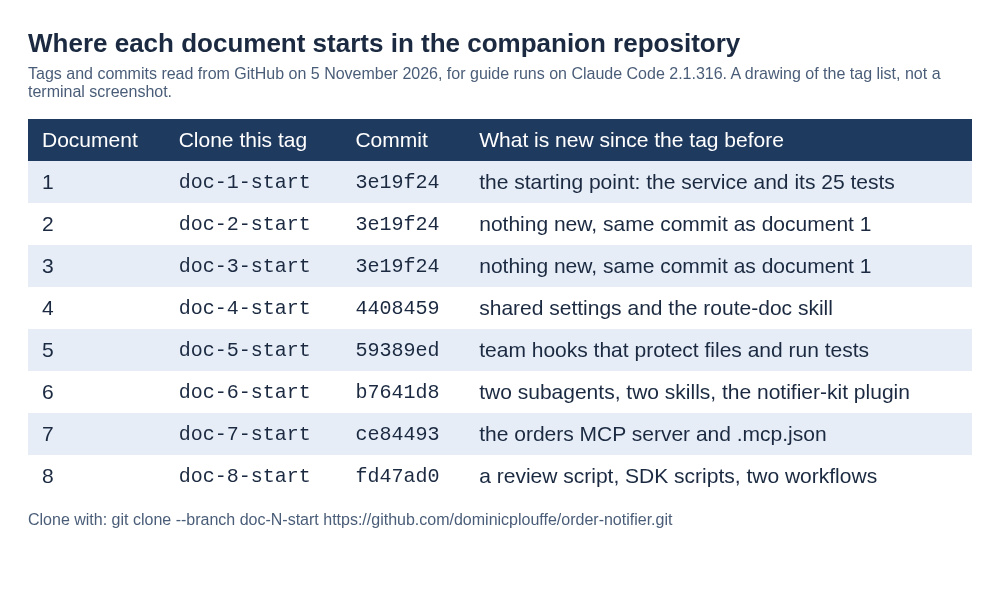
Clone the companion repository. It is a small Node service with 25 tests, and each document starts from its own tag, doc-1-start to doc-8-start, so your screen matches the page.
What did the lab not run?
Anything that needs a Mac, a Windows machine, an editor, root access, an organisation account, a cloud account or a browser login to a plan, because the lab had none of those. It signed in with a subscription token and a capped API key, so the browser login itself is not tested. Where that matters the text says “not tested” and gives the reason, in the place it applies.
For the same habit on another tool, see the LiteLLM budget post on this site. Bon. Start with document 1.