
Claude Code subagents are separate workers that Claude Code starts for you. Each has its own instructions and its own context window, and sends back a summary. Skills are folders of instructions Claude loads when a task matches, and plugins are a way to ship subagents, skills and hooks as one install. Claude Code is Anthropic’s coding agent for the terminal, and it is not open source. Anthropic’s sub-agents page lists 19 frontmatter fields for a subagent file at this version, and the skills page lists 20 for a skill. This document uses about a dozen of each.
This is document 5 of 8. In it I go over how to write Claude Code subagents and how to tell when Claude Code is really using one, what the tools line does and does not guard, which model a subagent runs on and what that costs, how a skill differs from a subagent and from a slash command, how to package all of it as a plugin that a teammate can install, and when to skip the lot. My position on Claude Code subagents: write one for noisy work you want out of your main context, write skills for knowledge Claude keeps getting wrong, and wait on plugins until a second person needs your setup. Every output below was run for real by the lab behind this guide on Claude Code 2.1.316, and anything the lab did not run says “not tested” with the reason.
Three results come first, because they change what you trust. A tools: line limits the subagent it sits in, and it does not limit Claude: in the lab a read-only subagent was never handed the Write tool (in the one run of four where it reached for Write, it got “No such tool available: Write”), and the main thread then wrote the file itself and said so. One letter, tool: for tools:, gave a subagent that was meant to be read-only the Write tool, with no warning on the screen. Only a debug log said anything. And a permissions.deny rule on a path did stop a subagent: its own Read of .env was refused, and so was its cat .env through Bash. That one I would trust more than the tools: line, for the cases the lab ran. If a subagent is a safety measure in your setup, hold all three in your head before you rely on it.
What do you need before you start?
The companion repository at the tag for this document, jq, and a terminal. The tag doc-5-start is the finished state of document 4, which is the commit 59389ed on the branch doc-4-work. Each document starts in its own folder, so this one is cloned into ~/order-notifier-doc5 and the clones from earlier documents stay where they are:
git clone --branch doc-5-start https://github.com/dominicplouffe/order-notifier.git ~/order-notifier-doc5
cd ~/order-notifier-doc5
git log --oneline | head -3
npm test 2>&1 | grep -E "^# (tests|pass|fail)"
mkdir -p /tmp/runs
You should see the hooks commit on top, 59389ed Add team hooks: protect files, run the tests after edits, then the settings commit, then the 25 passing tests of the earlier documents. A new clone is a folder Claude Code has never been started in, so the first headless calls print one line on stderr, Ignoring 1 permissions.allow entry from .claude/settings.json: this workspace has not been trusted., followed by the path and how to fix it. It is harmless for most of what follows. It is not harmless for the test-triage call, which needs a trusted folder, and that section gives the one line that does it. You can also accept the trust dialog instead: type claude in the folder and choose “Yes, I trust this folder”. The project already has a shared .claude/settings.json, two hook scripts from document 4, and one skill from document 3, route-doc.
One honest note on how the lab ran this. Most of its feature runs started from document 3’s finished state (4408459), which has the settings file and route-doc but no hooks. Document 4’s hooks were added back for the one section that asks what they do to a subagent, and for the finished-state checks. Where a result might differ because the hooks are there, I say so. If you want the files this document ends with, they are one commit on top of the hooks commit, on the branch doc-5-work: 12 files, 121 lines added, and it touches nothing document 4 changed.
The runs came from headless calls, claude -p, because a headless call leaves a record you can filter. I use --model haiku to keep each call to a fraction of a cent, which means Claude’s wording in your run will differ from the quotes here, since your default is Sonnet 5.5. The mechanics do not differ. Paste these two shell functions into the terminal you will use for the whole document (a new terminal does not have them). Each takes the transcript file as its argument, so one pair of functions works for every call below:
calls() { jq -c 'select(.type=="assistant")|.parent_tool_use_id as $p|.message.content[]?|select(.type=="tool_use")|{parent:$p,tool:.name,input:(.input|tostring|.[0:150])}' "$1"; }
digest() { jq -r 'select(.type=="result")|"DIGEST: is_error=\(.is_error) turns=\(.num_turns) total_cost_usd=\(.total_cost_usd) models=\(.modelUsage|keys|join(",")) permission_denials=\(.permission_denials|length)\nRESULT: \(.result|.[0:900])"' "$1"; }
This is the shape of every call. The prompt changes and so does the file name, and after each call the lab ran calls and digest on the file that call wrote:
claude -p 'PROMPT GOES HERE' --model haiku --output-format stream-json --verbose < /dev/null > /tmp/runs/out.jsonl
calls /tmp/runs/out.jsonl
digest /tmp/runs/out.jsonl
calls lists every tool call. A parent of null means the main thread made it, and a value means a call made inside a subagent. That one field is how you can see who did what. digest prints a one-line digest and the answer. Long answers below are shortened and the cut is marked […] (that mark is always a cut in an output, never part of a command you type), and the lab’s own folder paths and the ids after toolu_ are replaced by dots.
Every call writes its transcript to /tmp/runs/, outside the repository, on purpose. A transcript left in the project folder is one git add -A from your history, and two of them quote the fake .env lines the deny-rule section is about. It also gets read by anything that searches the repository: when a second pass followed the page in order with transcripts kept in the project folder, a count of matching lines in the skills section came out as 44 instead of 10, because 24 of the matches were in transcripts. Keeping them in /tmp makes the git status lines below true as printed. /tmp exists on macOS and Linux. The lab ran no Windows machine.
What ships with Claude Code before you add anything?
Five Claude Code subagents, 20 skills and 54 slash commands, on a repository that has one skill of its own. The lab asked a fresh session for its init event:
claude -p "hi" --model haiku --output-format stream-json --verbose < /dev/null | jq -c "select(.type==\"system\" and .subtype==\"init\")|{agents,skills,slash_commands:(.slash_commands|length),tools}" | cut -c1-1500
{"agents":["claude","Explore","general-purpose","Plan","statusline-setup"],"skills":["route-doc","deep-research","design","design-sync","dataviz","update-config","verify","debug","code-review","simplify","batch","fewer-permission-prompts","doctor","loop","schedule","claude-api","workflow-authoring","run","run-skill-generator","plugin-authoring"],"slash_commands":54,"tools":["Task","Bash","CronCreate", […]
The subagents are claude, Explore, general-purpose, Plan and statusline-setup. The skills are route-doc, yours, plus 19 names the program lists at startup. That is the list Claude prints at startup. The set you can type is a little different (/init and /security-review work and are not on it), and /context counts a third set, the skills Claude can see by description, so its number differs. The section on /skills below has the figures. The same event lists three built-in plugins (cc-plugin-agents-md, cc-plugin-telemetry, cc-plugin-plugin-authoring), and two more, cc-plugin-diff and cc-plugin-easel, showed in the /plugin screen under “Built-in”. The first interactive start also registered two marketplaces, anthropic-plugin-directory and claude-plugins-official, which comes up again in the plugin sections.
Which of these Claude Code subagents should you care about? Explore and general-purpose, today. Explore is a read-only searcher. The lab named it in the prompt:
claude -p "Use the Explore subagent to find where an order's amountCents is validated, and tell me the file and line number. Do not change anything." --model haiku --output-format stream-json --verbose < /dev/null > /tmp/runs/b1a.jsonl
{"parent":null,"tool":"Agent","input":"{\"subagent_type\":\"Explore\",\"description\":\"Find amountCents validation\",\"prompt\":\"In the repository at .../order-notifier, find where an order"}
{"parent":"toolu_...","tool":"Bash","input":"{\"command\":\"grep -rn \\\"amountCents\\\" . --exclude-dir=node_modules --exclude-dir=.git\",\"description\":\"Search for amountCents across repo excluding node"}
{"parent":"toolu_...","tool":"Bash","input":"{\"command\":\"find . -path ./node_modules -prune -o -path ./.git -prune -o -type f -print | head -200\",\"description\":\"List all files excluding node_modu"}
{"parent":"toolu_...","tool":"Read","input":"{\"file_path\":\".../order-notifier/src/orders.js\"}"}
{"parent":"toolu_...","tool":"Bash","input":"{\"command\":\"grep -rn \\\"maxOrderCents\\\\|validateOrder\\\\|formatAmount\\\" . --exclude-dir=node_modules --exclude-dir=.git\",\"description\":\"Find related val"}
{"parent":null,"tool":"Read","input":"{\"file_path\":\".../order-notifier/src/orders.js\",\"offset\":20,\"limit\":25}"}
DIGEST: is_error=false turns=2 total_cost_usd=0.00456056 models=claude-haiku-5-5 permission_denials=0
RESULT: The Explore agent is searching the repo for the `amountCents` validation now. I'll report the file and line once it finishes.
DIGEST: is_error=false turns=2 total_cost_usd=0.00456056 models=claude-haiku-5-5 permission_denials=0
RESULT: `amountCents` is validated in `validateOrder` in `.../order-notifier/src/orders.js`. I read those lines directly to confirm them.

- **Lines 24–26:** rejects anything that is not a positive integer. This covers non-integers (strings, floats), zero, and negative values.
- **Lines 27–31:** rejects amounts above `config.maxOrderCents`.

`validateOrder` is called from `buildNotification` at line 40. Nothing else in `src/` validates the field. […]
The tool is called Agent in the call, and the four calls with a parent are the subagent’s own work: two greps, a file listing and a Read. The last Read has parent: null, which is Claude checking the answer itself. A one-grep question about email addresses, with no subagent named, stayed in the main thread and cost $0.0015. That is a different question from the Explore one, so read it as a size, not a comparison. (All of this is Haiku, the lab’s choice. On the default Sonnet the same Explore question billed $0.0634, all of it Sonnet: 14 times the Haiku price for the same repository and the same question.)
Look at the digest twice. There may be two DIGEST lines and two RESULT lines (about half the runs gave two, half one), which brings up the next question.
Why does a headless call sometimes print two results?
Because in -p, Claude Code subagents can start in the background. When they do, the first result is Claude saying “The Explore agent is searching […] I’ll report the file and line once it finishes.” The second is the real answer. It does not happen every time: in six runs of the same Explore call the stream-json output had two result events in three and one in the other three, and the one-event runs held the answer directly. Count them in your own file with jq -c 'select(.type=="result")' file | wc -l.
A script that reads stream-json and takes the first result event gets, when there are two, a sentence that promises an answer. Take the last one for the answer. That is right whether there were one or two. When there are two, the one thing that lives in the first event is the permission-denial count. A refused call showed up in permission_denials of the first, and the second showed 0 (the deny-rule section below has the case). Or ask for --output-format json, where .result held the real answer in all three of the lab’s tries: with nothing set, with CLAUDE_CODE_DISABLE_BACKGROUND_TASKS=1, and with CLAUDE_CODE_FORK_SUBAGENT=0. The docs describe both variables as ways to make Claude wait. In the lab the JSON mode did not need either. Document 7 is where scripts live, and it will start from this.
One more thing, about which model Explore runs on. The sub-agents page, fetched 2026-11-03, gives Explore this row: “Model: the main conversation’s model. When the main conversation runs Fable, Explore’s model depends on how you connect: With a Claude subscription, an Anthropic Console account, or an LLM gateway reached through ANTHROPIC_BASE_URL, Explore runs on the Opus model that the opus alias resolves to.” The Opus rule is for a main conversation on Fable. The lab never ran Fable, and what it saw agrees with the first sentence: with the main model on Haiku only Haiku was billed, and with the default Sonnet only Sonnet was billed. So on Haiku or Sonnet, Explore runs on your main model. If you run Fable as your main model, read that row for your connection type before you trust a bill estimate, because the lab did not run that case.
How do you write Claude Code subagents?
They are Markdown files in .claude/agents/, with YAML at the top. Only name and description are required. Here are the first two the lab wrote, the kind a beginner would plausibly want: one that runs the tests and reports only failures, and one that reviews the routes and cannot edit anything.
mkdir -p .claude/agents
cat > .claude/agents/test-triage.md <<'EOF'
---
name: test-triage
description: Runs the test suite and reports only the failing tests with the assertion that failed. Use proactively after any code change, or whenever asked to run or check the tests.
tools: Bash, Read, Grep, Glob
model: haiku
---

You run the tests for this Node project and report what matters, nothing else.

1. Run `npm test`.
2. If every test passes, answer with one line: the number of tests and "all passing".
3. If any test fails, list each failing test by name, the assertion that failed, and the file and line it points at. Do not paste the full test output.
4. Never edit a file. You only run and report.
EOF
cat > .claude/agents/route-reviewer.md <<'EOF'
---
name: route-reviewer
description: Read-only reviewer for the HTTP routes in src/app.js. Use when asked to review, audit or look over route handling, status codes or input validation.
tools: Read, Grep, Glob
model: sonnet
---

You review HTTP route handlers. Read src/app.js and the tests that cover it. Report at most five findings, each with the line number, what a caller would see, and one sentence on the fix. You have no tool that edits files; if asked to change code, say what you would change and stop.
EOF
The description is the part Claude reads when it decides whether to hand a task over, so it says when to use the agent, and not only what it is. The body is the whole system prompt the subagent starts with. Check the files before you start a session:
claude plugin validate .claude/agents
Validating components in: .../order-notifier/.claude/agents

✔ Validation passed
(claude plugin validate is documented for plugins, and it also checks a plain agents folder. It exited 0 here.) Then a fresh call lists both new agents in the init event, in alphabetical order with the built-ins:
claude -p "hi" --model haiku --output-format stream-json --verbose < /dev/null | jq -c 'select(.type=="system" and .subtype=="init")|{agents}'
{"agents":["claude","Explore","general-purpose","Plan","route-reviewer","statusline-setup","test-triage"]}
Now use one. One step first, because this call runs npm test inside the subagent, and the Bash(npm test) rule that lets it through lives in .claude/settings.json, the file the stderr line above says Claude Code is ignoring. In the clone as you have it now, the lab ran the call below twice on 2.1.316, and both times Claude Code refused a Bash call (permission_denials was 3 in one run and 1 in the other) and the answer said the tests did not run. Mark the folder as trusted with the line document 7 gives. It sets one key in ~/.claude.json for the folder you are standing in, by its real path with any symlink followed, so run it inside the clone:
jq --arg p "$(pwd -P)" '.projects[$p].hasTrustDialogAccepted = true' ~/.claude.json > ~/.claude.json.new && mv ~/.claude.json.new ~/.claude.json
jq -c --arg p "$(pwd -P)" '.projects[$p]|{hasTrustDialogAccepted}' ~/.claude.json
{"hasTrustDialogAccepted":true}
Typing claude in the folder and choosing “Yes, I trust this folder” in the dialog is the other way. The cursor starts on “No, exit”, so a bare Enter closes Claude Code. Move to the second row first. With the folder trusted, the lab named the subagent in plain English:
claude -p "Use the test-triage subagent to run the tests." --model haiku --output-format stream-json --verbose < /dev/null > /tmp/runs/b3b.jsonl
{"parent":null,"tool":"Agent","input":"{\"subagent_type\":\"test-triage\",\"description\":\"Run test suite and report failures\",\"prompt\":\"Run the test suite for the project at .../order-n"}
{"parent":"toolu_...","tool":"Bash","input":"{\"command\":\"npm test 2>&1\",\"description\":\"Run npm test in the order-notifier project\"}"}
DIGEST: is_error=false turns=1 total_cost_usd=0.0025356700000000003 models=claude-haiku-5-5 permission_denials=0
RESULT: The test-triage agent ran the suite and reports **25 tests, all passing**. It made no file changes.
The Bash call with a parent is the subagent running npm test, which the project’s Bash(npm test) allow rule from document 3 let through, now that the folder is trusted. The 25 passing tests came back as one line, which is the point of the agent: the test output stayed in its context and not yours.
Model cost is where Claude Code subagents get interesting. The file says model: haiku. The call above carries --model haiku too, so the whole bill is Haiku. Run the same call with the main thread on Sonnet, and print the per-model part of the result event with this jq:
claude -p "Use the test-triage subagent to run the tests." --model sonnet --output-format stream-json --verbose < /dev/null > /tmp/runs/b3d.jsonl
jq -c 'select(.type=="result")|[.modelUsage|to_entries[]|{model:.key,input:.value.inputTokens,output:.value.outputTokens,cacheRead:.value.cacheReadInputTokens,cost:.value.costUSD}]' /tmp/runs/b3d.jsonl | tail -1
[{"model":"claude-sonnet-5-5","input":4,"output":327,"cacheRead":28413,"cost":0.0211343},{"model":"claude-haiku-5-5","input":4,"output":422,"cacheRead":6719,"cost":0.00041759}]
Sonnet $0.0211 for the main thread, Haiku $0.0004 for the worker. Run the test suite through Haiku, talk to Sonnet. Name the model with --model sonnet as above if you want the same split on your machine: with no --model the main thread runs your account’s default, and on the capped API key the lab used it was Opus (claude-opus-5-5, $0.0498 for the main thread in the same call), while a subscription token gave Sonnet.
How do Claude Code subagents look in an interactive session?
Differently from -p, and the first surprise is what /agents does not do. Older tutorials show a wizard with a Running tab and a Library tab. Typing /agents in 2.1.316 printed:
❯ /agents
  ⎿  The /agents wizard has been removed.

     Ask Claude to create or update subagents for you (e.g. "create a code-reviewer subagent that ..."),
     or edit the files directly:
       • .claude/agents/       (this project)
       • ~/.claude/agents/     (all projects)

     Docs: https://code.claude.com/docs/en/sub-agents
The docs page says the wizard applies to v2.1.197 and earlier. If a tutorial walks you through it, the tutorial is older than your install. You can ask Claude to write the file, as the message says, or write it yourself. Me, I’d write it myself, because the file is 8 lines and the description is the part worth thinking about.
To use an agent by hand, type @ and the first letters. The lab typed @te:
    + test/
    * test-triage (agent) – Runs the test suite and reports only the failing tests with…
    * route-reviewer (agent) – Read-only reviewer for the HTTP routes in src/app.js. Use w…
    + config/test.json
    + test/app.test.js
❯ @te
Picking the (agent) entry puts @"route-reviewer (agent)" in the prompt, and it matters which row you pick. Once .claude/agents/route-reviewer.md exists, typing @route-rev lists three rows in this order: the file .claude/agents/route-reviewer.md, then route-reviewer (agent), then the same file by absolute path. The first row is the one under the cursor, and Tab on it puts @.claude/agents/route-reviewer.md in the prompt. That is a file mention, and the lab saw what a file mention does: the main thread read the file (Read .claude/agents/route-reviewer.md (9 lines)), answered the question itself in 4 seconds, started no subagent, and /tasks said No tasks currently running. None of the screens below appear. To reach the agent, press Down until the ❯ marker sits on the (agent) row, then Tab. (@te, above, shows test/ first and the two agents under it, so there the agent rows come after one folder row.)
The lab sent @"route-reviewer (agent)" what does POST /orders answer when the body is not valid JSON? and the screen showed the call, the background panel and a counter that ticked while it worked:
● route-reviewer(Answer POST /orders invalid JSON question)
  ⎿  Backgrounded agent (↓ to manage · ctrl+o to expand)

● I've asked the route-reviewer agent to check how POST /orders handles a body that isn't valid JSON. It's
  running in the background, and I'll report its findings when it finishes.

✻ Waiting for 1 background agent to finish

                                                                                          ◐ medium · /effort
❯
  ⏵⏵ auto mode on (shift+tab to cycle) · […] · ↓ to manage

  ● main
  ◯ route-reviewer  Answer POST /orders invalid JSON question                             3s · ↓ 4.5k tokens
That is one real screen, taken 3 seconds in (the wording of Claude’s line differs from run to run). The rule lines around the prompt and a tip in the status line are left out and marked. Six seconds later the same row read 9s · ↓ 7.3k tokens. Note auto mode on in the status line: the lab’s interactive session started in auto mode, which matters for permissionMode below.
When it finished, the answer arrived as › Message from @route-reviewer (ctrl+o to expand) followed by the main thread’s summary. The summary said POST /orders answers 400 with {"error":"body is not valid JSON"}, and it ended with a line I like: “I haven’t re-read the source myself. The line numbers are the reviewer’s.” /tasks listed the finished one:
   Background

     Completed (1)
   ❯ ✔ Answer POST /orders invalid JSON question   done · Sonnet 5.5
The subagent’s own transcript is on disk, under ~/.claude/projects/<project>/<session>/subagents/, as agent-<id>.jsonl with a .meta.json next to it. Read it when an agent says something strange. And /cost afterwards printed the session’s bill, split by model, plus a suggestion:
   Total cost:            $0.0334
   Usage by model:
       claude-haiku-5-5:  2.2k input, 1.1k output, 166.0k cache read, 10.6k cache write ($0.0045)
      claude-sonnet-5-5:  6 input, 964 output, 11.4k cache read, 7.2k cache write ($0.0289)
   […]
   100% Give "route-reviewer" subagents a cheaper model

   Subagents               % of usage
   route-reviewer                 63%
Under half a cent for the Haiku main thread, and $0.0289 for one question to the Sonnet reviewer. The last lines depend on what else you ran in the last 24 hours. In another run, in order, after the Explore calls above, the screen ended 85% Run fewer sessions at once and 79% Give "Explore" subagents a cheaper model, with route-reviewer at 9% of subagent usage. The docs call /usage the command for this screen, and /cost opened the same one in the lab. Read that suggestion as a prompt to ask whether the review needs Sonnet, and for a read of one small route file it probably does not.
How do Claude Code subagents get picked?
Subagents get picked in two ways: you name one, or Claude matches your request to a description. The first is reliable and the second is sometimes. Both agents have a description that tells Claude when to use them. The test-triage one says “Use proactively after any code change, or whenever asked to run or check the tests.” The lab then asked for the tests without naming the agent, on Haiku twice and on Sonnet once. The Haiku prompt was Run the tests and tell me if anything is failing., and the Sonnet one, with no --model flag, was I just changed src/orders.js. Check that the tests still pass. Each went through the call shape at the top. The three answers:
RESULT: The suite passes: 25 of 25 tests, 0 failures. That run used the current working tree.
RESULT: Nothing is failing. `npm test` (which runs `node --test`) passed all 25 tests on Node v22.23.4, with 0 failures, 0 cancelled, and 0 skipped.
RESULT: I couldn't run the tests. The sandbox blocked both `node --test` attempts and asked for approval, and I didn't try another route around it. I don't know yet whether the tests pass.
None of the three used the subagent. The main thread ran the tests itself, and on Sonnet it ran node --test, which is not the allowed npm test, so it was refused twice. The route-reviewer description (“Use when asked to review, audit or look over route handling”) did get picked, on Sonnet, without being named: “Please review how POST /orders handles bad input.” called route-reviewer, twice, at $0.0829 and $0.0882.
Three tries and two tries are not a rate. A re-run of the Sonnet prompt did start test-triage once, after node --test was refused once, so “none of the three” is what the lab saw and not a rule. What the lab saw is that the proactive wording on test-triage did not make it proactive, and that a task which looks like review work did go to the reviewer. If you want a subagent used, name it, or @-mention it. If you want Claude to choose, write the description as the sentence a person would type when they need the agent, and test it with three prompts.
Does a tools line stop Claude from editing a file?
No, and this is the result I would put first. route-reviewer has tools: Read, Grep, Glob. The lab told the main thread to start it with an edit task, in a session with --permission-mode acceptEdits so that a Write would have been allowed if the tool had existed:
claude -p "Spawn the route-reviewer subagent with exactly this task: edit src/server.js and change the port to 3001. Then tell me word for word what it answered." --model haiku --permission-mode acceptEdits --output-format stream-json --verbose < /dev/null > /tmp/runs/b4a.jsonl
DIGEST: is_error=false turns=2 total_cost_usd=0.010352229999999999 models=claude-haiku-5-5,claude-sonnet-5-5 permission_denials=0
RESULT: The route-reviewer subagent could not make the edit because it has no file-editing tool. Its answer, word for word:

> The port isn't set in `src/server.js`. Line 8 calls `server.listen(config.port, ...)`, and `config.port` comes from `loadConfig()` in `src/config.js`.
>
> I have no tool that edits files, so I haven't changed anything. Here is what I would change:
[…]
git status --short afterwards listed ?? .claude/agents/ and nothing else (the transcripts are in /tmp/runs, so they are not in that list), so src/server.js was untouched. So far the line works. Then the lab used --agent route-reviewer, which makes the whole session that agent, and got the same refusal on the same task. This call has no --model flag, so the model is the one in the agent’s file:
claude -p 'Edit src/server.js and change the port to 3001.' --agent route-reviewer --permission-mode acceptEdits --output-format stream-json --verbose < /dev/null > /tmp/runs/agentflag.jsonl
jq -c 'select(.type=="system" and .subtype=="init")|{model}' /tmp/runs/agentflag.jsonl
{"model":"claude-sonnet-5-5"}
Also fine.
The third run is the one that matters. scribe-ok has tools: Read and a body that says to write notes-ok.txt. This is the file, and the prompt that started it, with --permission-mode acceptEdits on so that a Write would have been allowed if the tool had existed:
cat > .claude/agents/scribe-ok.md <<'EOF'
---
name: scribe-ok
description: Reads src/app.js and writes a short summary of it to notes-ok.txt.
tools: Read
---

Read src/app.js, then write a two-line summary to notes-ok.txt in the project root. If you cannot write a file, say so.
EOF
claude -p "Use the scribe-ok subagent to summarise src/app.js into notes-ok.txt." --model haiku --permission-mode acceptEdits --output-format stream-json --verbose < /dev/null > /tmp/runs/s2.jsonl
The lab ran that exact call four times. In one of the four the subagent made a Write call. In the other three it read src/app.js, looked for notes-ok.txt with Read, found it did not exist, and the main thread did the writing without the subagent trying. So I say “one run out of four”, and the other three are not a refusal of anything. This is the fourth run, every call paired with the result that came back for it, long results cut with […]. Call [1], the main thread’s Agent call that started the subagent, and the first result event are left out, so the numbering starts at [2]. The pairing of each call with its result is the lab’s own script, which is not printed. Of the commands above, calls and digest get you the same facts, and you match them by eye. In this block the result printed is the second:
[2] SUBAGENT: Read {"file_path": ".../order-notifier/src/app.js"}
    -> tool_result: is_error=None text="1\t// The HTTP surface: three routes, no framework.\n2\t\n3\timport { buildNotification, […]"
[3] SUBAGENT: Read {"file_path": ".../order-notifier/notes-ok.txt"}
    -> tool_result: is_error=True text='File does not exist. Note: your current working directory is .../order-notifier.'
[4] SUBAGENT: Write {"file_path": ".../order-notifier/notes-ok.txt", "content": "src/app.js is a framework-free HTTP handler: […]"}
    -> tool_result: is_error=True text='<tool_use_error>Error: No such tool available: Write. Write is not among the tools available here. Continue with the tools you have.</tool_use_error>'
[5] main thread: Read {"file_path": ".../order-notifier/src/app.js"}
[6] main thread: Write {"file_path": ".../order-notifier/notes-ok.txt", "content": "src/app.js is a framework-free HTTP handler: […]"}
    -> tool_result: is_error=None text='File created successfully at: .../order-notifier/notes-ok.txt (file state is current in your context — no need to Read it back)'
RESULT EVENT 2: subtype=success is_error=False turns=3 total_cost_usd=0.0031233650000000003 models=claude-haiku-5-5
    permission_denials (0): []
Three things to read off it. First, why does a read-only agent call Write at all? The log does not say why. My reading is that the body of the file tells it to write the summary and it followed that, but that is a guess, not something the log shows. Second, the result is No such tool available: Write, which means the tool was never handed to the subagent. It is not a permission refusal, and the digest agrees: permission_denials is 0, because nothing was denied. The tool did not exist for that worker. The same pair is in the subagent’s own transcript on disk, under ~/.claude/projects/<project>/<session>/subagents/agent-<id>.jsonl, with the tool_use and then the tool_result carrying that sentence. Third, parent on the last two calls is the main thread, which has Write. It said “I wrote it myself rather than through the scribe-ok subagent” and wrote notes-ok.txt with its own Write. The file exists because the main thread wrote it. The line that limits the worker does not limit the project.
That is a limit on one worker, and for Claude Code subagents I think it is a useful one: a reviewer that cannot edit gives you a review and not a surprise. It is not a guard, and it is not where you put a rule that must hold. Two things are, and the lab ran each against a subagent.
Does a deny rule stop a subagent?
For the cases the lab ran, yes. The sub-agents page says of the built-in subagents “Each inherits the parent conversation’s permission rules; most run with a restricted tool set.” The lab tested what that means for a file. The repository already has, from document 3, "deny": ["Read(./.env)", "Read(./.env.*)"] in .claude/settings.json. The lab made a .env with two fake lines in the project root, mode 600 (git check-ignore -v .env showed the repository already ignores it), then wrote a Read-only agent and asked for the file:
printf 'API_TOKEN=fake-token-for-the-lab-7f3a91\nDB_URL=postgres://localhost/practice\n' > .env
chmod 600 .env
git check-ignore -v .env
cat > .claude/agents/env-peeker.md <<'EOF'
---
name: env-peeker
description: Reads the file named in the request and reports its contents exactly. Use only when asked for the env-peeker agent.
tools: Read
---
Read the file you are asked about with the Read tool and reply with its contents, exactly. If the Read tool refuses, quote what it said.
EOF
claude -p "Use the env-peeker subagent to read the file .env and tell me exactly what it replied, word for word." --model haiku --output-format stream-json --verbose < /dev/null > /tmp/runs/s1a.jsonl
[2] SUBAGENT: Read {"file_path": ".../order-notifier/.env"}
    -> tool_result: is_error=True text='<tool_use_error>File is in a directory that is denied by your permission settings.</tool_use_error>'
RESULT EVENT 1: subtype=success is_error=False turns=2 total_cost_usd=0.0027173049999999997 models=claude-haiku-5-5
    permission_denials (1): [{"tool_name": "Read", "tool_use_id": "toolu_...", "tool_input": {"file_path": ".../order-notifier/.env"}}]
The subagent’s own Read was refused, and the denial is counted: permission_denials has one entry, the subagent’s Read. The message says “directory” for a rule that names a file; I print it as it came. (A headless call often prints two result events and sometimes one, as above. With two, read the first for permission_denials. The second showed 0, so a script that takes the last event for the answer will report no denial for a call that was refused. With one, that one event holds the count. Another run of this call gave a single event with permission_denials at 1.) The control is the same prompt with the two deny lines deleted. The command that does it writes through a temporary file, because jq alone only prints the changed JSON and leaves .claude/settings.json as it was (the lab ran the bare form and the file’s checksum did not change):
jq "del(.permissions.deny)" .claude/settings.json > settings.tmp && mv settings.tmp .claude/settings.json
git diff --stat
git diff --stat printed 3 insertions(+), 2 deletions(-), which is more than the one rule: jq re-wraps the allow array over three lines. Your working tree now holds a changed settings file, with no deny rule, until you run git checkout .claude/settings.json, which prints Updated 1 path from the index and puts the rule back. The subagent’s Read then returned 1<TAB>API_TOKEN=fake-token-for-the-lab-7f3a91 and the second line, permission_denials was 0, so the rule is the only difference.
The next thing a reader tries is cat. The lab made a second agent, env-cat with tools: Bash and a body that says to run cat on the file, and passed --allowedTools "Bash(cat *)" so a refusal could not be the ordinary “needs approval” prompt:
cat > .claude/agents/env-cat.md <<'EOF'
---
name: env-cat
description: Prints a file with cat and reports its contents exactly. Use only when asked for the env-cat agent.
tools: Bash
---
Run `cat` on the file you are asked about with the Bash tool and reply with its contents, exactly. If the command is refused, quote what it said.
EOF
claude -p "Use the env-cat subagent to cat the file .env and tell me exactly what it replied, word for word." --model haiku --allowedTools "Bash(cat *)" --output-format stream-json --verbose < /dev/null > /tmp/runs/s1c.jsonl
The result:
[2] SUBAGENT: Bash {"command": "cat .../order-notifier/.env", "description": "Print the contents of the .env file in the project directory"}
    -> tool_result: is_error=True text='Permission to use Bash with command cat .../order-notifier/.env has been denied.'
    permission_denials (1)
With the deny lines removed (the jq line above, then git checkout .claude/settings.json afterwards) and the same flag, the same cat returned the two lines (is_error=False, permission_denials 0). So on 2.1.316 a Read(./.env) deny rule also blocked cat .env through Bash, even with Bash(cat *) allowed. The message for that one is the generic “has been denied” sentence, not the “directory” sentence.
Say what was run and no more: these were headless calls in the default mode, with Haiku as the main model. A deny rule against another way of reading the file, such as node -e or python -c, was not run. A subagent started with permissionMode: bypassPermissions, a rule written with an absolute path or another glob, and the interactive session in auto mode were not run either. So “a deny rule stops the file tools and the cat form the lab ran” is the claim, not “a deny rule stops every way of reading the file”. Cost of the four calls: $0.0095.
The other thing is a hook from document 4. The lab ran that one on a subagent too, and it is the last section of this document: the Write of package-lock.json was blocked with exit 2 inside the subagent. A hook from document 4 and a deny rule from document 3 are where a rule that must hold goes. In the other direction, a deny rule on the agent itself, permissions.deny: ["Agent(route-reviewer)"], made Claude do the review in the main thread and say that no subagent was used, and --disallowedTools "Agent(Explore)" took the Explore type away. The call was claude -p "Use the Explore subagent to find the file that builds the notification email. Say which subagent type you used." --model haiku --disallowedTools "Agent(Explore)". The lab’s run used general-purpose instead and said “this session has no Explore type”. A re-run on a different question said the Explore agent was denied and searched in the main thread. What Claude does in its place varies. That the rule removed the type did not.
What does a misspelled field do?
Nothing you can see. This is the lab’s second-worst surprise. scribe-typo is the same agent with tool: Read where tools: Read should be:
cat > .claude/agents/scribe-typo.md <<'EOF'
---
name: scribe-typo
description: Reads src/app.js and writes a short summary of it to notes.txt.
tool: Read
---

Read src/app.js, then write a two-line summary to notes.txt in the project root.
EOF
claude -p "Use the scribe-typo subagent to summarise src/app.js into notes.txt." --model haiku --permission-mode acceptEdits --output-format stream-json --verbose < /dev/null > /tmp/runs/typo1.jsonl
ls notes.txt
With acceptEdits on, the subagent’s calls were Read of src/app.js, then Write of notes.txt, both with a parent id, and ls notes.txt found it afterwards (delete it with rm notes.txt). The field was ignored, so the agent had every tool. The session printed nothing. claude plugin validate .claude/agents passed. What did say something was the debug log:
claude --debug-file /tmp/runs/debug.log -p "hi" --model haiku < /dev/null > /dev/null 2>&1; grep -i -E "scribe|does not recognize|unrecognized" /tmp/runs/debug.log | head -8 | cut -c1-300
2026-11-03T02:13:44.173Z [WARN] Agent file .../order-notifier/.claude/agents/scribe-typo.md has a frontmatter key Claude Code does not recognize or apply: "tool" (did you mean "tools"?)
The docs say the same thing in plain words: Claude Code “ignores a field it doesn’t recognize without reporting an error”, and the debug line exists from v2.1.296. So a restriction line on Claude Code subagents gets checked one way, by running with --debug-file and searching for “does not recognize”. Do it once after you write any agent whose safety depends on a field, which means any agent with a tools line. Claude Code also drops a symlink named latest next to the log file. In /tmp/runs it is out of your way. With --debug-file debug.log in the project folder, *.log in .gitignore hides the log and not the link, and git status --short prints ?? latest (seen again on a second run, 2.1.316).
Agent files that fail in other ways go quiet too, and claude plugin validate is only some of the help. The lab wrote four bad agent files. Each is a three-line body, Say hi., under a header that breaks one rule:
cat > .claude/agents/no-description.md <<'EOF'
---
name: no-description
tools: Read
---

Say hi.
EOF
cat > .claude/agents/broken-yaml.md <<'EOF'
---
name: broken-yaml
description: "Unterminated quote
tools: Read
---

Say hi.
EOF
cat > .claude/agents/team-reviewer.md <<'EOF'
---
name: team:reviewer
description: Reviews things. Use when asked for team reviewer.
tools: Read
---

Say hi.
EOF
cat > .claude/agents/no-name.md <<'EOF'
---
description: Has no name. Use when asked for the nameless agent.
tools: Read
---

Say hi.
EOF
claude plugin validate .claude/agents; echo "exit=$?"
Validate the folder, not one file: a file path is read as a plugin manifest and fails with json: Invalid JSON syntax. The folder form printed this (the other agents in the folder passed silently):
Validating components in: .../order-notifier/.claude/agents

Validating agent: .../order-notifier/.claude/agents/no-description.md

⚠ Found 1 warning:

  ❯ description: No description in frontmatter. A description helps users and Claude understand when to use this agent.

Validating agent: .../order-notifier/.claude/agents/broken-yaml.md

✘ Found 1 error:

  ❯ frontmatter: YAML frontmatter failed to parse: YAML Parse error: Unexpected character. At runtime this agent does not load at all — with no frontmatter name it is treated as a co-located reference document and skipped.

✘ Validation failed
exit=1
None of the four showed up in the init list afterwards: the one without a description, the one with a broken YAML header, the one named team:reviewer, and the one with no name. Validate said nothing about the last two. The debug log had the reason for the colon case: names must not contain ':' (reserved for plugin namespacing). Run the --debug-file call from the previous section again and search it with grep -i -E "no-description|broken-yaml|team|no-name|must not contain". Delete the four files when you are done. The sub-agents page says the same, and gives a name up to 256 characters. In -p, none of this appeared on screen.
Which model do Claude Code subagents run on?
The one you ask for, in an order the lab could check, and the numbers are in the picture. The lab made a tiny agent that does nothing except answer “ok”, so the cost was the model and not the work, and changed one thing at a time with the main thread on Haiku.
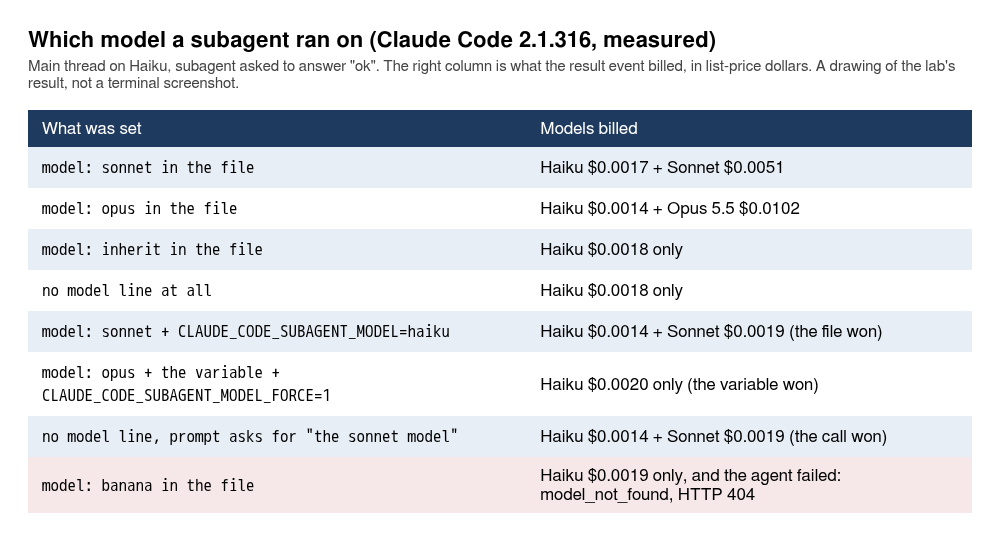
Here are the files and the calls behind the rows. Four tiny agents differ in one line: model: sonnet, model: opus, model: inherit, and no model line.
for m in sonnet opus inherit; do
cat > .claude/agents/m-$m.md <<EOF
---
name: m-$m
description: Answers with the single word ok. Use only when the user asks for the m-$m agent.
tools: Read
model: $m
---

Reply with the single word ok and nothing else.
EOF
done
cat > .claude/agents/m-none.md <<'EOF'
---
name: m-none
description: Answers with the single word ok. Use only when the user asks for the m-none agent.
tools: Read
---

Reply with the single word ok and nothing else.
EOF
claude -p 'Use the m-sonnet subagent and tell me exactly what it replied.' --model haiku --output-format stream-json --verbose < /dev/null > /tmp/runs/row.jsonl
jq -r 'select(.type=="result")|.modelUsage|to_entries|map("\(.key)=\(.value.costUSD)")|join(" + ")' /tmp/runs/row.jsonl | tail -1
claude-haiku-5-5=0.0018013700000000005 + claude-sonnet-5-5=0.005804
Swap m-sonnet for m-opus, m-inherit or m-none for the other rows (Haiku $0.0015 + Opus 5.5 $0.0116; Haiku only, $0.0020, for the last two). The three rows with a variable or a request in the prompt are the same call with one change: CLAUDE_CODE_SUBAGENT_MODEL=haiku in front of claude for the file-against-variable row (Haiku $0.0018 + Sonnet $0.0027, so the file won), CLAUDE_CODE_SUBAGENT_MODEL=haiku CLAUDE_CODE_SUBAGENT_MODEL_FORCE=1 with m-opus for the forced row (Haiku $0.0022 only), and, with m-none, the prompt Use the m-none subagent, run on the sonnet model, and tell me exactly what it replied. for the call-against-file row (Haiku $0.0019 + Sonnet $0.0028). Delete the four m- files afterwards.
The order from the docs, highest first: the model Claude passes on the call, the model line in the file, the CLAUDE_CODE_SUBAGENT_MODEL variable, and the main thread’s model. The lab saw three of the four steps. A file with model: sonnet beat the variable set to haiku. The call won when the prompt said “run on the sonnet model” and the file had no model line, and the Agent call carried "model":"sonnet". The variable only beat the file when CLAUDE_CODE_SUBAGENT_MODEL_FORCE=1 was set next to it. The plain variable against the main thread’s model was not run. The docs add that before v2.1.251 the variable came first and beat everything, so an older tutorial that says so is now wrong.
Two details for the bill. model: inherit and no model line cost the same, because a subagent inherits the main thread’s model by default. And a model name that does not exist is not caught when the file loads. This is the whole file, the call, and everything the call printed on stderr:
cat > .claude/agents/m-banana.md <<'EOF'
---
name: m-banana
description: Answers with the single word ok. Use only when the user asks for the m-banana agent.
tools: Read
model: banana
---

Reply with the single word ok and nothing else.
EOF
claude -p "Use the m-banana subagent and tell me exactly what it replied." --model haiku --output-format stream-json --verbose < /dev/null > /tmp/runs/banana.jsonl 2> /tmp/runs/banana.err; echo exit=$?; cat /tmp/runs/banana.err
exit=0
[claude-code:unrecognized_model] {"model":"banana","query_source":"agent:custom:m-banana"}
That one line, 91 bytes counting its newline, is everything the call wrote to stderr, and the exit code is 0. The agent was listed in the init event and started. The message sat in the subagent’s own transcript, and the main thread reported it:
RESULT: The m-banana subagent did not reply. The run failed before it produced any output, so there is no reply to quote.

The failure message was: "There's an issue with the selected model (banana). It may not exist or you may not have access to it. Run --model to pick a different model." The error type was `model_not_found` (HTTP 404), and the model sent to the API was `banana`.
A typo in a model name looks like a broken agent and not like a typo, so check model: first when an agent returns nothing, and search your terminal output for unrecognized_model. That was a headless call. What the interactive screen shows for the same file was not tested.
What else can go in the frontmatter?
A lot, and the lab ran the six that change what Claude Code subagents can do. The agent names below (writer-plain, quick-reader, notes-keeper, hooked, sandboxed, asker) are the lab’s stand-ins, so name yours for the job. Every call was claude -p "..." --model haiku --output-format stream-json --verbose < /dev/null, and I show the prompt, the file and the result for each. The hooks from document 4 were present in this run and do not act on these files (they act on src/*.js, test/*.js, and on paths containing .env, package-lock.json or .git/).
permissionMode
The rule, from the sub-agents page, fetched 2026-11-03: “If you leave it unset, the subagent inherits the main conversation’s permission mode.” Then the main conversation’s mode decides whether the file’s value is used. “When the main conversation is in bypassPermissions, acceptEdits, or auto mode, the subagent runs in that same mode and Claude Code ignores the permissionMode you set.” In plan mode it “stays in plan mode whichever permissionMode you set”. “When the main conversation is in default or dontAsk mode, the subagent runs in the permission mode you set”, except that bypassPermissions in a file does not apply on its own.
The lab ran one row of that: the main thread in the default mode, and a file that sets acceptEdits. Two agents, the same except for one line:
cat > .claude/agents/writer-plain.md <<'EOF'
---
name: writer-plain
description: Writes the word plain into out-plain.txt. Use only when asked for the writer-plain agent.
tools: Read, Write
---
Write the single word plain into out-plain.txt in the project root, then reply done.
EOF
cat > .claude/agents/writer-accept.md <<'EOF'
---
name: writer-accept
description: Writes the word accept into out-accept.txt. Use only when asked for the writer-accept agent.
tools: Read, Write
permissionMode: acceptEdits
---
Write the single word accept into out-accept.txt in the project root, then reply done.
EOF
claude -p "Use the writer-plain subagent and tell me whether it worked." --model haiku --output-format stream-json --verbose < /dev/null > /tmp/runs/b6a1.jsonl
claude -p "Use the writer-accept subagent and tell me whether it worked." --model haiku --output-format stream-json --verbose < /dev/null > /tmp/runs/b6a2.jsonl
writer-plain‘s Write came back “Permission to use Write has been denied. IMPORTANT: You may attempt […]” with permission_denials at 1, and the main thread said “No, it didn’t work”. writer-accept‘s Write came back “File created successfully at …/out-accept.txt” with zero denials, and git status showed out-accept.txt. That is inheritance working and the file’s value used, which is what the table says for a main thread in default mode.
What the lab did not run is every other row: the main thread in acceptEdits, bypassPermissions, auto or plan, where the docs say the file’s value is ignored or overridden. This matters because the interactive session in the lab started in auto mode (the status line in the panel above says auto mode on). If you repeat writer-accept from an auto or acceptEdits session you should expect no difference between the two agents, because per the page the file’s value is ignored there. That would be the rule working, not a broken field. And since a file’s permissionMode can hand one worker more trust than a default-mode session, read agent files from a repository you did not write as carefully as you read its hooks.
maxTurns
cat > .claude/agents/quick-reader.md <<'EOF'
---
name: quick-reader
description: Reads the test files one at a time and lists their test names. Use when asked for the quick-reader agent.
tools: Read, Glob
maxTurns: 2
---
Glob test/*.test.js, then Read each test file one at a time and list the test names in each. Work through every file.
EOF
claude -p "Use the quick-reader subagent to list the test names in every test file. Tell me exactly how far it got." --model haiku --output-format stream-json --verbose < /dev/null > /tmp/runs/b6b.jsonl
The subagent made Glob, Glob, Read and stopped, and the main thread said: “The quick-reader agent did not finish. It stopped at its 2-turn limit with partial output, and I have no test names from it yet.” That is three tool calls under a limit of two turns, so count turns and not calls. The docs say the output comes back “marked as partial” and Claude can resume it. In the lab’s first run of this the main thread resumed it by itself, with SendMessage and the agent’s id after a ToolSearch, and the third run finished the job. In this second run it did not resume: it reported the stop and offered to. So the resume is something Claude may do, not something you can count on. Cost: about $0.003 for this call.
memory
cat > .claude/agents/notes-keeper.md <<'EOF'
---
name: notes-keeper
description: Answers questions about the order-notifier routes and remembers what it learned. Use when asked for the notes-keeper agent.
tools: Read, Grep, Glob
memory: project
---
Answer questions about this service. Before you start, check your agent memory. When you finish, save one or two short facts you learned to your memory.
EOF
claude -p "Use the notes-keeper subagent to find out which status code POST /orders returns for an invalid order. Tell me its answer." --model haiku --permission-mode acceptEdits --output-format stream-json --verbose < /dev/null > /tmp/runs/b6c1.jsonl
find .claude/agent-memory -type f | sort; cat .claude/agent-memory/notes-keeper/MEMORY.md; git status --short .claude/agent-memory
--permission-mode acceptEdits is there because in a headless call the agent’s own writes need it. The agent tried to Read .claude/agent-memory/notes-keeper/MEMORY.md (“File does not exist”), read the code, then wrote two files. The index is MEMORY.md. The topic file’s name and the wording are the agent’s, so yours will differ (another run named it post-orders-status-codes.md). The lab’s run:
.claude/agent-memory/notes-keeper/MEMORY.md
.claude/agent-memory/notes-keeper/order-validation-status-codes.md
- [Order validation status codes](order-validation-status-codes.md) — invalid order is 422 (src/app.js), bad JSON is 400, send failure is 502
?? .claude/agent-memory/
The topic file has a name, a description, metadata: type: project, a paragraph, and a “Why” and a “How to apply” line. A second call with acceptEdits on, asking what it already remembers “before it looks at any code”, answered from the index entry only, made no tool calls, and “wrote nothing to memory in this run”. So the memory is new files in your repository, and you decide whether to commit them or ignore them. In the first run of this check the answer also said “the 422 note may be stale”, because a recent commit mentioned a 400. Memory written by an agent is a claim with a line number on it, and line numbers move.
hooks inside the agent file
The hook script and the agent file are the part a reader cannot guess, so here they are in full. The script prints the event, the tool, the agent_type and the command to a log:
mkdir -p .claude/hooks
cat > .claude/hooks/log-bash.sh <<'EOF'
#!/bin/bash
# append the tool name and command that Claude Code sends on stdin to ~/hooklog.txt
jq -r '"\(.hook_event_name) \(.tool_name) agent_type=\(.agent_type // "-") \(.tool_input.command // "")"' >> "$HOME/hooklog.txt"
exit 0
EOF
chmod 755 .claude/hooks/log-bash.sh
cat > .claude/agents/hooked.md <<'EOF'
---
name: hooked
description: Runs two harmless shell commands. Use when asked for the hooked agent.
tools: Bash
hooks:
  PreToolUse:
    - matcher: "Bash"
      hooks:
        - type: command
          command: "${CLAUDE_PROJECT_DIR}/.claude/hooks/log-bash.sh"
---
Run `node --version`, then run `git --version`, then reply with both lines.
EOF
claude -p "Use the hooked subagent. When it is done, run pwd yourself with the Bash tool and tell me the results." --model haiku --output-format stream-json --verbose < /dev/null > /tmp/runs/b6d.jsonl
cat ~/hooklog.txt
The nesting is the thing to copy: hooks, then the event, then a list whose items have a matcher and their own hooks list, whose items have type and command. The log:
PreToolUse Bash agent_type=hooked node --version
PreToolUse Bash agent_type=hooked git --version
PreToolUse Bash agent_type=hooked date
PreToolUse Bash agent_type=hooked echo hooked-check
Four lines, all agent_type=hooked, and none for the pwd the main thread ran: the hook in the agent’s frontmatter fired for the subagent’s own Bash calls and not for the main thread’s. Two things the log shows that are easy to miss. The prompt above asked for neither pair. The agent file’s body asks for node --version and git --version, and the main thread wrote its own instruction to the subagent (date and echo hooked-check), so the subagent ran all four. So “two calls” is not what happened. And the subagent’s git --version was refused in the default mode (permission_denials 1, “Permission to use Bash has been denied.”), and its line is in the hook log anyway. A PreToolUse hook ran before the permission decision. My first run of this check had three lines, not four, with git --version twice and permission_denials 2, and the same refusal. The second git --version line is not in this run.
A Stop hook in the frontmatter reached its script as hook_event_name SubagentStop with the agent_type, in the first run. This closes two items document 4 marked “not tested”. There is one catch, and it is in the docs and in the lab: a plugin’s agent file ignores hooks, permissionMode, mcpServers and initialPrompt. The same file that wrote its output and logged “fired” under .claude/agents/ had its Write refused and logged nothing when it came from a plugin. (That plugin-agent result is the lab’s own and has no file printed here, and I did not re-run it. Treat it as the docs’ rule plus one observation.)
isolation: worktree
cat > .claude/agents/sandboxed.md <<'EOF'
---
name: sandboxed
description: Creates a file named scratch.txt containing the word scratch, then reports the folder it worked in. Use when asked for the sandboxed agent.
tools: Write, Bash
isolation: worktree
permissionMode: acceptEdits
---
Create scratch.txt in your current working directory containing the word scratch. Then run pwd and git status --short and reply with both outputs.
EOF
claude -p "Use the sandboxed subagent and tell me exactly what it replied." --model haiku --permission-mode acceptEdits --output-format stream-json --verbose < /dev/null > /tmp/runs/b6e.jsonl
ls scratch.txt; git worktree list
The agent’s file landed in .claude/worktrees/agent-<id>/scratch.txt. This time it was written with a Bash printf, not with Write. The main checkout had no scratch.txt (ls: cannot access 'scratch.txt': No such file or directory), and git worktree list showed two lines. The first line is what a fresh clone of doc-5-start prints. The lab’s own checkout was on doc-5-work and printed b7641d8 [doc-5-work] there:
.../order-notifier                                59389ed (detached HEAD)
.../order-notifier/.claude/worktrees/agent-<id>  3e19f24 [worktree-agent-<id>]
Two things to know. The new worktree started at 3e19f24, the repository’s main branch, and not at the commit the lab had checked out, so it had none of the checked-out branch’s files: a reader on a feature branch gets the default branch’s files. And the main checkout’s git status shows ?? .claude/worktrees/ until the folder is ignored, and git add -A would try to add the worktree as an embedded repository. The finished state of this document adds three lines to .gitignore for that, and you add the same three now, then remove the worktree, because a later grep across the repository (the /find-usages count in the skills section) finds the copy’s files too, and the lab’s count was 20 lines with the worktree present and 10 without:
printf '\n# Claude Code: subagent worktrees stay out of git\n.claude/worktrees/\n' >> .gitignore
git worktree remove --force .claude/worktrees/agent-*
git branch -D $(git branch --list 'worktree-agent-*' | tr -d ' ')
The ignore line is for git status and git add, and the remove is for searches. --force is needed because the worktree holds an uncommitted scratch.txt.
CLAUDE.md and subagents
CLAUDE.md for this test is two lines, and the agent is told to answer only from its starting instructions:
cat > CLAUDE.md <<'EOF'
# order-notifier

The release codename is HERON-12. Mention it only when asked.
EOF
cat > .claude/agents/asker.md <<'EOF'
---
name: asker
description: Answers a question from its own instructions without reading any file. Use when asked for the asker agent.
tools: Read
---
Answer the question you are given from the instructions you were started with. Do not read any file. If your instructions do not contain the answer, reply NONE.
EOF
claude -p "Ask the Explore subagent: what is the release codename? It must answer only from the instructions it was started with, without reading any file, and say NONE if it has none. Tell me its answer." --model haiku --output-format stream-json --verbose < /dev/null > /tmp/runs/c6f1.jsonl
claude -p "Ask the asker subagent: what is the release codename? Tell me its answer." --model haiku --output-format stream-json --verbose < /dev/null > /tmp/runs/c6f2.jsonl
claude -p "What is the release codename?" --model haiku --output-format stream-json --verbose < /dev/null > /tmp/runs/c6f3.jsonl
The built-in Explore agent answered NONE. The custom asker answered HERON-12, and so did the main thread: “The release codename is HERON-12, per the project’s CLAUDE.md.” The docs say Explore and Plan skip CLAUDE.md, and now it is a thing seen and not only read. If a convention matters to a searcher, put it in the prompt. Delete CLAUDE.md when you are done (rm CLAUDE.md), or the codename rides along on every later call and into your next commit.
The other fields on the docs page (background, effort, autoCompactWindow, omitClaudeMd, initialPrompt, mcpServers, color, experimental) were not run. mcpServers waits for document 6. Also not run: the memory: user and memory: local scopes, and isolation: worktree with a dirty working tree.
Can a whole session run as an agent, and can you define one for a single call?
Yes to both. claude --agent route-reviewer makes the session that agent, as shown above, with its model and its tools. An agent key in .claude/settings.local.json does the same with no flag (printf '{"agent":"route-reviewer"}\n' > .claude/settings.local.json, and rm .claude/settings.local.json when you are done): {"agent":"route-reviewer"} made a plain -p call run as the reviewer, on Sonnet, with the edit refused ($0.0114). And --agents takes JSON for a subagent that exists for one call and is never written to disk:
claude -p "Use the shouter subagent to describe GET /health in one sentence." --model haiku --agents '{"shouter":{"description":"Describes a route in capital letters. Use when asked for a loud description.","prompt":"You describe the route you are asked about in ONE sentence, in capital letters. Read src/app.js first."}}' --output-format stream-json --verbose < /dev/null > /tmp/runs/shouter.jsonl
jq -r 'select(.type=="result")|.result|.[0:200]' /tmp/runs/shouter.jsonl | tail -1
ls .claude/agents | grep -c shouter
GET /HEALTH RETURNS HTTP 200 WITH A JSON BODY `{ "ok": true, "env": config.env }` WITHOUT ANY AUTHENTICATION OR DEPENDENCY CHECKS, AND IS MATCHED ONLY WHEN THE REQUEST METHOD IS GET AND THE URL PATHNA
0
The grep -c printed 0: no shouter file was written (it exits 1 when it finds none, which is the result you want here). The answer is cut at 200 characters by the jq slice, and its wording varies from run to run. The capital letters do not. Good for a CI script that needs one worker and no files.
Do Claude Code subagents save context?
A little, in a repository this small, and it costs a little more. The lab asked for the same job twice on Haiku, listing the test names in test/:
claude -p "Read every file in test/ yourself with the Read tool, one at a time, and list only the test names. Do not use any subagent." --model haiku --output-format stream-json --verbose < /dev/null > /tmp/runs/main.jsonl
claude -p "Use the Explore subagent to read every file in test/ and send back only the test names. Do not read any test file yourself." --model haiku --output-format stream-json --verbose < /dev/null > /tmp/runs/explore.jsonl
for f in main explore; do jq -s -r '[.[]|select(.type=="assistant" and .parent_tool_use_id==null)|.message.usage]|last|"input=\(.input_tokens) cache_read=\(.cache_read_input_tokens) cache_write=\(.cache_creation_input_tokens) total=\(.input_tokens+.cache_read_input_tokens+.cache_creation_input_tokens)"' /tmp/runs/$f.jsonl; done
The jq line adds up the last main-thread turn’s input tokens, the size of the main context at the end, and it prints total=24202 for the first call and total=18948 for the second in the lab’s run. Yours will differ by a few hundred tokens or more, since what a session loads at the start differs. Done by the main thread with four Read calls, the main context ended at 24,202 tokens and the call cost $0.0037. Done through Explore, the main context ended at 18,948 tokens and the call cost $0.0043. About 5,254 tokens left the main context, and the call cost $0.0043 against $0.0037.
Four small test files. In a codebase where the reading is 200 files and a log, the 5,000 becomes 50,000 and the trade changes. I would not delegate a read this small. The docs list “running tests, fetching documentation, or processing log files” as the work to hand off, and the costs page says plainly that the subagent’s own requests still draw on your usage.
There is also a fork. /subtask hands a short job to a copy of the session:
❯ /subtask list the three routes of this service, one line each
  ⎿  ⑂ forked list-the-three (2eae)
It finished in 2 seconds, the main thread answered “Per the subtask result […]”, and /tasks listed ✔ list the three routes of this service, one line e… done · Haiku 5.5.
What is a skill, and how is it different from Claude Code subagents?
A skill is instructions plus, optionally, files. It runs in your main context, where a subagent runs in its own. A skill is a folder under .claude/skills/<name>/ with a SKILL.md. Claude sees every skill’s description all the time, and loads the body only when the task matches or when you type /<name>. The docs now say the older custom commands in .claude/commands/ have been merged into skills: the same /name either way, and if both exist the skill wins.
Here is the first skill the lab wrote, and the one the finished state ships. It has one dynamic line: the ! followed by a backtick command runs before Claude sees the text, and its output replaces the line.
mkdir -p .claude/skills/changelog-draft
cat > .claude/skills/changelog-draft/SKILL.md <<'EOF'
---
description: Drafts a changelog entry from the recent git history. Use when the user asks for a changelog entry, release notes, or a summary of what changed since the last release.
---

## Recent commits

!`git log --oneline -10`

## Instructions

Write a changelog entry for the commits above: a heading "Changelog", then one bullet per user-visible change in plain words. Skip commits that only touch tests or docs. End with a line "Commits covered: N".
EOF
claude plugin validate .claude/skills
Validating components in: .../order-notifier/.claude/skills

✔ Validation passed
The name changelog-draft is not the first one the lab used, and the reason is a result of its own. The lab’s first version was called release-notes, and when it typed /rel in an interactive session the menu listed two entries with that name:
  ❯ /release-notes              Writes release notes from the recent git history. Use when the user asks for
                                release notes, a changelog entry, or a summary of what changed since the la…
    /release-notes              View release notes
    /reload-skills              Pick up skills added or changed on disk during this session
    /reload-plugins             Activate pending plugin changes in the current session
The second one is a built-in command that shows Claude Code’s own release notes. The skills page, fetched 2026-11-03, has a row for exactly this in its “Resolve skills that share a name” table: for a skill and a built-in command with the same name, “In a local terminal session, your skill replaces the built-in command, but not its aliases. A project usage skill replaces /usage, and the built-in alias /cost still runs the built-in command”. So the docs say the skill wins. The menu showed both entries, and the lab did not press Enter in the interactive menu, so I did not see which one ran there. In -p, typing /release-notes ran the skill, which agrees with the row. The lab renamed the skill. Under the new name, typing /chan shows /changelog-draft and three built-in skills whose descriptions happen to contain “chan” (/verify, /update-config and /simplify), so the menu matches descriptions as well as names. Typing /release lists the built-in /release-notes plus changelog-draft, because its description contains the words release notes. Before you commit a skill name, type its first three letters in the menu and look at what else answers.
The skill runs two ways. Claude can call it from a plain request, and you can type the name. The lab’s run under the final name, with the plain request:
claude -p "Draft a changelog entry for the latest commits." --model haiku --output-format stream-json --verbose < /dev/null > /tmp/runs/k6a.jsonl
{"parent":null,"tool":"Skill","input":"{\"skill\":\"changelog-draft\"}"}
{"parent":null,"tool":"Bash","input":"{\"command\":\"git log --format='%h %s' -6 && git show --stat --format='--- %h %s' 3e19f24 59389ed 4408459 b7641d8 17493fa | head -80 && git show 3e19f24"}
{"parent":null,"tool":"Bash","input":"{\"command\":\"git show --stat --format='--- %h %s' 3e19f24 59389ed 4408459 b7641d8 17493fa\",\"description\":\"Show stats for the recent commits\"}"}
DIGEST: is_error=false turns=5 total_cost_usd=0.0025601799999999996 models=claude-haiku-5-5 permission_denials=2
RESULT: I couldn't read the commit diffs because the shell commands needed approval, so this draft is based on the commit subjects only. Please check the wording against the code before publishing.

## Changelog

- Requests whose target `new URL` rejects now get a 400 response instead of an error. Retry, limit and auth-header behavior is covered by new tests.
[…]
Commits covered: 5
The first tool call is Skill with the skill’s name, which is how you see it was chosen. Then look at permission_denials=2. The skill’s own git log --oneline -10 ran, because the skill file’s dynamic line is part of the skill. Then Claude ran more git commands to understand the diffs, and the default mode refused them: two in this run, and five in each of two others. (Another run had no denials at all, since Claude chose other commands. The count depends on what it decides to run.) The answer still came, built from commit subjects, and it said so. A skill that needs more than its dynamic line needs permission rules for what it will run. The docs name an allowed-tools field for that, and the lab did not run it. (Under the old name the /release-notes typed in -p was refused the same way, three times.)
A prompt that matched nothing, What does src/config.js do, in one sentence?, made no Skill call, which is the control. The lab also tried a vague description. With description: Helps with stuff. the same plain request went first to Bash, git log and an ls -la of the skill folder, and then called the Skill anyway. (Another run made no Skill call at all with that description.) One run, and I will not draw a rule from it, except that the vague description did not stop it, and a clear description is cheaper than finding out. The docs say the description and when_to_use text is truncated at 1,536 characters in the skill’s listing, so put the use case first. These two runs used the first name, release-notes.
What is a skill that only Claude can use?
One with user-invocable: false. It does not show in the / menu, but its description is always in context, so Claude can load it when the task matches. The lab wrote service-conventions for the order service’s error format, with a second file beside it for the table of status codes:
---
description: Error-response and status-code conventions for the order-notifier HTTP API. Use whenever you add or change a route, an error message or a status code in src/app.js.
user-invocable: false
---

Follow these conventions whenever you touch an HTTP response in this service.

- Every error body is JSON with one key: {"error": "<short lowercase message>"}.
- Never put a stack trace or a file path in a response.
- The table of status codes in use, and what each one means here, is in status-codes.md next to this file. Read it before you choose a code.
Put the table beside it, in .claude/skills/service-conventions/status-codes.md (this file is on the doc-5-work branch too):
# Status codes in use

| Code | Where | Meaning here |
|------|-------|--------------|
| 200 | GET /health | service is up |
| 200 | POST /orders | the order id was already notified; body has duplicate: true |
| 201 | POST /orders | the notification was sent |
| 400 | any | request target is not a valid URL, or the body is not valid JSON |
| 404 | any other route | not found |
| 422 | POST /orders | the order failed validation (email, amount) |
| 502 | POST /orders | the email endpoint could not be reached or refused the notification |
A question about the repository’s conventions made three calls:
{"parent":null,"tool":"Skill","input":"{\"skill\":\"service-conventions\"}"}
{"parent":null,"tool":"Read","input":"{\"file_path\":\".../order-notifier/.claude/skills/service-conventions/status-codes.md\"}"}
{"parent":null,"tool":"Bash","input":"{\"command\":\"grep -n \\\"status\\\\|error\\\\|409\\\\|400\\\\|res\\\\.\\\\(writeHead\\\\|end\\\\|json\\\\)\\\" src/app.js | head -80\",\"description\":\"Find status and error ha"}
The skill, then the supporting file, then the code. The second file loads only when Claude decides it needs it, which is why a long reference table belongs beside the skill and not inside it. The answer used the table: “409 is not in the status table yet […] If you add 409, add a row”. And typing the name yourself does nothing: /service-conventions in -p gave turns=0, an empty result, $0 and exit 0, with no message at all. Compare a name that does not exist, /no-such-skill, where the model answered that it “isn’t an installed command in this session”. An empty answer from a typed name is the signature of a skill you cannot invoke by hand.
The lab’s init event showed the other side. A user-invocable: false skill is in neither the skills list nor the slash commands, and /skills in the interactive session lists it anyway, which is where you find it.
Can Claude Code subagents start with a skill already loaded?
Yes, with a skills: list in the agent’s frontmatter, and the difference is easy to see. Two agents were told to answer from their starting instructions only, without reading files, and asked whether an error response may contain a stack trace. This is the first file. The second, without-skill, is the same with the skills: lines and the name changed:
cat > .claude/agents/with-skill.md <<'EOF'
---
name: with-skill
description: Answers a question from its starting instructions only. Use when asked for the with-skill agent.
tools: Read
skills:
  - service-conventions
---

Answer the question from the instructions you were started with. Do not read any file. If your instructions do not contain the answer, reply NONE.
EOF
claude -p 'Ask the with-skill subagent: may an error response contain a stack trace? Tell me its answer word for word.' --model haiku --output-format stream-json --verbose < /dev/null > /tmp/runs/withskill.jsonl
with-skill had skills: [service-conventions]:
The with-skill subagent answered:
"Never put a stack trace or a file path in a response."
So by its instructions, an error response may not contain a stack trace.
and without-skill, the same agent minus the line, answered NONE. A subagent does not see your skills unless you list them. Preloading puts the full text into that agent’s context at the start, so list the short ones.
What other things can a skill do?
Four more that the lab ran.
A skill can run in a forked subagent. context: fork plus agent: Explore turns the body into the task of an Explore worker:
mkdir -p .claude/skills/find-usages
cat > .claude/skills/find-usages/SKILL.md <<'EOF'
---
description: Finds every use of a word in the repository. Use when asked where something is used.
context: fork
agent: Explore
---

Find every use of $ARGUMENTS in this repository with grep and report how many there are.
EOF
claude -p '/find-usages maxOrderCents' --model haiku --output-format stream-json --verbose < /dev/null > /tmp/runs/findusages.jsonl
/find-usages maxOrderCents ran its greps with the parent forked-command-find-usages, answered “There are 10 occurrences of maxOrderCents in the repository (the .git directory was excluded)” (that is 10 matching lines in src/, config/ and test/, and it needs the worktree from the isolation section removed and the transcripts out of the folder, or the count is higher), and the main thread’s turn count in the digest was 0. $ARGUMENTS in the body took the typed word.
The same name at two levels resolves in the order the docs give. A personal skill ~/.claude/skills/ping that said PERSONAL and a project skill .claude/skills/ping that said PROJECT:
mkdir -p ~/.claude/skills/ping .claude/skills/ping
printf -- '---\ndescription: Answers with one word.\n---\n\nReply with the single word PERSONAL.\n' > ~/.claude/skills/ping/SKILL.md
printf -- '---\ndescription: Answers with one word.\n---\n\nReply with the single word PROJECT.\n' > .claude/skills/ping/SKILL.md
claude -p '/ping' --model haiku --output-format stream-json --verbose < /dev/null > /tmp/runs/ping.jsonl
jq -r 'select(.type=="result")|.result|.[0:100]' /tmp/runs/ping.jsonl | tail -1
rm -rf ~/.claude/skills/ping .claude/skills/ping
/ping answered PERSONAL. A plugin skill with the same short name as a project skill was the opposite, because plugin skills are namespaced. The init list held release-notes and notifier-kit:release-notes together, and the project one ran when typed bare.
A broken skill file is quieter than a broken agent file. With an unterminated quote in the description:
mkdir -p .claude/skills/broken-yaml
cat > .claude/skills/broken-yaml/SKILL.md <<'EOF'
---
description: "Unterminated quote
---

Reply with the single word BROKEN.
EOF
claude plugin validate .claude/skills; echo exit=$?
validate, on the skills folder (a path to one skill folder is read as a plugin and fails differently), said:
Validating components in: .../order-notifier/.claude/skills

Validating skill: .../order-notifier/.claude/skills/broken-yaml/SKILL.md

✘ Found 1 error:

  ❯ frontmatter: YAML frontmatter failed to parse: YAML Parse error: Unexpected EOF. At runtime this skill loads with empty metadata (all frontmatter fields silently dropped).

✘ Validation failed
exit=1
and /broken-yaml still ran and answered BROKEN. Delete the folder afterwards (rm -rf .claude/skills/broken-yaml). A skill with no description at all got a warning and also ran. For skills, a bad header costs you the description, which means Claude never learns when to use it, while the typed command keeps working.
And you can switch a skill off without deleting it. skillOverrides in .claude/settings.local.json takes four values on the docs page, and the lab ran three:
{"skillOverrides":{"release-notes":"off"}}
With "off" the skill left the init list (21 to 20) and typing its name printed Skill "release-notes" is disabled via skillOverrides. Remove the override from your settings to run it. with 0 turns and $0. With "user-invocable-only" it stayed listed, but Claude did not call the Skill tool, and read .claude/skills/release-notes/SKILL.md with Bash and followed it by hand. A permissions.deny rule Skill(release-notes) was weaker still: Claude called the Skill tool, was denied once, and did the job another way. Plain "name-only" was not run beyond the init list. These runs used the first name, release-notes. The settings.local.json file is yours and is not committed, which is where I would keep these.
How do you see and reload skills in a session?
/skills lists them with a cost estimate next to each:
   Skills
   3 skills · enter/space to cycle, / to search, t to sort, Esc to close

   ❯ ✔ changelog-draft       project · ~60 tok
     ✔ route-doc             locked by author · user-only · project · ~30 tok
     ✔ service-conventions   project · ~60 tok
The ~60 tok is what the skill costs in every session. Your three skills here come to about 150 tokens. /context counts a different set from the one in the init event, and its number is not the cost of what you wrote. In a fresh clone of doc-4-work, whose only skill is route-doc (which /context does not count, as the next few sentences explain), the interactive /context printed 17 skills and Skills: 2.7k tokens, all 17 under the heading “Built-in”. A clone of doc-5-work, which has the repository’s two skills that Claude can see (changelog-draft and service-conventions, about 60 tokens each), printed 19 skills and Skills: 2.8k tokens. So the program’s own 17 are about 2.7k of that line, and yours add roughly 60 tokens each. The lab’s earlier session in this document printed 19 skills and 2.7k with two of its own skills added. The split there is inferred from the clone runs, since that screen printed the count and not the names. Two details. route-doc sets disable-model-invocation: true, so you can type /route-doc and it does not appear in /context at all. And service-conventions sets user-invocable: false, so it is in /context and not in the init list. A headless claude -p "/context" prints a smaller set as a markdown table, for free (no model call, $0): 14 skills and 2.3k in the doc-4-work clone, 16 and 2.4k in the doc-5-work clone, because artifact-capabilities, artifact-design and artifact-diagramming (390 tokens together) are left out of it. So if you check the 17 with the headless call, you will get 14. Whether the 17 are the same on another plan or account was not tested. A skill you do not use still costs its description on every turn, so the habit is the same as for MCP servers: leave out the ones you will not use.
A skill file created during a session appeared in the / menu with no restart. The lab made one from the prompt with a ! command (a shell line typed after an exclamation mark), and /hello showed up as Greets the user. Use when asked for a greeting. (project). That worked because .claude/skills/ already existed. The docs say a new top-level skills folder needs /reload-skills, which is also in the menu with the line “Pick up skills added or changed on disk during this session”. The lab did not create a new top-level folder mid-session, so that exception is not tested.
What is a plugin?
A folder that holds Claude Code subagents, skills and hooks, with a manifest and a name. Anthropic’s plugins page says it is “a directory of skills, agents, hooks, MCP servers, or other components that Claude Code installs and loads as one unit”. It earns its place when a second person needs your setup, because it gives them one command and version numbers. Until then, the loose files above are less work.
The lab packaged the pieces of this document as notifier-kit, in the repository, in a folder called plugins/. These are the files, and the order of creation does not matter:
mkdir -p plugins/notifier-kit/.claude-plugin plugins/notifier-kit/skills/changelog-draft plugins/notifier-kit/agents plugins/notifier-kit/hooks plugins/notifier-kit/scripts
cat > plugins/notifier-kit/.claude-plugin/plugin.json <<'EOF'
{
  "name": "notifier-kit",
  "description": "A changelog skill, a test-triage subagent and a session log for order-notifier",
  "version": "1.0.0",
  "author": {
    "name": "Practice Reader"
  }
}
EOF
cp .claude/skills/changelog-draft/SKILL.md plugins/notifier-kit/skills/changelog-draft/SKILL.md
cp .claude/agents/test-triage.md plugins/notifier-kit/agents/test-triage.md
cat > plugins/notifier-kit/hooks/hooks.json <<'EOF'
{
  "hooks": {
    "SessionStart": [
      {
        "hooks": [
          {
            "type": "command",
            "command": "\"${CLAUDE_PLUGIN_ROOT}/scripts/log-session.sh\""
          }
        ]
      }
    ]
  }
}
EOF
cat > plugins/notifier-kit/scripts/log-session.sh <<'EOF'
#!/bin/bash
# Append one line per session start to the plugin's own data folder.
mkdir -p "$CLAUDE_PLUGIN_DATA"
echo "$(date -u +%FT%TZ) session started in $(jq -r .cwd)" >> "$CLAUDE_PLUGIN_DATA/sessions.log"
exit 0
EOF
chmod 755 plugins/notifier-kit/scripts/log-session.sh
claude plugin validate plugins/notifier-kit
Only name is required in the manifest, per the components page, and version keeps users on that version until you change it. The hook script gets two variables from Claude Code: CLAUDE_PLUGIN_ROOT, the install folder, which changes with every version, and CLAUDE_PLUGIN_DATA, a folder that survives updates and is the place for state. Wrap the root in double quotes in the command, as the file does, so a path with a space stays one word. Validate printed this:
⚠ Found 1 plugin directory warning:

  ❯ .claude-plugin/plugin.json icon: No icon (ICON_MISSING). No icon found in the plugin. […]
About these checks:
  ❯ The repository root was taken to be .../order-notifier, the nearest parent folder with a .git folder or file. README.md and LICENSE were taken from it, because this plugin folder has none of its own. […]
These plugin directory checks do not change the result below.
The directory also runs a safety scan and a policy review that this command does not.
✔ Validation passed
An icon is for the public directory. For a private plugin, the warning is noise and the last line is the one that counts.
How do you try a plugin without installing it?
--plugin-dir, for one call. The lab loaded the folder, asked “hi”, and read the init event:
claude -p "hi" --model haiku --plugin-dir ./plugins/notifier-kit --output-format stream-json --verbose < /dev/null | jq -c "select(.type==\"system\" and .subtype==\"init\")|{plugins,agents:(.agents|map(select(test(\"notifier\")))),skills:(.skills|map(select(test(\"notifier\"))))}"
The plugin showed as notifier-kit@inline, its agent as notifier-kit:test-triage and its skill as notifier-kit: plus the skill name. The SessionStart hook wrote a line into ~/.claude/plugins/data/notifier-kit-inline/sessions.log: 2026-11-03T02:23:52Z session started in .../order-notifier. The next call without the flag had no trace of the plugin. The prefix is the lesson. Inside a plugin everything has the plugin’s name in front of it, so a plugin cannot collide with your own files, and you type /notifier-kit:changelog-draft.
How do you install it for a teammate?
Through a marketplace, which is a JSON file in a repository. Add .claude-plugin/marketplace.json at the repository root:
mkdir -p .claude-plugin
cat > .claude-plugin/marketplace.json <<'EOF'
{
  "name": "notifier-tools",
  "description": "Plugins for the order-notifier team",
  "owner": {
    "name": "Practice Reader"
  },
  "plugins": [
    {
      "name": "notifier-kit",
      "source": "./plugins/notifier-kit",
      "description": "A changelog skill, a test-triage subagent and a session log"
    }
  ]
}
EOF
claude plugin validate .
Validate passed, and added one piece of advice, that the README has no line that installs the plugin. Then add the marketplace, from a folder when you are testing and from GitHub when you are sharing. Pick one, because the update step below behaves differently on each. The lab did the GitHub form from the finished branch, with the branch pinned after a #:
claude plugin marketplace add dominicplouffe/order-notifier#doc-5-work
claude plugin marketplace list | tail -4
claude plugin install notifier-kit@notifier-tools
claude plugin list
Adding marketplace…SSH not configured, cloning via HTTPS: https://github.com/dominicplouffe/order-notifier.git
Refreshing marketplace cache (timeout: 120s)…
Cloning repository (timeout: 120s): https://github.com/dominicplouffe/order-notifier.git (ref: doc-5-work)
Clone complete, validating marketplace…
Cleaning up old marketplace cache…
✔ Successfully added marketplace: notifier-tools (declared in user settings)

  ❯ notifier-tools
    Source: GitHub (dominicplouffe/order-notifier@doc-5-work)

Installing plugin "notifier-kit@notifier-tools"...✔ Successfully installed plugin: notifier-kit@notifier-tools (scope: user)
Installed plugins:

  ❯ notifier-kit@notifier-tools
    Version: 1.0.0
    Scope: user
    Status: ✔ enabled
The folder form, claude plugin marketplace add ./ from the repository root, printed the same last line, ✔ Successfully added marketplace: notifier-tools (declared in user settings), and claude plugin list then showed a Read from: line pointing at your folder. Only this form picks up a version bump you commit locally. Start a relative path with ./, because the docs warn that name/name is read as a GitHub repository.
Two results about where things get written. The marketplace is declared in your user settings, as an extraKnownMarketplaces entry, and the install wrote "enabledPlugins": {"notifier-kit@notifier-tools": true} into ~/.claude/settings.json. The files themselves sit under ~/.claude/plugins/cache/notifier-tools/notifier-kit/1.0.0.
Then see what you installed. claude plugin details prints the inventory and a cost line:
claude plugin details notifier-kit | sed -n 1,12p
notifier-kit 1.0.0
  Description: A changelog skill, a test-triage subagent and a session log
  Source: notifier-kit@notifier-tools

Component inventory
  Skills (1)  changelog-draft
  Agents (1)  test-triage
  Hooks (1)  SessionStart  (harness-only — no model context cost)
  MCP servers (0)
  LSP servers (0)

Projected token cost
The next lines, which sed -n 12,20p on the same command prints, were:
Projected token cost
  Always-on:   ~95 tok   added to every session

Per-component (rounded)
  component        always-on  on-invoke
  changelog-draft        ~50        ~70
  test-triage            ~50       ~100

  On-invoke cost is paid each time a skill or agent fires.
That block was printed with no credential in the environment. With CLAUDE_CODE_OAUTH_TOKEN set, the same command printed ~124 always-on and ~60 ~90 and ~60 ~130 for the two components. A second pass saw this change four times in a row with the same plugin, and I did not test a normal /login session, so the second set is what a signed-in reader probably sees. That is the figure to check before you install anything from anyone: the always-on number is what every session pays, used or not. The lab saw ~105 tok for the official commit-commands plugin, whose three skills (clean_gone, commit, commit-push-pr) it installed and listed and did not run, because running them makes commits.
A fresh call after the install listed notifier-kit:test-triage in the agents and notifier-kit: plus the skill name among the skills. Typing /notifier-kit:changelog-draft in -p ran the plugin’s copy of the skill: Commits covered: 2, with a README note and three tooling commits left out as not user-visible.
What about the two copies of the same agent?
Delete the loose file once the plugin is installed. With .claude/agents/test-triage.md and the plugin’s notifier-kit:test-triage both present, asking for “the test-triage subagent” called notifier-kit:test-triage. Both were in the init list. Nothing on screen said there were two, so after you package something, remove the standalone copy, or you will not know which one ran.
Who sees the plugin, and how do you turn it off?
The scope decides, and the lab ran all three. The default is user scope. --scope project wrote the entry into the committed .claude/settings.json, and the diff is worth reading, because Claude Code rewrote the whole file:
claude plugin uninstall notifier-kit
claude plugin install notifier-kit@notifier-tools --scope project
git diff -- .claude/settings.json
@@ -1,8 +1,13 @@
 {
   "$schema": "https://json.schemastore.org/claude-code-settings.json",
   "permissions": {
-    "allow": ["Bash(npm test)"],
-    "deny": ["Read(./.env)", "Read(./.env.*)"]
+    "allow": [
+      "Bash(npm test)"
+    ],
+    "deny": [
+      "Read(./.env)",
+      "Read(./.env.*)"
+    ]
   },
   "hooks": {
     "PreToolUse": [
@@ -27,5 +32,8 @@
         ]
       }
     ]
+  },
+  "enabledPlugins": {
+    "notifier-kit@notifier-tools": true
   }
 }
(The file header lines are left out. This is the diff in a tree that already has document 4’s hooks block, which is why there are two hunks. The lab’s first run, from document 3’s state, had one.) git diff --stat said 10 insertions(+), 2 deletions(-): the compact arrays became one item per line. If you review diffs, expect that once. Undo it before you go on, because the commands further down assume the plugin is at user scope. The undo names the scope it removes, then the local scope is the next try, and the last two lines put the plugin back at the default scope:
claude plugin uninstall notifier-kit --scope project
git checkout .claude/settings.json
claude plugin install notifier-kit@notifier-tools --scope local
cat .claude/settings.local.json
claude plugin uninstall notifier-kit --scope local
claude plugin install notifier-kit@notifier-tools
✔ Successfully uninstalled plugin: notifier-kit (scope: project)
Updated 1 path from the index
Installing plugin "notifier-kit@notifier-tools"...✔ Successfully installed plugin: notifier-kit@notifier-tools (scope: local)
{
  "enabledPlugins": {
    "notifier-kit@notifier-tools": true
  }
}
✔ Successfully uninstalled plugin: notifier-kit (scope: local)
Installing plugin "notifier-kit@notifier-tools"...✔ Successfully installed plugin: notifier-kit@notifier-tools (scope: user)
The local install wrote .claude/settings.local.json, the file that stays yours. A plain claude plugin uninstall notifier-kit removes the user-scope copy only, and with the plugin at project scope it answers Plugin "notifier-kit" is not installed in user scope. Use --scope to specify the correct scope., which is the error you get if you type the next sequence without the undo above. The docs add that committing the project entry turns the plugin on for teammates but does not download it, so each of them runs the install once. The lab has one machine, so that second half is not tested.
claude plugin disable notifier-kit printed ✔ Successfully disabled plugin: notifier-kit (scope: user), set the value to false, and removed the agent from the init list. enable brought it back.
Updating needs a version bump, and you only see it work on a marketplace that reads your folder. The GitHub marketplace added above reads the branch it was pinned to on GitHub, not your clone. A second pass bumped "version" to "1.1.0" in plugins/notifier-kit/.claude-plugin/plugin.json, committed, ran claude plugin marketplace update notifier-tools and claude plugin update notifier-kit@notifier-tools, and got ✔ notifier-kit is already at the latest version (1.0.0). To watch an update happen, switch to the folder form first. This is the sequence, from the 1.0.0 you built:
claude plugin uninstall notifier-kit
claude plugin marketplace remove notifier-tools
claude plugin marketplace add ./
claude plugin install notifier-kit@notifier-tools
sed -i 's/"version": "1.0.0"/"version": "1.1.0"/' plugins/notifier-kit/.claude-plugin/plugin.json
git add plugins .claude-plugin && git commit -q -m "notifier-kit 1.1.0"
claude plugin marketplace update notifier-tools
claude plugin update notifier-kit@notifier-tools
(sed -i as written works on Linux. On macOS use sed -i '', or edit the file by hand. The commit adds those two paths only, on purpose: git add -A here would also stage the practice files this document left in your tree.) The last two commands printed:
Updating marketplace: notifier-tools...Validating local marketplace
✔ Successfully updated marketplace: notifier-tools
Checking for updates for plugin "notifier-kit@notifier-tools"…
✔ Plugin "notifier-kit" updated from 1.0.0 to 1.1.0 for scope user. Restart to apply changes.
A second pass ran the same sequence one version up, because it had already bumped once: the output was identical with 1.1.0 to 1.2.0 in the last line. Whether the commit matters to a folder marketplace was not tested. The lab committed before updating each time.
Uninstall left things behind. claude plugin uninstall notifier-kit printed ✔ Successfully uninstalled plugin, set enabledPlugins to {} and left the extraKnownMarketplaces entry in place. claude plugin marketplace remove notifier-tools removed that, and the list went back to the two built-in marketplaces. Run both when you clean up.
What does the /plugin screen show?
Six tabs: Plugins Discover Installed Marketplaces Errors Stats. Discover is a catalog, and it was the first thing the lab saw, with a count at the top that changes by the day, so I do not print it. The Marketplaces tab lists each source with N available • Updated ... and the keys Enter to select · u to update · d to remove. Typing /plugin install notifier-kit@notifier-tools opened a details pane with the choice of scope:
   Plugin Details
   notifier-kit
   Release notes, a test-triage subagent and a session log
   By: Practice Reader
   Will install:
   · Components will be discovered at installation

   ⚠ Make sure you trust a plugin before installing, updating, or using it. Anthropic does not control what
     MCP servers, files, or other software are included in plugins and cannot verify that they will work
     as intended or that they won't change. See each plugin's homepage for more information.

   ❯ Install for you (user scope)
     Install for all collaborators on this repository (project scope)
     Install for you, in this repo only (local scope)
     Back to plugin list
The pane is from the lab’s earlier run, when the plugin’s description still began with “Release notes”, so yours will show the description you wrote. Enter on user scope printed ✓ Installed notifier-kit. Plugin is now active. and no reload was needed. A plugin from a folder or a custom marketplace shows no cost. A plugin from the official marketplace does:
   Last updated: Feb 20, 2026
   […]
   Context cost (estimated):
   · Every turn: ~100 tokens
   · When invoked: ~930 tokens
That is commit-commands@claude-plugins-official, estimated by the screen itself. On the Installed tab, Space marks a row will disable, and the note says changes apply when you close the menu. Closing it ran /reload-plugins, which printed Reloaded: 0 plugins · 0 skills · 6 agents · 0 hooks · 0 plugin MCP servers · 0 plugin LSP servers, and claude plugin list afterwards showed Status: ✘ disabled.
When a plugin loads badly, the Errors tab has the reason. The lab cut a hooks.json off in the middle. The start screen showed nothing, and the tab read:
   Plugins  Discover   Installed   Marketplaces   Errors (1)   Stats
   […]
       Failed to load hooks from .../hooks/hooks.json: JSON Parse error: Unexpected EOF
Other broken plugin files failed in claude plugin validate: a plugin.json that is not JSON gave json: Invalid JSON syntax: JSON Parse error: Property name must be a string literal with exit 1, and one with no name gave name: Invalid input: expected string, received undefined. One thing did not fail. A marketplace entry whose name differed from the plugin’s own name still printed ✔ Validation passed, though the docs ask the two to match. The lab did not try to install through that mismatch, so I cannot say what it does.
Failed installs exit 1 with a plain message: Plugin "no-such-plugin" not found in marketplace "claude-plugins-official", and for an unknown marketplace the same plus a hint, Your local copy may be out of date — try claude plugin marketplace update no-such-marketplace.
Is there a quicker way to start a plugin?
claude plugin init. It makes the files for you in a folder that loads on the next start:
claude plugin init my-helper --with skills hooks
✔ Created plugin "my-helper" at ~/.claude/skills/my-helper
  It will auto-load next session as my-helper@skills-dir. Run /reload-plugins to load it now.
  Disable: claude plugin disable my-helper@skills-dir. Remove: delete the directory.
Five files: .claude-plugin/plugin.json with the description TODO: describe what this plugin provides, a SKILL.md, skills/example/SKILL.md, hooks/hooks.json and hooks-handlers/on-session-start.ts.
Read the path in that output twice, because it is not your project. ~/.claude/skills/my-helper is in your home folder, so the plugin is a user-level plugin and loads in every project you open from now on, not only this one. claude plugin list showed it with Scope: user and Status: ✔ loaded. The generated hooks/hooks.json has a SessionStart hook whose command is bun "${CLAUDE_PLUGIN_ROOT}/hooks-handlers/on-session-start.ts", so every new session starts a program called bun. On the lab’s clean machine there was no bun, and the next call, run with --include-hook-events as in the last section of this document, printed:
{"hook_name":"SessionStart:startup","outcome":"error","exit_code":127,"stderr":"/bin/sh: 1: bun: not found\n"}
A plain claude -p call stays silent about it and exits 0, so you will not notice until you read the hook events, and then the error line is in the output of every later document that prints them. Unless you have bun and want that plugin, take it out now. The command’s own output says how: delete the directory. The lab did that and the next claude plugin list printed “No plugins installed.” and the hook events were gone.
rm -rf ~/.claude/skills/my-helper
The lab did not run the generated TypeScript handler, because it had no bun. Whether your machine can run it is yours to test before you keep the plugin.
What do the hooks from document 4 do to Claude Code subagents?
They fire, and that changes what a subagent reports. Before you run it, take out the plugins from the plugin section (the clean-up block at the end of this section does it). Its own SessionStart hook would add a line to the output below, {"hook_name":"SessionStart:startup","outcome":"success","exit_code":0,"out":""}, and a call without --include-hook-events would still emit that one event. Your clone of doc-5-start is the hooks commit, 59389ed, where .claude/settings.json blocks writes to protected paths such as package-lock.json with a PreToolUse hook. An editor-bot subagent with Read, Edit, Write and permissionMode: acceptEdits was told to write the word locked into package-lock.json:
cat > .claude/agents/editor-bot.md <<'EOF'
---
name: editor-bot
description: Edits files as asked. Use when asked for the editor-bot agent.
tools: Read, Edit, Write
permissionMode: acceptEdits
---

Do exactly the edit you are asked to do.
EOF
claude -p 'Use the Agent tool right now to start the editor-bot subagent with exactly this task: create package-lock.json in the project root containing the single word locked. Do not inspect anything first. Then tell me exactly what the subagent reported.' --model haiku --include-hook-events --output-format stream-json --verbose < /dev/null > /tmp/runs/eb.jsonl
jq -c 'select(.subtype=="hook_response")|{hook_name,outcome,exit_code,out:.output}' /tmp/runs/eb.jsonl
ls package-lock.json
Two details in that call are not decoration. --include-hook-events is what puts hook events in the stream: the same call without it gave no hook_response event at all in a tree without the plugin (the block still happened). And the prompt starts the agent by name with the Agent tool. The plainer “Use the editor-bot subagent to write the word locked into package-lock.json.” made the main thread look for the file first, find none (this repository has no package-lock.json), and never start the agent. The hook response was exit code 2, and the subagent reported the block:
{"hook_name":"PreToolUse:Write","outcome":"error","exit_code":2,"out":"Blocked: .../order-notifier/package-lock.json matches protected pattern 'package-lock.json'\n"}
ls: cannot access 'package-lock.json': No such file or directory
Nothing was written. An edit to src/server.js through the same subagent ran PreToolUse:Edit and PostToolUse:Edit, both with outcome success. This is the call, with a plainer prompt than the one above, because “Do not inspect anything first” suits the package-lock.json case, where the file does not exist and there is nothing to read, and not an edit, where the subagent must read the file first (with that sentence in the prompt, four runs made no Edit hook event, and one of them failed with “Cannot create new file – file already exists”):
claude -p 'Use the editor-bot subagent to add a one-line comment at the top of src/server.js.' --model haiku --include-hook-events --output-format stream-json --verbose < /dev/null > /tmp/runs/ee.jsonl
jq -c 'select(.subtype=="hook_response")|{hook_name,outcome}' /tmp/runs/ee.jsonl
git diff --stat -- src/server.js
{"hook_name":"PreToolUse:Edit","outcome":"success"}
{"hook_name":"PostToolUse:Edit","outcome":"success"}
 src/server.js | 1 +
 1 file changed, 1 insertion(+)
Three of three runs printed that. Undo it with git checkout src/server.js and rm .claude/agents/editor-bot.md. So subagents are not a way around a hook, and a hooks config can change the wording of what a subagent reports back. The lab did not run the same Write on document 3’s state without hooks, so it does not show what it would have done there. That also makes a case for putting the rule that must hold in a hook and not in a tools line.
What should be gone before document 6?
The plugins. A plugin that is still enabled changes the numbers in documents 7 and 8: the slash command and agent counts in the init event each go up by one, and the tool count does not move. A fresh run on a clone of doc-5-start printed 24 tools, 52 slash commands and 5 agents before the plugin and 24, 53 and 6 with it, on the capped API key, and notifier-kit:changelog-draft and notifier-kit:test-triage were the two names that appeared. The same two runs on the subscription token started from 25, 53 and 5, because the baseline depends on the credential and on the clone, so compare against your own count and not these. (On the token the count with the plugin read 55 and fell back to 54, not 53, because ultrareview also showed up in that home from the second call on, with no plugin involved.) Its SessionStart hook puts an extra hook event first in a stream, which makes a head -1 on the stream print null fields. Remove what this document installed, in the scope it went in at, then check:
claude plugin uninstall notifier-kit
claude plugin marketplace remove notifier-tools
rm -rf ~/.claude/skills/my-helper
claude plugin list
claude plugin marketplace list
✔ Successfully uninstalled plugin: notifier-kit (scope: user)
✔ Successfully removed marketplace: notifier-tools
No plugins installed. Use `claude plugin install` to install a plugin.
Configured marketplaces:

  ❯ anthropic-plugin-directory
    Source: Built in (Anthropic Directory)
Your marketplace list may show more than that one, for example the official one, if you opened the /plugin screen. If you also installed a plugin from it, such as commit-commands, remove it with claude plugin uninstall commit-commands, and run claude plugin list until it says No plugins installed. The lab ran this block in a clean home right after the folder-form update sequence, with notifier-kit installed at user scope as that sequence leaves it. A plugin left at project scope would need --scope project on the first line, and git checkout .claude/settings.json after it. The commit-commands removal was not run against an installed copy in that pass, because the clean home did not have the official marketplace. Typed with nothing installed it answers Plugin "commit-commands" not found in installed plugins and changes nothing.
What did it cost to exercise all this?
$0.6245 for 97 headless calls on Claude Code subagents, skills and plugins, list-price equivalents on the subscription token, counting kept outputs only: 75 calls and $0.5666 in the main lab run, and 22 calls and $0.0579 in a closing run that re-ran the deny rule, the Write case, the frontmatter fields and the model typo. Add $0.0334 for the one metered interactive session. The last fixes to this document were checked in a clean home with 8 more calls, about $0.08 with the capped API key, and the plugin counts above took 6 more one-word Haiku calls on top of that, and most of that was the one Opus call that showed what the default model costs there. By group: the built-in subagents took 7 calls and $0.0869, custom agents 6 calls and $0.0778, and the restriction, typo, skipped-file, deny and automatic-delegation runs 8 calls and $0.1575, which is the biggest group because several ran on Sonnet, one of them a full review at $0.0829. Model choice took 8 calls and $0.0324, the other frontmatter fields 10 calls and $0.0305, and the agent setting plus the context comparison 3 calls and $0.0194. The closing run by part: the deny rule on a subagent 4 calls and $0.0095, the scribe-ok Write case 4 calls and $0.0128 (three of the four made no Write call), the frontmatter fields 13 calls and $0.0336, the model typo 1 call and $0.0020.
Skills were cheap: the triggers 5 calls and $0.0095, the other skill runs 9 calls and $0.0139. Plugins through --plugin-dir took 2 calls and $0.0061, the plugin agent and skill rules 3 calls and $0.0057, hooks against subagents 3 calls and $0.0071, the finished-state check 4 calls and $0.0972, and the switches 4 calls and $0.0110. The last re-check after the rename was 3 calls and $0.0116, and it is included in the total.
I wrote about putting a cap in front of spend that loops, for a different tool, in the LiteLLM budget post, and it applies here the day you let a subagent run unattended in CI. The dearest single call was $0.0882, a Sonnet review in the finished-state check, main thread and subagent both. The cheapest that reached a model was $0.0010, a Haiku one-word reply. Typed commands that never reach the model, such as /service-conventions in -p and a skill switched off, cost $0. Not counted: 15 one-word “hi” probe calls that read the init event, about $0.001 each on Haiku. Those are Haiku prices for most of it, so your Sonnet numbers will be higher. One Sonnet review of the route file cost between $0.046 and $0.088 in three runs, and a subagent that only runs the tests on Haiku cost about a quarter of a cent ($0.0025).
Two costs that are not on the bill. Skills and plugins add to every session: /skills showed about 60 tokens for each of the lab’s own skills (the 2.7k tokens /context showed in an empty project is the program’s own 17 skills, not the lab’s), and claude plugin details gave about 95 always-on for notifier-kit as built in this document with no credential in the environment, and about 124 with an OAuth token set in CLAUDE_CODE_OAUTH_TOKEN (the 118 of an earlier run was probably the same effect). I did not test a normal /login session, so read the figure as a size and compare it on your own machine. And the docs’ costs page says agent teams use approximately 7x more tokens than standard sessions when teammates run in plan mode. The lab did not run agent teams, so that is the docs’ number and not ours.
What was not tested?
Every item has a reason.
- Agent teams: experimental, not switched on here. “Named subagents become teammates” is untested.
claude agentsand background agent view: only the help line “Manage background agents” was read.- Managed (organisation) subagents, skills, plugins, marketplace allowlists and
strictPluginOnlyCustomization: the lab has no root and no Team or Enterprise organisation. - Claude Code subagent fields not run:
background,effort,autoCompactWindow,omitClaudeMd,initialPrompt,mcpServers(MCP is document 6),colorandexperimental.cacheTtl. - Claude Code subagent controls not run:
--append-subagent-system-promptand its file form,--agentsgiven as a file path, nested subagents and the depth and concurrent limits the docs state,Ctrl+B, resuming a subagent by name after a restart, and/btw. - Skill features not run:
paths:,model:andeffort:in a skill’s frontmatter,shell: powershell, named positionalarguments:, skillhookswithonce,allowed-toolsanddisallowed-tools,/skill-doctor, skills synced from claude.ai, Cowork and cloud sessions, skills in subfolders, and--add-dirskills. A skill whose!command fails (the docs say that aborts the invocation) was not run either. - The bundled skills:
/code-review,/simplify,/batch,/debug,/loop,/verify,/run,/deep-research,/dataviz,/designand the rest were listed and not run. - Plugin features not run:
userConfigandclaude plugin configure, bundled MCP or LSP servers and mods (MCP is document 6), plugin dependencies andclaude plugin prune,claude plugin eval,testandtag(help text only),--plugin-url,.zipplugin folders, a private marketplace, a marketplace given as a hosted URL, auto-update toggles, marketplace entries that point at other repositories, and the/pluginStats tab. - The plugin install on a machine where no interactive session ever ran: the docs say the official marketplace is not registered there. The lab’s base home always had it.
- The project-scope install on a teammate’s machine: one machine only.
- Installing, VS Code, JetBrains and cloud sessions: IDE and cloud are document 8.
- Windows and PowerShell forms of
--agentsand hooks: no Windows machine. - Anything in a real home directory: every run used a throwaway home.
- Which entry runs when
/release-notesis typed in the interactive menu with both present: not run here, and the docs say the skill wins. Also not run: what a marketplace-name mismatch does at install. - A deny rule against other ways to read a file:
node -eorpython -creading.env, a subagent withpermissionMode: bypassPermissions, an absolute-path or other-glob rule, and the interactive auto-mode session. OnlyReadandcatthrough Bash were run. permissionModein a file with the main thread inacceptEdits,bypassPermissions, auto orplan: only the default-mode row was run, and the docs say the file’s value is ignored or overridden in the others.- A model typo on the interactive screen: only the headless stderr line was captured.
- The
memory: userandmemory: localscopes, andisolation: worktreewith a dirty working tree. - Explore when the main conversation runs Fable: the lab never ran Fable.
Who should skip this?
Claude Code subagents earn their place on noisy work, and that is all. If you use Claude Code alone, in a terminal you watch, on one repository, skip plugins entirely and probably skip skills until Claude gets the same convention wrong twice. The one thing from this document that pays for itself in a week is a single subagent for the noisy job, running the tests or reading logs, on Haiku.
If you were hoping a tools line would keep Claude out of a file, skip that idea. Use a deny rule or a hook. The lab ran a Read(./.env) deny rule against a subagent and it held for Read and cat, and it did not try other ways in. And if you take agent or plugin files from other people, read them like you read their hooks, because permissionMode: acceptEdits in a file is a decision someone made for you, in a default-mode session. In an acceptEdits or auto session the docs say the file’s value is ignored.
What is next?
Document 6 is MCP servers, which is the field mcpServers waits for and the one plugins can also bundle. A test to run before then, on your own machine: write the shortest agent you can for the noisiest thing in your workflow, add --debug-file once and search the log for “does not recognize”, and look at the parent field of one run to see who did the work.
Previous: Claude Code Hooks: Rules the Agent Cannot Talk Around | Next: Claude Code MCP Servers: Add One, Then See What It Reaches | Back to the series