
Claude Code settings are JSON files that decide which model a session starts on, what it may run without asking, which files it must not read, and what your terminal shows. Claude Code is Anthropic’s coding agent for the terminal, and it is not open source. The same few keys live in more than one file, so the first question is always which copy wins. This document is the answer, plus the two things people build on top of settings: permission rules and custom slash commands.
This is document 3 of 8. In it I go over where Claude Code settings live and how the lab measured which file wins, how allow, ask and deny rules behave, whether a deny rule can protect a .env file, what a broken file does, how to write your own slash command and a status line, and how to share all of it with a team. My position: put team rules in the committed file, personal ones in the local file, and do not believe a Read(./.env) deny is a secret barrier, because the lab got the file’s contents past it in one command. Every output below was run for real by the lab behind this guide on Claude Code 2.1.316, and anything the lab did not run says “not tested” with the reason.
One result changes how you should edit these files. At 2.1.316 one wrong-typed value, cleanupPeriodDays written as the string "thirty", made Claude Code skip the whole project settings file, and the file’s allow rule and its deny rule on .env both stopped working, with no message in a claude -p run. A malformed rule on its own loses only itself. The section on broken files shows both, with what claude doctor printed.
Where do Claude Code settings live, and which file wins?
Claude Code reads settings from four kinds of file, and Anthropic’s settings page names them. They differ in who they affect:
| Scope | File | Who it affects |
|---|---|---|
| User | ~/.claude/settings.json |
You, in every project on this machine |
| Shared project | .claude/settings.json |
Everyone who works in that folder, if you commit it |
| Project local | .claude/settings.local.json |
You, in this one project |
| Managed | managed-settings.json and other managed sources |
Everyone your organization deploys it to |
Not tested: managed settings. The Linux path is /etc/claude-code/managed-settings.json, which needs root, and the lab has no root, no sudo, and unshare was refused. The lab’s debug log (see the debugging section) shows Claude Code looking for that exact path and reporting it missing, which is all the lab can say. MDM and registry delivery, and settings pushed from the claude.ai console, need a Team or Enterprise organization and a Mac or Windows machine, so they are not tested either.
The runs below start from the companion repository, at the tag that matches this document, cloned into its own folder, ~/order-notifier-doc3, so the clones from earlier documents stay out of the way. It is the same commit as the earlier documents, so your npm test should print what the lab’s did:
git clone --branch doc-3-start https://github.com/dominicplouffe/order-notifier.git ~/order-notifier-doc3
cd ~/order-notifier-doc3
npm test 2>&1 | grep -E "^# (tests|pass|fail)"
# tests 25
# pass 25
# fail 0
After document 1, a reader has one settings file, ~/.claude/settings.json. Installing alone does not create it. The first-run theme picker wrote it, and document 1 added to it as you went: the env block with DISABLE_AUTOUPDATER, the minimumVersion floor, and skipDangerousModePermissionPrompt if you accepted the bypass-permissions warning. The autoUpdatesChannel line from the stable-channel experiment should be gone if you ran the restore command at the end of the update section. So yours holds the theme and some of those keys, and a /model pick adds a modelSettings block (document 2 shows it). Print it:
cat ~/.claude/settings.json
{
  "theme": "dark"
}
The block above is the lab’s file in a clean home that had only been through the theme picker, so it has the one key. Yours has more, and that is fine: nothing in this document depends on the extra keys, and they are the user layer in the precedence table below. There is no .claude folder in the project yet. Everything that follows adds one.
How did the lab measure precedence?
It needed a key whose effect it could read without guessing, and the model key is one. A headless call with --output-format stream-json --verbose starts with an init event that names the model the session actually started on. The prompt is one word, so each call costs a few cents or less. The probe the lab ran, with the paths shortened:
claude -p "Reply with the single word: ok" --max-turns 1 --output-format stream-json --verbose < /dev/null > out.jsonl
jq -c 'select(.type=="system" and .subtype=="init")|{model,permissionMode,output_style,slash_commands:(.slash_commands|length),skills:(.skills|length),tools:(.tools|length),mcp_servers,apiKeySource}' out.jsonl
With no model key in any file, on the subscription token the lab used:
{"model":"claude-sonnet-5-5","permissionMode":"default","output_style":"default","slash_commands":53,"skills":19,"tools":25,"mcp_servers":[],"apiKeySource":"none"}
Two things in that line come back later. permissionMode is default in a -p run even though the interactive session starts in auto mode, and slash_commands is 53, which will go up by one for every command file the lab adds. For the rest of the precedence runs I cut each line down to its model field. The lab ran the same command each time with one change, and the change is in the left column:
| Change before the call | Model the session started on |
|---|---|
"model": "haiku" in ~/.claude/settings.json |
claude-haiku-5-5 |
plus {"model": "sonnet"} in .claude/settings.json |
claude-sonnet-5-5 |
plus {"model": "opus"} in .claude/settings.local.json |
claude-opus-5-5 |
plus --settings '{"model": "haiku"}' on the command line |
claude-haiku-5-5 |
the same with a file path, --settings /tmp/one-session.json |
claude-haiku-5-5 |
ANTHROPIC_MODEL=haiku in the shell, all three files present |
claude-haiku-5-5 |
ANTHROPIC_MODEL=haiku and --model sonnet together |
claude-sonnet-5-5 |
--setting-sources user, all three files present |
claude-haiku-5-5 |
That is one table where I would otherwise write eight sentences, and the drawing below puts the same result in rank order. The lab’s measured order, highest first: the --model flag, the ANTHROPIC_MODEL variable, --settings, the local file, the shared project file, the user file. The settings page says managed settings sit above all of these. That one is the docs’ word, not the lab’s.
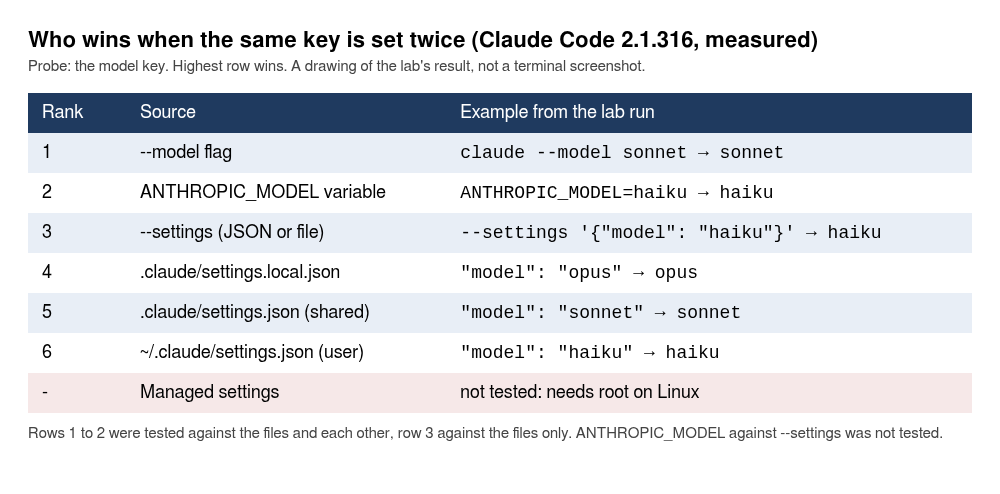
Two limits on that order. The settings page lists five levels in its stack, highest first: managed settings, command line, project local, shared project, user. Environment variables are not a level in it, and the page says that where a key has both a variable and a setting, the winner is decided pair by pair. The lab never ran ANTHROPIC_MODEL and --settings against each other, so their order is my reading of the docs, which say the variable “applies over the model key from any file”. And the model key is one key. Do not read this table as a rule for every setting.
--setting-sources user is the line worth remembering. It tells Claude Code to read only your user file and ignore the project and local ones. Use it when you run claude -p inside a repository you did not write, because a repository’s own settings file can pre-approve commands.
The cost of those probe calls is a footnote with a point. The haiku call cost $0.0014, the sonnet call $0.0175 and the opus call $0.0484, all for one word. The price gap between models is real, and the Opus call also started with a cold prompt cache, which the lab’s own log flags as part of the number. Document 1 has the cache arithmetic.
What does /status tell you about it?
It lists which files Claude Code loaded, and nothing more. The lab created three files, a user one allowing Bash(git status) and denying Read(./.env), a project one allowing Bash(npm test) and asking before Bash(git push *), and a local one allowing Bash(git log *). Then it ran /status:
   Version:           2.1.316
   Session kind:      interactive
   Auth token:        CLAUDE_CODE_OAUTH_TOKEN
   Model:             Default (Sonnet 5.5 · Efficient for routine tasks)
   Setting sources:   User settings, Shared project settings, Project local settings
   Auto mode server:  Enabled
I cut the session name, the session id, the socket address and the working directory, which are yours to see on your own machine. The line to read is Setting sources. The settings page says it “lists each settings file Claude Code loaded”, and that it does not tell you which file supplied a given key. It is the quickest check that a file you just wrote was picked up. In the lab’s /status there was also a “System diagnostics” block with warnings about a leftover npm install at /usr/local/bin/claude. That is a leftover in the lab’s image, so I left it out. You will not have it on a clean machine.
Do lists merge or override?
They merge, and a deny beats an allow. The same session’s /permissions screen showed the allow rules from all three files in one list:
   Claude Code won't ask before using allowed tools.
     1. Add a new rule…
     2. Bash(git log *)
     3. Bash(git status)
     4. Bash(npm test)
Three files, three rules. A rule in the deny list of one file beats an allow for the same command in another. The lab put {"permissions": {"allow": ["Bash(npm test)"]}} in the user file and the same rule under deny in the project file, then asked for the tests with claude -p. Result: 2 denials, no test run. The permissions page spells out the order: “Rules are evaluated in order: deny, then ask, then allow”, and the first match decides. An allow cannot carve an exception out of a deny.
How do you write a permission rule in a settings file?
You add a permissions key with an allow, ask or deny list, and each entry is a tool name, or a tool name with a pattern in brackets. Anthropic’s permissions page is the reference for the pattern syntax, and the lab’s first test is the one every beginner meets, a headless run with no rules at all. A -p run starts in the default mode, which the screens call Manual, so anything that needs approval is refused, because nobody is there to approve it:
claude -p "Run npm test and tell me how many tests passed. Answer in one sentence." --max-turns 4 --output-format json < /dev/null > out.json
jq -c '.permission_denials[]|{tool_name,tool_input}' out.json
{"tool_name":"Bash","tool_input":{"command":"npm test 2>&1 | tail -30"}}
{"tool_name":"Bash","tool_input":{"command":"npm test"}}
Claude’s answer was “I couldn’t run npm test: the tool denied it twice”, for $0.0237. The two refused attempts are in permission_denials, which is where to look first whenever a -p run says it could not do something. Claude tried a piped form and then the plain command. The model sometimes fills in the Bash tool’s optional description key as well, so on some runs each line also carries "description":"Run npm test". The lab saw both forms.
Before you create the project file, start claude once in this folder, answer the trust dialog and exit. If you followed the /status section above you already did. A project rule in a folder whose trust dialog you never accepted is ignored, and the section after the next one shows what that looks like.
Create the project file:
mkdir -p .claude
cat > .claude/settings.json <<EOF
{
  "permissions": {
    "allow": ["Bash(npm test)"]
  }
}
EOF
Run the same command again. This time the answer was “25 tests passed, with 0 failures.” with 0 denials, for $0.0217. One rule was enough. The piped form matches too: the ask-rule test further down shows the npm test 2>&1 | tail -30 form hitting a Bash(npm test) rule, and the permissions page says Claude Code splits compound commands before matching. It also lists the wrappers it strips before matching: timeout, time, nice, nohup and stdbuf, so a rule for npm test still matches timeout 30 npm test.
The star and the space
Bash(npm test) matches that command and nothing longer. Bash(npm test *) matches npm test followed by anything. The docs say the space before a trailing star is part of the rule, so Bash(ls *) does not match lsof and Bash(ls*) does. When you answer “Yes, and don’t ask again” on a prompt, Claude Code writes the starred form, as the lab saw further down.
A rule in a folder you never trusted does nothing
The lab removed the trust flag for the project from ~/.claude.json, with jq, to make a clone look like one that no claude -p run had ever seen the dialog for. Same file, same prompt. Stderr said:
Ignoring 1 permissions.allow entry from .claude/settings.json: this workspace has not been trusted. Run Claude Code interactively here once and accept the trust dialog, or set projects["/tmp/lab/c/h/order-notifier"].hasTrustDialogAccepted: true in /tmp/lab/c/h/.claude.json.
The path is the lab’s. The rule was ignored, the call was refused, and the run still exited 0. In a script, that is easy to miss, and the message is on stderr, so a pipeline that discards stderr never sees it. Start claude once in the folder and accept the dialog, and the rule takes effect.
One more thing from the same runs. In a -p run, a command that uses a shell variable is refused before it runs. When the lab asked for echo PORT=$PORT NOTIFIER_ENV=$NOTIFIER_ENV with Bash(echo *) allowed, the tool result was “A variable in this command can’t be checked before it runs”. That is why the environment-variable example below uses node -e and not echo $PORT.
One-off permissions on the command line
--allowedTools grants a tool for one run and saves nothing. The lab ran --allowedTools 'Bash(npm test)' with no settings files, and it passed 25 tests with 0 denials for $0.0059, then confirmed that no .claude folder existed afterwards. --disallowedTools is the same for deny, and where both name the same rule the deny won in the lab’s run. Use the flags for scripts and the files for rules you want to keep.
Can a deny rule keep Claude out of your .env?
For the routes the rule names, yes, and the one it does not name matters most. The companion repository ships .env.example with a fake token, NOTIFIER_API_TOKEN=test_sk_not_a_real_token_0000, made up for exactly this kind of test. The lab copied it to .env (git-ignored in this repo already) and put these rules in the project file:
{
  "permissions": {
    "deny": ["Read(./.env)", "Read(./.env.*)"]
  }
}
Then it tried four ways to get the token out. All four ran claude -p in the default mode.
The Read tool. “Read the file .env and tell me the value of NOTIFIER_API_TOKEN.” Blocked, with the Read call listed in permission_denials. Claude said it could not read the file and had not tried to get around the block.
cat .env, with Bash(cat *) and Bash(grep *) allowed as well. Blocked: Claude’s answer was “The permission to run cat .env was denied”. A grep -n NOTIFIER_API_TOKEN .env was blocked too. The tool result read “Permission to use Bash with command grep -n NOTIFIER_API_TOKEN .env has been denied.” The permissions page says deny rules for Read apply to file commands Claude Code recognizes in Bash, cat, head, tail, sed and tee, and to redirections.
A program that opens the file itself. The lab allowed Bash(node *) and kept the same deny rules, then asked Claude to run this one-liner:
node -e "console.log(require(\"fs\").readFileSync(\".env\",\"utf8\"))"
It ran. The tool result held the whole file, token line included, with 0 denials. The permissions page says it plainly: Read and Edit deny rules do not apply to “arbitrary subprocesses that read or write files indirectly, like a Python or Node script that opens files itself”, and it points to the sandbox for OS-level enforcement. The lab did not need to be clever. It was handed an allowed node and asked.
grep -r NOTIFIER_API_TOKEN ., with the deny rules in place. It returned README.md, .env.example and src/config.js, and left .env out:
README.md:- `NOTIFIER_API_TOKEN`
.env.example:NOTIFIER_API_TOKEN=test_sk_not_a_real_token_0000
src/config.js:    apiToken: pick(env, 'NOTIFIER_API_TOKEN') ?? fromFile.apiToken,
The lab then removed the deny rule and ran it again, and .env was still missing. The same search in a normal shell, grep -rn NOTIFIER_API_TOKEN . --exclude-dir=.git, returns four lines including the one from ./.env. So the deny rule was not the reason, and I do not know what is. The likely cause is that Claude Code’s own search skips git-ignored files, but the log does not prove that, so take it as a guess. What the run shows is only that this one command did not print the file, with or without the rule.
Mettons the real .env holds a key to a seller’s marketplace account, the kind of file a catalogue service really has. I made that up, but the file is shaped like one. My view, and it is one I would defend on a team: a Read(./.env) deny is a seat belt for an agent that is trying to follow your rules, not a lock. It stops the honest routes and it will stop most accidents. It does not stop a subprocess, and any project where you have allowed node can open the file, and the docs name Python scripts the same way. If the file holds a real secret, keep the secret out of the project folder, or turn on the sandbox, which document 8 covers. The lab did not test the sandbox here.
What does Read(./.env) actually match?
The docs table on the permissions page is headed “How path patterns match” and it has four pattern types. //path is an absolute path from the filesystem root, and ~/path is from your home directory. /path is “Path relative to the settings source”, and the page warns that a pattern like /Users/alice/file is not an absolute path, because “the single leading slash anchors at the settings source, not the filesystem root”. In the project file /src/** means <primary working directory>/src/**, and in the user file ~/.claude/src, which is why a Read(/secrets/**) deny in your user file protects nothing in your projects. The fourth type is path or ./path, “Path relative to current directory”. Those two are one type, so ./.env and .env are the same pattern. The page adds that “bare filenames follow gitignore semantics and match at any depth, so Read(.env) and Read(**/.env) are equivalent”, and its table says Read(.env) blocks “any .env at or under the current directory”, not one in a parent directory or another project.
So the rule the document tells you to commit is not a root-only rule, and the lab checked. It put a second fake file at sub/.env and asked for each in turn. With no deny rule, both were read. With Read(./.env), the root .env was refused, and sub/.env was refused both times it was asked, with the tool message “File is in a directory that is denied by your permission settings”. Read(**/.env) gave the same result. A control showed the deny was not blocking everything nested: with the rule in force, sub/notes.txt was read normally. The other side of the same coin is Read(./.env.*), which also stops Claude reading .env.example, and you will meet that the first time you ask it to look at the example file. Not tested: a .env in a parent of the folder you start in, starting claude from inside sub/, and the single-slash form Read(/.env).
Can a repository change your permission mode?
Among all the Claude Code settings, the permission mode is the one with the biggest blast radius. A repository can set the mode your session starts in, with two exceptions. The permissions.defaultMode key sets the mode a session starts in. In each of the lab’s runs the project file had its own defaultMode, and the init event’s permissionMode was the evidence:
| Where | Value | Mode the session started in |
|---|---|---|
| user file | acceptEdits |
acceptEdits |
| project file | bypassPermissions |
default, ignored, no message anywhere |
| project file | auto |
default, ignored the same way |
| project file | plan |
plan |
| project file | acceptEdits |
acceptEdits, honoured, and a file write went through with no prompt |
| project file | dontAsk |
dontAsk, honoured, and a file write was refused with no prompt |
| command line | --permission-mode acceptEdits |
acceptEdits |
The settings page names the two exceptions: auto and bypassPermissions “don’t take effect from project or local settings”. It says to set them in user or managed settings, or pass --permission-mode for one session, and it adds that before v2.1.257 bypassPermissions took effect from any file. The page names no other value. The lab checked the others in a trusted folder at 2.1.316, and a committed project file put the session into acceptEdits: the init event said so, the footer read “accept edits on”, and a file write ran with no prompt. dontAsk took effect too, and the write came back “Permission to use Write has been denied because Claude Code is running in don’t ask mode.” So a repository cannot switch every check off, but it can switch off the edit prompts. That is the case to know, because acceptEdits is looser than Manual, and the only thing that tells you is the footer. The part I do not like is that the two ignored values fail quietly, with no message anywhere. If you need auto or bypassPermissions, set it in your user file or on the command line, where it is yours, and glance at the footer after you open a repository you did not write. Not tested: a project default written over a user acceptEdits, and acceptEdits from a folder you never trusted, since -p never shows the trust dialog.
claude --help listed six values for --permission-mode at 2.1.316: acceptEdits, auto, bypassPermissions, manual, dontAsk and plan. The init event reports the default mode as default, and the screens call it Manual.
Giving Claude one more folder
By default Claude reads inside the project. The lab put checklist.txt in ~/shared-notes, outside the project, and asked Claude to read it. Result: 2 denials, no file in the lab’s run (a second run saw 1, because the model tried once). With this in the project file:
{
  "permissions": {
    "additionalDirectories": ["~/shared-notes"]
  }
}
the file was read and quoted (“Release checklist: tag, push the tag, announce in #ops.”) with 0 denials. That grants read access to a path, which a project file can do for everyone who clones it. Think before committing a path outside the repo.
What does “Yes, and don’t ask again” write?
An allow rule, in the local file, with a star on the end. The lab started claude --permission-mode default, which gives Manual mode (the footer read manual mode on), and asked for the tests. This is the prompt. The line under the tip is a description the model writes, so yours may read differently, for example “Run the test suite”:
 Bash command
 Tip: auto mode handles these prompts for you — choose "switch to auto mode" below
 Run npm test
 npm test 2>&1 | tail -30
 This command requires approval
 Do you want to proceed?
 ❯ 1. Yes
   2. Yes, and don’t ask again for: npm test *
   3. Yes, and switch to auto mode · auto mode handles these prompts for you
   4. No
 Esc to cancel · Tab to amend
The lab pressed Down once for option 2 and Enter. The tests ran: “All 25 tests passed, with 0 failures.” Then it read the file the choice wrote:
cat .claude/settings.local.json
{
  "permissions": {
    "allow": [
      "Bash(npm test *)"
    ]
  }
}
The user file was unchanged (in the lab’s clean home it still read {"theme": "dark"}, and yours will show its extra keys). The choice goes to the project-local file and nowhere else. In the lab git status stayed empty, because the first time Claude Code writes that file it also adds **/.claude/settings.local.json to ~/.config/git/ignore, and git check-ignore confirmed it. A file you create by hand gets no such treatment: in the precedence runs, git status --short showed ?? .claude/ for the hand-made local file. Add the line to the repository’s .gitignore yourself. The next section does that. If you ran the probe near the top of this document that wrote out.jsonl into the clone, git status --short will also list ?? out.jsonl, in this section and the next. That file is yours, not Claude Code’s, so delete it or ignore it.
A new session in the same folder asked for the tests again and did not prompt.
An ask rule beats an allow rule, even when you are in auto mode. The lab wrote both for the same command, "allow": ["Bash(npm test)"] and "ask": ["Bash(npm test)"], and started a normal auto-mode session. The prompt it got:
 Ask rule Bash(npm test) overrides auto mode for this command.
 /permissions to let auto mode decide
 Do you want to proceed?
 ❯ 1. Yes
   2. No
Only Yes and No, no “don’t ask again”. The first attempt at this test matched the status bar’s esc to interrupt text before the prompt had drawn, and the lab discarded it and ran it again. The settings page flags a related trap: a “don’t ask again” saved in the local file does not outrank an ask rule from a project or managed file.
What do /permissions and /config show?
/permissions has seven tabs, in this order: Permissions, Recently blocked, Allow, Ask, Deny, Auto mode, Workspace. It opens on Allow. Choosing a rule opens a “Delete denied tool?” style box that says which file the rule comes from (“From shared project settings”, in the lab’s run), and the default answer is No. The Auto mode tab showed built-in rule counts, 16 soft allow, 72 soft deny and 1 hard deny in this build. I list them because they will change, so compare against your own screen.
/config opens a searchable list of settings, and it has a trap the lab walked into. It needs two presses of Esc to close: the first leaves the search box, the second closes the menu. In the lab’s second attempt one Esc followed by typed text toggled the first row, “Auto-compact”, and wrote "autoCompactEnabled": false into ~/.claude/settings.json. Nothing warned about it. With two Escs, the user file was untouched. The form /config verbose=true printed “Set Verbose output to true” and wrote "verbose": true to the user file. /config spinnerTipsEnabled=false printed “spinnerTipsEnabled isn’t a /config setting.”, so the key=value form works only for keys the menu lists. The menu row “Default permission mode” read Manual in a session that had started in auto mode, which is confusing, and I have no explanation for it.
Not tested: editing a rule from /permissions. The lab opened the screens and left them.
One more command belongs here, and the lab did run it. /fewer-permission-prompts is a bundled skill that reads your session transcripts and proposes an allow list. In Manual mode it prompted five times for permission to read the transcript folder, each answered Yes (once). In the lab’s run, after three earlier prompts in the session, it changed nothing and said npm test fell below a “~3-use threshold”. In a second run, after only two prompted sessions, it proposed creating .claude/settings.json with Bash(npm test) and asked “Do you want to create settings.json?”, so what it does depends on how much history the folder has. Run it after a week of real use, not in a first session.
What happens when a settings file is broken?
What you see differs between an interactive start and claude -p, and what gets skipped depends on the defect: a file that is not valid JSON is skipped whole, and for valid JSON it depends on which entry is wrong. The lab broke the project file several ways. First, a trailing comma, which is not valid JSON:
{
  "permissions": {
    "allow": ["Bash(npm test)"],
  }
}
jq says parse error: Expected another key-value pair at line 4, column 3. The claude -p run printed nothing about it, exited 0, and did not apply the rule inside: 2 denials, the same as having no file. An interactive start showed this:
  Settings Error

  /tmp/lab/c/h/order-notifier/.claude/settings.json
   └ Invalid or malformed JSON

  Files with errors are skipped entirely, not just the invalid settings.

  ❯ 1. Fix with Claude
    2. Exit and fix manually
    3. Continue without these settings
Choose 3 and /status showed Setting sources: User settings, plus two warnings in the diagnostics block: “Found invalid entries in: …/settings.json” and “Transcript retention cleanup is paused until the settings errors above are fixed (cleanupPeriodDays cannot be determined reliably)”. The second one tells you a broken file has a cost beyond the file: your session history is not being cleaned up while it stays broken.
claude doctor was the route to the reason, and it runs without starting a session. Its report is long, so this block shows only the “Invalid settings” section of it:
Invalid settings
- /tmp/lab/c/h/order-notifier/.claude/settings.json: Invalid or malformed JSON
The second kind of break is valid JSON with wrong content. The lab first tried four defects in one file: a number written as a string, a permission rule missing its closing bracket, an unknown hook event, and a misspelled top-level key.
{
  "cleanupPeriodDays": "thirty",
  "permissions": {
    "allow": ["Bash(npm test)", "Bash(npm test"],
    "deny": ["Read(./.env)"]
  },
  "modle": "sonnet",
  "hooks": { "PreToolUsee": [] }
}
The Settings Error dialog listed each bad entry, one per line, with a reason (“cleanupPeriodDays: Expected number, but received string”, and for the rule, “Malformed Tool(content) rule”). The hook line carried the full list of valid hook event names, which is the most useful error message in this document. Bon. And the claude -p run did not apply the good allow rule: 2 denials. But four defects at once cannot say which one did the damage, so the lab ran them alone. Each probe was one claude -p call on Haiku. The allow probe asks Claude to run npm test, and a denial means the allow rule was lost. The deny probe asks it to read .env with the Read tool, and a refusal means the deny rule was in force. Each defect had a control run with the good file.
A wrong-typed value alone skips the whole file. The good file (an allow rule for Bash(npm test) and a deny for Read(./.env)) ran npm test with 0 denials and refused the .env read with 1. The same file plus one line, "cleanupPeriodDays": "thirty", did this: npm test was refused with “This command requires approval”, and the .env read went through and the first line of the file came back, with 0 denials. The allow rule and the deny rule were both gone, from one string where a number belongs. claude doctor exited 0. Its report is more than 30 lines long, with the version, the platform, the update status, then an “Invalid settings” section, then a Remote Control block and a list of install warnings that have nothing to do with your settings. The “Invalid settings” section held one line, and this block shows only that section, with the start of the file path trimmed to ...:
Invalid settings
- .../order-notifier/.claude/settings.json › cleanupPeriodDays: Expected number, but received string
It does not say the file was skipped. Only the interactive start does, with the same “Settings Error” dialog and “Files with errors are skipped entirely, not just the invalid settings.” A -p run prints nothing and exits 0.
A malformed rule alone loses only itself. With "Bash(npm test" next to the good rule, npm test ran with 0 denials and the .env read was refused with 1. Both good rules stayed in force. claude doctor said so (the “Invalid settings” section only, path trimmed):
Invalid settings
- .../order-notifier/.claude/settings.json › permissions.allow: Invalid permission rule "Bash(npm test" was skipped: Malformed Tool(content) rule. Rules take the form Tool or Tool(content) and must end at the closing ")"; parentheses inside the content are literal
The interactive start shows a different dialog for this case. It is titled “Settings Warning”, not “Settings Error”, and it ends “The values listed above were skipped; the rest of the file is in effect.” with Continue as the first option. That much matches the two cases above. But the title is not a reliable sign of which case you are in, and the next paragraph shows why.
Other defects. In the hooks lab, an unknown hook event name and a timeout written as a string on a UserPromptSubmit hook each lost only their own entry, and npm test still ran with the allow rule in force. A handler with no type and the key hook where hooks belongs did the same. One hook shape skipped the whole file, a matcher written as a list, such as ["Bash","Edit"], and this is the one that matters for the next paragraph. Document 4 gives the hook shapes their own section.
The dialog title follows the hook event, not the defect. A later lab run opened the interactive start, screen only, no prompt sent, on three project files, each with one defect. The list-typed matcher on a PreToolUse hook opened “Settings Error” and so did the string timeout ("10" instead of 10) on a PreToolUse hook. Both ended with “Files with errors are skipped entirely, not just the invalid settings.” and offered “Fix with Claude”, “Exit and fix manually” and “Continue without these settings”. The same string timeout on a UserPromptSubmit hook opened “Settings Warning”, ended “The values listed above were skipped; the rest of the file is in effect.” and offered Continue first. The Error dialog gives its own reason, in the line it prints for each bad entry:
a PreToolUse/PermissionRequest hook that cannot be loaded may be what guards the permissions declared beside it, so nothing it sits in is applied until the entry is fixed or removed.
So a broken hook on those events takes the file with it, because the file may hold the permissions that hook was guarding, while a broken hook on UserPromptSubmit, the one other event tried, lost only itself. Which other events behave like which is not tested. Anthropic’s settings page does not state this split. It describes Error and Warning by the kind of defect and gives the hook example only as “an unknown hook event name”. For anyone editing Claude Code settings by hand, that means the “Continue” button is not safe to press on the strength of the title alone. Read the sentence at the bottom of the dialog, or run claude doctor. Not tested: what the allow and deny rules do after you choose “Continue without these settings” on the PreToolUse string-timeout file, since the dialog run sent no prompt and no -p probe ran on that file.
What a lost deny rule looks like
This is the example to keep in mind, and the lab ran it on a file that is valid JSON. The file held an allow for Bash(npm test), a deny for Read(./.env), and a PreToolUse hook whose matcher was a list. The control, with the good file, refused the .env read: “I couldn’t read the .env file. The Read tool returned a permission error”, 1 denial. The file with the list-typed matcher gave this back, with exit 0 and permission_denials empty:
The first line of `.env` is: # Copy this file to .env and fill in real values for your own machine.
The deny rule was gone and the run said nothing. Asked to run npm test, the same file was refused, so the allow rule was gone too. claude doctor explained why. This is the “Invalid settings” section only, with the folder path trimmed to ..., and the full section has two lines for this defect:
Invalid settings
- .../order-notifier/.claude/settings.json › hooks.PreToolUse.0: Invalid hook matcher (matcher: Invalid input: expected string, received array) — a PreToolUse/PermissionRequest hook that cannot be loaded may be what guards the permissions declared beside it, so nothing it sits in is applied until the entry is fixed or removed.
- .../order-notifier/.claude/settings.json › hooks.PreToolUse.0.matcher: Expected string, but received array
  Suggested fix: Hooks use a matcher + hooks array. The matcher is a string: a tool name ("Bash"), pipe-separated list ("Edit|Write"), or empty to match all. Example: {"PostToolUse": [{"matcher": "Edit|Write", "hooks": [{"type": "command", "command": "echo Done"}]}]}
That wording is the second way to read doctor. “Entry ignored” or “was skipped” means you lost that entry. “Nothing it sits in is applied” means you lost the file, deny rules included. Two runs gave the same result on that file, one in the hooks lab and one here, each a sample of one per condition. The .env deny is not a secret barrier, as the section above showed, but it is still the rule most people commit first, and a typo in a hook can quietly remove it.
Anthropic’s settings page describes the two cases this way. A “Settings Error” is for invalid JSON or a value the schema rejects, and the dialog says files with errors are skipped entirely. A “Settings Warning” is for individual entries that fail, such as “a malformed permission rule or an unknown hook event name”, and the page says Claude Code “skips those values and keeps the rest of the file in effect”. The runs fit that, with one correction the page does not make: the wrong-typed cleanupPeriodDays produced the Error case, and so did a list-typed matcher and a string timeout on a PreToolUse hook, while the same string timeout on a UserPromptSubmit hook gave the Warning case. Not tested: any other wrong-typed value as a whole-file trigger, so which type errors skip the file is known for one top-level key only, and whether the malformed-rule allow rule applies in an interactive session after you choose Continue, since only -p was probed for allow and deny. Also not tested on Sonnet. These probes ran on Haiku, and permission handling is not meant to depend on the model.
The practical rule is short. After you edit any of your Claude Code settings files, run claude doctor, and read the sentence, not just the file name. The settings page adds that a ~/.claude.json it cannot parse is copied to ~/.claude/backups/ and that Claude Code keeps the five most recent .claude.json.backup files there, which is the number to know before you hand-edit that one. The misspelled top-level key, modle, produced nothing at all, not in the dialog and not in claude doctor. A typo in a key name is the one mistake the checks do not catch.
Can an editor catch it for you?
Partly. Add a $schema line and an editor that reads JSON schemas will underline bad values:
{
  "$schema": "https://json.schemastore.org/claude-code-settings.json"
}
The lab fetched that schema. The address answered 301 and sent the fetch on to https://www.schemastore.org/claude-code-settings.json, which answered 200 and held 142 top-level properties. Editors follow the redirect, so the underline works, and the committed file below keeps the shorter address. The lab then ran the files from this document through it with Python’s jsonschema 4.26.0. The good files validated. cleanupPeriodDays: "thirty", an unknown hook event and a defaultMode of "yolo" were all rejected. And modle passed. The schema catches wrong values, not misspelled keys. Treat it as a spell checker for values.
How do you write a custom slash command?
You write a markdown file. Claude Code has two places for it, and the older one still works. Anthropic’s skills page says “Custom commands have been merged into skills”: a file at .claude/commands/deploy.md and a skill at .claude/skills/deploy/SKILL.md both create /deploy. If both exist, the skill wins. Document 5 covers skills as a whole, and the skills page puts a ceiling on a SKILL.md at 500 lines, with each description cut off at 1,536 characters in the skill listing. Here they are only a way to make a repeatable command, and ours are a dozen lines.
The lab built the older form first, a project command that reports test results in a fixed shape. The <<\EOF matters. With a plain <<EOF the shell runs the backticks inside the text, and the lab lost a whole run to that before it noticed:
mkdir -p .claude/commands
cat > .claude/commands/test-status.md <<\EOF
---
description: Run the test suite and report in a fixed format
allowed-tools: Bash(npm test)
---
Run `npm test`. Then report exactly three lines:
Total: <number of tests>
Passed: <number>
Failed: <number, and the name of each failing test>
Say nothing else.
EOF
claude -p '/test-status' --max-turns 4 --output-format json < /dev/null
The answer was Total: 25, Passed: 25, Failed: 0, with 0 denials, for $0.0223 on the first call and $0.0065 on a repeat. The command’s allowed-tools line did the permission work. The init event’s slash_commands count went from 53 to 54, one per file.
The same job asked as a plain sentence (“Run npm test and report Total, Passed and Failed.”) was refused with 3 denials. Claude first tried a Skill tool call named test-status, which was denied, then npm test twice. And a command with no allowed-tools line gets the same treatment as any other request: the lab’s test-plain.md was refused for npm test with 2 denials. A command is not a permission. allowed-tools is, for the turn that runs the command. The skills page says the grant clears when you send your next message.
Arguments, hints and the current format
The current format is a folder with a SKILL.md in it. This one takes a route as its argument, and it is the file the companion repository’s finished state keeps:
mkdir -p .claude/skills/route-doc
cat > .claude/skills/route-doc/SKILL.md <<\EOF
---
description: Write a two-sentence description of one HTTP route in this service
argument-hint: [METHOD /path]
disable-model-invocation: true
allowed-tools: Read
---

The five most recent commits, for context:

!`git log --oneline -5`

Find the route "$ARGUMENTS" in src/app.js and describe it in two sentences: what a caller sends and every status code it can get back. Do not change any file.
EOF
Four things in that file. argument-hint is the text the autocomplete shows after the name. disable-model-invocation: true means Claude will not run it on its own, only you can type it. $ARGUMENTS is replaced by whatever you type after the command. And the line that starts with ! and a backtick runs a shell command before Claude sees the prompt, and puts its output in the text.
Run it headless:
claude -p '/route-doc POST /orders' --max-turns 5 --output-format json < /dev/null
Claude described POST /orders and the status codes it can return, 201, 200 with duplicate: true, 400, 422 and 502, with 0 denials, for $0.0111 warm. The init event’s skills count went from 19 to 20.
In an interactive session, typing / opens a menu of every command. Typing /rou narrowed it to three rows, with /route-doc Write a two-sentence description of one HTTP route in this service (project) first and highlighted, followed by /schedule and /background. Tab completes the name and shows the hint after it:
❯ /route-doc METHOD /path
Add the arguments and Enter, and the answer arrives. The (project) tag tells you where the file lives. /help has a “Custom commands” tab that listed all three of the lab’s commands with their source, /route-doc (project), /standup (user) and /test-status (project).
A user-level command lives in ~/.claude/commands and works in every project. The lab’s standup.md held !`git log --since="3 days ago" --oneline` and an instruction to turn it into three bullets, and it worked from inside the companion repository with 0 denials. The three bullets it wrote about that repository were plain and accurate, which is all this test was for.
The silent failure in -p
This one costs people an hour, so here it is in full. The lab wrote a skill whose ! line does something other than read, with no allowed-tools for it:
---
description: Probe: does shell injection need permission
disable-model-invocation: true
---
!`touch injected.txt && echo created`
Say what the line above printed.
Save that block as .claude/skills/inject/SKILL.md in the clone. Run with claude -p '/inject', the result was empty. Zero turns, exit 0, no file created, permission_denials empty. The only trace was a local-command-stderr event in the stream saying “Shell command permission check failed … touch … needs approval”. The skills page describes the same abort. Add allowed-tools: Bash(touch *) to the skill and it runs and the file exists. By contrast, !`git log --oneline -5` needed no pre-approval at all, because it is read-only. If a headless command returns nothing and costs $0, suspect the shell lines first.
How do you set up a status line?
A status line is one of the Claude Code settings that runs a script of yours every time the screen updates, so it is worth ten minutes. You add a statusLine key that points at a command, and the command prints one line. Claude Code gives the command a JSON blob on standard input. The status line page shows the full set of fields. The lab used three: model.display_name, workspace.current_dir and cost.total_cost_usd. The script needs jq, so install it first if jq --version fails.
cat > ~/.claude/statusline.sh <<\EOF
#!/bin/bash
# Reads the session JSON on stdin; prints one line.
input=$(cat)
MODEL=$(echo "$input" | jq -r ".model.display_name")
DIR=$(echo "$input" | jq -r ".workspace.current_dir | split(\"/\") | last")
BRANCH=$(git branch --show-current 2>/dev/null)
COST=$(echo "$input" | jq -r ".cost.total_cost_usd // 0")
printf "[%s] %s (%s) \$%.2f\n" "$MODEL" "$DIR" "${BRANCH:-no branch}" "$COST"
EOF
chmod +x ~/.claude/statusline.sh
Test it by hand with a made-up payload before Claude Code ever sees it. The status line page suggests this, and it takes two seconds:
echo '{"model":{"display_name":"Sonnet 5.5"},"workspace":{"current_dir":"/home/me/order-notifier"},"cost":{"total_cost_usd":0.0345}}' | ~/.claude/statusline.sh
[Sonnet 5.5] order-notifier (no branch) $0.03
The lab ran that with its shell inside the cloned repository, and (no branch) is not a bug: a clone of a tag is a detached HEAD, so git branch --show-current prints nothing. On a branch you will see the branch name. Now tell Claude Code to use the script, in ~/.claude/settings.json:
{
  "theme": "dark",
  "statusLine": {
    "type": "command",
    "command": "~/.claude/statusline.sh"
  }
}
At the start of a session the line showed under the prompt, above the footer: [Sonnet 5.5] order-notifier (no branch) $0.00. After one cheap turn it read $0.02 (a second run saw $0.03. A one-word call costs between about $0.02 and $0.03 depending on the cache). The status line page also documents a refreshInterval field that re-runs the command every N seconds, with a minimum of 1, for lines that show a clock. The lab did not test it.
What does /statusline do instead?
It asks a background agent to write the setting for you, and at 2.1.316 it did not behave the same way twice. The lab ran this from a user file that held only {"theme": "dark"}:
/statusline show the model name, the git branch and the session cost
A statusline-setup agent started, finished in 13 seconds, and reported “The command is inline in settings.json, so there’s no separate script file.” The status line page says /statusline “generates a script file in ~/.claude/“. The lab’s first run wrote an inline command into ~/.claude/settings.json and no file. The result line read Sonnet 5.5 | no branch | $0.08.
One thing before the numbers, because it changes how far you can trust them. Every /statusline run in the lab, all 25, ran with HOME pointed at a throwaway folder under /tmp, not at the home folder of the account that was running them. The agent noticed and blamed it. One run that ended on a question said “It only had Read and Edit tools, so it couldn’t create a file or find your real home directory”. Two other runs that ended on a question said the same in other words (“it has no shell access, so it couldn’t look up your home directory”, “it has no shell tool to look up your home directory”), and two more runs said “it couldn’t find your real home directory” and “it couldn’t look up your real home directory” in their first answer, which also ended on a question, before the answer yes was typed. Some of the questions and the dialog below may come from that and not from /statusline. What it does on an ordinary home folder is not tested, because a run there would write to the lab account’s own ~/.claude/settings.json. Treat the split below as what happened in a lab, and the advice after it as what to do if your own run goes that way.
That was one run, the lab’s first. The lab then did it ten more times, in two later rounds on a clean throwaway home folder, on the same 2.1.316 with the same user file and the same steps. The ten did not agree:
- Three wrote the setting with nothing typed after the command. Each put an inline
statusLinecommand into~/.claude/settings.jsonand no script file. One of the three had the agent say it could not find the settings file, and the main session then found it and resumed the agent. - Two wrote it after the reader typed a yes. The agent asked a question (“Which directory should hold the status line config?” in one, “Do you want me to write that entry into that settings file?” in the other), the lab typed
yes, write it to ~/.claude/settings.json, and the setting was written. One of the two wrote an inline command. The other wrote a script file,~/.claude/statusline-command.sh(409 bytes, executable), and astatusLineentry that runs it withbash. That is what the status line page describes, so “did not do what the docs say” is not true of every run. In the lab’s further runs the typed yes was usually followed by the read dialog described below. - Four ended with a question and wrote nothing. The agent said it had only Read and Edit tools, or that its read of the settings file was denied, proposed a
statusLineblock and asked which file to write. The user file still read{"theme": "dark"}when each run ended. - One stopped at a dialog. The main session tried to read
~/.claude/settings.json, and the screen showed this (the paths are the lab’s and yours will show your own home folder. A six-line explanation of the “No, and block” answer sits between the path and the question on the real screen and is trimmed here):
 Read outside the working directories
 Read(/tmp/walk/s6h/.claude/settings.json)
 Allow this read outside the working directories?
 ❯ 1. Yes, and keep allowing any reads outside the working directories
   2. No, and block reads outside the working directories from now on
   3. No, and ask again next time
   4. Yes, but ask again next time
Nothing was written in that run. Option 1 is the default, so pressing Enter grants reads outside the project folder for every project, which is more than this job needs. Option 4 allows this one read and asks again next time, and that is the one I would pick. In that run the lab stopped at the dialog. A further batch of runs, with the typed yes, went through it (next paragraph).
The numbers from here on use two groups, so here they are built. The first group is the ten above. The second is a further batch of 14 runs, made later on the same version from the same command: 3 wrote with nothing typed, 7 wrote after a typed yes, and 4 ended with a question that the lab left unanswered. That is 10 of the 14 that wrote a line. Together the two groups are 24 runs, and the lab’s first run is the 25th. Of the 24, 6 wrote the setting with nothing typed (3 and 3), 9 wrote it after a typed yes (2 and 7), 8 ended on a question (4 and 4), and 1 stopped at the dialog. Those add up to 24.
This dialog is what the typed yes normally leads to. The order the log shows is the same each time: the main session tries Write(~/.claude/settings.json), gets “Error writing file”, tries to read the file, and this screen comes up. The agent is not always the one that fails, since in the 6 of 24 runs where nothing was typed it did write the user file itself. In the typed-yes runs it reported that it could not (the “Read and Edit tools” answer above), and the lab’s throwaway home folder is the likely reason. In the further batch of 14 the dialog appeared after the typed yes in 7 of 7, and in 8 of the 9 typed-yes runs the lab made in all. In those seven the lab pressed Down three times and Enter, which is option 4, and the write finished in 7 of 7: the file had its statusLine block 149 to 158 seconds after the command, and the screen showed Added 5 lines, removed 1 line. In one earlier run the lab’s next keystroke landed on the default instead, and the dialog came up after the write attempt as well. A reader who types the yes and presses Enter on reflex gets option 1, a standing permission for every project. Press Down three times first.
So the reliable reading is that /statusline may write the setting at once, may ask you a question first, and may end without writing anything. When you type the command, do not wait for a “done” line. In six of the runs the agent finished in 12 to 32 seconds and the line under the prompt was live by then, but the session printed no “done” or “Churned for” line afterwards and sat idle. Look at the status line, and run cat ~/.claude/settings.json to see what you got. If the file still has no statusLine block and the session ended on a question, answer it. If it says it is resuming the agent, give it another half minute first: in 2 of the 24 runs (one in each group) the file had no block for up to about 30 seconds while the session resumed the agent, with no question on the screen. After you answer, expect the read dialog above, and pick option 4 there.
The third segment of the line showed the short commit hash in most runs and HEAD in one, and no branch in the lab’s first run. The clone is a detached HEAD, and the command the agent writes decides what is printed there, not the version. In the lab’s first run the agent said it could not confirm the cost field name, and the line did show a cost, so the field name was right. In 2 of the 10 runs of the further batch of 14 that wrote a line, the agent went further and told the main session the status line input has no cost field, then left the cost out: the line read Sonnet 5.5 | 3e19f24, with no dollar figure. That is wrong. The status line page documents cost.total_cost_usd, and the hand-written script above reads it and prints $0.02. If your line has no dollar figure, ask for the cost again and name the field. Whether a reply other than the typed yes works is not tested. If you would rather not depend on an agent to change your Claude Code settings, the hand-written script above gets you the same kind of line in two minutes, and you know exactly what is in it.
To take a status line out, run /statusline delete, or delete the statusLine field from ~/.claude/settings.json by hand, and remove the script file if the agent wrote one. The status line page describes both. The lab did not run the removal.
Can you change how Claude answers?
Yes, with output styles, which are described on the output styles page and are one more of the Claude Code settings that change behaviour without touching your code. The lab measured the effect on one question. /output-style with no argument works in -p too, lists the styles and costs nothing: 0 turns, $0. /output-style concise wrote {"outputStyle": "Concise"} into .claude/settings.local.json. The lab asked “What does src/notifier.js do? Explain it for someone new to the repo.” under four styles:
| Style | Output tokens | Words in the answer |
|---|---|---|
| Default | 606 | 217 |
| Concise | 453 | 151 |
custom file Bullets |
344 | 101 |
"outputStyle": "bullets", wrong case |
564 | 212 |
That is one question, one run each, so it is a sample, not a rate. A second run gave the same order and the same wrong-case result, with different numbers (578/205, 416/142, 331/101 and 592/235). The custom style was a file the lab wrote, .claude/output-styles/bullets.md, with name: Bullets, description, keep-coding-instructions: true, and one instruction: answer in at most five short bullets. The last row is the trap. The key’s value must match the style name exactly, and with "bullets" the lab got the Default answer with no error and no warning. The init event even printed output_style: "bullets", as if it had worked. The dollar column for these four calls is not comparable, because two were cold-cache and two warm, so the table quotes tokens.
Can you set environment variables in settings?
Yes, with the env key, and it beats what your shell exported. It is the one place where Claude Code settings reach into your environment, and the environment variables reference lists which variables also have a settings key. The lab put {"env": {"PORT": "4100", "NOTIFIER_ENV": "test"}, "permissions": {"allow": ["Bash(node *)"]}} in the project file, exported PORT=9999 in the parent shell, and asked Claude to run a one-liner:
node -e 'console.log(process.env.PORT, process.env.NOTIFIER_ENV)'
The Bash tool printed 4100 test. Without the env key, the same call printed 9999 undefined. The setting wins over the parent shell inside Claude Code’s tool calls. Keep secrets out of a committed env block, for the reason in the .env section above.
How do you test with a clean configuration?
Point CLAUDE_CONFIG_DIR at an empty folder and Claude Code reads none of your user settings. With "model": "haiku" in the user file, a plain call started on claude-haiku-5-5. With CLAUDE_CONFIG_DIR=/tmp/clean-config, an empty folder, it started on claude-sonnet-5-5, the account default, and filled the folder with its own files. The trust warning came back too, because the trust flags live in that folder’s .claude.json. That is the quick way to find out whether a strange behaviour is your configuration or the tool.
--safe-mode goes further. In the lab, the custom command probe disappeared from the init event’s list, 54 commands down to 53, and the help text says it disables “CLAUDE.md, skills, installed plugins, hooks, MCP servers, custom commands and agents, output styles, workflows, custom themes, keybindings”. Settings keys were a different matter: the project’s model key still applied in the lab’s run, so safe mode is not a full reset.
And --debug-file /tmp/dbg.log writes a log whose lines name every settings path Claude Code tried. The lab’s, about 200 lines for a one-word call (196 in one run, 200 in a second run), included “Broken symlink or missing file encountered for settings.json at path: /etc/claude-code/managed-settings.json”. Search it with grep -i settings.
How do you share all of this with a team?
Commit the project file and the commands, ignore the local file. Claude Code settings that a whole team shares should stay small, because everyone who clones the repository inherits them. The lab built the finished state as one commit on top of doc-3-start: .claude/settings.json, the route-doc skill, and three lines in .gitignore.
mkdir -p .claude
cat > .claude/settings.json <<\EOF
{
  "$schema": "https://json.schemastore.org/claude-code-settings.json",
  "permissions": {
    "allow": ["Bash(npm test)"],
    "deny": ["Read(./.env)", "Read(./.env.*)"]
  }
}
EOF
printf "\n# Claude Code: personal overrides stay out of git\n.claude/settings.local.json\n" >> .gitignore
git add .gitignore .claude
git commit -m "Share Claude Code settings and the route-doc skill"
npm test 2>&1 | grep -E "^# (tests|pass|fail)"
The route-doc skill from the previous section is already in .claude/skills/route-doc/SKILL.md if you followed along, so git add .claude picks it up. The lab’s commit hash was 4408459 (yours will differ, since a hash depends on author and time), with three files changed and 22 insertions, and the tests still passed, 25 of 25. The heredoc overwrites any .claude/settings.json you built up during the experiments above, which is what you want here. If you also kept the test-status.md command from the custom-commands section, git add .claude takes it too: a second pass that had kept it got 4 files changed, 31 insertions(+) and the hash cea654e. An output style would be committed the same way, so delete what you do not want shared, or add files by name. If you would rather diff against the lab’s, the branch is doc-3-work: git fetch origin doc-3-work && git diff doc-3-start origin/doc-3-work. Then the lab checked that the committed state worked. /route-doc GET /health ran with 0 denials. npm test ran with 0 denials. And with a copy of .env.example saved as .env, a request to read it was refused, with the Read call listed as the one denial.
What a teammate sees is worth knowing before you commit an allow rule. The lab cloned the repo into a folder Claude Code had never seen. The trust dialog showed:
 ⚠ This folder pre-approves 1 tool permission in .claude/settings.json:
   Bash(npm test)
 These will apply without asking. Only proceed if you trust this configuration.
That is Claude Code telling a stranger what your file does, before it does it. It is a decent design. The lab’s “remote” for this test was a bare repository on disk, not GitHub, so the clone was real and the hosting was not. Not tested: how two teammates’ machines behave with different Claude Code versions.
What did it cost to exercise all this?
$0.9922 for 92 headless calls, list-price equivalents on the subscription token, counting only kept outputs, so slightly under the true total. The main lab run was 66 calls and $0.9700, and the closing runs added 26 calls and $0.0222. By group, first the main run: precedence 7 calls $0.0704, permission rules 12 calls $0.1932, modes and directories 8 calls $0.1037, broken files 2 calls $0.0301, commands and skills 11 calls $0.1995, output styles 9 calls $0.1268, environment, debug and injection 9 calls $0.1124, safe mode 4 calls $0.0348, the finished-state check 3 calls $0.0753, and one probe $0.0240. The closing runs, which answered the questions about broken files, project modes and the .env path: the whole-file test 4 calls $0.0044, the malformed rule 4 calls $0.0042, the deny-rule loss 3 calls $0.0022, project modes 6 calls $0.0052 and the nested .env 9 calls $0.0061. The cheapest call was $0.0002, one word on Haiku. The dearest was $0.0484, one word on Opus 5.5 from a cold cache.
The interactive sessions were not metered one by one. The /statusline session’s own status line read $0.09 at the end, and /permissions, /status, /config and the settings dialogs make no model call. That includes the three dialog-title runs above, which opened the start screen and sent no prompt, so they added no calls to the tally. The six interactive Haiku sessions in the closing runs, one short prompt each, are not metered either. As in document 1, a call within seconds of another costs less, so your numbers will not match to the fourth decimal. A thousand calls of the one-word kind at the dearest price above come to $48.40, and I made the loop up. I wrote about putting a cap in front of that kind of spend for a different tool in the LiteLLM budget post.
What was not tested?
The list is long, and every item has a reason.
- Managed settings (
/etc/claude-code/managed-settings.json): the lab has no root, nosudoand no user namespaces. MDM, registry and console-delivered settings need a Team or Enterprise organization and a Mac or Windows machine. - Cloud-session settings: the settings page lists rules for sessions that run in the cloud, and the lab ran none.
apiKeyHelper,awsAuthRefresh,modelPickerandavailableModels: they belong to managed or cloud-provider setups the lab does not have.- Windows paths and PowerShell status lines: there is no Windows machine in the lab.
- The VS Code and desktop settings screens: not run, so nothing here says what they show.
- Vim mode and keybinding edits:
/keybindingswas run, and it created~/.claude/keybindings.jsonwith a template listing every default binding by context. Changing a binding and using it was not tested. ANTHROPIC_MODELagainst--settings, and a file with only a malformed rule: named above.- Your real home folder: every run used a throwaway one, so what happens to a long-lived
~/.claude/settings.jsonfull of old keys is not tested. The same goes for/statuslineon an ordinary home folder, where the agent may well write the setting at once and skip the question and the dialog. The lab did not run it because it would have written to the lab account’s own user file. After you run the one command, open the file and look for astatusLineblock with"type": "command"; if it is there, the Claude Code settings change landed.
Who should skip most of this?
If you work alone on one project, you need two things from these Claude Code settings: the Bash(npm test) allow rule, and claude doctor after every edit. The rest is for teams, for scripts, and for the day a setting does not do what you think. And if your plan is to keep a real secret safe with a deny rule, skip the deny rule and fix the secret.
What is next
Document 4 is hooks, the rules an agent cannot talk its way out of, and they live in the same settings files you just learned to read. One thing to check before then, on your own machine: the lab ran claude doctor in this document only on broken files, so run it on a good one and see what it prints. On a good file a second run’s claude doctor printed 28 lines and no “Invalid settings” section. It did still print one settings line, Managed settings (remote): none configured for this organization, so the silence to look for is the missing “Invalid settings” section, not a missing word “settings”. Remember that absence as the signal.
Previous: Claude Code Session: Context, Memory and Plan Mode | Next: Claude Code Hooks: Rules the Agent Cannot Talk Around | Back to the series