
A Claude Code session is one running conversation between you and Anthropic’s coding agent, held in a terminal, inside a project folder. Everything the agent knows about your work sits in that conversation’s context window, and most of what separates a beginner from a daily user is knowing what is in it, what it costs, and how to clear, shrink or keep it. Claude Code is not open source (the license file says “All rights reserved”), and it ships often. On 3 November 2026 the lab behind this guide ran everything below on Claude Code 2.1.316.
This is document 2 of 8. In it I go over the loop of a working session, @ file references, /clear, /compact and the automatic kind, the places CLAUDE.md can live, auto memory, plan mode as a real workflow, reviewing and undoing what Claude did, and coming back to a session later. My position: use plan mode for anything that touches more than one file, treat every instruction file as a suggestion and not a lock, and do not trust any tutorial about memory, this one included, without checking it on your own machine. One thing an older tutorial may still tell you is gone on 2.1.316, the # shortcut, and several results come from a single run or change from run to run, which I say each time it matters. Every output below came from a real run. Anything the lab did not run says “not tested” and gives the reason.
The three surprises, so you can watch for them. /compact kept a codeword the lab told it to forget, and in all three summaries the lab read, the reason was that the summary listed what the user had typed. The # shortcut that older tutorials use to save a note to memory is gone, and Anthropic’s changelog says so. And the same plan-mode prompt, run twice, produced two different diffs, one with 28 tests passing and one with 27. Only the # shortcut is a change in the product. The other two are what a run can show you, and runs vary. Each has its own section.
What do you need before you start a Claude Code session?
You need document 1 done: Claude Code 2.1.316 installed, logged in, and a first session behind you. The companion repository is a small Node service with 25 tests and no install step. Every example here starts from the tag doc-2-start, which is commit 3e19f24, the same commit as doc-1-start, because document 1 changes nothing in the repository.
git clone --branch doc-2-start https://github.com/dominicplouffe/order-notifier.git ~/order-notifier-doc2
cd ~/order-notifier-doc2
npm test
Each document in this guide starts in its own folder, ~/order-notifier-docN for document N, so a clone you made earlier is never in the way and never leaks files into a later one. Document 1 used ~/order-notifier. If you cloned it somewhere else, nothing breaks: this document only needs the new folder.
The last line should end with 25 tests and 25 passing. One trap in that clone: a tag is not a branch, so git leaves you on a detached HEAD. The lab asked Claude to commit later in this document, and Claude’s own reply was “You’re on a detached HEAD, not a branch, so this commit isn’t on any branch yet.” Run git switch -c session-practice before you start and the problem never shows up.
One more prerequisite, because a commit comes later in this document: git needs to know who you are. A machine where you already commit has this set. On one that does not, a second pass on a clean home folder watched Claude stage three files and then stop with “Author identity unknown”. Set it once, with your own name and address:
git config --global user.name "Your Name"
git config --global user.email "you@example.com"
The first time you run claude in a new clone, it stops and asks “Is this a project you created or one you trust?” with the cursor on “No, exit”. Press Down to reach “Yes, I trust this folder”, then Enter. Pressing Enter on the default quits. Document 1 explains the prompt.
The lab ran on Debian 12 on x86-64 with the Sonnet 5.5 model and the default permission mode. At 2.1.316 that default is auto mode, and the footer of the screen says so. The lab could not run anything on macOS or Windows, and where that matters the text says so.
What does one turn in a Claude Code session look like?
You type a prompt and press Enter. Claude Code prints one line per tool it uses, then the answer, then a line with a cooking verb and a duration. This is the screen after the first prompt of the first session, “What does this project do? Answer in three sentences.”
❯ What does this project do? Answer in three sentences.

  Listed 1 directory

● This is a small, dependency-free Node.js service (Node 20+) that accepts orders over HTTP at POST /orders,
  validates them, and builds a confirmation email. It then POSTs that email to a configurable endpoint, and it
  replies 201 on success, 200 for a duplicate order id, 422 for an invalid order, and 502 if the notification
  can't be sent. It also has a GET /health route and reads its settings from config/<NOTIFIER_ENV>.json,
  which environment variables can override. It's a toy companion repo for a Claude Code guide, built to be
  small enough to read in one sitting while still giving hooks, subagents, slash commands and CI something to
  act on.

✻ Sautéed for 6s · done 12:07 AM
“Listed 1 directory” is the tool line. The verb at the bottom changes every turn (the lab saw Sautéed, Crunched, Brewed, Cogitated) and means nothing. While Claude works, the footer says esc to interrupt.
The next prompt in that session depended on the first answer. The lab asked “Where would I change the largest order we accept, and what is the value now?” and got back maxOrderCents, 100000, and three places: config/development.json:7, src/config.js:36 and src/orders.js:27. In any Claude Code session a follow-up works because the whole conversation so far goes back to the model with every turn, which is also why a long session gets slower and dearer.
A few controls you will use on day one:
- A line that starts with
!runs in your shell, and the output goes into the conversation. The lab typed! git status --short && git log --oneline | head -1, and Claude then answered about the output as a normal turn: “The working tree is clean … and the latest commit is 3e19f24”. Escduring a turn stops it. The screen printedInterrupted · What should Claude do instead?and the prompt came back.- You can type a second message while Claude works. In the lab it appeared under the first one and ran after it.
- When the prompt box is idle it can show grey ghost text, a suggested next prompt (“run the tests”, “commit this”). It is not typed text. The lab did not test accepting it with Tab, because the driver never sent that key.
/exitleaves, and printsResume this session with: claude --resume <session-id>.
Everything in a Claude Code session is saved as you go. The transcript is a JSON-lines file at ~/.claude/projects/<working directory with / and . turned into ->/<session-id>.jsonl. For the lab’s folder that directory was -tmp-lab-s-h-order-notifier, and a short session of two answered prompts, one ! command, /context, one interrupted task and /cost came to 85 lines and 335 KB. Those files hold what you typed and what Claude read, so treat the folder like any other place that can hold a secret.
What is in the context, and what is it costing?
Two slash commands answer that. /context draws the window and sorts it by category. This is the one from the end of that first session, with the picture of dots cut out and the numbers kept:
  ⎿  Context Usage
     Sonnet 5.5
     claude-sonnet-5-5
     35.3k/1m tokens (4%)

     Estimated usage by category
     ⛁ System prompt: 2.8k tokens (0.3%)
     ⛁ System tools: 22.3k tokens (2.2%)
     ⛁ Skills: 2.7k tokens (0.3%)
     ⛁ Messages: 7.5k tokens (0.7%)
     ⛶ Free space: 931.7k (93.2%)
     ⛝ Autocompact buffer: 33k tokens (3.3%)

     Auto-compact window: 1m tokens

     Skills · /skills
     └ 17 skills · 2.7k tokens
Before you have typed anything, 27.8k tokens of the 35.3k are Claude Code’s own system prompt, tool definitions and skill list. Your conversation was 7.5k. /context all expands the lists of memory files and skills.
/cost opens the usage screen. The same session read:
   Total cost:            $0.0799
   Total duration (API):  19s
   Total duration (wall): 40s
   Total code changes:    0 lines added, 0 lines removed
   Usage by model:
       claude-haiku-5-5:  1.2k input, 14 output, 0 cache read, 0 cache write ($0.0001)
      claude-sonnet-5-5:  1.0k input, 961 output, 306.5k cache read, 9.4k cache write ($0.0798)
   Prompt cache (main):   7 requests · 96% of input tokens from cache · no misses · warm (1h TTL, last
   activity 8s ago)
Two things in there. The lab ran on a subscription token, so that $0.0799 is what the same usage would cost at API prices, not a charge on a card. And 96 percent of the input came from the prompt cache, which is why a session of seven requests is cheap. The cache keeps the repeated start of the conversation at a discount, and a long idle gap lets it go cold. Document 1 has the price arithmetic. /cost is a tab of /status, so /usage lands on the same screen.
How do you point Claude at a file?
Type @ and the first letters of a path. A completion line appears under the prompt, Tab accepts it, and then you type a space and finish the sentence. Tab does not add the space for you. A later re-run typed the next word straight after the Tab and got @src/orders.jsAnswer: the line ⎿ Read src/orders.js (48 lines) was missing, and the file was silently not attached. (Claude can still go and read the file itself with a tool, and the screen then says Read 1 file. That is not the same as your @ attaching the file.) The lab typed “Which error class is thrown when amountCents is zero? Look in @src/ord”, saw + src/orders.js, pressed Tab, and sent. The screen showed the file being read before the answer started:
❯ Which error class is thrown when amountCents is zero? Look in @src/orders.js Answer in one sentence.
  ⎿  Read src/orders.js (48 lines)

● OrderError is thrown when amountCents is zero, because the check at src/orders.js:24 rejects any value that
  isn't a positive integer, with the message "order.amountCents must be a positive integer".
The Read src/orders.js (48 lines) line is Claude Code attaching the file. You can name two files and a directory in one prompt, and the lab did: it got Read src/app.js (73 lines), Read test/app.test.js (197 lines) and Listed directory config/.
What does the @ change? The lab ran the same question twice in headless mode and counted tool calls. With @src/orders.js: one turn, zero tool calls. With a plain src/orders.js in the sentence: two turns and one Bash call, a grep for amountCents. So @ puts the file in front of the model. It does not stop the model from reading more, and it does not make anything cheaper. The two calls cost $0.0279 and $0.0225, and the cheaper one was the second only because the first call paid to fill the cache. Order decides the cost, so do not use @ to save money. Use it so you know which file the answer came from.
A path that does not exist is not an error. The lab asked about @src/billing.js. Claude tried to read it, ran git ls-files | grep -i bill; ls src, and said the file does not exist. That took three turns.
What does /clear do, and can you get the conversation back?
/clear empties the conversation of your current Claude Code session. The lab planted a codeword (“kumquat”), ran /clear, and asked what the codeword was. The answer: “I don’t know of a codeword … the /clear you ran wiped anything said before it.” In /context, Messages went from 6.2k tokens (0.6%) to 130 tokens (0.0%), and Free space from 933k to 939.8k.
It is not a delete, though. The cleared conversation stays in the session list. /resume opened a picker with it, titled by Claude (“Kumquat codeword”, “22 seconds ago · HEAD · 283.2KB”. The lab’s clone was on a detached HEAD, so if you ran git switch -c session-practice as advised, the middle word is your branch name, session-practice), Enter brought it back, and “What is the codeword?” got “The codeword is kumquat.” Anthropic’s checkpointing page also says the rewind menu gets an entry for the pre-/clear conversation, until you exit. The lab did not look for that entry, so that part is the docs’ claim and not a run.
My advice: /clear between unrelated tasks, every time. A fresh context costs less per turn and cannot be confused by the last task.
What does /compact keep?
/compact replaces the conversation with a summary and frees the room the old messages took. You can give it instructions, and Anthropic’s context window page suggests exactly that, /compact focus on the auth bug fix. The instructions steer the summary. They are not a delete button, and the lab found that out the hard way.
The setup was plain on purpose. Auto memory was switched off for this run (CLAUDE_CODE_DISABLE_AUTO_MEMORY=1), so the only place a fact could live was the conversation. The lab told Claude “For this conversation the codeword is kumquat, and the order limit is staying at 100000 cents. Reply with just: ok.”, had it read src/orders.js, src/config.js and test/app.test.js, and then ran this:
❯ /compact Keep the decision about the order limit and which files apply it. The codeword does not matter.
  ⎿  Compacted (ctrl+o to see full summary)
  ⎿  Read test/app.test.js (197 lines)
  ⎿  Read src/orders.js (48 lines)
  ⎿  Read src/config.js (39 lines)
Then it asked, “What is the codeword?”
❯ What is the codeword?
● The codeword is kumquat. You set it in your first message, and it has no effect on the code or the order
  limit.
The instruction said the codeword did not matter, and Claude still had it. The likely reason is in the transcript. A compaction is stored with the flag isCompactSummary: true, and the one summary the lab read has nine numbered sections. The sixth is “All user messages”. Here it is as logged:
6. All user messages:
   - "For this conversation the codeword is kumquat, and the order limit is staying at 100000 cents. Reply with just: ok."
   - "Read src/orders.js and src/config.js and tell me in two sentences where the limit is applied."
   - "Read test/app.test.js and name the tests that exercise the limit."
   - The summary request (text-only, no tools). Its additional instructions say to keep the decision about the order limit and which files apply it, and that the codeword does not matter.
Read the last bullet carefully. The first three are the lab’s prompts, quoted. The fourth is not a quote: it is the summary writer’s own paraphrase of the /compact instruction. So the instruction to forget the codeword reached the summary as a description, and the codeword reached it because it sat, verbatim, in the first prompt.
The nine sections are Primary Request and Intent, Key Technical Concepts, Files and Code Sections, Errors and fixes, Problem Solving, All user messages, Pending Tasks, Current Work and Optional Next Step, and the file ends with a pointer back to the full transcript. Press Ctrl+O right after /compact to try to read it on screen (more on that below).
Now the limit of what that first run shows. It is one summary from one run, and the model writes a new summary each time. So the lab ran the same recipe again, in a fresh session, with two compactions in a row. This time it read both stored summaries. The first one wrote section 6 the same way, with the first three prompts quoted, but its fourth bullet did not carry the sentence that the codeword does not matter:
6. All user messages:
   - "For this conversation the codeword is kumquat, and the order limit is staying at 100000 cents. Reply with just: ok."
   - "Read src/orders.js and src/config.js and tell me in two sentences where the limit is applied."
   - "Read test/app.test.js and name the tests that exercise the limit."
   - (Then the summary-request message, which asked for a text-only summary with no tool calls and said to keep the order-limit decision and the files that apply it.)
So section 6 differs between runs, as I said it might. The second summary, written after the lab added a second codeword (“pomelo”) and a retry count of 3, listed the earlier prompts again, kumquat sentence word for word, and then the new ones:
6. All user messages:
   - "For this conversation the codeword is kumquat, and the order limit is staying at 100000 cents. Reply with just: ok."
   - "Read src/orders.js and src/config.js and tell me in two sentences where the limit is applied."
   - "Read test/app.test.js and name the tests that exercise the limit."
   - (Summary-request message asking for a text-only summary that keeps the order-limit decision and the files that apply it.)
   - "New for this conversation: the second codeword is pomelo, and the notifier retry count is staying at 3. Reply with just: ok."
   - "Read src/notifier.js and tell me in two sentences how a failed send is retried."
   - "Read test/notifier.test.js and name the tests that cover the retry."
   - (Current summary-request message, asking to keep the retry-count decision and the files that apply it.)
The summaries do not nest: the second does not quote the first, it rebuilds the list from the conversation it was given. Both summaries also say in section 1 that the codeword is irrelevant, and section 6 quotes it anyway. Asked “What are the two codewords?” after the second compaction, Claude answered “The first codeword is kumquat, and the second is pomelo. You said the second one doesn’t matter for this work, so I haven’t used either in the investigation.” The decision made before the first compaction also came back, with file and line numbers. The retry count came back as “stays at 3. I haven’t found where that value is set”, which is right, because the lab made that fact up and it is in no file.
That is three summaries from two sessions, all on Sonnet 5.5 and one Linux machine. It is more than one, and it is not a guarantee. Anthropic’s own context window page says only that a focus instruction “keeps what you choose”, and the lab did not contradict it.
So here is what I would take from it. In every summary the lab read, the prompts you typed were listed, your instruction decided what the summary stressed, and what Claude read or said was summarised. Do not treat that as a promise in either direction. If you pasted a secret into a prompt, assume /compact may carry it forward, and read your own summary before you rely on it. /clear removes it from the conversation, though the transcript file on disk still has it.
One practical catch on reading the summary. In the first session, Ctrl+O right after /compact showed it. In the second session the lab pressed Ctrl+O after each /compact, the screen said “Showing detailed transcript”, and the rows on screen were the tail of the transcript, not the summary. Scroll up from there. The sure way is the transcript file on disk: its path is the last line of every summary.
The drawing below puts the lab’s runs in one place.
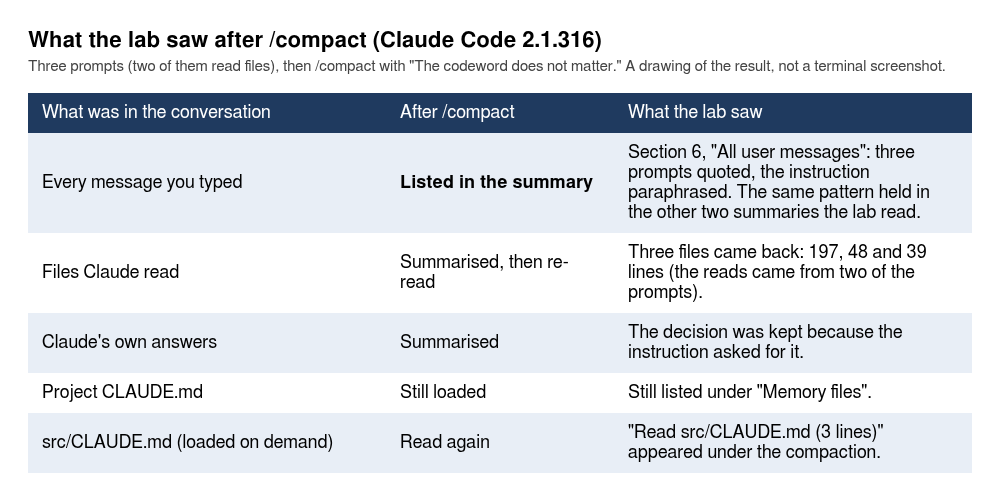
There is a second trap, and the lab fell into it on the first attempt. The first run planted the codeword with the words “Two things to keep …”. Claude saved both facts to auto memory (memory/codeword.md and memory/order-limit.md), so they came back after the compaction for that reason and not because of the compaction. That is why the run above has auto memory off. If you test /compact yourself, switch auto memory off first (CLAUDE_CODE_DISABLE_AUTO_MEMORY=1 claude), or you will measure the wrong thing.
Three smaller results:
- On a small conversation
/compactdoes not shrink anything. Messages went from 8.6k tokens to 9.8k, because the re-read files come back. Anthropic’s context window page says Claude Code re-reads up to five recently used files, and that a file over 5,000 tokens comes back as a path reference without its content. It pays off on big contexts, like the one in the next section. - The project CLAUDE.md stayed listed under “Memory files” after the compaction.
src/CLAUDE.md, which had loaded on demand, came back asRead src/CLAUDE.md (3 lines). That run used the two smaller files printed in the CLAUDE.md section below. Anthropic’s context window page disagrees with itself here. Its table says “Nested CLAUDE.md in subdirectories: Claude Code reloads them on demand”, which is what the lab saw. The text under the table says path-scoped rules and nested CLAUDE.md files “load into message history … so compaction summarizes them away with everything else”. I would not rely on either for a rule that must hold, and I would put it in the project-root CLAUDE.md, which the page also recommends. - Three turns plus one compaction cost $0.21.
When does Claude Code compact on its own?
When the context nears its limit, Claude Code compacts without being asked. Where it does that is a setting. In 2.1.316 on Sonnet 5.5, /context showed “Auto-compact window: 1m tokens” and a buffer of 33k tokens kept free. /autocompact with no value opens a dialog (Current setting for Sonnet 5.5: 1m tokens (default for this model)), where Enter applies and Esc cancels. With a value it sets the window:
❯ /autocompact 150k
  ⎿  Auto-compact window for Sonnet 5.5 set to 150k tokens
/context then read “Auto-compact window: 150k tokens”, with the buffer unchanged at 33k, which is now 22.0 percent of the window. The setting is saved per model, in your user settings file, as the lab found by reading it:
{
  "theme": "dark",
  "modelSettings": {
    "claude-sonnet-5-5": {
      "autoCompactWindow": 150000
    }
  }
}
That was the lab’s file in a clean home. Yours also holds what document 1 put there (minimumVersion, the env block, perhaps skipDangerousModePermissionPrompt), and the modelSettings block sits beside them.
Does it really fire? The lab made six log files of 700 lines each, about 62 KB apiece, in a logs/ folder (they are not part of doc-2-start, so you make them yourself. The repository’s .gitignore has *.log, so git status will not list them, and the only untracked file this section leaves is the autocompact.jsonl of the second block), set the window to 100k with the documented flag --autocompact 100k, and asked headless Claude to read them one by one. The files come from this loop, and every seventh line says failed:
mkdir logs && for i in 1 2 3 4 5 6; do
  awk -v n=$i 'BEGIN{for(k=1;k<=700;k++) printf "2026-10-%02d order ord_%d_%05d amount=%d email=customer%d@example.test status=%s\n", n, n, k, (k*37)%99000+100, k, (k%7==0?"failed":"notified")}' > logs/orders-$i.log
done
claude -p 'Read logs/orders-1.log to logs/orders-6.log one file at a time with the Read tool, in order, reading each file completely (use offset and limit if one read is cut off). Do not use grep, wc or any shell command. After each file say how many lines have status=failed. At the end give the six numbers.' \
  --autocompact 100k --output-format stream-json --verbose < /dev/null > autocompact.jsonl
The stream held three system events with subtype compact_boundary and trigger auto:
pre_tokens 69,792 -> post_tokens 6,070
pre_tokens 63,980 -> post_tokens 17,322
pre_tokens 71,335 -> post_tokens 6,307
Each took 10.6 to 12.5 seconds. They fired at 64k to 71k, which fits the window minus the buffer, 100k minus 33k, which is 67k. After three compactions the model still answered correctly, 100 failed lines in each of the six files. Sixteen turns, $0.9754. That is the dearest single item in this document, and it is dear because the lab forced a compaction every two files.
The lab did not run the CLAUDE_CODE_AUTO_COMPACT_WINDOW environment variable, the autoCompactWindow key written by hand (only the command wrote it), or idle compaction. Only the flag and the command were run.
Which CLAUDE.md files does Claude read, and when?
CLAUDE.md is a plain markdown file of instructions that Claude Code loads into context at the start of a session. Anthropic’s memory page says to keep each file under 200 lines, and says Claude treats the content as context, not as enforced configuration. The lab’s tests agree with both, and the second one is the one people forget.
The setup: three made-up files, each carrying a different checkable fact. A user file at ~/.claude/CLAUDE.md:
# Reading preferences
Keep answers short: one small paragraph, no bullet lists unless I ask for a list.
A project file at ./CLAUDE.md:
# order-notifier

Node 20+, ES modules, no dependencies. Run `npm test` after every change and report the pass count.
Money is integer cents. Never use floating point for an amount.
Routes live in src/app.js, validation in src/orders.js. Keep orders.js free of network and clock calls.
And a subdirectory file at src/CLAUDE.md:
# Rules for src/

Every exported function in src/ gets a one-line JSDoc comment.
Never import anything from outside this repository.
The control first. With none of the three files in place, the lab asked “list every instruction file loaded” and Claude said “none”. Then with all three, asked without letting Claude read anything:
- Launched in the repository root: the user file and the project file were loaded.
src/CLAUDE.mdwas not. Claude had seensrc/CLAUDE.mdin the git status output but not its text. - Same launch, but Claude was first told to read
src/orders.js: all three, and the screen showed⎿ Loaded src/CLAUDE.mdunder the read. - Launched from inside
src/: all three, with the project file picked up from the directory above.
So the user file and every CLAUDE.md in the directories above you load at launch, and a file in a subdirectory loads when Claude first touches something in that subdirectory. The docs say the same. The loading tests above ran with the three files printed. /context all was run in a separate session on two smaller files, so I print those too, and the numbers belong to them. The user file was the same two lines. The project CLAUDE.md had three lines:
# order-notifier
Node 20+, ES modules, no dependencies. Run npm test after every change and report the pass count.
Money is integer cents. Never use floating point for an amount.
And src/CLAUDE.md had two:
# Rules for src/
Every exported function in src/ gets a one-line JSDoc comment.
With those, /context all listed “Memory files” with ~/.claude/CLAUDE.md at 45 tokens and CLAUDE.md at 67 tokens, 112 in total. The five-line project file printed earlier is longer, so expect a larger number from it; the lab did not count it. The subdirectory file is not in that list even after it loaded, because it lives in the message history. After /compact the screen said Read src/CLAUDE.md (3 lines) for the two-line file, and the lab did not check why the count is not 2.
What happens when two levels both give an order about the same thing? The lab put End every reply with the line: -- user in the user file and -- project in the project file, and asked for a one-sentence hello:
Hello! I'm ready to help with your order-notifier project. -- project -- user
Claude did both. With only the user file: -- user. Be careful what that shows. It is not a conflict, because both orders can be obeyed at once by printing two lines. It shows that the files are added together, not that one overrides the other. It says nothing about what happens when the two orders cannot both be followed.
So the lab ran a real conflict. The user file, ~/.claude/CLAUDE.md, said:
# My preferences
- Write git commit messages in the past tense, for example "Added a health route".
The project file, ./CLAUDE.md in the repository, said the opposite:
# order-notifier
- Write git commit messages in the imperative mood, for example "Add a health route".
The prompt was the same each time: “Write a one-line git commit message for a change that adds a 5-second timeout to the fetch call in src/notifier.js. Reply with the message only.” Each call was headless (claude -p), in a fresh home folder, so nothing carried over. The lab then swapped the two instructions between the files, so that the user file said imperative and the project file said past tense, because the repository’s own commit history is imperative and could have been what Claude followed. Three calls per model per arrangement, on Haiku 5.5 and on Sonnet 5.5, 12 calls in all:
| User file said | Project file said | Haiku 5.5 | Sonnet 5.5 |
|---|---|---|---|
| past tense | imperative | 3 of 3 imperative (“Add a 5-second timeout to the fetch call in src/notifier.js”) | 3 of 3 imperative |
| imperative | past tense | 3 of 3 past tense (“Added a 5-second timeout to the fetch call in src/notifier.js”) | 3 of 3 past tense |
The project file won 12 of 12, whichever tense it held. A later re-run of the same arrangement made 21 calls and the project file won 19 of them. The two the user file won were both Haiku, with an imperative user file and a past-tense project file. So read the table as one draw, not as a rate. To check that both files reached Claude, the lab asked one more call to list every instruction about commit messages and the file each came from. It named both files by path, called it “The conflict”, and chose the project file, “since it is the more specific instruction and the repo’s own history uses it”, then added “If you want past tense for this repo, tell me and I’ll use that instead.” Treat that as one run’s own explanation, not as a rule. That fits the load order on Anthropic’s memory page, which lists the CLAUDE.md locations “in load order, from broadest scope to most specific, so a project instruction appears in context after a user instruction”. The page also says “Consistency: if two instructions contradict each other, Claude may pick one arbitrarily”, so 12 of 12 is what these runs did, not something the page promises. (The page’s other line about being read last, “instructions closer to where you launched Claude are read last”, is about CLAUDE.md files in parent and child folders, not about user versus project.)
Now what that does not show. The same page says “if two instructions contradict each other, Claude may pick one arbitrarily.” It also says, in its section on .claude/rules/ files, “if a user rule and a project rule conflict, Claude may follow either one, so keep the two consistent”. That sentence is about rules files, not CLAUDE.md files, so I cite it only as Anthropic’s general warning. My 12 calls do not contradict “may”. They were one wording, one task, one-line rules, two models, headless, and on one version. So do not write “the project file always wins” in your own notes. In the lab’s first twelve calls it won every time, in a re-run it won 19 of 21, and Anthropic says not to count on it.
Two more things from those runs. Two of the twelve replies carried a second line, a Co-Authored-By trailer naming the model that answered: Co-Authored-By: Claude Haiku 5.5 <noreply@anthropic.com> in one Haiku reply and Co-Authored-By: Claude Sonnet 5.5 <noreply@anthropic.com> in one Sonnet reply. That is Claude Code adding its own commit attribution, not something either file asked for. The other ten replies had no trailer, and the one-off call that listed the instructions named the same attribution rule as a system reminder, not a file. The lab did not look up the setting that controls it. And the lab scored only the first line of each reply.
The page also describes /doctor prompt-audit, which checks your instruction files for mistakes and contradictions. It needs 2.1.283 or later, and the lab was on 2.1.316. It has its own section below.
So the practical meaning of “context, not configuration” is this. Keep your files consistent, and anything that must never be broken belongs in a permission rule or a hook. Anthropic’s memory page says the same thing and points at hooks. Document 3 covers rules, document 4 covers hooks.
Other things the lab ran on CLAUDE.md:
CLAUDE.local.mdloads next toCLAUDE.md(the lab’s file said “use port 3100”, and Claude knew it). The catch: this repository’s.gitignoredoes not list it, sogit statusshowed?? CLAUDE.local.md. Add the line to.gitignoreyourself, or you will commit your private notes.- Imports. A line in CLAUDE.md reading
Follow @docs/commit-style.md for every commit.pulled the file in, and Claude quoted the imported convention with zero tool calls. Written in backticks,@docs/commit-style.mdstays literal text, and Claude said it had not read the file. The docs add a limit: imported files can import others to a maximum depth of four hops. .claude/rules/tests.mdwith apaths:filter oftest/**/*.jswas not known at launch (Claude said “None”), and was known after Claude readtest/orders.test.js, which it quoted.AGENTS.mdalone was used. With a CLAUDE.md next to it, it was not. That is the docs’ default as well.
What does /doctor prompt-audit find?
/doctor prompt-audit reads your instruction files and reports what is stale, wrong or contradictory. Anthropic’s memory page says “nothing in your files changes until you ask Claude to apply them”. It also says that by default the audit covers “your CLAUDE.md, CLAUDE.local.md, and AGENTS.md files, plus the rules, skills, commands, subagents, and output styles under .claude/ and ~/.claude/“, so on your own machine it reads your user-level files too, not only the repository’s. To audit one file or folder, pass its path, for example /doctor prompt-audit .claude/skills/deploy. The lab’s project was a fresh clone with a fresh home folder and one CLAUDE.md, so its run exercised only the CLAUDE.md part, and your report may have more to read than the one below. If you followed the CLAUDE.md section, you have a user file at ~/.claude/CLAUDE.md and a src/CLAUDE.md, and the audit reads both. To match the lab, run this in a second clone, with ~/.claude/CLAUDE.md moved aside. The lab tested the “nothing changes” sentence on a project CLAUDE.md it wrote with four kinds of mistake a beginner could plausibly make: scripts that do not exist (npm run test:unit and npm run lint), a wrong test folder and framework (spec/ and Jest), two indentation rules that contradict each other (tabs and 2 spaces), and a “careful senior engineer” line of padding:
# order-notifier

A small Node service that takes orders over HTTP and sends confirmation emails.

## Commands
- Run the tests with `npm run test:unit` before you finish any change.
- Start the server with `npm start`.
- Lint with `npm run lint`.

## Layout
- The code is in `src/`. The tests are in `spec/` and use Jest.
- Config files are in `config/`.

## Style
- You are a careful senior engineer. Think step by step and double-check everything. IMPORTANT: ALWAYS be thorough.
- Indent with tabs.
- Indent with 2 spaces.
The facts the audit should find were printed first: package.json has only a start and a test script (node --test), the tests are in test/ and use node:test, there is no spec/ folder, and src/orders.js indents with 2 spaces. In an interactive session the lab typed /doctor prompt-audit and pressed Enter. Within seconds the screen showed Claude reading a file inside Claude Code’s own temporary folder, the instructions of its bundled /claude-api skill, and then it read your CLAUDE.md. About 27 seconds later there was a report. It started by stating its assumptions: the one CLAUDE.md in the project was the whole scope, and it had not read settings files, .mcp.json or ~/.claude.json. Then the findings. All four kinds of mistake were in it. The report counted the two missing scripts as two findings, so there are five rows. This is the lab’s table. A re-run by someone else gave the same five findings as a numbered list, each with Location, Evidence, Why obsolete, Confidence and Action lines, plus a small table of counts, so the layout and the wording vary:
| # | Where | Finding | Action |
|---|---|---|---|
| 1 | CLAUDE.md:6 |
npm run test:unit is not a script |
rewrite to npm test |
| 2 | CLAUDE.md:8 |
npm run lint is not a script |
remove |
| 3 | CLAUDE.md:11 |
spec/ and Jest: tests are in test/ and use node:test |
rewrite |
| 4 | CLAUDE.md:16-17 |
the two indentation rules contradict | remove line 16, keep 17 |
| 5 | CLAUDE.md:15 |
the “careful senior engineer … ALWAYS be thorough” line | remove |
Row 4 carried its evidence: “every file in src/ and test/ has 0 tab-indented lines”. The report’s reason for row 5: “Think step by step” is redundant on a model that already plans and reasons. Under the table, a proposed diff headed “Nothing is applied.” with a separate hunk per change (the re-run’s heading said the diff was not applied because the request did not ask for edits). This is my shortened copy of the table. The lab’s columns also had the evidence and a confidence rating. The line numbers are the model’s, and the re-run’s were off by one or two lines in all five places (it said CLAUDE.md:8 for the test:unit line, which is line 6), although the display of Claude’s own edit numbered the lines correctly. Open the file and check each location before you apply anything.
Does it change nothing? The lab ran the audit a second time and hashed the file before and after: the SHA-256 was a8c40910b0bf...fb879 both times, git status showed only the untracked CLAUDE.md, and the list of tools Claude used had no edit or write in it. In the first session, to take one hunk, the lab typed “Apply only the proposed edit that fixes the two contradicting indentation rules. Change nothing else.” Claude made one edit, removed the line - Indent with tabs., and said it matched the 2-space indents in src/ and test/. The second run found the same four mistakes in the same groups, with different wording, so do not expect identical text.
Two things you may trip on. The grey text in the input box after the report, such as “apply the diff”, is a suggestion Claude drew, not text you typed, and the lab pressed neither Tab nor Enter on it. And the audit is not free: each of the two sessions cost about $0.42 on Sonnet 5.5, nearly all of it cache reads and a cache write of 76 to 79 thousand tokens, and the /cost screen itself suggested running /doctor on a cheaper model. That is a lot for a 17-line file, so run it when you have a long file or an old one, not every day. The lab did not try it on Haiku.
What does /init write?
/init asks Claude to read the repository and write a CLAUDE.md. In 2.1.316 it asked no questions. Run it where there is no CLAUDE.md yet: a second fresh clone (git clone --branch doc-2-start https://github.com/dominicplouffe/order-notifier.git ~/order-notifier-doc2-init), or your clone after you delete CLAUDE.md. The lab ran it in a clean clone:
❯ /init
  Read 1 file, ran 2 shell commands
● Write(CLAUDE.md)
  ⎿  Wrote 29 lines to CLAUDE.md
One turn, 14 seconds, $0.0771. The file had three sections: Commands, Architecture, and “Behaviours that are easy to break”. A later re-run in another clean clone wrote 26 lines, for $0.0751, with sections named Commands, Architecture and Configuration, so the count and the headings change from run to run. The middle of it looked like this:
## Commands

Zero dependencies (Node >= 20, ESM); there is no install or build step.

- `npm test` — runs `node --test`, which finds every `*.test.js` under `test/`. Do not pass a directory (`node --test test/` fails on Node 22 with "Cannot find module").
- Single file: `node --test test/orders.test.js`. Single test: `node --test --test-name-pattern="<substring>" test/app.test.js`.
- `npm start` — serves on port 3000 using `config/development.json`.
What if you run /init in the tree you built through the CLAUDE.md section, with its 5-line CLAUDE.md and the src/CLAUDE.md? It does not write a new file. In the re-run Claude said “I updated the existing CLAUDE.md instead of replacing it”, the tool line was still Write(CLAUDE.md) but the result line said Added 20 lines and not Wrote 21 lines, and your five lines stayed byte for byte. It put a header line above them and added a Commands section and an Architecture section below. In the latest re-run the file went from 5 lines to 25. In an earlier one it reached 32, with a rule about JSDoc comments copied from src/CLAUDE.md. So the line count and what it copies vary. A second pass in the same kind of tree got something else again: nothing written at all. Claude said “A CLAUDE.md already exists (untracked) … so I haven’t overwritten anything”, listed suggested additions, and asked “Do you want me to apply the CLAUDE.md additions?”, and the file stayed at 5 lines. Read what it says before you answer, because it may ask first. If you want the full draft, use a clean clone and compare.
Claude said it had not run the single-test commands it wrote down, “so they’re untested”, which is a fair thing to check yourself before you trust the file. The file is left untracked afterwards, so read it, cut what is wrong, and commit it. The /cost screen after /init suggested “Run /init on a cheaper model”, which is the first of several cost hints the lab saw and is worth knowing exists.
My view on the output: it is a good first draft of the commands and the architecture, and a weak place to put rules. The best line in it was the one about node --test test/ failing on Node 22, and that line came from the README, not from any insight. Add your own rules by hand.
What is auto memory, and what happened to the # shortcut?
Auto memory is notes Claude writes for itself about your project, kept outside the repository and loaded again in later sessions. /memory opens the dialog for it:
   Memory

   ❯ Auto-memory  true
     User instructions     Saved in ~/.claude/CLAUDE.md
     Project instructions  Checked in at ./CLAUDE.md
     Open auto-memory folder

   Learn more: https://code.claude.com/docs/en/memory
(The lab’s screen had those four rows. I left out the blank rows and the box drawing.) The files live at ~/.claude/projects/<project>/memory/. There is an index, MEMORY.md, with one line per note, and one file per note with a small frontmatter block. Anthropic’s memory page says the first 200 lines or 25KB of the index load at the start of every session. This is the index and the note from a run in a clean clone, one made before the CLAUDE.md section. That detail matters, as you will see below:
== MEMORY.md
- [Money as integer cents](money-as-integer-cents.md) — always use integer cents for money, never floats
== money-as-integer-cents.md
---
name: money-as-integer-cents
description: "Always represent money as integer cents (never floats) in code, config, APIs and tests"
metadata:
  node_type: memory
  type: feedback
  originSessionId: b6a14776-5a21-4d69-84f0-f8f457d273a6
  modified: 2026-11-03T00:21:24.564Z
---

Always use integer cents for money.

**Why:** User stated it as a standing rule; avoids float rounding errors. The repo already follows it (`amountCents`, `maxOrderCents`, integer validation in `src/orders.js`).

**How to apply:** Name money fields with a `Cents` suffix, validate with `Number.isInteger`, and convert to a decimal string only at display time (e.g. `formatAmount`).
How did that note get written? In the clean clone the lab typed # always use integer cents for money, the old shortcut, which in earlier versions appended the line to a memory file. In 2.1.316 the # is dropped from the echoed text and the line is sent as an ordinary prompt. Claude answered, saved the auto-memory note above (“Wrote 2 memories”) and wrote no CLAUDE.md and changed none.
You will not get that result in your tree, and the reason is worth seeing. In the CLAUDE.md section you wrote a CLAUDE.md whose second line is “Money is integer cents. Never use floating point for an amount.” Type the same line there and the lab’s re-run printed this (three tries, two on the default model and one on Haiku, the same in substance each time):
❯ always use integer cents for money

● That's already in the project's CLAUDE.md ("Money is integer cents. Never use floating point for an
  amount."), so I haven't saved a duplicate memory. If you want it to apply in your other projects too, tell
  me and I'll add it to your global instructions.
The memory folder stayed empty: ls printed nothing and there was no MEMORY.md. So if you open the folder after that line and find nothing, nothing went wrong. Claude does not save what your files already say. To get a note into your own tree, tell it something new, and the next paragraph does that.
The shortcut itself is gone. Its job is done now by auto memory when Claude decides a note is worth keeping, or by you opening the file from /memory. Anthropic’s changelog settles it: version 2.0.70 lists “Removed # shortcut for quick memory entry (tell Claude to edit your CLAUDE.md instead)”. If a tutorial still tells you to type #, it predates that release.
Does a saved note carry into a new session? This one works in your tree, because the fact is new to it. The lab typed, in an interactive session, “Remember that in this project we call the order limit the ceiling.” The screen printed Recalled 1 memory, wrote 2 memories (I did not look into what the “recalled” one was, in a folder that had been empty), and Claude replied that it had saved the term. Two files were written, and the index was one line:
- [Order limit = ceiling](order-limit-ceiling.md) — project term for the order limit
A brand-new headless session then answered “What does this project call the order limit? One sentence.” with ‘The project calls it the “ceiling” (per the saved memory note “Order limit = ceiling”).’ The same question with CLAUDE_CODE_DISABLE_AUTO_MEMORY=1 set did not give that word. On the first go it said “I can’t say for certain”. On the latest it answered with maxOrderCents, a config name it found in the code, and never said “ceiling”. The wording of the failure varies, and the missing word does not. So the note, and not the model, carried the fact.
The headless case came out differently in the lab’s two goes, and that is the point. In the lab’s first go, a claude -p prompt starting “Remember that …” got the reply “Understood”, wrote nothing, and a later session did not know. The lab did not keep the exact wording of that prompt. Told “Save this to your auto memory as a project note, then confirm in one sentence: the order limit is called the ceiling in this project.”, it wrote both files, in four turns for $0.0293. A later re-run tried claude -p 'Remember that the order limit is called the ceiling in this project.' < /dev/null three times in three fresh clones, once on Haiku and twice on the default model, and every time Claude took four or five turns, replied that it had saved the note, and left MEMORY.md plus a note file in ~/.claude/projects/<project>/memory/. A later headless question on the default model answered “the ceiling”. So whether a headless “Remember that” saves anything varies, and the reliable habit is to name the place, as in the “Save this to your auto memory” wording, then look in the memory folder yourself. A file that is not there is a note that was not saved.
A cost note: the lab’s CLAUDE.md probe calls ran about $0.02 each. Instruction files are small next to the 27.8k tokens Claude Code carries on its own.
How does plan mode work as a daily workflow?
In a Claude Code session, plan mode makes Claude read and propose without touching your files. Press Shift+Tab to cycle the permission mode. Document 1 covers all six modes, and Anthropic’s permission modes page gives the cycle from auto mode as default, then acceptEdits, then plan. The lab pressed it from the start state and saw the footer change each time:
  ⏵⏵ auto mode on (shift+tab to cycle)
  manual mode on          (one press)
  accept edits on         (two presses)
  ⏸ plan mode on (shift+tab to cycle)   (three presses)
(One line per screen, with the footer text on each.) Three presses from the start. A fourth goes back to auto mode, per the docs. The lab did not press it.
The practice task, made up for this document: add a route that tells you whether an order was already sent. This is the prompt, typed in plan mode:
Add a GET /orders/:id route to the order service. It should answer 200 with {"id","notified":true} for an order that was already sent, and 404 with {"error":"not found"} otherwise. Update the tests and the README route table.
First the headless version, because it shows the rule most plainly. claude -p "<that prompt>" --permission-mode plan read the files, wrote a plan to ~/.claude/plans/add-a-get-orders-id-snuggly-lecun.md (the name differs every time), and replied “I’ve written the plan, but I haven’t changed any code. ExitPlanMode is disabled in this session, so I can’t ask for approval the normal way.” git status afterwards printed nothing, and permission_denials was empty. It cost $0.0656. Headless plan mode gives you a plan file and stops. It cannot ask you to approve it.
The interactive flow is the useful one. After reading the code Claude showed a screen headed “Ready to code?” with its plan. This is the top and the bottom of it, from the lab’s second run:
   Ready to code?
   Here is Claude's plan:
   Plan: GET /orders/:id
   Context
   The service records sent orders only in the in-memory seen Set in createApp (src/app.js). There is no
   way to ask whether an order was notified. Add GET /orders/:id: 200 {"id","notified":true} if the id is
   in seen, otherwise 404 {"error":"not found"}.
   ...
   Claude has written up a plan and is ready to execute. Would you like to proceed?
   ❯ 1. Yes, and use auto mode
     2. Yes, manually approve edits
     3. Tell Claude what to change
        shift+tab to approve with this feedback
The plan itself had a changes list and a verification step (npm test, no argument). It also flagged something the lab had not asked about: decodeURIComponent throws on input like %zz, and in this service’s async handler an uncaught throw becomes an unhandled rejection. That is a good reason to plan first. The plan caught a bug before there was code.
The lab chose option 3 and typed a correction: do not touch the header comment in src/app.js, and add the README row only. The revised plan said “leave the header comment alone” and listed one README row, so it honoured the correction. Then it chose option 2, to approve edits by hand. Every edit comes up as a diff:
 Do you want to make this edit to app.js?
 ❯ 1. Yes
   2. Yes, and switch to accept edits (auto-approve file edits and common file commands) for this session
      (shift+tab)
   3. No
The lab answered 1 for the first edit and 2 for the second, and the rest went through without asking. Then Claude ran npm test, which needed its own approval (the screen offered “Yes, and don’t ask again for: npm test *”), and finished with:
● GET /orders/:id now answers 200 {"id","notified":true} for an order that was already sent, and 404
  {"error":"not found"} otherwise. npm test passes (27 tests, 0 failures).
The session got named after the plan in the footer. The whole flow cost $0.1632 on the /cost screen.
Bon. Here is the part to take seriously. The lab ran this exact flow twice. Run one changed 3 files with 53 lines added and ended with 28 tests passing (25 plus 3). Run two, the one above, added 45 lines and ended with 27 tests (25 plus 2). Same prompt, same repository, same model, same correction. Two different diffs. So the output in this section is one real run, and yours will differ in line counts, test names and even the number of tests. If a tutorial gives you “the” diff for a prompt, it was one draw. What you can rely on is the shape: a plan, a chance to push back, then edits.
What the lab did not run: Ctrl+G to edit the plan in an editor (no editor could be driven in the sandbox), and option 1, “Yes, and use auto mode”.
How do you review what Claude did in a Claude Code session?
Four tools, from cheapest to dearest.
! git diff --stat in the session, or the same command outside it. After run one the numbers were the same both ways:
 README.md        |  1 +
 src/app.js       | 13 +
 test/app.test.js | 39 +
 3 files changed, 53 insertions(+)
(The lab’s output also had the + bars.) Get in the habit of looking from outside the session at least once. A model’s account of its own edits is a claim, and git diff is the evidence.
/diff shows the edits made in the Claude Code session you are in, and works only in the session that made them. In a new session after /exit it says “No changes this session” and offers “3 files edited before this session” in a clean clone. In your tree it counted the untracked files too and printed “+6 files edited before this session”: three modified and three untracked. In the Claude Code session that made them, it opens a side panel beside the conversation: “3 files changed +53”, the file list with counts, and the diff for the highlighted file. (A later re-run said “+51”, because Claude writes a different test file each time.) The panel folds test files away: that re-run’s list showed README.md +1, src/app.js +13 and a row 1 test/generated (show), and the test file’s count appears only after you press show. It stays open. The lab sent Esc to close it and the panel stayed in later screens, so closing it is not tested. The ✕ in the corner is for the mouse.
Ask for a review. The lab asked, in a new session, “Review my uncommitted changes like a code reviewer. At most three concerns, most important first. Do not edit anything.” Claude ran git diff, read src/app.js, and returned three concerns: a race where a send still in flight looks like a 404, a fall-through block that is easy to break when the next route is added, and thin edge-case tests. It also noticed the header comment still said “three routes”. It edited nothing. One caution: this reviewer is the same model that wrote the code, so it is a second look and not an independent one.
/code-review is a built-in skill that you start from a Claude Code session and that runs as a background agent. It prints “Running in the background as @code-review”, and when it is done “Agent “/code-review” finished”. Which numbers you get depends on the diff. Before the findings, know what it looks at. The skill tells the agent to run git diff @{upstream}...HEAD, or git diff main...HEAD or git diff HEAD~1 if there is no upstream, and to add git diff HEAD when there are uncommitted changes. The agent picks the commands. In one re-run the agent’s own first shell command was this:
(git diff @{upstream}...HEAD 2>/dev/null || git diff main...HEAD 2>/dev/null || git diff HEAD~1)
echo "=== WORKING TREE ==="; git diff HEAD
echo "=== STATUS ==="; git status --short
(The agent ran it as one line. I put it on three.) The two silent git diff attempts fail in the clone you have, because a clone of a tag has no upstream branch and no local main. In that run git diff HEAD~1 ran, and the review took in the repository’s own last commit (six files: README.md, src/app.js, src/notifier.js and three test files) as well as the uncommitted change. That is the unusual run. In five later runs on Haiku, on a hand-made change to the same three files, the agent’s first command tried the range and the working tree together, the range failed, and the review covered the working tree only. None of the five ran git diff HEAD~1, and one said so itself: “The review compared the working tree only, because main isn’t a local branch here.” So what it looks at can change from run to run, and a review of your change may include code you did not write.
The lab first ran it on a one-line diff, a comment above formatAmount, which you can make by stashing the plan section’s change (git stash) and adding one comment line. Afterwards, drop the comment with git checkout -- src/orders.js and bring your change back with git stash pop. Those two are plain git, and a later check ran them in the three-file tree: after the checkout only the untracked files were left, and after the pop the three modified files and the same diff stat came back. In a clean clone that run finished in 8 seconds and reported “Code review(review · 0 findings)”. Claude then summarised it, and mentioned that formatAmount assumes two decimal places, so a currency with none would be formatted wrongly. That one command cost $0.1148, more than the whole plan-mode session, and the /cost screen afterwards listed “/code-review 52%” and “Run /code-review on a cheaper model”. Those percentages depend on what else the day’s usage held, so treat them as one run’s.
In your tree the same recipe came out differently, because you have the CLAUDE.md files. The re-run took 14 seconds, printed no “0 findings” line, and cost $0.1083. Claude’s summary said “The review found no new runtime bug”, and then listed what it flagged: src/CLAUDE.md wants a one-line JSDoc on every exported function, and validateOrder, buildNotification and OrderError have none. It also said the new // comment is not a /** */ one, and that formatAmount uses (cents / 100).toFixed(2), which is floating-point math on an amount, against the integer-cents rule. Your own instruction files change what it flags, and so does the model’s mood on the day: a second pass on the same recipe in its own tree got five findings (a missing header comment, a route fall-through, a race on seen, ids containing /, and a missing JSDoc) in 24 seconds. Expect a different list from either of ours. The /cost screen listed “/code-review 11%” and the hint “Give simple subagents a cheaper model”.
To review only your change, make a local main first with git branch main origin/main. Then the second attempt, git diff main...HEAD, succeeds and shows nothing, and git diff HEAD shows your three files. The lab ran that on a copy of the three-file tree, on Haiku. The agent’s commands were git diff main...HEAD --stat, which printed nothing, and git diff HEAD --stat, which listed the three files. It took 48 seconds and reported ten findings, all on the working tree. Claude’s summary added that git diff HEAD was empty, which did not match the modified files in the status snapshot, so the reviewed diff “may not be the one you expect”. The lab did not keep the agent’s transcript, so I cannot show why, and the line did not come back in four later runs with a local main, made on that hand-made change to the same three files (31 to 64 seconds. The summaries gave seven, eight and five findings, and “one real bug and a few smaller issues” with four named. In all of them the three files were listed). I do not know the cause, so treat the line as one run’s. Without the main branch, the one run that chained the three attempts as shown above took 44 seconds and gave eight findings: most of them “pre-existing and not caused by your uncommitted changes”, in Claude’s words, including a race on the duplicate check and a bare throw that can crash the process, and two that touched your diff, an unauthenticated GET /orders/:id that reveals which orders were notified and a notified field that means different things in two responses. The five no-main runs that reviewed the working tree took 21 to 50 seconds and gave short lists of findings (three, six, “one real bug and a few smaller” and two lists the lab did not count). Seconds and finding counts are one run’s. I did not price the three-file runs one by one. It is a heavy tool for a small diff, and it finds things in a big one. Reach for it before a pull request, not after every edit.
To commit, ask: “Commit these changes with a one-line message.” The result was commit 1755cef, “Add GET /orders/:id to look up an order that was sent” (yours will have another hash and message). The working tree was clean afterwards in the lab’s clean clone. It will not be clean in yours. A re-run in the tree you have by now committed only the three tracked files and said it had left the untracked ones out, and git status --short afterwards still listed three ?? lines (autocompact.jsonl, CLAUDE.md, src/CLAUDE.md, and a-session.txt if you have reached the resume section). That is correct: you did not ask it to commit them. Also, with the 5-line CLAUDE.md from the CLAUDE.md section in place, Claude ran npm test before committing, because that file tells it to, and in the clean clone it did not. So the reply and the message differ with the tree you have. Read the end of the message:
Add GET /orders/:id to look up an order that was sent
Co-Authored-By: Claude Sonnet 5.5 <noreply@anthropic.com>
Claude Code adds a Co-Authored-By trailer by default. If your team does not want it, the docs describe an attribution setting. The lab did not run that setting.
How do you undo an edit with /rewind?
/rewind is the undo for Claude’s file edits. Anthropic’s checkpointing page says every prompt you send that starts a turn creates a checkpoint, that Claude Code keeps snapshots for the 100 most recent checkpoints in a session, and that it deletes a session’s snapshots about 30 days after the session last saved one.
The lab asked Claude to add a one-line comment above validateOrder in src/orders.js, then ran /rewind. The menu lists your prompts, and the highlight starts on (current), so press Up to reach the prompt you want:
   Rewind
   Restore the code and/or conversation to the point before…
     ↑ 1 more
     !  git diff --stat
     No code changes
   ❯ (current)
   Enter to continue · Esc to cancel
Enter on the edit prompt shows the choices:
   Rewind
   Confirm you want to restore to the point before you sent this message:
   │ Add a one-line comment above validateOrder in src/orders.js saying what it checks.
   │ (22s ago)
   This message and everything after it will be removed.
   The code will be restored -1 in orders.js.
   ❯ 1. Restore code and conversation
     2. Restore conversation
     3. Restore code
     4. Summarize from here
   ↓ 5. Summarize up to here
   ⚠ Restored files go back whole, losing later changes by anyone. Bash changes to other files are not
   undone.
The lab pressed 3, Restore code. From outside the session git status printed nothing and the comment line was gone from src/orders.js. Note the warning on the screen. Restored files go back whole, so anything you edited in that file yourself after the checkpoint goes too, and files changed only by shell commands are not tracked. The docs say the same, and add that edits made by a subagent are usually not captured. Git is still the real undo. /rewind is the quick one.
Esc Esc is the shortcut for the same menu, with a catch the lab hit. Two Escapes sent half a second apart did nothing, in two tries. Two Escapes written together opened the menu. On a real keyboard a quick double tap is probably fine, and the docs say it works when the prompt box is empty, but the lab drove the terminal through a script, so that part is not tested with real fingers. The lab also did not run options 1, 2, 4 and 5 of the menu, or the instructions row that the docs describe for the two Summarize options.
How do you come back to a Claude Code session later?
Every Claude Code session is a file, so you can reopen one. The lab built three sessions in a fresh home folder to see which command finds which. Session A was interactive and named at the start with claude -n order-lookup, begun in accept-edits mode. Session B was a later headless claude -p run. Session C was another headless run.
Inside session A, /export a-session.txt wrote a plain-text copy of the screen and printed “Conversation exported to: …/a-session.txt”. It goes into the current folder, so it shows in git status as untracked.
claude --continue(interactive) opened session A and not the newer headless B. The permission mode came back too, withaccept edits onin the footer.claude --resumewith no argument opens a picker. It listed only A. The box below is redrawn shorter than on screen, because the lab’s capture cut off the right edge of the real one:
  Resume session
  ╭──────────────────────────────────────────╮
  │ ⌕ Search…                                │
  ╰──────────────────────────────────────────╯
    order-notifier
  ❯ order-lookup
    2 seconds ago · HEAD · 288.4KB      (shows session-practice if you made that branch)
    Ctrl+A to show all projects · Ctrl+B to only show current branch · Space to preview · Ctrl+R to rename ·
    Type to search · Esc to cancel
claude --resume order-lookupopened A directly with the whole conversation on screen.claude -p --continueis different. It resumes the newest session, headless ones included. After the lab made headless session C, it answered about C and kept C’s session id. (Earlier, when A was the newest, it picked A.) The docs describe both behaviours, and the lab’s results match them.claude -p --resume <id>keeps the same session id and appends to the same file (38 lines in the lab’s check). Add--fork-sessionand you get a new id and a new file (36 lines) with the original unchanged./branch alt-approach, inside a resumed session, printed:Branched conversation "alt-approach". You are now in the new branch (session 5daa...). Use /resume d8ad... ("order-lookup") to return to the original, or run claude -r d8ad... in a new terminal.Use it to try a second approach without losing the first.
Resumed headless calls were cheap, $0.025 to $0.047 each, mostly cache read.
The failure cases, run in a fresh home folder, with the lab’s output as logged:
$ claude -p --continue "hello" < /dev/null
Hello! I'm ready to help with the order-notifier project. What would you like to work on?
exit=0
$ claude -p --resume 00000000-0000-0000-0000-000000000000 "hello" < /dev/null
No conversation found with session ID: 00000000-0000-0000-0000-000000000000
exit=1
$ claude --resume nosuchname < /dev/null
Error: --resume requires a valid session ID or session title when used with --print. Usage: claude -p --resume <session-id|title>. Provided value "nosuchname" is not a UUID and does not match any session title.
exit=1
The reply to hello is the model’s own wording, and a second pass got “Hello! What would you like to work on in this repo?” instead; the exit codes and the two error lines were identical.
The last command ran with standard input redirected from /dev/null, not from a terminal. What you see when you type claude --resume nosuchname in a real terminal was not run, so I cannot say it prints the same message. The surprising row is the first. --continue with nothing to continue is not an error. It starts fresh and does not tell you.
What did it cost to exercise a Claude Code session?
The lab ran on a subscription token, so the figures are API-price equivalents from /cost and from the total_cost_usd field in the JSON output. They are the lab’s numbers for one run each, on one day, and the same prompt on a cold cache costs a little more. The table has the larger items.
| What | Cost | Note |
|---|---|---|
Short session loop, 2 prompts, !, /context, interrupt |
$0.0799 | 7 requests |
/compact with instructions, 3 turns |
$0.2141 | auto memory off |
| Three automatic compactions, 16 turns | $0.9754 | 370 KB of logs read |
/init |
$0.0771 | wrote 29 lines |
| Plan mode, headless | $0.0656 | wrote a plan file |
| Plan mode, interactive, plan to passing tests | $0.1632 | 27 tests |
| Review the diff and commit | $0.0818 | |
/code-review on a one-line diff |
$0.1148 | 8 seconds |
| 12 headless commit-message calls plus a control, conflicting CLAUDE.md files | $0.0907 | 13 calls, Haiku and Sonnet |
/doctor prompt-audit, one session |
$0.4210 | a second session cost $0.4185 |
Two /compact in one session, 9 prompts |
$0.4274 | auto memory off |
The lab’s recorded total for the first run was about $2.82: $1.7078 from the headless calls plus $1.1135 from nine /cost readings. Several interactive sessions in that run were not metered one by one, so the true figure is a little higher. The second round, which closed the conflict, /doctor prompt-audit and second-/compact questions, cost $1.36 more: 13 headless calls and three interactive sessions. That is about $4.18 for the whole document. The documents after this one will print their own totals.
Whatever your number is, the shape of the problem is real. Mettons a CI job runs the headless plan-mode call from above 200 times a day. At $0.0656 a call that is 200 × $0.0656 = $13.12 a day, and I made the 200 up but not the arithmetic. The cache would make later calls cheaper, so treat it as a ceiling for that prompt. A cap in front of the spend is how you find the number before the invoice does, and I wrote about that for a different tool in the LiteLLM budget post.
What was not tested?
Each item says why. Where the reason is “I did not ask the lab to run it”, that is the whole reason, and nothing blocked it.
- The “Resume this conversation?” dialog that appears when you resume a long conversation after a long break or on another model. It needs a long idle gap and a long saved conversation, and the lab did not produce either.
claude --from-pr <number>and background sessions (claude agents,claude attach,claude stop). They need a GitHub pull request or the agent view, and they belong to later documents.- The
/resumepicker keys Ctrl+A, Ctrl+B, Ctrl+W, Ctrl+R and Space. The lab drove only Up, Down, Enter and Esc, and I did not ask for the others. - Ctrl+G to edit the plan in your editor, and “Open auto-memory folder” in
/memory. Both need an editor, and the sandbox has none to drive. claudeMdExcludesandCLAUDE_CODE_ADDITIONAL_DIRECTORIES_CLAUDE_MDwith--add-dir. They matter when other teams’ CLAUDE.md files sit near your project, and the companion repository has none, so no run was built for them. An organisation-managed CLAUDE.md, symlinked shared rules and theclaude-md-and-agents-mdsetting: I did not ask the lab to run these either.- The
autoCompactWindowkey written by hand,CLAUDE_CODE_AUTO_COMPACT_WINDOW, and idle compaction. The command that writes the same key and the flag were run; I did not ask for two more routes to one setting, and the lab did not look up what triggers idle compaction. - Accepting the grey ghost suggestion with Tab, and rewind options 1, 2, 4 and 5. The lab did not press Tab on it, and I did not ask for the others.
- The CLAUDE.md conflict, in more shapes than the one tested. The conflict above was headless only, with one one-line style rule. A conflict between a CLAUDE.md and a
.claude/rules/file, inside one file, between the root file andsrc/CLAUDE.md, withCLAUDE.local.md, with a safety rule or a long list, and in an interactive session were not run. /doctor prompt-auditin other shapes. The path form from Anthropic’s example (/doctor prompt-audit .claude/skills/deploy), a project with a user-level CLAUDE.md, rules, skills, commands or subagents (the lab’s project had none, and the report said so), turning the bundled/claude-apiskill off to see the audit go away, a folder that is not a git repository, a larger CLAUDE.md, applying every hunk at once, and running it on Haiku. One 17-line file was audited twice.- A third
/compact,/compactwith no instruction on a long conversation, an automatic compaction firing by itself (the window here is 1m tokens), and what a second compaction does with a CLAUDE.md read mid-session. The lab ran two compactions in one session and I did not ask for more. - Windows and macOS. Everything above ran on one Linux machine.
Who should skip the heavy parts of this?
If you work in short, one-task sessions on a small repository, skip /compact, auto-compaction and the memory sections for now. /clear between tasks does the same job for nothing. Skip /code-review on small diffs, since the lab paid $0.1148 to be told a comment was fine. And skip plan mode for a one-line change, where the plan costs more than the edit would.
Do not skip the git habit. Claude’s account of what it changed is a claim, and git diff takes a second.
What is next
Document 3 is settings: where they live, which file wins, permission rules, and your own slash commands. Before then, run one check on your own machine. Start with CLAUDE_CODE_DISABLE_AUTO_MEMORY=1 claude, so auto memory cannot hold the fact for you. Plant a codeword, run /compact and tell it to forget the word, read the summary (Ctrl+O, and scroll up if you land on the end of the transcript), then ask for the word. If your summary differs from mine, yours is the data point that counts.
Previous: How to Install Claude Code and Run Your First Session | Next: Claude Code Settings, Permissions and Custom Commands | Back to the series