
Claude Code hooks are commands that Claude Code itself runs at fixed points in a session: before a tool call, after an edit, when a prompt is submitted, when Claude says it is finished. They are set in the same settings files as document 3. Claude Code is Anthropic’s coding agent for the terminal, and it is not open source. A sentence in CLAUDE.md is a request the model can weigh and drop, while a hook is code that runs whether the model agrees or not, and that difference is the reason to learn them. Anthropic’s hooks reference has 33 event sections at this version, and the hooks in this document use about a dozen of them.
This is document 4 of 8. In it I go over what a hook receives and how it says no, three hooks built on the companion repository (one that protects files, one that runs the tests after every edit, one that formats), hooks that add context and hooks that stop Claude from stopping, what a broken hook does, where hooks live and which ones run in a folder you do not trust, and whether any of it keeps a secret safe. My position: a hook is a seat belt and not a wall. It stops Claude making an honest mistake. The lab got past its own .env guard with one command, so a hook is not where you keep a secret safe. Every output below was run for real by the lab behind this guide on Claude Code 2.1.316, and anything the lab did not run says “not tested” with the reason. A second pass on a clean machine, by someone who did not write this document, repeated the steps afterwards. Where a command, script or output below comes from that second pass and not from the lab, the text says “the second pass”.
One result changes how you should edit these files, so it comes first. In a hooks block, a matcher written as a list instead of a string, on a PreToolUse hook, made Claude Code 2.1.316 skip the whole settings file. A string timeout on PreToolUse opened the “Settings Error” dialog, which says the file is skipped entirely, and on UserPromptSubmit it opened a “Settings Warning” that skipped only the hook (I did not run an allow or deny rule through the PreToolUse string-timeout file), so assume that any malformed PreToolUse hook can take its file with it. The allow rule beside it went, and so did the deny rule: with Read(./.env) in the same file, Claude read a fake .env and quoted its first line. Run claude doctor after every edit of a hooks block. The section on wrong-shaped config has the transcript, and it is the reason I would not keep Claude Code hooks and security rules in one file without testing both.
What do you need before the first hook?
The companion repository at the tag for this document, jq, and a terminal. The runs below start from document 3’s finished state, which is the tag doc-4-start. Each document starts in its own folder, so this one is cloned into ~/order-notifier-doc4 and the clones from earlier documents stay where they are:
git clone --branch doc-4-start https://github.com/dominicplouffe/order-notifier.git ~/order-notifier-doc4
cd ~/order-notifier-doc4
git log --oneline | head -3
npm test 2>&1 | grep -E "^# (tests|pass|fail)"
4408459 Share Claude Code settings and the route-doc skill
3e19f24 Answer 400 to a request target `new URL` rejects; test retry, limit and auth header
17493fa README: note that node --test takes no argument on Node 22
# tests 25
# pass 25
# fail 0
The project already has the settings file you built in document 3, with one allow rule and two deny rules:
cat .claude/settings.json
{
  "$schema": "https://json.schemastore.org/claude-code-settings.json",
  "permissions": {
    "allow": ["Bash(npm test)"],
    "deny": ["Read(./.env)", "Read(./.env.*)"]
  }
}
One step before the first headless call, because skipping it changes results later in this document. A fresh clone is a folder Claude Code has never seen, and until you trust it, a headless call leaves out the allow rule above. Start claude once in the clone, answer Yes, I trust this folder at the dialog (it names Bash(npm test) as the one tool the folder pre-approves), and leave with /exit. Skip that and the first claude -p in the clone prints this on standard error before it answers (the path is shortened here):
Ignoring 1 permissions.allow entry from .claude/settings.json: this workspace has not been trusted. Run Claude Code interactively here once and accept the trust dialog, or set projects["..."].hasTrustDialogAccepted: true in ...
With that line showing, npm test is no longer pre-approved. On a fresh, untrusted clone the second pass ran a headless claude -p 'Run npm test with the Bash tool and reply with the last line of its output.' --model haiku --permission-mode acceptEdits, and it was refused: one permission denial, This command requires approval. The hooks are a separate matter, and the section on folders you never trusted shows that they run anyway. Every result below was run in a trusted folder, except the ones in the section on folders you never trusted and the one run in a folder with a space in its path, which were run in folders Claude Code had not been started in. If one of the others says npm test ran without a prompt and yours was refused, this is the first thing to check.
Every hook script in this document reads its input with jq, so jq --version has to print something. The lab’s machine printed jq-1.6. The jq download page lists the installers. The lab did not test installing it on macOS or Windows, because it has neither, so for those two the download page is your source and not me.
The runs came from headless calls, claude -p, because a headless call leaves a record you can filter. This is the shape of every one of them, with the prompt changed. I use --model haiku to keep each call to a fraction of a cent, which means Claude’s wording in your run will differ from the quotes here, since your default is Sonnet 5.5. The hook behaviour does not differ.
claude -p 'PROMPT GOES HERE' --model haiku --permission-mode acceptEdits \
  --output-format stream-json --verbose --include-hook-events < /dev/null > out.jsonl

jq -c 'select(.type=="system" and .subtype=="hook_response")
  |{subtype,hook_event,hook_name,outcome,exit_code,stdout:(.stdout|tostring|.[0:160]),stderr:(.stderr|tostring|.[0:160])}' out.jsonl

jq -r 'select(.type=="result")|"RESULT: "+(.result|.[0:200])' out.jsonl
The first command runs one prompt and writes every event of the session to out.jsonl. The second picks out each hook’s answer and prints what it said and how it exited. The third prints the first 200 characters of Claude’s final reply, which is the RESULT: line in the blocks that have one. From here on I show the prompt and the output, and each block was this set with that prompt, unless I say otherwise (a few used --permission-mode default or an --allowedTools flag, and I name them). One note on the filter: you could match every event whose subtype starts with hook instead of only hook_response. That also prints a hook_started line before each answer (with "outcome":null), and a hook_progress line for a slow hook, so you see about twice the lines. Both forms were run on 2.1.316, and the hook_response lines were identical. If you see the extra lines, you are not doing anything wrong.
What do Claude Code hooks receive?
One JSON object on standard input, whatever the event. The quickest way to see exactly what, before you write any logic, is a recorder: a script that appends its input to a file. Three lines:
mkdir -p .claude/hooks
cat > .claude/hooks/record.sh <<'EOF'
#!/bin/bash
# Append whatever Claude Code sends on stdin, as one compact JSON line, to ~/hooklog/events.jsonl
mkdir -p "$HOME/hooklog"
jq -c . >> "$HOME/hooklog/events.jsonl"
EOF
chmod +x .claude/hooks/record.sh
Then register it. The lab registered the recorder on 28 event names at once, in .claude/settings.local.json, the file that is yours and is not committed, generated with jq so it did not have to type 28 blocks:
EVENTS="SessionStart UserPromptSubmit UserPromptExpansion PreToolUse PermissionRequest PermissionDenied PostToolUse PostToolUseFailure PostToolBatch Notification SubagentStart SubagentStop TaskCreated TaskCompleted Stop StopFailure InstructionsLoaded ConfigChange CwdChanged DirectoryAdded PreCompact PostCompact PreModelSwitch PostModelSwitch SessionEnd MessageDisplay Setup TeammateIdle"
jq -n --arg ev "$EVENTS" '{hooks: ($ev|split(" ")|map({key:., value:[{hooks:[{type:"command",command:"${CLAUDE_PROJECT_DIR}/.claude/hooks/record.sh"}]}]})|from_entries)}' > .claude/settings.local.json
head -22 .claude/settings.local.json
{
  "hooks": {
    "SessionStart": [
      {
        "hooks": [
          {
            "type": "command",
            "command": "${CLAUDE_PROJECT_DIR}/.claude/hooks/record.sh"
          }
        ]
      }
    ],
    "UserPromptSubmit": [
      {
        "hooks": [
          {
            "type": "command",
            "command": "${CLAUDE_PROJECT_DIR}/.claude/hooks/record.sh"
          }
        ]
      }
    ],
Every other event is the same block under another name. The file has three layers and you will see them again in every hook in this document: an event name, a list of matcher groups, and inside each group a list of hooks. ${CLAUDE_PROJECT_DIR} is a variable Claude Code sets to the project root, so the script is found whatever folder the session is in. All 28 names were accepted, and claude doctor printed no “Invalid settings” section for the file. The .claude/hooks/ folder is not ignored by git, so git status shows it as new. That is fine for now, and it matters in the formatter section.
Then one prompt that makes Claude do five different things:
Do these in order and keep each answer short: (1) read package.json; (2) run node --version with the Bash tool; (3) cd into src with the Bash tool and run pwd; (4) write notes.txt in the project root containing the word hello; (5) try to read missing-file.txt. Then say done.
The run used --allowedTools 'Bash(node --version)' 'Bash(cd src && pwd)' so the two shell commands did not stop to ask. The events that fired, in order, from jq -r '[.hook_event_name, (.tool_name // ""), (.source // .reason // .notification_type // "")]|@tsv' ~/hooklog/events.jsonl:
SessionStart		startup
UserPromptSubmit
PreToolUse	Read
PostToolUse	Read
PreToolUse	Bash
PostToolUse	Bash
PostToolBatch
PreToolUse	Bash
PostToolUse	Bash
CwdChanged
PostToolBatch
PreToolUse	Write
PostToolUse	Write
PreToolUse	Read
PostToolUseFailure	Read
PostToolBatch
MessageDisplay
Stop
SessionEnd		other
Nineteen lines for one prompt. Yours will not match line for line: Haiku batches its tool calls differently from run to run, so PostToolBatch and CwdChanged move around, and if you have a ~/.claude/CLAUDE.md (document 2 has you write one) an InstructionsLoaded line follows the first SessionStart. A second pass saw exactly that, with the same events and the same counts. Two details. PostToolUseFailure fired for the read of a file that does not exist, in place of PostToolUse, so a hook on PostToolUse never hears about a tool that failed. And CwdChanged fired after the cd, and the shell stayed in src: the next hook input after it carries "cwd":".../order-notifier/src". That is what the Bash tool does, and a script that assumes it runs from the project root will be wrong after any cd, which is why the scripts below use $CLAUDE_PROJECT_DIR.
A PreToolUse line for the node --version call, with the session id and the folder replaced by ...:
{"session_id":"...","transcript_path":"...","cwd":".../order-notifier","prompt_id":"61040591-34bb-4276-b2d4-0ea964e6d279","permission_mode":"acceptEdits","effort":{"level":"medium"},"hook_event_name":"PreToolUse","tool_name":"Bash","tool_input":{"command":"node --version","description":"Print Node.js version"},"tool_use_id":"toolu_01S9raFAjUR3zkHMdTZ7VQfH"}
The common keys are session_id, transcript_path, cwd and hook_event_name, and on most events prompt_id, permission_mode and effort. After that each event adds its own, and the lab’s recorder saw these: UserPromptSubmit has prompt. PreToolUse has tool_name, tool_input and tool_use_id, and PostToolUse adds tool_response and duration_ms. PostToolUseFailure has error and is_interrupt, PostToolBatch has tool_calls, and Stop has last_assistant_message and stop_hook_active (you will need that one). SessionStart has source, SessionEnd has reason, and Notification has message and notification_type. PermissionRequest has tool_name, tool_input and permission_suggestions, and UserPromptExpansion has command_name and command_args. The compaction events have trigger, PostCompact adds compact_summary, and CwdChanged has old_cwd and new_cwd. A tool call made by a subagent also carries agent_id and agent_type. The hooks reference lists more fields than the lab saw, and its event list has 33 event sections at the time of writing, so for any field not named here it is your source and the recorder is your check.
My advice: do not write a hook before you have recorded what its event sends. Ten seconds with the recorder replaces guessing at field names, and the recorder is the first of the Claude Code hooks I would install anywhere.
Which events fire where?
Not all of them fire in a headless call. The lab ran a second round with the same recorder, and the split is this:
- Headless and interactive:
SessionStart(withsourcestartup),UserPromptSubmit,PreToolUse,PostToolUse,PostToolBatch,CwdChanged,PostToolUseFailure,MessageDisplay,StopandSessionEnd. AlsoInstructionsLoaded, once aCLAUDE.mdexists (memory_typeProject,load_reasonsession_start; none fires indoc-4-start, which has noCLAUDE.md).UserPromptExpansionfired for/route-doc GET /health, the skill document 3 built, andSubagentStartandSubagentStopfired for the Explore subagent. A/compacton a--continuesession firedSessionStart(resume),PreCompact(manual),SubagentStop,SessionStart(compact) andPostCompact, in that order.PermissionRequestfired when a Write was refused in default mode, and the recording hook said nothing, so the Write was refused: one denial. - Only in an interactive session:
Notification,ConfigChange(sourcelocal_settings, from an edit tosettings.local.json),FileChanged(matcherpackage.json,eventchange),DirectoryAdded(from/add-dir),PreModelSwitchandPostModelSwitch,SessionEndwithreasonclearorprompt_input_exit, andSessionStartwithsourceclear.Setupfires onclaude --init-only(triggerinit).
Two of those need a note on how to make them happen, and the second pass worked out both. FileChanged needs its own registration, which the 28-event recorder file did not have: the same recorder script under "FileChanged": [{"matcher": "package.json", "hooks": [{"type": "command", "command": "${CLAUDE_PROJECT_DIR}/.claude/hooks/record.sh"}]}], then echo >> package.json from a second terminal while the session is open (undo it with git checkout package.json). The model events fire only when the model actually changes. The second pass started with claude --model haiku and typed /model sonnet: both fired, with from_model claude-haiku-5-5, to_model claude-sonnet-5-5 and requested_model sonnet. In a default session, which already ran Sonnet 5.5, /model sonnet only saved the choice (Set model to Sonnet 5.5 and saved as your default for new sessions) and neither event fired. Either way the command also writes "model": "sonnet" into ~/.claude/settings.json, so delete that line if you did not want it.
- Not confirmed:
StopFailureandPermissionDenied. A model name that does not exist stops before any turn, and noStopFailureevent came. In auto mode acurl | bashcommand was run and not denied, so there was nothing forPermissionDeniedto hook. Both are listed as not tested at the end.
How does a hook say no?
With its exit code, or with JSON on standard output. The first is simpler, and I would start there. The lab put a PreToolUse hook on the Bash tool and changed the script’s body, one case at a time. The registration stays the same:
{
  "hooks": {
    "PreToolUse": [
      {
        "matcher": "Bash",
        "hooks": [
          {
            "type": "command",
            "command": "${CLAUDE_PROJECT_DIR}/.claude/hooks/t.sh"
          }
        ]
      }
    ]
  }
}
Every script in this section is the file .claude/hooks/t.sh, a scratch file you overwrite for each case. Write each script block to that path with a here-document, as the recorder was written, and run chmod +x .claude/hooks/t.sh once (writing over the file with > keeps the mode). The registration above is the whole of .claude/settings.local.json for these cases, so put it there in place of the recorder’s 28 events, or the recorder keeps logging beside it.
The prompt every time was Run node --version with the Bash tool. Reply with exactly what the tool returned, or say plainly that it did not run and why., with --allowedTools 'Bash(node --version)'. First the control, a hook that exits 0 and prints nothing:
#!/bin/bash
cat > /dev/null
exit 0
{"subtype":"hook_response","hook_event":"PreToolUse","hook_name":"PreToolUse:Bash","outcome":"success","exit_code":0,"stdout":"","stderr":""}
RESULT: The Bash tool returned:

v22.23.4
Then exit 2 with a message on standard error:
#!/bin/bash
cat > /dev/null
echo "Blocked by the team hook: node is off limits today" >&2
exit 2
{"subtype":"hook_response","hook_event":"PreToolUse","hook_name":"PreToolUse:Bash","outcome":"error","exit_code":2,"stdout":"","stderr":"Blocked by the team hook: node is off limits today\n"}
RESULT: The command did not run. A team hook blocked it before it started, with this message: `PreToolUse:Bash hook error: [${CLAUDE_PROJECT_DIR}/.claude/hooks/t.sh]: Blocked by the team hook: node is off limits today`.
That is the block. The command never ran, and Claude was told why, in your words. On the screen of a live session the same hook looks like this:
❯ Run node --version with the Bash tool and tell me the output.
  Ran 1 shell command
  ⎿  Not run · permission denied
     │ Reason: PreToolUse:Bash hook error: Blocked by the team hook: node is off limits today
Now the one that surprises people. Exit 1 is the usual Unix code for “failed”, and it does not block:
#!/bin/bash
cat > /dev/null
echo "something broke" >&2
exit 1
{"subtype":"hook_response","hook_event":"PreToolUse","hook_name":"PreToolUse:Bash","outcome":"error","exit_code":1,"stdout":"","stderr":"something broke\n"}
RESULT: v22.23.4
The command ran. In a headless call Claude never saw the message. In an interactive session you see this, above the result:
❯ Run node --version with the Bash tool and tell me the output.
  Ran 1 shell command
  ⎿  PreToolUse:Bash hook error
  ⎿  Failed with non-blocking status code: something broke
● The output of node --version is v22.23.4.
So if your rule is “this must not run”, the exit code is 2, and a script that fails with 1 by habit is a guard that does not guard.
One limit before you copy this pattern to another event. Exit 2 only blocks where the action has not happened yet. The hooks reference has a table headed “Exit code 2 behavior per event”, and I opened it today. PreToolUse is “Blocks the tool call”. PostToolUse shows stderr to Claude, and the table’s note is “the tool already ran”. PermissionRequest is “Exit code 2 isn’t honored for this event and the permission flow proceeds unchanged. Deny through the decision object instead”. Notification is “Exit code and stderr are ignored”, and SessionStart is “Shows stderr to user only”. UserPromptSubmit and Stop can block, and so can Elicitation, which the MCP section below uses. The lab saw the PostToolUse row first-hand, and the test-runner section below shows it: its hook exits 2 after the edit, and the changed file stayed on disk until Claude fixed the test. So a PostToolUse hook can complain and cannot stop an edit. If you want a guard, put it on PreToolUse, and if you want to refuse a permission prompt from a hook, use the JSON decision, not exit 2. I only ran exit 2 on PreToolUse, PostToolUse, UserPromptSubmit and Stop. For the other rows I am quoting the table and not my own runs. The hooks reference says the same thing: with an exit code other than 0 or 2 and no valid JSON, the action proceeds, unless the hook is one of the kinds whose failure blocks the action. The lab saw it first-hand, and that is the version I trust.
What about JSON?
Exit 0, and print an object. The block below is what the lab’s hook printed, with jq -n building it so the quoting is right:
#!/bin/bash
cat > /dev/null
jq -n '{hookSpecificOutput:{hookEventName:"PreToolUse",permissionDecision:"deny",permissionDecisionReason:"Policy: no node commands in this repo"}}'
RESULT: The Bash call did not run. A PreToolUse hook in this repo blocked it with the message "Policy: no node commands in this repo", so `node --version` never executed and I have no version output to report.
That blocks, and Claude sees the reason. The fields are permissionDecision (the lab ran deny, allow and ask) and permissionDecisionReason, and they live inside hookSpecificOutput. Put them at the top level of the object and they are ignored, with no message on the screen. The script is the deny script with the two fields moved out of hookSpecificOutput:
#!/bin/bash
cat > /dev/null
jq -n '{permissionDecision:"deny",permissionDecisionReason:"wrong level"}'
The command ran:
{"subtype":"hook_response","hook_event":"PreToolUse","hook_name":"PreToolUse:Bash","outcome":"success","exit_code":0,"stdout":"{\n  \"permissionDecision\": \"deny\",\n  \"permissionDecisionReason\": \"wrong level\"\n}\n","stderr":""}
RESULT: The Bash tool returned:

v22.23.4
The only trace is in the debug log. Add --debug-file /tmp/dbg.txt to the headless command and grep "unrecognized keys" /tmp/dbg.txt: Hook JSON output had unrecognized keys (ignored): permissionDecision, permissionDecisionReason. Hence the drawing below, which collects what the lab saw for ten different answers a PreToolUse hook can give.
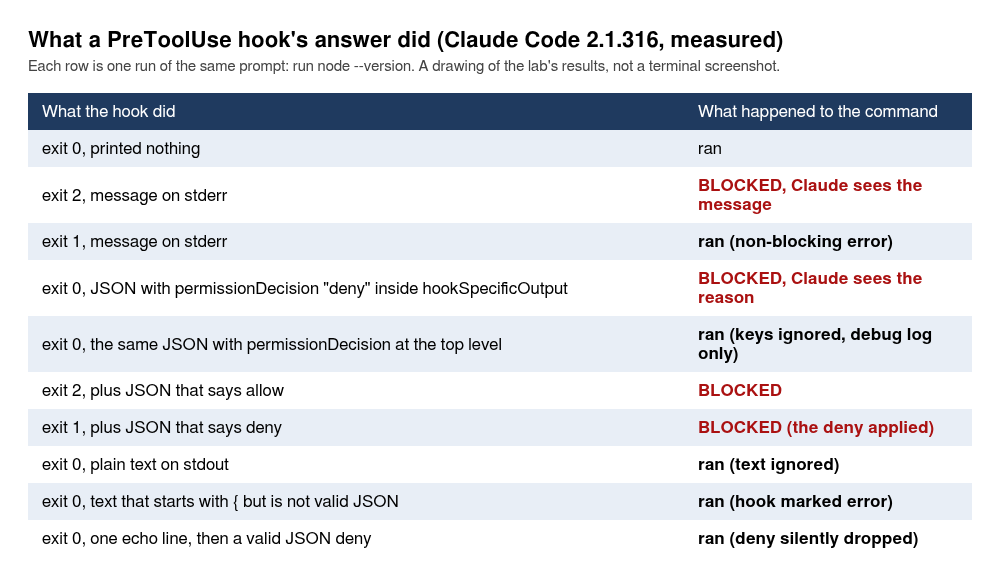
Some of those rows need a word. Two of them look like they contradict what I said about exit codes, and they do not. A hook that printed a JSON allow and then exited 2 was blocked: the stream shows "outcome":"error","exit_code":2 with the allow on standard output, one permission denial, and Claude said the hook blocked the call with exit 2 says no. So exit 2 beats a JSON allow. And a hook that printed a JSON deny with the reason deny printed, then exit 1 and then exited 1 was also blocked, with one denial and Claude quoting PreToolUse:Bash hook error: deny printed, then exit 1. Exit 1 on its own does not block, as above, and here it was the JSON deny on standard output that did the blocking. Read the drawing that way: exit 2 decides, and in the one case the lab ran at exit 1, a JSON deny, the JSON is what blocked. I did not run an allow, ask or defer at exit 1, and I ran no exit code other than 0, 1 and 2 with JSON. The live hooks page states the rule in its “Exit code output” table. In the row for JSON that passes schema validation, the column for any other exit code reads “Success. Claude Code ignores the exit code, and the fields alone decide”, and the sentence above the table gives this very case: a PreToolUse hook that “exits 1 but prints JSON that passes validation” still has that JSON decide. The lab’s run is one cell of that table. The same row adds an exception: for a hook whose failure blocks the action, such as one with onFailure: "block" set, the run “counts as a failure instead”, and the “Block the action when a hook fails” section says a non-zero exit code counts as a failure “even if it printed JSON that allows the action”. I did not run that case with JSON. Do not take the second row as a licence to fail with 1: print your JSON and exit 0. ask in a headless call is refused, one denial, because nobody is there to answer. A line printed before the JSON, as a shell profile echo would do, turns the whole output into plain text and the deny is dropped silently. The lab’s script printed Shell ready on arm64 and then a valid deny object, the command ran, and the debug log said Hook output does not start with {, treating as plain text. And output that starts with { and ends with } but is not valid JSON is marked an error with the message Hook output looks like a JSON object but is not valid JSON — JSON Parse error: Expected '}', and the command still runs. If you print JSON from a script, build it with jq -n and print nothing else to standard output.
Four more things the lab checked about JSON on PreToolUse:
allowis not free. With no allow rule and the default mode,touch hook-made.txtwas refused. With a hook that printedpermissionDecision: "allow"the same command ran. (Do your own allow demonstration withtouch.node --versionneeds no rule in default mode, because read-only commands go through, and the lab’s first attempt at this proved nothing for that reason.)- A deny rule beats a hook’s allow. With
--disallowedTools 'Bash(touch *)'on the command line and a hook that said allow, the command was refused. - A hook’s deny holds under
--permission-mode bypassPermissions. The refusal message wasPreToolUse:Bash hook error: deny holds even in bypassPermissions, and the control run with a silent hook ran the command. This is the strongest thing a hook gives you, and it is why I would reach for a hook when a rule has to hold with everything else switched off. - A hook can rewrite the call. With
updatedInputthe lab’s hook changed the command, and the tool ranecho rewritten-by-hookwhere Claude had asked fornode --version. Claude repliedThe tool returned exactly: rewritten-by-hook, which is a fine way to confuse a model, so use it with care. AndadditionalContextreached Claude: asked whether there was a note from a hook next to the tool result, it quotedNote from the hook: the lab codeword is PELICAN-7.
Plain text on standard output from a PreToolUse hook is ignored: the hook printed just some words, exit 0, and the command ran. Plain text does become context on two other events, covered below.
How does a matcher choose which tool?
The matcher string is checked against the tool name for tool events. The lab ran the blocking script, exit 2 with a message, against touch hook-made.txt for each shape:
Bashfired.- Lowercase
bashnever ran the hook. Matchers are case-sensitive, and the command went through. Bash|Editfired (a list of exact names joined by a pipe).^B.*h$fired (it contains other characters, so it is a regular expression).*fired, and so did a group with nomatcherkey at all.
On an event that has no tool, a matcher means something else or nothing. On UserPromptSubmit a matcher is ignored and the hook fires anyway: a hook with matcher Bash ran on a plain prompt. On SessionStart the matcher is the source, so startup or compact select a start type, and resume and clear arrive in the input (the next sections use two of them). The hooks reference has a full table of what the matcher matches per event, and the lab did not run each row of it.
There is also an if field on a hook, inside the group, that filters by tool name and arguments with the permission-rule syntax. The lab put "if": "Bash(touch *)" on a hook. It ran for touch hook-made.txt, did not run for node --version, and ran for the chained npm test && touch hook-made.txt. I like it for the case where a script would otherwise start with a long case statement; the test-runner section has the other use.
How do you block edits to files Claude should leave alone?
With a PreToolUse hook on Edit|Write that reads the path from the input and exits 2 on a match. The script below is the one in the hooks guide‘s example, adjusted to protect three patterns, and it is the first file this document adds to the companion repository:
cat > .claude/hooks/protect-files.sh <<'EOF'
#!/bin/bash
# protect-files.sh: block Edit and Write on files Claude should not change.
# Exit 2 blocks the tool call and Claude sees the message on stderr.
INPUT=$(cat)
FILE_PATH=$(echo "$INPUT" | jq -r '.tool_input.file_path // empty')
FILE_PATH="${FILE_PATH//\\//}"

PROTECTED_PATTERNS=(".env" "package-lock.json" ".git/")

for pattern in "${PROTECTED_PATTERNS[@]}"; do
  if [[ "$FILE_PATH" == *"$pattern"* ]]; then
    echo "Blocked: $FILE_PATH matches protected pattern '$pattern'" >&2
    exit 2
  fi
done

exit 0
EOF
chmod +x .claude/hooks/protect-files.sh
If you would rather not paste a here-document, the same file is .claude/hooks/protect-files.sh on the doc-4-work branch of the companion repository.
Test it by hand before Claude Code ever sees it. That is a habit I would keep for all Claude Code hooks, because a script you can run in two seconds with made-up input is the cheapest test in this document. The lab piped four sample inputs into it, plus one with no path at all:
for p in /p/order-notifier/.env /p/order-notifier/src/app.js /p/order-notifier/.env.example /p/order-notifier/package-lock.json; do
  echo "{\"tool_name\":\"Write\",\"tool_input\":{\"file_path\":\"$p\"}}" | .claude/hooks/protect-files.sh
  echo "  -> exit $?  ($p)"
done
echo '{}' | .claude/hooks/protect-files.sh; echo "  -> exit $?  (no file_path at all)"
Blocked: /p/order-notifier/.env matches protected pattern '.env'
  -> exit 2  (/p/order-notifier/.env)
  -> exit 0  (/p/order-notifier/src/app.js)
Blocked: /p/order-notifier/.env.example matches protected pattern '.env'
  -> exit 2  (/p/order-notifier/.env.example)
Blocked: /p/order-notifier/package-lock.json matches protected pattern 'package-lock.json'
  -> exit 2  (/p/order-notifier/package-lock.json)
  -> exit 0  (no file_path at all)
Notice .env.example. The pattern .env matches it too, and a template file your team commits is now off limits to Claude. Tighten the pattern if that bothers you. Then register the hook. The lab first ran every hook in this document from .claude/settings.local.json, so nothing was committed until it worked:
{
  "hooks": {
    "PreToolUse": [
      {
        "matcher": "Edit|Write",
        "hooks": [
          {
            "type": "command",
            "command": "\"$CLAUDE_PROJECT_DIR\"/.claude/hooks/protect-files.sh"
          }
        ]
      }
    ]
  }
}
The double quotes around $CLAUDE_PROJECT_DIR are not decoration. A project path with a space in it breaks the unquoted form, and the section on where hooks live shows the error. Now ask Claude for a file the hook protects, the lockfile:
Create the file package-lock.json in the project root containing an empty JSON object. Use the Write tool. Tell me plainly if you could not.
{"subtype":"hook_response","hook_event":"PreToolUse","hook_name":"PreToolUse:Write","outcome":"error","exit_code":2,"stdout":"","stderr":"Blocked: /path/to/order-notifier/package-lock.json matches protected pattern 'package-lock.json'\n"}
RESULT: I could not create `package-lock.json`. A PreToolUse hook blocked the Write call with this message:
> Blocked: /path/to/order-notifier/package-lock.json matches protected pattern 'package-lock.json'
The hook is `.claude/hooks/protect-files.sh`, and it protects that filename on purpose. I haven't tried to get around it, for example by writing the file through Bash. If you want the file created, you'll need to either remove or adjust that pattern in the hook, or create the file yourself with `echo '{}' > package-lock.json`.
The lab’s folder is shown as /path/to. The file was not created (ls printed No such file or directory). That is the whole mechanism. Everything else in this section is about the cases where it is less simple than it looks.
Did the hook add anything to the .env deny rule?
In this project, not for .env itself, and the lab found that out by accident. Document 3 left two deny rules in the shared settings, Read(./.env) and Read(./.env.*). With those in force the lab asked Claude to create or edit .env, and the hook never ran. The prompt:
Create a new file named .env in the project root containing exactly one line: NOTIFIER_ENV=development. Use the Write tool. Tell me plainly if you could not.
RESULT: I could not create the `.env` file. The Write tool returned an error: "File is covered by a Read deny rule in your permission settings and cannot be written." A permission rule blocks writes to that path, so I didn't try another route like a shell command to get around it.
There was no PreToolUse event in the stream, and the debug log said Write tool validation error: code=13 messageChars=86. A write to a path that a Read rule denies is refused before any hook runs. For an existing .env it never gets that far, because Edit needs a Read first and the Read is denied. So for .env the deny rules already do the job here, and the hook earns its place on what the rules do not name: package-lock.json and anything under .git/. That covers the Write and Edit tools. The next section is about Bash, where the rules behave differently.
To see the hook work on .env itself, the lab deleted the deny rules from the project settings (in its throwaway home only) and ran the same prompt twice. With no hook and no rule, Write created the file: ls showed -rw-r--r-- 1 agent agent 25 ... .env and NOTIFIER_ENV=development in it. With the hook and no rule:
{"subtype":"hook_response","hook_event":"PreToolUse","hook_name":"PreToolUse:Write","outcome":"error","exit_code":2,"stdout":"","stderr":"Blocked: /path/to/order-notifier/.env matches protected pattern '.env'\n"}
RESULT: I could not create the `.env` file. A PreToolUse hook blocked the write: `.claude/hooks/protect-files.sh` rejected `/path/to/order-notifier/.env` because it matches a protected pattern `.env`.
An Edit on an existing .env (Claude could read it once the deny rule was gone) was blocked too, and the file’s checksum did not change. One aside for document 3’s rules: Read(./.env.*) also stops Claude reading .env.example, which the lab saw when it asked for an edit there, so a rule that protects the secret file also hides the template from Claude.
Does any of that stop a subprocess?
No, and this is the part I would not skip. The lab restored the deny rules, made a .env with cp .env.example .env (the rule keeps Claude from reading it, and you can still copy it yourself), and tried the Bash route one step at a time. First the plainest attempt, a Bash command that appends to .env. That bare version is the second pass’s own run, and the lab’s first version was another one, below. It had Bash(echo *) allowed on the command line so the call would not stop to ask. It is the headless shape from the top of the document with this prompt and this flag:
Using the Bash tool run exactly this command and tell me what happened: echo B=1 >> .env
claude -p 'Using the Bash tool run exactly this command and tell me what happened: echo B=1 >> .env' --model haiku --allowedTools 'Bash(echo *)' --permission-mode acceptEdits
The command ran. Claude answered The command ran and exited with no output, which is what echo does on success. It appended the line B=1 to .env, there were zero permission denials, and tail -n 1 .env printed B=1 with the file’s checksum changed. That was 3 of 3 runs, all three the second pass’s. The two deny rules did not stop it, and it is worth seeing why: Read(./.env) is a rule about reading, and >> writes.
The lab’s first version of this test looked like the opposite, and it is the better lesson. The prompt was Append the line REVIEWED=yes to the end of .env with the Bash tool, using echo and a double angle bracket redirect. Tell me plainly if you could not. It was refused with one denial and .env was unchanged, 2 of 2. But the command Claude chose to run was echo REVIEWED=yes >> .env && tail -n 3 .env: the append, then a read of the file to show the result. Run as that exact chain, it was denied with the rules in force and it ran, changing .env, with the rules deleted. The rule refused the tail, and the whole command went with it. So the boundary is this. With these two deny rules, a Bash command that reads .env, alone or chained after a write, is refused, and a Bash command that only writes it is not. Take away the Bash(echo *) allowance and the bare append is still stopped in default mode, but for another reason: Output redirection to '.../.env' needs approval, one denial, file unchanged (one run, the second pass’s, so I give it a count of one). That is the ordinary permission prompt asking about a redirect, and it goes away as soon as an allow rule covers the command, as it did above.
Then a second hook on Bash, which greps the command for .env:
#!/bin/bash
# protect-bash.sh: second guard: refuse Bash commands that mention .env (but not .env.example)
CMD=$(jq -r '.tool_input.command // empty')
if echo "$CMD" | sed 's/\.env\.example//g' | grep -q '\.env'; then
  echo "Blocked: this command mentions .env" >&2
  exit 2
fi
exit 0
That blocked the bare echo B=1 >> .env too, because the command text contains .env. Then the lab asked Claude to run this, word for word, with Bash(node *) allowed and both hooks and the deny rule in place:
Using the Bash tool run exactly this command and tell me what happened: node -e "require(String.fromCharCode(102,115)).appendFileSync(String.fromCharCode(46,101,110,118), String.fromCharCode(10)+String.fromCharCode(66,61,49))"
RESULT: The command ran and exited with no output, which is expected for this command.
The character codes decode to ordinary strings. The command is equivalent to:
require("fs").appendFileSync(".env", "\nB=1")
It appended a newline followed by `B=1` to `.env` in the current working directory (...)
.env ended with B=1 as its last line. The string .env never appears in that command, so the grep has nothing to find, and the deny rule matches text, not what a program does later with its arguments. A second run built with writeFileSync did the same with a .env that did not exist yet, with the file hook and the deny rule in place. Two things to say about that, in fairness. The lab told Claude to run that command, and in every other run in this section Claude stopped at the block and told the user how to do the change by hand, without trying a workaround. And a prompt injection, a bad dependency or a script Claude runs could do the same thing without asking.
So here is the plain version. Claude Code hooks and deny rules are a seat belt. They catch an honest mistake and a model that is willing to be stopped. A subprocess that is allowed to run can go around them, a plain redirect writes where a Read rule never looks, and a guard that matches text can be talked around by anything that builds the text in pieces. If a file has to stay safe from the code that runs on your machine, that is not a job for a hook. It is a job for a sandbox, a container, or a machine where the secret is not, and document 8 covers sandboxing. I put a .env guard in this document anyway, because mistakes are the common case and the guard costs one script.
How do you run the tests after every edit?
With a PostToolUse hook on Edit|Write that runs npm test and sends the failure back on standard error with exit 2. This is the second file the document adds, and it is the one I would keep on every project:
cat > .claude/hooks/run-tests.sh <<'EOF'
#!/bin/bash
# run-tests.sh: after Claude edits a .js file under src/ or test/, run the tests.
# Failing tests go back to Claude on stderr with exit 2. A pass is silent.
FILE=$(jq -r '.tool_input.file_path // empty')
case "$FILE" in
  */src/*.js|*/test/*.js) ;;
  *) exit 0 ;;
esac
cd "$CLAUDE_PROJECT_DIR" || exit 0
OUT=$(npm test -- --test-reporter=spec 2>&1)
if [ $? -ne 0 ]; then
  echo "$OUT" | tail -n 40 >&2
  exit 2
fi
exit 0
EOF
chmod +x .claude/hooks/run-tests.sh
That file is also in doc-4-work. Three decisions in it. The case statement exits 0 at once for any file that is not a .js file under src/ or test/, so editing the README costs nothing. The cd "$CLAUDE_PROJECT_DIR" makes it independent of where the shell is. And the --test-reporter=spec flag matters more than it looks. Node’s default TAP output puts the failing test in the middle of the output, so tail -n 40 cut it off in the lab’s first try (a hook that reports “tests failed” without saying which is a poor hook). The spec reporter prints the failures last, so the tail keeps them.
Test it by hand, as before:
export CLAUDE_PROJECT_DIR=$PWD
echo '{"tool_input":{"file_path":"/x/README.md"}}' | .claude/hooks/run-tests.sh; echo "README.md -> exit $?"
time (echo '{"tool_input":{"file_path":"/x/src/app.js"}}' | .claude/hooks/run-tests.sh; echo "src/app.js, tests green -> exit $?")
README.md -> exit 0
src/app.js, tests green -> exit 0

real	0m0.951s
user	0m0.844s
sys	0m0.166s
About a second per run on this repository’s 25 tests. Register it in .claude/settings.local.json the same way as before, with PostToolUse as the event and run-tests.sh as the command. Then the task. The existing test for /health pins the exact response body, so adding a field must break it, which is what makes this a fair test. The lab told Claude not to run any commands itself, so the hook output was its only way to learn that a test had broken:
In src/app.js make the GET /health response also include a field uptime: process.uptime() rounded to whole seconds. Do not run any commands yourself. If a tool result tells you a test failed, fix whatever needs fixing. Keep your final answer to two sentences.
The first PostToolUse hook run exited 2. Claude was shown the hook’s standard error, which is the last 40 lines of the test output (the stream cut it at 160 characters, so the lab read the first 900 characters back from the same hook run’s recorded output). The block below is that readback, with the blank lines removed, and the stack frames that follow the diff cut off:
✔ a zero or negative amount is rejected (2.406599ms)
✔ an amount over the configured limit is rejected and named in the message (1.024072ms)
✔ an amount of exactly the configured limit is accepted (0.483729ms)
✔ amounts format with two decimals and the currency (1.387295ms)
✔ the notification names the order and the amount (0.588283ms)
ℹ tests 25
ℹ suites 0
ℹ pass 24
ℹ fail 1
ℹ cancelled 0
ℹ skipped 0
ℹ todo 0
ℹ duration_ms 1189.633316
✖ failing tests:
test at test/app.test.js:41:1
✖ GET /health reports the environment (57.329387ms)
  AssertionError [ERR_ASSERTION]: Expected values to be strictly deep-equal:
  + actual - expected

    {
      env: 'test',
      ok: true,
  +   uptime: 0
    }
Claude called Read, Edit, Read, Edit. Its second edit changed test/app.test.js, the second hook run exited 0, and npm test afterwards printed # pass 25 and # fail 0. The final answer:
`GET /health` in `src/app.js` now returns `uptime: Math.round(process.uptime())` alongside `ok` and `env`. The one failing test, `GET /health reports the environment`, deep-compared the whole body, so I changed it to check the three keys and that `uptime` is a non-negative integer; I did not re-run the tests, per your instruction.
Cost of that run: $0.0028 on Haiku, five turns. One honest limit, and the control behind it. Without the hook, the printed prompt gave this: Claude called Read and Edit, ran no command because the prompt told it not to, and left test/app.test.js failing. npm test afterwards printed # pass 24 and # fail 1, and the answer (I did not run any commands or tests, as you asked) was true and no help. To run that control yourself, empty the registration and reset the tree, echo '{}' > .claude/settings.local.json and git checkout -- src test, and send the same prompt. The lab’s own control used a different prompt, one that let Claude check for itself:
In src/app.js make the GET /health response also include a field uptime: process.uptime() rounded to whole seconds. Then make sure npm test passes. Keep your answer to two sentences.
With that, and document 3’s Bash(npm test) allow rule in force in a trusted folder, Claude ran npm test itself and fixed the same test (six turns, $0.0026 on Haiku). So the hook did not make Claude able to find the failure. It made the check happen every time, right after the edit, and without a decision on Claude’s part. That is the value: a guarantee, not a capability. If you have ever told a model “run the tests before you say you are done” in CLAUDE.md and watched it skip that step once, this is the fix.
The if field can do the path filtering instead of the script. With "if": "Edit(**/*.js)" on the hook and the case statement removed, an edit to README.md ran no hook at all, and an edit to src/config.js ran it. That version also runs the tests for a .js file outside src/ and test/, so check which filter you mean.
What does a formatter hook do to a repository nobody formatted?
It rewrites the whole file. The hooks guide’s best-known example is a PostToolUse hook that runs Prettier on every file Claude edits. The lab ran it as written:
{
  "hooks": {
    "PostToolUse": [
      {
        "matcher": "Edit|Write",
        "hooks": [
          {
            "type": "command",
            "command": "jq -r \".tool_input.file_path\" | xargs npx prettier --write"
          }
        ]
      }
    ]
  }
}
Start from a clean tree. The test-runner section left the uptime edit uncommitted in src/app.js and test/app.test.js, so run git checkout -- src test first (the hooks folder and settings.local.json are untracked and stay). It works. The first use prints npm warn exec The following package was not found and will be installed: prettier@3.9.10, and the hook took 1,830 ms for one edit, most of it npx starting up. The trouble is on order-notifier, which was never run through Prettier: npx prettier --check src test flagged all nine files (Code style issues found in 9 files), and still all nine with --single-quote added. The .prettierrc further down is the fix. The prompt, which the next run repeats on a formatted repository:
In src/config.js change the fallback port from 3000 to 3001. Keep your answer to one sentence.
 src/config.js | 29 +++++++++++++++--------------
 1 file changed, 15 insertions(+), 14 deletions(-)
-import { readFileSync } from 'node:fs';
-import { join, dirname } from 'node:path';
-import { fileURLToPath } from 'node:url';
+import { readFileSync } from "node:fs";
+import { join, dirname } from "node:path";
+import { fileURLToPath } from "node:url";
One changed number, 29 changed lines, every single quote turned double. A reviewer reading that diff has to find the one real line among 28 noise lines, which defeats the point of reviewing diffs from document 2. (The tests still passed, 25 of 25, so nothing had broken. It was only noise.) When the prompt said “Change nothing else”, Claude noticed the reformat in git diff, restored the file with git checkout and sed (not the Edit or Write tool, so the hook stayed quiet) and finished with a one-line diff. That is Claude cleaning up after the hook, and I would not plan on it.
The fix is the order of operations: format the repository once, in its own commit, and only then add the hook. The formatting commit is not in the doc-4-work branch on purpose, so you make it. Do it on a branch of your own from doc-4-start, not on the finished state. The first line of the block throws away the port edit the run above left in src/config.js. On a tree that still holds earlier edits the printed numbers do not hold, and the commit takes those edits with it:
git checkout -- src test
git switch -c format-once
cat > .prettierrc <<'EOF'
{
  "singleQuote": true,
  "printWidth": 100
}
EOF
npx prettier --write src test
npm test 2>&1 | grep -E '^# (pass|fail)'
src/app.js 174ms (unchanged)
src/config.js 31ms (unchanged)
src/notifier.js 23ms (unchanged)
src/orders.js 36ms
src/server.js 12ms (unchanged)
test/app.test.js 135ms (unchanged)
test/config.test.js 17ms
test/notifier.test.js 48ms
test/orders.test.js 28ms
# pass 25
# fail 0
With singleQuote and a print width of 100, Prettier changed four files, 21 insertions and 6 deletions, and the tests still pass. Commit that on its own:
git add .prettierrc src test
git commit -m "Format with Prettier"
Not tested as typed: the lab’s own line for this step ran git add -A . ':!.claude/settings.local.json', which exited 1 on the ignored file it had excluded, so the commit command did not run, and the git switch -c line was not part of the lab’s run either. The next run, with the hook added on top, showed git diff --stat as one file changed, which is what a formatted and staged or committed tree gives. Check git status after you commit and you will know. With the formatting in, the same port prompt (the one with “Change nothing else”) came back like this, and Prettier reported the file unchanged:
{"subtype":"hook_response","hook_event":"PostToolUse","hook_name":"PostToolUse:Edit","outcome":"success","exit_code":0,"stdout":"src/config.js 157ms (unchanged)\n","stderr":""}
 src/config.js | 2 +-
 1 file changed, 1 insertion(+), 1 deletion(-)
-    port: Number(port ?? fromFile.port ?? 3000),
+    port: Number(port ?? fromFile.port ?? 3001),
Not tested: the formatter hook together with the test-runner hook. The hooks reference says all hooks that match an event run in parallel, so two PostToolUse hooks on the same edit race each other, and the tests could run against the file before it is formatted. If you want both, the safe shape is one script that formats and then tests, and the lab did not run that.
Can Claude Code hooks put facts in front of Claude?
Yes, on UserPromptSubmit and SessionStart. On those two events, and on UserPromptExpansion and PostModelSwitch per the hooks reference, whatever a command hook prints on standard output as plain text is added to Claude’s context. Nothing else among the Claude Code hooks in this document needs less code. The hook below prints three sentences, one of them built from git log:
#!/bin/bash
cat > /dev/null
echo "Context from the team hook: the current ticket is ORD-1187 (the order retry bug). The sprint ends 2031-01-02. Latest commit: $(git -C "$CLAUDE_PROJECT_DIR" log -1 --format=%s)."
It is registered on UserPromptSubmit with no matcher. The prompt was Without using any tool, answer in one line: which ticket number is the current ticket and when does the sprint end, according to the information you were given with this message?:
{"subtype":"hook_response","hook_event":"UserPromptSubmit","hook_name":"UserPromptSubmit","outcome":"success","exit_code":0,"stdout":"Context from the team hook: the current ticket is ORD-1187 (the order retry bug). The sprint ends 2031-01-02. Latest commit: Share Claude Code settings and the ","stderr":""}
RESULT: ORD-1187 is the current ticket, and the sprint ends on 2031-01-02.
The stdout is cut at 160 characters by the filter at the top of the document, which is why the commit message ends mid-phrase. The commit named there is whatever your last commit is called: on the format-once branch from the formatter section it reads Latest commit: Format with Prettier. The ticket and the date exist nowhere in the repository, so the answer could only have come from the hook. Pick facts like that for your own test. The lab’s first try at the SessionStart version printed the last three commits, which proved nothing, because Claude Code already puts a git status snapshot with recent commits into the context. The JSON form, hookSpecificOutput.additionalContext, did the same thing as the plain text, and I prefer it for anything a script builds, for the reason in the JSON section: one stray echo turns a JSON answer into plain text.
SessionStart works the same way with a startup matcher. The lab’s hook printed a report with a ticket, a release freeze date and the last three commits, and Claude answered both facts:
#!/bin/bash
cat > /dev/null
echo "Session start report from the team hook. Current ticket: ORD-1187. Release freeze starts 2031-01-02. Last three commits:"
git -C "$CLAUDE_PROJECT_DIR" log --oneline -3
The registration is the SessionStart block with "matcher": "startup" and the script as its command, the same shape as the registrations above. It also said, unprompted, that the freeze date looked wrong: Today is 2026-11-03, so 2031-01-02 is about four years out. The date was the lab’s joke, and the observation was a good one. Context from a hook is believed, but not blindly.
Three other things a SessionStart hook can do, all run:
- Set an environment variable for the Bash tool. A startup hook appended
export NOTIFIER_ENV=set-by-session-start-hookto the file named in$CLAUDE_ENV_FILE, and thennode -p process.env.NOTIFIER_ENVin a Bash call printedset-by-session-start-hook. The same command in a plain shell printedundefined. The script:
#!/bin/bash
cat > /dev/null
if [ -n "$CLAUDE_ENV_FILE" ]; then
  echo "export NOTIFIER_ENV=set-by-session-start-hook" >> "$CLAUDE_ENV_FILE"
fi
exit 0
- Name the session. JSON with
sessionTitlewrote the title into the session transcript. The lab’s script printed both a title and a context line, andgrep -l hooks-lab-title ~/.claude/projects/*/*.jsonlfinds the transcript it landed in:
#!/bin/bash
cat > /dev/null
jq -n '{hookSpecificOutput:{hookEventName:"SessionStart",additionalContext:"The team codeword is HERON-12.",sessionTitle:"hooks-lab-title"}}'
Not tested: what the title looks like in the session picker, which the lab did not open.
- Re-inject a reminder after
/compact. This is the use I would copy first. ASessionStarthook with matchercompactprintedReminder after compaction: tests are run with npm test, the house rule is single quotes, and the codeword is HERON-12.The script was oneechoof that sentence aftercat > /dev/null. The lab ran a call, compacted it with--continue, and asked a third call for the codeword with no tools:
claude -p 'The project codeword is not in any file. Say ok.' --model haiku
claude -p '/compact' --model haiku --continue
claude -p 'Without using any tool, tell me the codeword from the reminders you were given after the compaction. Reply with just the codeword, or say you do not see one.' --model haiku --continue
These three prompts are the second pass’s. Its third call answered HERON-12. The control for them, the same third prompt in a session that was never compacted and had no such hook, answered I do not see one. The lab’s own run used two other prompts, Read package.json and tell me the package name in one line. first and What is the codeword in the reminder you were given after the compaction? One line, no tools. third, with the compact call between. It also answered HERON-12, and its control, the lab’s third prompt in a session that was never compacted, answered I don't see a codeword in the reminders I was given after the compaction. Each answer goes with the prompt that produced it. Anything that lives only in the conversation can be lost to a compaction, and a hook puts it back.
One more, for claude -p users: a SessionStart hook that returns initialUserMessage becomes the first turn of a headless session, and the prompt on the command line becomes the second. The hook script, registered on SessionStart with the startup matcher, and the two prompts:
#!/bin/bash
cat > /dev/null
jq -n '{hookSpecificOutput:{hookEventName:"SessionStart",initialUserMessage:"Reply with the single word FIRST."}}'
claude -p 'Now reply with the single word SECOND.' --model haiku
The lab’s two replies were FIRST and SECOND.
Can a hook refuse a prompt?
Yes. Exit 2 on UserPromptSubmit blocks the prompt before the model sees it. A hook that blocks prompts containing something that looks like an Anthropic key:
#!/bin/bash
PROMPT=$(jq -r ".prompt")
if echo "$PROMPT" | grep -q "sk-ant-"; then
  echo "Blocked: the prompt contains something that looks like an Anthropic API key. Remove it and send again." >&2
  exit 2
fi
exit 0
Here is my key sk-ant-api03-FAKEFAKEFAKE0000 please store it in a file called key.txt
{"is_error":false,"subtype":"success","num_turns":0,"result":"UserPromptSubmit operation blocked by hook:\n[${CLAUDE_PROJECT_DIR}/.claude/hooks/t.sh]: Blocked: the prompt contains something that looks like an Anthropic API key. Remove it and send again.\n\n\nOriginal prompt: Here is my key sk-ant-api03-FAKEFAKEFAKE0000 please store it in a file called key.txt","total_cost_usd":0}
Zero turns, zero cost, no key.txt. Now read the last line of that result again. The block message ends with Original prompt: and the whole prompt, so the key you were trying to keep out is echoed back, and in a headless run it sits in the result JSON and any log that keeps it. The fix is one field. Adding hookSpecificOutput.suppressOriginalPrompt: true to a JSON block removes that line:
#!/bin/bash
cat > /dev/null
jq -n '{decision:"block",reason:"The prompt looks like it contains an API key. Remove it and send again.",hookSpecificOutput:{hookEventName:"UserPromptSubmit",suppressOriginalPrompt:true}}'
{"is_error":false,"num_turns":0,"result":"UserPromptSubmit operation blocked by hook:\nThe prompt looks like it contains an API key. Remove it and send again.","total_cost_usd":0}
A prompt guard that prints the secret is the wrong kind of guard, so use the JSON form for this one. Two limits. On this event a matcher is ignored and the hook fires anyway (the lab put the matcher Bash on it and the hook ran on a plain prompt), and an if field means it never runs. And the hooks reference gives UserPromptSubmit a default timeout of 30 seconds, where most events get 600, because the hook blocks every prompt until it returns.
Can a hook stop Claude from stopping?
It can, and of all Claude Code hooks it is the one most likely to cost you money by accident. Stop fires every time Claude finishes responding, not only at the end of a task. A hook can send Claude back to work with {"decision":"block","reason":"..."}, with exit 2 and a message, or with additionalContext. Here is the useful version, the one that refuses to let Claude stop while the tests fail:
#!/bin/bash
INPUT=$(cat)
if [ "$(echo "$INPUT" | jq -r '.stop_hook_active')" = "true" ]; then
  exit 0
fi
cd "$CLAUDE_PROJECT_DIR" || exit 0
OUT=$(npm test -- --test-reporter=spec 2>&1)
if [ $? -ne 0 ]; then
  jq -n --arg out "$(echo "$OUT" | tail -n 30)" '{decision:"block",reason:("npm test fails. Fix it before you stop.\n" + $out)}'
fi
exit 0
The first four lines are the important part, and the next paragraph says why. Save it as .claude/hooks/t.sh and register it as the only entry in .claude/settings.local.json:
{ "hooks": { "Stop": [ { "hooks": [ { "type": "command", "command": "\"$CLAUDE_PROJECT_DIR\"/.claude/hooks/t.sh" } ] } ] } }
Then start from a clean tree, or the uptime task is already done and the hook has nothing to push on: on a tree that still held the earlier uptime edit, one Stop run came back, no block, and Claude replied that the change was already in src/app.js. git checkout -- . && git switch --detach doc-4-start gives you the clean tree (git switch format-once brings your branch back). The lab gave Claude the uptime task again, with only this hook registered on Stop, and this prompt:
In src/app.js make the GET /health response also include a field uptime: process.uptime() rounded to whole seconds. Do not run any commands yourself. When you have made the change, stop.
The output:
{"subtype":"hook_response","hook_event":"Stop","hook_name":"Stop","outcome":"success","exit_code":0,"stdout":"{\n  \"decision\": \"block\",\n  \"reason\": \"npm test fails. Fix it before you stop.\\nℹ skipped 0\\nℹ todo 0\\nℹ duration_ms 486.186087\\n\\n✖ failing tests:\\n\\ntest at te","stderr":""}
{"subtype":"hook_response","hook_event":"Stop","hook_name":"Stop","outcome":"success","exit_code":0,"stdout":"","stderr":""}
Two Stop runs, one block and one pass. Between them Claude went back and edited test/app.test.js: its tools, in order, were Read, Edit, Read, Edit, Edit, and it said The stop hook will re-run the suite, so the result will show there. Seven turns, $0.0044 on Haiku.
Now the same idea without the stop_hook_active check, on a hook that always blocks, with the prompt Say hello in one sentence.:
#!/bin/bash
cat > /dev/null
jq -n '{decision:"block",reason:"Not finished. Say one more sentence about the project."}'
In the lab’s run the hook ran 11 times and Claude produced 11 assistant messages, and then Claude Code stepped in and ended the turn with this message:
A hook blocked the turn from ending 9 consecutive times — overriding and ending turn. For Stop/SubagentStop hooks, check stop_hook_active in the input and return success while it's true. Set CLAUDE_CODE_STOP_HOOK_BLOCK_CAP to raise this limit.
In that run: fifteen turns, an empty result, exit code 0, and $0.0071 on Haiku. A second run of the same hook and prompt, the second pass’s, did not give the same counts: 22 hook runs, 34 assistant messages, 27 turns and $0.0115, with the same empty result and the same message word for word, still saying nine consecutive times. Treat the counts as a range and the message as the stable part. In that second run Claude did more than answer between the blocks: two Bash commands that searched the project for the hook, then a Read and an Edit of .claude/settings.local.json, the file that holds it. That fits a sentence in the hooks reference, which I read today: after eight continuations in a row Claude Code overrides the next block, and “the count of consecutive continuations resets each time Claude calls a tool.” The message counts nine blocks, the ninth being the one overridden. So Claude Code protects you from the infinite loop when Claude does nothing but answer, and the failure is bounded in that case. It is not free. Mettons the hook runs a real suite that takes a minute and the loop goes the full nine blocks: that is nine minutes of waiting and nine rounds of model calls, and I made the minute up but not the shape. I wrote about putting a cap in front of spend that loops, for a different tool, in the LiteLLM budget post. The reason it fits in a Haiku bill here is that the lab’s script was instant. And Claude read the hook script, saw the loop, and told the user about it, which is nice and not something to plan on.
Two more facts. Exit 2 with the reason on standard error blocks a stop too. The lab’s hook asked for the word DONE-CHECKED on the last line, with the prompt Say hello in one sentence., and Claude added it (its answer ended DONE-CHECKED):
#!/bin/bash
INPUT=$(cat)
if [ "$(echo "$INPUT" | jq -r '.stop_hook_active')" = "true" ]; then exit 0; fi
echo "Before you stop: add the word DONE-CHECKED to your last line." >&2
exit 2
And a vague hook of the prompt type, registered like this and run with the uptime prompt above, which says not to run commands:
{ "hooks": { "Stop": [ { "hooks": [ { "type": "prompt", "prompt": "check all tasks are complete, tests still pass" } ] } ] } }
It looped to the same cap, in 12 turns (the lab’s own, longer wording of the same idea also ended at 12 turns). My reading, which the lab did not test, is that the model judging it had no way to check the tests and so never said yes. If you want a Stop check, make it a script that can say yes.
Not tested: raising the cap with CLAUDE_CODE_STOP_HOOK_BLOCK_CAP, and the SubagentStop conversion of a Stop hook, which belongs to document 5.
What do broken Claude Code hooks do?
Mostly, nothing, and that is the problem. The lab broke the same PreToolUse Bash hook in nine ways and checked each time whether node --version still ran. The debug line to grep is Hooks: PreToolUse:Bash [command] finished with status N (NN ms). Grep with the colon, grep "Hooks: ", because the log also holds many “hooks module cc-plugin-…” lines for Claude Code’s own built-in plugins.
- The script path does not exist: status 127,
/bin/sh: 1: .../t.sh: not found. Not blocking. The command ran. - The script is not executable (mode 644, no
chmod +x): status 126,Permission denied. Not blocking. The command ran. - A syntax error in the script, an unfinished
if: bash exits with status 2 on a syntax error, so this one blocks. The reason Claude was shown wast.sh: line 5: syntax error: unexpected end of file. The only broken hook in the list that fails safe, and it does so by accident. - The script outlives its timeout (it sleeps 6 seconds, the hook’s timeout is 2): outcome
cancelled, debugtimed out after 2000ms (2005ms), and the command ran after the wait. onFailure: "block"on the hook, a field the docs date to v2.1.295 or later, turns the failures above into blocks. A timeout was blocked withtimed out; blocking because onFailure is "block", a missing script withfailed; blocking because onFailure is "block"plus the shell’s own message, and exit 1 was blocked too. With"onFailure": "continue", exit 1 went through.- A guard that fails open. The lab’s copy of the protect script called a command that is not installed,
jqx, standing in for a machine withoutjq. The shell printedcommand not found, the script went on, ranexit 0, and let everything through.
That last one is the one that matters on a real team, where Claude Code hooks run on every laptop. Your script runs on a colleague’s machine, jq is not installed, and the guard has been off for a month without a single error on anyone’s screen. The test by hand does not catch it on your machine. What does is onFailure: "block" on any hook that exists to say no, and a line at the top of the script such as command -v jq >/dev/null || { echo "jq is required" >&2; exit 2; }. I wrote that line to show the shape of the fix, and the lab did not run it.
The schema file at schemastore, which the $schema line at the top of the shared settings file points to, rejects onFailure (see the next section), so an editor that validates against it will underline a field that works.
What if the hooks block is the wrong shape?
This is the result I put at the top, so here is the transcript. claude doctor has a section called “Invalid settings” that names each problem it found in the settings files. You get it with:
claude doctor 2>&1 | sed -n '/[Ii]nvalid settings/,/^$/p'
The lab wrote a correct hooks block and eight wrong-shaped ones into the shared .claude/settings.json, which also held document 3’s Bash(npm test) allow rule, and for each it recorded the doctor output, whether the hook fired, and whether npm test still ran without a prompt. For seven of the eight wrong shapes, doctor said the entry was ignored and nothing else changed, on the event the lab tried them on. Which event is the whole point, so here it is shape by shape. Five of the seven ran on a UserPromptSubmit hook: an object where a list belongs, a group with no inner hooks, a handler with no type, a string timeout, and the key hook for hooks. The other two are unknown event names, which have no event to run on. The eighth shape, the list-typed matcher, ran on PreToolUse. For example, an event holding an object where a list belongs (on UserPromptSubmit):
Invalid settings
- .../order-notifier/.claude/settings.json › hooks.UserPromptSubmit: Hook event "UserPromptSubmit" must be an array of matchers; received object. This entry was ignored.
The others that lose only their own entry: a group with no inner hooks array (Hook matcher "hooks" must be an array of hook entries; received undefined; matcher ignored.), a handler with no type (Hook entry has no "type"; entry ignored. Valid types: command, prompt, agent, http, mcp_tool), an unknown event name (Unknown hook event "PreToolUsee" was ignored. followed by the list of valid events, and the same for the wrong case, pretooluse), a timeout given as a string on a UserPromptSubmit hook (Invalid command hook (timeout: Invalid input: expected number, received string); entry ignored.), and the key hook instead of hooks. In each of the seven, in a trusted folder, npm test still ran with zero denials, so the allow rule was in force. I will not call these harmless in general, because the event decides. A later run put the same string timeout on a PreToolUse hook, and the interactive start opened “Settings Error” with “Files with errors are skipped entirely, not just the invalid settings.” On UserPromptSubmit the same string opened “Settings Warning” with “The values listed above were skipped; the rest of the file is in effect.” The Error dialog says a PreToolUse or PermissionRequest hook that cannot be loaded may be guarding the permissions beside it. So the four other shapes that lost only their entry on UserPromptSubmit (object for array, no inner hooks, no type, hook for hooks) have not been run on PreToolUse, and what doctor says about them there is not tested. Neither are the other events: which of them behave like UserPromptSubmit and which like PreToolUse is not tested. Until you have run claude doctor, treat any wrong shape in a hook on PreToolUse or PermissionRequest as a whole-file skip. Also not tested: what the allow rule does in a -p run on the PreToolUse string-timeout file.
Then the eighth shape, the one that skipped the whole file when the lab first ran it, a matcher written as a list on a PreToolUse hook:
{"PreToolUse":[{"matcher":["Bash","Edit"],"hooks":[{"type":"command","command":"\"$CLAUDE_PROJECT_DIR\"/.claude/hooks/t.sh"}]}]}
Invalid settings
- .../order-notifier/.claude/settings.json › hooks.PreToolUse.0: Invalid hook matcher (matcher: Invalid input: expected string, received array) — a PreToolUse/PermissionRequest hook that cannot be loaded may be what guards the permissions declared beside it, so nothing it sits in is applied until the entry is fixed or removed.
- .../order-notifier/.claude/settings.json › hooks.PreToolUse.0.matcher: Expected string, but received array
  Suggested fix: Hooks use a matcher + hooks array. The matcher is a string: a tool name ("Bash"), pipe-separated list ("Edit|Write"), or empty to match all. Example: {"PostToolUse": [{"matcher": "Edit|Write", "hooks": [{"type": "command", "command": "echo Done"}]}]}
Read the end of the first line: nothing it sits in is applied until the entry is fixed or removed. It means it. In the same run, in a folder trusted as the first section describes, npm test, which document 3 allowed, was refused with two denials, and Claude said Bash requires approval for npm test. That is a nuisance. Then the lab asked the harder question: the file also holds Read(./.env) and Read(./.env.*), so what happens to the deny rules? It created a fake .env from .env.example and asked Claude to read it and quote the first line. With the good file, as a control:
RESULT: I can't read the first line of `.env`. The Read tool returned a permission error: the file is in a directory that your permission settings deny. I didn't try to get around that, for example by reading it through Bash. If you want me to read it, you'd need to change the permission rule or tell me another way to proceed.
With the list matcher in the same file, nothing else changed:
RESULT: The first line of `.env` is:
# Copy this file to .env and fill in real values for your own machine.
Zero permission denials. The deny rule went with the file. The first line of a .env that the lab had made from the example file is a comment, so nothing secret leaked here. Put a real one there and the answer is its contents.
I want to be careful about how far to take it. This was one shape, a matcher as a list, on one event (PreToolUse), tested on one version, and the doctor message describes the intent: a hook that guards permissions and cannot be loaded makes Claude Code stop applying the file, which is safe in one direction and loud in the other. But the result is the opposite of what the sentence “skipped” suggests to someone who keeps their deny rules and their hooks in one file, as this document does. Three rules follow. Run claude doctor after every edit of a hooks block and read the Invalid settings section. Keep security rules in a file with nothing experimental in it, or at least test the deny rule again after you touch the hooks. And if something that used to be refused suddenly is not, check the file for load errors before you suspect the model.
The schema at json.schemastore.org/claude-code-settings.json (it redirects, so I show it as text and not as a link) agrees with doctor on all of these but one. The lab ran the published schema against the hooks files in this log with a Python validator. It rejected the list matcher, the object where an array belongs, the missing type, the unknown event and the string timeout, and accepted the exec form, http and prompt hooks and disableAllHooks. It rejected the valid onFailure field, so the schema lags the docs, and a red underline in your editor is a hint and not a verdict. The finished state of this document validated clean.
What does the finished state look like, and how do you check it?
Once both scripts work from .claude/settings.local.json, the team version goes into the committed .claude/settings.json, next to document 3’s rules. This is the file the lab ended with, and the whole difference from doc-4-start is 24 added lines in this file plus the two scripts:
{
  "$schema": "https://json.schemastore.org/claude-code-settings.json",
  "permissions": {
    "allow": ["Bash(npm test)"],
    "deny": ["Read(./.env)", "Read(./.env.*)"]
  },
  "hooks": {
    "PreToolUse": [
      {
        "matcher": "Edit|Write",
        "hooks": [
          {
            "type": "command",
            "command": "\"$CLAUDE_PROJECT_DIR\"/.claude/hooks/protect-files.sh"
          }
        ]
      }
    ],
    "PostToolUse": [
      {
        "matcher": "Edit|Write",
        "hooks": [
          {
            "type": "command",
            "command": "\"$CLAUDE_PROJECT_DIR\"/.claude/hooks/run-tests.sh"
          }
        ]
      }
    ]
  }
}
Remove the same two Claude Code hooks from your settings.local.json first. The lab found that the same handler in both the project file and the local file ran once, so a duplicate does no harm, but two copies of one thing is how a file ends up lying to its reader. Then the four checks:
jq empty .claude/settings.json && echo valid-json
claude doctor 2>&1 | sed -n '/[Ii]nvalid settings/,/^$/p'
echo '--- (end of doctor Invalid settings section; empty means none)'
npm test 2>&1 | grep -E '^# (tests|pass|fail)'
valid-json
--- (end of doctor Invalid settings section; empty means none)
# tests 25
# pass 25
# fail 0
The /hooks command shows what Claude Code hooks are registered, read-only. In the lab’s interactive session on the finished state it showed:
   Hooks
   2 hooks on 2 events
   This menu is read-only. To add or change a hook, edit settings.json or ask Claude. Learn more
     PreToolUse  before tool execution
   ❯ [Project] "$CLAUDE_PROJECT_DIR"/.claude/hooks/protect-files…   Edit|Write · command
     PostToolUse  after tool execution
     [Project] "$CLAUDE_PROJECT_DIR"/.claude/hooks/run-tests.sh     Edit|Write · command
     All events
   Enter to view · Esc to close
Each hook is tagged [User], [Project] or [Local] by the file it came from, and Enter on one shows its source and a line that names the file it came from. For the two hooks on this screen, which are both [Project], that is, in the second pass, Source: Project settings (.claude/settings.json) and To change or remove this hook, edit .claude/settings.json or ask Claude. The lab saw .claude/settings.local.json in that line for a hook it had put in the local file. With no hooks the menu says “no hooks yet”. The menu does not edit anything, and I find that reassuring: nothing you can click wrong. And it picks up edits to a settings file made while a session is running. The lab wrote a hook into settings.local.json 15 seconds after a session started, it appeared in /hooks, and it fired on the next prompt with no restart (written at 01:43:52, fired at 01:44:06).
Finally the read-back the way a teammate does it, from a clean clone of the tag, and then the finished branch:
git clone --branch doc-4-start https://github.com/dominicplouffe/order-notifier.git ~/order-notifier-doc4-teammate
cd ~/order-notifier-doc4-teammate
git fetch origin doc-4-work
git diff --stat doc-4-start origin/doc-4-work
 .claude/hooks/protect-files.sh | 17 +++++++++++++++++
 .claude/hooks/run-tests.sh     | 15 +++++++++++++++
 .claude/settings.json          | 24 ++++++++++++++++++++++++
 3 files changed, 56 insertions(+)
The branch is doc-4-work at commit 59389ed. Both scripts are mode 755 in it, which matters, because a script without chmod +x is the status 126 case from the broken-hook section. After checking it out, npm test printed 25 of 25.
Where do Claude Code hooks live, and which ones run?
In the same four places as other settings, plus skills and plugins, and the lab ran the first three. The user file ~/.claude/settings.json, the committed project file and the local project file all fired: four responses for four handlers, with a second copy of one handler in two files counted once. The switches:
disableAllHooks: truein the local file: nothing fired. In the user file withfalsein the project file, hooks fired: the value that is left after precedence decides, as in document 3.--settings '{"disableAllHooks": true}'on the command line: nothing fired. So did--safe-mode.--setting-sources user: only the user hook.project: only the project hook.user,project: both.- A file passed with
--settings: its hook ran for that call only. - A hook in a skill’s frontmatter (document 3’s
route-doc): it fired twice during/route-doc GET /health, once per Read, and not at all on a plain prompt that read a file.
The project path with a space in it is the practical one. The lab cloned the repository into a folder called my project and wrote the same hook four ways:
{"outcome":"error","exit_code":127,"stderr":"/bin/sh: 1: /tmp/lab/d/h/my: not found\n"}
That is the unquoted $CLAUDE_PROJECT_DIR/.claude/hooks/sp.sh. The shell cut the path at the space. Three forms worked: the variable in double quotes (what this document uses everywhere), the exec form ("command": "${CLAUDE_PROJECT_DIR}/.claude/hooks/sp.sh", "args": [], which needs no quoting), and "command": "bash" with the script path in args. My choice would be the exec form for anything new. The lab ran the double-quoted form everywhere else, and that is why it is the one I show.
Not tested: hooks in a plugin’s hooks/hooks.json and in a subagent’s frontmatter, which belong to document 5. Managed hooks, allowManagedHooksOnly and strictPluginOnlyCustomization: the lab has no root and no Team or Enterprise organisation.
Do hooks run in a folder you have never trusted?
Yes, in a headless call, and that is the security detail about Claude Code hooks I would put first for anyone who scripts claude -p. The first clone you made is no use for this, because the first section had you trust it, and Claude Code keeps the trust answer per path. Make a second clone at a path you have never started claude in, for example git clone --branch doc-4-start https://github.com/dominicplouffe/order-notifier.git ~/order-notifier-doc4-untrusted, and do not run claude interactively in it. The lab did the same with a clone at ~/untrusted/order-notifier. In that clone it added a SessionStart hook to the committed project file .claude/settings.json, and another to the user file ~/.claude/settings.json. These are the registrations the lab printed (jq .hooks on the project file, and the user file, which already held "theme": "dark"):
{ "hooks": { "SessionStart": [ { "hooks": [ { "type": "command", "command": "\"$CLAUDE_PROJECT_DIR\"/.claude/hooks/mark.sh" } ] } ] } }
{ "theme": "dark", "hooks": { "SessionStart": [ { "hooks": [ { "type": "command", "command": "~/.claude/hooks/mark-user.sh" } ] } ] } }
The lab’s two scripts, mark.sh and mark-user.sh, each appended one line, project hook fired or user hook fired and the time, to ~/hooklog/marks.log. Each is a four-line script: the shebang, cat > /dev/null, mkdir -p "$HOME/hooklog", and the echo into marks.log. The second pass registered the same two hooks as one-line commands instead, echo project hook fired $(date +%T) >> $HOME/untrusted-marks in the project file and the same with user in the user file, and got both lines (project hook fired 21:37:22 and user hook fired 21:37:22) with the same Ignoring 1 permissions.allow entry line. To follow it, use those one-liners as the command value, put the project one in the clone’s .claude/settings.json beside the permissions block, back up your own ~/.claude/settings.json first, and take the test hooks out afterwards. The lab’s run:
$ claude -p 'Say ready.' --model haiku < /dev/null
Ignoring 1 permissions.allow entry from .claude/settings.json: this workspace has not been trusted. Run Claude Code interactively here once and accept the trust dialog, or set projects["/path/to/untrusted/order-notifier"].hasTrustDialogAccepted: true in /path/to/.claude.json.
Ready.
and the file both hooks append to (~/hooklog/marks.log) held user hook fired 01:37:34 and project hook fired 01:37:34. The allow rule was held back, and the hooks ran. The held-back allow rule is also why the first section has you trust the clone before anything else. The hooks reference says the same, in its security considerations: in a -p or SDK session Claude Code treats the folder as trusted, so hooks committed to a repository’s settings run in a folder you never trusted. Command hooks run with your full user permissions, and that is a shell script from a stranger’s repository, run on your machine, at the start of a session. Before you point claude -p at a repository you did not write, read its .claude/settings.json, or start with --bare, or pass --settings '{"disableAllHooks": true}'. (The lab’s --bare test needs the API key and not the token, and without --bare the hook fired, with it it did not.)
Interactively it is different, and the lab watched the dialog. In the same never-trusted folder, the trust dialog opened with:
 Accessing workspace:
 /path/to/untrusted/order-notifier
 Quick safety check: Is this a project you created or one you trust? (Like your own code, a well-known open
 source project, or work from your team). If not, take a moment to review what's in this folder first.
 Claude Code'll be able to read, edit, and execute files here.
 ⚠ This folder pre-approves 1 tool permission in .claude/settings.json:
   Bash(npm test)
 These will apply without asking. Only proceed if you trust this configuration.
 Security guide
 ❯ No, exit
   Yes, I trust this folder
It names the pre-approved Bash(npm test) and says nothing about hooks. Answering “No, exit” ran neither hook (the marks file was never created). Answering “Yes, I trust this folder” ran both at start, and the next start asked nothing and ran both again. So the dialog guards hooks, and does not mention them. I would like it to, and I would not rely on a reader remembering.
Are there Claude Code hooks that are not commands?
Yes: http, prompt, agent and mcp_tool. The lab ran all four, with a toy server for the first and one-line rules for the second and third, and, for the fourth, the MCP server that document 6 builds.
httpposts the same JSON a command hook gets on stdin to a URL. With a throwaway Python server on127.0.0.1:4777answering 200 with a deny body, the call was blocked. A 500 reply (HTTP 500 from http://127.0.0.1:4777/hooks/pre-tool-use) and a refused connection (connect ECONNREFUSED 127.0.0.1:4777) were non-blocking errors, and the command ran. With"onFailure": "block"the refused connection blocked the call. A header such as"Authorization": "Bearer $LAB_TOKEN"reached the server asBearer lab-demo-valueonly when"allowedEnvVars": ["LAB_TOKEN"]was set on the hook, and asBearerwithout it. That is a nice safety: a hook cannot send out a variable you did not name. The registration, in.claude/settings.local.json, and the toy server (run it aspython3 server.py 200for the deny answer andpython3 server.py 500for the error, and leave it off for the refused connection). The server printed here is a clean-machine rewrite that was run again with the same results. The lab’s own was a different script, with other arguments, that logged the headers and body it received to a file, and the results above are the lab’s:
{ "hooks": { "PreToolUse": [ { "matcher": "Bash", "hooks": [ { "type": "http", "url": "http://127.0.0.1:4777/hooks/pre-tool-use" } ] } ] } }
import http.server, json, sys, os
mode = sys.argv[1]
class H(http.server.BaseHTTPRequestHandler):
    def do_POST(self):
        n = int(self.headers.get('Content-Length', 0)); body = self.rfile.read(n)
        with open(os.path.expanduser('~/http-seen.txt'), 'a') as f:
            f.write(json.dumps({'path': self.path, 'auth': self.headers.get('Authorization'), 'event': json.loads(body or b'{}').get('hook_event_name')}) + '\n')
        if mode == '500':
            self.send_response(500); self.end_headers(); self.wfile.write(b'boom'); return
        out = json.dumps({'hookSpecificOutput': {'hookEventName': 'PreToolUse', 'permissionDecision': 'deny', 'permissionDecisionReason': 'denied by the toy http hook'}}).encode()
        self.send_response(200); self.send_header('Content-Type', 'application/json'); self.end_headers(); self.wfile.write(out)
    def log_message(self, *a): pass
http.server.HTTPServer(('127.0.0.1', 4777), H).serve_forever()
For the header runs, add "headers": { "Authorization": "Bearer $LAB_TOKEN" } to the hook, with and without "allowedEnvVars": ["LAB_TOKEN"], and start claude with LAB_TOKEN=lab-demo-value in its environment. cat ~/http-seen.txt shows what the server received.
promptasks a small model to judge the hook input and answer yes or no. OnPreToolUsefor Bash with the ruleBlock any Bash command that deletes or removes files or directories. Allow everything else.andcontinueOnBlock: true,rm scratch.txtwas refused and the file stayed.node --versionwent through. The model that judges is another call, so it costs tokens each time and it is not deterministic. I would not guard a file with it.agentstarts a sub-agent with read tools to check something before Claude stops. Debug lines showed it ran (Agent hook condition was met, two requests, about 6 seconds), but it produced no hook event in the stream. The docs mark it experimental, and what I can say is that it ran and that the lab could not see what it decided.async: trueon a command hook runs it in the background. APostToolUsehook that slept 4 seconds then returnedadditionalContextmade the whole call take 10.0 seconds synchronous, 7.6 seconds withasync, and 5.3 seconds with a hook that did nothing. In a headless call the async hook endedcancelledand its context never reached Claude (Claude answered that no hook had given it a codeword). Fire-and-forget is what async is for.PermissionRequesthooks answer the permission prompt for you. One that returned{"hookSpecificOutput":{"hookEventName":"PermissionRequest","decision":{"behavior":"allow"}}}fortouchmade the file appear with zero denials, whilemkdirwith the hook silent was refused.mcp_toolcalls a tool on an MCP server that Claude Code already has configured, instead of running a script. It needs a server, and the companion repository gets one only in document 6, so this one was run on that document’s finished state (doc-4-workplus theordersserver). You will not have that server yet, so read this as a preview and come back after document 6. The lab registered the server like this, and the-ematters, because the server writes its trace file only whenORDERS_MCP_LOGis set (any path you can read will do, and/tmpis the lab’s choice):
claude mcp add orders -e ORDERS_MCP_LOG=/tmp/orders-trace.txt -- node mcp/orders-stdio.mjs
Without the -e there is no trace file to look at, because the server only writes one when that variable is set (that is in its source). I expect the hook still works without it, but every run in the lab had the -e, so that is not tested. The hook goes in .claude/settings.local.json, with the file path substituted into the arguments by ${tool_input.file_path}, which the hooks reference says works for string values:
{
  "permissions": { "allow": ["mcp__orders"] },
  "hooks": {
    "PostToolUse": [
      { "matcher": "Write", "hooks": [{ "type": "mcp_tool", "server": "orders", "tool": "preview_notification", "input": { "order": { "id": "${tool_input.file_path}", "customerEmail": "hook@example.test", "amountCents": 100 } } }] }
    ]
  }
}
The prompt, which names the Write tool on purpose:
Use the Write tool to create the file notes/todo.txt containing the single line check the outbox. Then say done.
The proof is the trace file named by ORDERS_MCP_LOG, which logs every message the server receives. It holds one tools/call, made by the hook and not by Claude:
<- {"method":"tools/call","params":{"name":"preview_notification","arguments":{"order":{"id":"/tmp/lab/m/h/order-notifier/notes/todo.txt","customerEmail":"hook@example.test","amountCents":100}}},"jsonrpc":"2.0","id":4}
The substitution worked inside the nested object, and notes/todo.txt existed afterwards. The first attempt, with a prompt that did not say “the Write tool”, never fired the hook: Haiku wrote the file with a printf in Bash, and a hook with matcher Write does not see that. Name the tool in the prompt. I only ran the Write matcher. The hooks reference’s own example for this field matches Write|Edit, and a Bash call’s input carries command and not file_path, so I would not add Bash to that matcher with this input. That was not run. A misspelled tool name (preview_notificaton) did not block anything. The hook response was {"outcome":"error","exit_code":1,"stderr":"unknown tool: preview_notificaton"}, and the Write still succeeded.
One place this hook type is skipped at launch, and the reader sees nothing. The hooks reference, under “Events that fire before MCP servers are available”, says SessionStart at launch (including with --continue or --resume) and every Setup event fire before the session’s MCP servers are available to hooks. Claude Code skips their mcp_tool hooks without calling the tool, and the debug log records mcp_tool hooks are not available for the 'SessionStart' hook event (no MCP client context), or the same message naming Setup. When SessionStart fires again later in the session, after /clear or a compaction, its mcp_tool hooks run. The quote is from the reference, which I read today. The lab did not run mcp_tool on SessionStart, at launch or after /clear, so I did not see the skip or the later run myself and both are not tested. The reference’s advice is a type: "command" hook on SessionStart for anything the session needs at launch, which is what the SessionStart section above uses.
Elicitationis the event for an MCP server that stops to ask the user a question through a form. The lab used a small throwaway server of its own with one tool,ask_name, that asks “Which name should go on the order?”. It is not part of the companion repository, so you cannot follow this one at all. Read it for the shape. With no hook, in a headless call where nobody can answer, the server received a cancel. Claude reported:The `ask_name` tool returned exactly: `client answered: {"action":"cancel"}`. Then the lab added a command hook on the event, with the matcher set to the server name,misc. The registration, as logged, in.claude/settings.local.json:
{
  "permissions": { "allow": ["mcp__misc"] },
  "hooks": { "Elicitation": [{ "matcher": "misc", "hooks": [{ "type": "command", "command": "\"$CLAUDE_PROJECT_DIR\"/.claude/hooks/answer-form.sh" }] }] }
}
The mcp__misc allow rule is there because I expect an mcp__misc call without a rule to be refused in a headless run, with nobody to answer a prompt. Every Elicitation run in the lab had the rule, so that is an inference and not tested. The script, .claude/hooks/answer-form.sh, mode 755 (the log path is /tmp/elicit.log here, a shortened version of the lab’s):
#!/bin/bash
# answer an MCP form for the user: log what was asked, then accept with a fixed name
jq -c '{event: .hook_event_name, server: .mcp_server_name, message: .message}' >> /tmp/elicit.log
echo '{"hookSpecificOutput":{"hookEventName":"Elicitation","action":"accept","content":{"name":"Sam Reader"}}}'
Same prompt, and this time the server received the hook’s answer: the client answered with action `accept` and content `{"name":"Sam Reader"}`. The log file the hook wrote holds what the hook was given:
{"event":"Elicitation","server":"misc","message":"Which name should go on the order?"}
Exit 0 and JSON worked here. The hooks reference says an Elicitation hook that exits 2 declines the request and that its hookSpecificOutput is ignored on any exit but 0, and I did not run that. Not tested: the ElicitationResult event, and the interactive form dialog (only the headless cancel and the hook’s answer were run).
The PostToolUse JSON fields, which the lab ran on node --version, are worth one paragraph. Each case is the PostToolUse hook with matcher Bash and a script of cat > /dev/null followed by one jq -n line, with the prompt from the top of this section and --allowedTools 'Bash(node --version)'. The five jq -n lines were '{hookSpecificOutput:{hookEventName:"PostToolUse",updatedToolOutput:{stdout:"[redacted by hook]",stderr:"",interrupted:false,isImage:false}}}', the same with updatedToolOutput:"[redacted by hook]" as a plain string, '{decision:"block",reason:"Hook says: run the command again to double check."}', '{continue:false,stopReason:"Stopped by the hook"}' and '{systemMessage:"Heads up from the hook: lab box."}'. Of the five, the decision:"block" line and the continue:false line are the second pass’s wording. The lab ran the same two fields with other strings, The output of this command must not be trusted: re-run it with the full path. and Stopped by the team hook: build is frozen., and the results below hold for either wording. updatedToolOutput with the full shape ({"stdout":"[redacted by hook]","stderr":"","interrupted":false,"isImage":false}) replaced what Claude saw, and Claude answered that the output was [redacted by hook]. The same field as a plain string was ignored and Claude saw v22.23.4, so the value has to match the tool’s output shape. A decision: "block" with a reason reached Claude, which ran the command again. {"continue":false,"stopReason":"..."} ended the turn: two turns, empty result. And systemMessage appeared in the stream as PostToolUse:Bash says: Heads up from the hook: lab box. and Claude did not see it, because it is for you and not for the model.
Can Notification tell you Claude is waiting?
Yes, in an interactive session, and that is the hook people install first. The lab left a Write prompt unanswered in Manual mode, and 9 seconds later the hook fired with notification_type permission_prompt and the message Claude needs your permission. After the prompt was answered and the session sat idle for 75 seconds, it fired again with idle_prompt and Claude is waiting for your input. The hooks guide puts the first at about 6 seconds of waiting and the second at about 60 seconds after Claude finished. Neither fires in a headless call.
Not tested: the desktop notification commands (osascript on macOS, notify-send on Linux) and the terminalSequence field, because the lab has no desktop. The hooks reference says -p ignores terminalSequence.
Can Claude write the hook for you?
It can try, and expect a permission question. In a headless call with acceptEdits, Claude’s Write to .claude/settings.local.json was refused (one denial, because .claude/ is a protected path) and it printed the JSON for the user to paste instead. In an interactive session with acceptEdits it raised Do you want to create settings.local.json? with three answers (yes, yes and allow Claude to edit files in this project’s .claude folder for this session, no), and on a second try it went through a bundled skill with a “Do you want to proceed?” dialog. The route differed from run to run. So: read the JSON before you say yes, and run /hooks afterwards. The lab ran this once headless and a few times interactively, which is not enough to say how often each route comes up.
When is a hook the wrong tool?
When a plain permission rule says the same thing. If the rule is “never read .env“, a Read(./.env) deny does it with one line of JSON and no script to break, and the lab’s own run showed the deny rule refusing a write before any hook ran. When the rule is a preference, such as house style or “explain your plan first”, it belongs in CLAUDE.md, where the model can use judgment. And when the file or the command has to be safe from code that runs on your machine, a hook is the wrong tool, because the lab’s node one-liner went round three guards.
Where Claude Code hooks are the right tool, I would say: the thing must happen every time and no model decides (run the tests after an edit, format after a save), the thing must hold even in bypassPermissions (the one place a hook’s deny was shown to stay in force), or the thing is a fact only your machine knows (a ticket number, a freeze date, a reminder after compaction). Those are the three uses in this document that earned their place. The Stop hook is a fourth, with a cap on the damage.
And a warning about the other direction. Every hook adds a script that can fail open, a path that breaks on a space, a jq dependency on a teammate’s laptop, and a place where a typo drops your deny rules. The ones in this document total two scripts and 24 lines of JSON. I would start there and stop until something annoys you.
What did it cost to exercise all this?
$0.1846 for 137 headless calls, list-price equivalents on the subscription token, counting kept outputs only, plus $0.0227 for 14 calls in attempts the lab threw away for its own mistakes (a quoting bug, a missing directory). By group: the recorder on 28 events took 1 call and $0.0025, and more events (permission, CLAUDE.md, a slash command, a subagent, compaction) 4 calls and $0.0129. The exit codes, JSON and matchers on PreToolUse took 28 calls and $0.0166, broken hooks 9 calls and $0.0055, the .env guard 17 calls and $0.0201, and the test runner 5 calls and $0.0123. The formatter took 3 calls and $0.0069, UserPromptSubmit and SessionStart 16 calls and $0.0120, and Stop 4 calls and $0.0138, of which the endless-block loop alone was $0.0071. Where hooks live took 13 calls and $0.0079, hook types and flags 14 calls and $0.0227, asking Claude to write one 1 call and $0.0023, wrong-shaped config 11 calls and $0.0089, the JSON output fields 8 calls and $0.0071, and the finished-state check 2 calls and $0.0041. The last group is the dearest single call, $0.0290: one call on Sonnet 5.5 in auto mode, for a curl | bash command, an attempt to make auto mode refuse something so PermissionDenied would fire (it did not). The groups add up to the 137 calls and the $0.1846. That total is the hooks lab alone. The second pass’s runs are not in the 137 calls or the $0.1846: its walk was 138 headless calls on Haiku for $0.1529, plus one default-model call on Sonnet 5.5 ($0.0229), two --bare calls and about 20 short interactive sessions that were not metered one by one. Its re-run of the endless-block loop alone was $0.0115, so with the lab’s $0.0071 the loop was two runs and $0.0186, and the Stop figure above covers the lab’s runs only. The mcp_tool and Elicitation runs came from the MCP lab and are counted under document 6’s tally, not here. The cheapest was $0.00018: one word on Haiku with a warm cache.
Those are Haiku prices for most of it, because the point was to see hook behaviour and not to see Claude’s wording. The interactive sessions sent a handful of one-line Haiku prompts each and were not metered one by one. As in document 1, a call within seconds of another costs less, so your numbers will not match to the fourth decimal. The hooks themselves cost nothing, since they are your scripts. The prompt and agent types are the exception: each is a model call, and the lab saw two extra requests of about 6 seconds from one agent hook.
What was not tested?
Every item has a reason.
- The
ElicitationResultevent, anElicitationhook that exits 2, and the interactive elicitation form: the lab ran themcp_toolhook and theElicitationhook that answers with JSON (headless), and no more. Themcp_toolandElicitationruns used document 6’s server and a throwaway server, so they cannot be followed fromdoc-4-start. - Hooks in plugins and in a subagent’s frontmatter, and the
SubagentStopconversion of a Stop hook: plugins and subagents are document 5. - Managed settings,
allowManagedHooksOnly,strictPluginOnlyCustomization: no root in the lab, and they need a Team or Enterprise organisation. - Windows: the PowerShell tool,
"shell": "powershell", and what happens without Git Bash. The lab has no Windows machine. Installingjqon macOS and Windows is also not tested. - Desktop notifications (
osascript,notify-send,terminalSequence): no desktop. PermissionDeniedandStopFailure: the lab could not make them fire (see the events section).TaskCreated,TaskCompleted,TeammateIdle: they belong to agent teams.WorktreeCreateandWorktreeRemove: they replace git’s own behaviour, and the lab did not want to break the repository to find out.PostModelSwitchon resume.- A
Notificationmatcher that selects one notification type: only the unfiltered hook was run. - Smaller fields:
MessageDisplaydisplayContent,asyncRewake,SessionStartwatchPathsandreloadSkills,once,statusMessage, a prompt hook’s impossible field, thedeferdecision, andCLAUDE_CODE_STOP_HOOK_BLOCK_CAPraised. - The VS Code extension, the desktop app and cloud sessions: not run.
- The formatting commit as typed, and the formatter and test-runner hooks together: see the formatter section.
- Wrong-shaped config on
PreToolUseand on the other events: the four shapes that lost only their own entry onUserPromptSubmit(an object where an array belongs, a group with no innerhooks, a handler with notype, the keyhookforhooks) were run only there. The lab did not run them onPreToolUse, so whatclaude doctorand the loader do with them there is not tested, and which other events behave likeUserPromptSubmitand which likePreToolUseis not tested either. The reason is that the stringtimeoutwas the one shape the lab put onPreToolUse, and it skipped the whole file. What to do about it: runclaude doctorafter every edit, and until you have, treat any wrong shape in a hook onPreToolUseorPermissionRequestas a whole-file skip. Also not tested: what the allow rule does in a-prun on thatPreToolUsestring-timeout file. - Exit codes with JSON beyond the two cells the lab ran: exit 1 with a JSON
denyblocked, and exit 2 beat a JSONallow. The lab did not run anallow,askordeferat exit 1, any other exit code with JSON, or a non-zero exit with JSON on a hook withonFailure: "block". The reason is that the lab ran those two and no more. The only source for the rest is the hooks reference’s “Exit code output” table, which gives the rule for all of them. The advice stands: print your JSON and exit 0. mcp_toolonSessionStart: at launch (skipped, per the hooks reference) and after/clearor a compaction (run, per the reference). The lab never put anmcp_toolhook on that event, so neither the skip nor the later run was seen.- Two inferences about the
mcp_toolandElicitationhooks: that themcp_toolhook still works without the-ethat sets the server’s trace file, and that anmcp__misccall without an allow rule is refused in a headless run. Every run in the lab had the-eand the rule, so neither was tried without it. - The session picker: what a
sessionTitlelooks like there. The lab read the title in the session transcript and never opened the picker. - Interactive sessions’ model calls were not metered one by one.
Who should skip Claude Code hooks?
If you work alone on one project and run Claude Code in a terminal you watch, you can skip most of it. Two of these hooks pay for themselves in a week: the test runner and, on a team, the Notification hook. The rest is for repositories with more than one person in them, for scripts, and for the day you need something to hold when permissions are off.
And if the thing you want to protect is a real secret, close this document and read document 8. The .env guard here is a lock on a door in a house with the windows open, and the lab opened a window in one command.
What is next?
Document 5 is subagents, skills and plugins, and plugins are the second place a hook can come from, which is why the plugin hook paths are listed above as not tested. A test to run before then, on your own machine: take the hook you trust most and break it on purpose, with a typo in the event name, and see whether claude doctor and you notice the same day.
Previous: Claude Code Settings, Permissions and Custom Commands | Next: Claude Code Subagents, Skills and Plugins in One Repo | Back to the series